
 Log in
 Start Free Trial

CRM cost per user in 2026 depends on the plan, billing term, and capabilities your sales team needs; compare the total recurring bill divided by paid users, not the advertised seat rate alone. Budget separately for implementation, data migration, training, and any communication or integration charges specified in the quote. Choose the lowest total cost that supports your actual follow-up process—not the lowest headline rate.
- How much does a CRM cost per user in 2026? Compare the full recurring bill per paid user.
- Separate recurring subscription charges from migration, configuration, training, and communication costs.
- Archescrm suits growing sales teams that need CRM workflow automation and shared customer conversations.
- Require a working follow-up demonstration before choosing a subscription.
How much does a CRM cost per user in 2026?
Calculate CRM cost per user by dividing the full recurring subscription and required recurring extras by the number of paid users. Keep the billing period consistent: compare monthly totals with monthly totals, or annual totals with annual totals.
A per-user rate is only useful when you know what the user can actually do. Contact storage alone is not the same purchase as contact management with automatic follow-ups, shared conversations, and pipeline workflows.
Use this breakdown when requesting a quote:
| Cost component | What to establish | How to treat it |
|---|---|---|
| User subscriptions | Which roles require paid access | Include in recurring cost |
| Workflow automation | Whether required follow-up rules are included | Include any required recurring charge |
| Customer communication | How email, WhatsApp, SMS, and calls are billed | Separate subscription access from usage charges |
| Integrations | Whether necessary connections require separate services | Include required recurring services |
| Implementation | What configuration and onboarding include | Keep separate from ongoing subscription cost |
| Data migration | Who cleans, maps, and imports records | Include in the initial project budget |
| Training and administration | Who teaches users and maintains workflows | Account for internal work as well as invoiced services |
Automation deserves its own check because a contact database does not answer every follow-up requirement. Use the CRM workflow automation cost guide to structure that part of the discussion.
Why this matters
A lead arrives. Someone needs to own it, understand the conversation, and take the next step. Your CRM purchase should support that sequence rather than simply give the team another place to enter information.
A subscription that leaves essential follow-up work outside the system still leaves that work with your team. A broader subscription is not automatically better either: paying for features without an owner or a defined use adds expense without establishing a better process.
For your 2026 shortlist, start with the work that must happen after an inquiry. Then compare the cost of delivering that work in each proposed configuration.
Build your CRM budget around the work
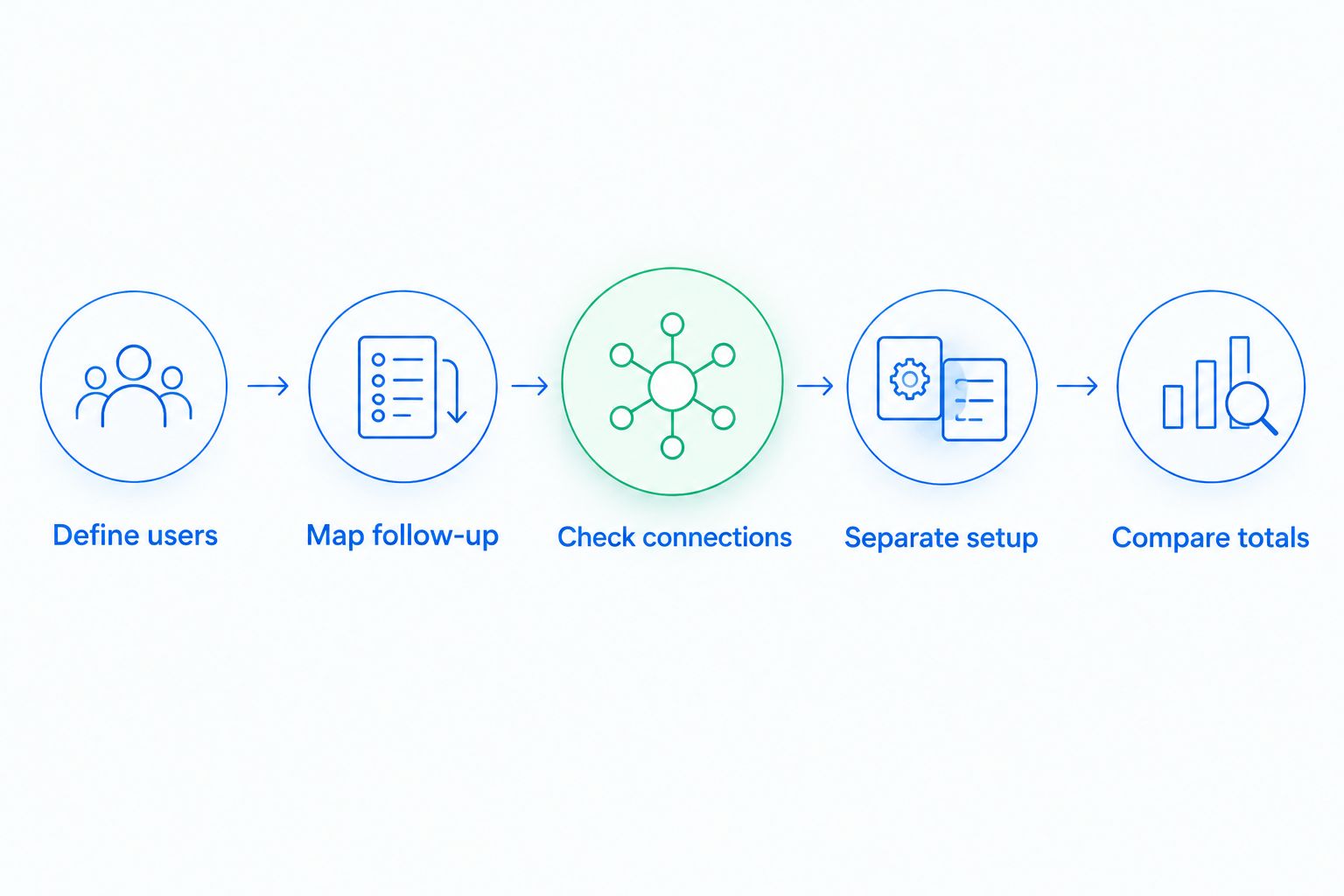
Use a repeatable sequence before comparing quotes. The goal is to give each vendor the same requirements so that differences in the proposals mean something.
1. Define users
List the people who need to create contacts, respond to customers, manage opportunities, or review sales activity. Separate daily users from people who only need occasional oversight.
Ask how each role is licensed. Do not assume that a manager, administrator, or occasional viewer receives access under the same terms as a salesperson.
2. Map follow-up
Write down what should happen when an inquiry arrives, when a customer replies, and when a lead stops responding. Assign responsibility for each action before discussing automation.
Keep the requirements observable. “Create a follow-up task when a lead needs attention” is easier to evaluate than “improve sales productivity.”
3. Check connections
Name the communication channels and existing tools that the team must use. Specify what information needs to move between them and the CRM.
An integration name alone does not settle the requirement. Ask whether the connection supports your actual task, who configures it, and what happens when information fails to transfer.
4. Separate setup
Request distinct lines for subscriptions, configuration, migration, and training. Establish who owns each task and what completion means.
A migration is not finished merely because records appear in the system. Your team should also check contact ownership, field mapping, and whether the imported information supports the intended workflow.
5. Compare totals
Use the same users, requirements, and billing period across proposals. Show initial project costs separately from the recurring operating commitment.
A 12-month comparison covers 1 year. Compare that full commitment with the equivalent period elsewhere, rather than treating a rate displayed for 1 month as the entire purchasing decision.
Which CRM scope should you budget for?
These are buying scopes, not named vendor plans. Use them to decide what belongs in your requirements before considering a particular subscription.
| Buying scope | Best for | Main benefit | Trade-off |
|---|---|---|---|
| Contact management | Teams whose main requirement is organizing leads and ownership | Keeps customer records and responsibilities together | Does not by itself establish an automated follow-up process |
| Pipeline and follow-up | Teams that need consistent next actions across open deals | Connects opportunity tracking with tasks and reminders | Requires agreed stages, triggers, and ownership |
| Connected communication | Teams handling customer conversations across channels | Brings communication into the sales workflow | Requires channel setup and clear usage terms |
Contact management: define the minimum useful scope
Best for teams that need organized records and clear ownership. Start here when the immediate problem is finding customer information and knowing who handles each lead.
The advantage is a focused requirement. The limitation is equally clear: organized contacts do not replace a follow-up process. If your team needs reminders or sequences, include them explicitly rather than assuming they accompany contact management.
Pipeline and follow-up: budget for the rules
Best for teams that need consistent action after an inquiry. Specify the stages, tasks, reminders, and follow-up sequences that the CRM must support.
The benefit is connecting the deal record to the next action. The trade-off is configuration work: someone must decide which customer interactions trigger changes and which actions still require a salesperson's judgment.
Connected communication: budget for the channels
Best for teams that need customer conversations alongside sales activity. Identify whether email, WhatsApp, SMS, calls, or a combination belongs in the required workflow.
Shared context supports handoffs, but a channel listed on a feature page is not a complete billing explanation. Confirm connection requirements, usage terms, and the responsibilities for maintaining each channel.
Why CRM cost per user varies
The meaningful differences come from scope and contract terms. Ask vendors to explain these factors against your written requirements, not against a generic feature checklist.
- User roles: Establish which people need paid access and whether different permissions change licensing.
- Workflow requirements: Confirm that the proposed subscription covers the reminders, tasks, sequences, and pipeline actions you need.
- Communication channels: Clarify what connecting and using email, WhatsApp, SMS, and calls entails.
- Integrations: Identify required connections, configuration responsibilities, and any separate services involved.
- Implementation scope: Define the migration, training, and setup work included in the proposal.
- Billing commitment: Compare payment schedules, renewal terms, and the rules for changing user counts.
Do not pay for an undefined requirement. If a feature matters enough to affect the purchase, describe the action it must support and ask to see that action demonstrated.
How do I compare monthly and annual CRM billing?
Compare the full contractual commitment, not just the displayed monthly equivalent. A monthly-looking rate does not tell you when payment is due or how long you are committed.
For a 2026 buying decision, ask for the billing schedule, renewal conditions, cancellation terms, and user-change rules in writing. Keep those answers beside the feature comparison so a lower-looking rate does not hide a different commitment.
Neither billing approach wins automatically. Choose the commitment that matches your purchasing requirements after confirming that the proposed configuration works.
What should I include in a first-year CRM budget?
Include the recurring subscription, required recurring services, and the work needed to make the system usable. Keep internal staff time visible even when it does not appear on the vendor's invoice.
Use this checklist before approving the project:
- Data preparation: Decide who removes duplicate records, resolves missing information, and maps fields.
- Configuration: Assign ownership for pipelines, permissions, follow-up rules, and communication setup.
- Training: Identify what salespeople and managers must learn to perform their daily work.
- Acceptance: Define the workflow demonstrations that establish the system is ready.
- Administration: Name the person responsible for changes after launch.
Separate initial work from ongoing work. That makes the budget easier to review and prevents a one-time project expense from being mistaken for a permanent subscription charge.
Is a lower per-user CRM rate always better?
No. A lower per-user rate is only better when the configuration meets the same requirements under terms you accept.
Compare complete workflows rather than isolated features. Ask each vendor to show a lead arriving, receiving an owner, entering a pipeline, and getting the appropriate next action after a customer interaction.
Record what happens automatically and what your team must do manually. That distinction gives you a practical basis for evaluating the subscription without inventing a revenue forecast or assuming that every automation improves the process.
Where Archescrm fits
Archescrm is best for growing sales teams that need CRM workflow automation and customer conversations in one place. The platform brings together lead and contact management, sales pipelines, follow-up workflows, and communication across email, WhatsApp, SMS, and calls.
Archescrm also supports automatic opportunity movement based on customer interactions and configured workflows, conversation summaries, and connections through integrations and APIs. Those capabilities match a buying brief centered on keeping leads, conversations, tasks, and sales activity together.
The trade-off is process responsibility. Your team still needs to define ownership, stages, and follow-up rules; software cannot decide your operating standards for you. Evaluate Archescrm against a written workflow and confirm the proposed commercial terms before committing.
What should I ask during a CRM demonstration?
Bring a realistic sales scenario, not a request for a general product tour. Ask the presenter to show the work your team will perform and explain which proposed subscription supports it.
Use these acceptance questions:
- Can a salesperson identify the lead owner and next action without searching another tool?
- Can the team see the customer conversation alongside the opportunity?
- What happens after a customer replies or stops responding?
- Which tasks require manual updates?
- Who changes workflow rules when your sales process changes?
- What information can your team export, and under what terms?
End by requesting a written scope that matches the demonstration. A capability shown during a sales call should not remain disconnected from the configuration you are being asked to buy.
FAQ
How much does a CRM cost per user in 2026?
CRM cost per user in 2026 depends on the subscription, required capabilities, and billing terms. Divide the full recurring bill by paid users, and budget separately for implementation and migration.
What should I ask for in a CRM quote?
Ask for user licensing, included capabilities, required extras, billing terms, and setup responsibilities. Request separate recurring and one-time charges so you can compare equivalent scopes.
Does every employee need a paid CRM account?
Determine paid access from each employee's role and the vendor's licensing terms. Ask specifically about salespeople, managers, administrators, and occasional viewers.
Is annual CRM billing better than monthly billing?
Annual billing is not automatically better than monthly billing. Compare the full commitment, payment schedule, renewal conditions, and rules for changing users.
Are messaging and calls included in a CRM subscription?
Confirm messaging and call terms in the specific proposal. Channel access, connection requirements, and usage billing are separate questions that the quote should answer.
What is Archescrm best for?
Archescrm is best for growing sales teams that need CRM workflow automation, pipeline tracking, and customer conversations together. Evaluate its lead management, communication, and follow-up capabilities against your team's actual workflow.
How do I know whether a CRM subscription is worth it?
Require the proposed CRM configuration to demonstrate the work your team needs. Check lead ownership, conversation access, follow-up actions, and manual tasks before accepting the commercial terms.
One last thing
Test a reply, not just a new lead. Lead capture shows how a record enters the system; a customer reply shows whether the conversation, opportunity, and next action stay connected.
Before signing a CRM agreement in 2026, ask for that handoff to be demonstrated in the configuration you will purchase. It is a more useful acceptance test than counting features you have not assigned anyone to use.