
 Log in
 Start Free Trial

CRM workflow automation setup takes as long as your team needs to define the rules, connect the required data, configure the actions, and verify the results; there is no universal completion time. The work includes more than building a rule: you also need to test exceptions, prevent duplicate actions, and confirm that follow-up stops when a customer responds. Schedule the launch around a working, tested workflow—not around a promised number of hours.
- How long does it take to set up CRM workflow automation? Scope, connected data, and testing determine the timeline.
- Start with 1 workflow, then expand after its trigger, action, and stop condition pass testing.
- Arches CRM supports growing sales teams that need lead management and automated follow-up in one place.
- A saved automation is not launch-ready until replies, duplicate events, and ownership changes behave correctly.
How long does it take to set up CRM workflow automation?
The setup timeline follows the work you include. Automating an internal reminder has a different scope from coordinating lead capture, assignment, customer messages, and pipeline changes across connected systems.
For a focused starting point, use automatic follow-up reminders to define what should happen when an opportunity needs attention. Keep the first workflow narrow enough that you can explain its behavior without opening the settings.
Use these steps to build a schedule around actual deliverables:
- Define the outcome. Name the missed action you want to prevent, such as an unassigned lead or an overdue follow-up.
- Specify the trigger. Identify the exact event or condition that starts the workflow.
- Prepare the data. Check the contact details, ownership fields, and pipeline stages the rule will use.
- Configure the action. Decide whether the workflow creates a task, sends a message, or changes an opportunity stage.
- Test the exceptions. Check replies, missing fields, duplicate events, and changes in ownership.
- Release and review. Confirm the results in actual records and assign someone to handle failures.
Each step has a completion condition. Configuration ends when the rule is saved; implementation ends when the intended behavior works and your team knows what to do when it does not.
Why this matters
A lead arrives. Nobody owns the next action. A salesperson assumes someone else has followed up, and the conversation stalls. Automation should close that operational gap—not simply add another notification.
For your 2026 rollout, distinguish setup effort from elapsed time. Setup effort is the work needed to configure and test the automation. Elapsed time also includes waiting for access, decisions, approvals, and clarification from the people who own the sales process.
That distinction changes your next move. If configuration is waiting on a pipeline-stage decision, adding more configuration time to the calendar does not solve the problem. Get the decision first.
Which setup scope should you start with?
Choose the smallest scope that solves a real follow-up problem. Do not include every communication channel or pipeline stage just because the CRM supports them.
The following options describe implementation approaches, not measured completion times. Use the table to decide what belongs in your first release.
| Setup scope | Best for | Main benefit | Trade-off | Launch condition |
|---|---|---|---|---|
| Internal reminder | Teams with clear ownership but inconsistent next actions | Creates a task without sending a customer-facing message | A salesperson still has to act | The correct owner receives the correct task |
| Customer follow-up | Teams with a repeatable outreach process | Applies an agreed message and follow-up rule | Requires message review and clear stop conditions | Eligible contacts receive the intended message, and replies stop inappropriate follow-up |
| Connected pipeline workflow | Teams coordinating lead capture, conversations, and opportunity stages | Connects several parts of the sales process | Requires checks across data sources and stage rules | Connected events produce the intended record changes without duplicates |
Start with an internal reminder when your follow-up process is still being clarified. It lets you check assignment and timing without automatically sending an unfinished message to a customer.
Choose customer follow-up when your team can already explain who qualifies, what gets sent, and when the sequence must stop. Choose a connected pipeline workflow when the handoffs between systems are part of the problem you need to solve.
Internal reminder: prove ownership before adding outreach
An internal reminder needs a clear owner, a triggering condition, and a task that tells the salesperson what to do. A generic instruction to follow up leaves the important decision unresolved.
Write the task around the conversation: review the latest reply, confirm the next step, or contact the lead about the unanswered question. Then check that reassignment does not leave the reminder with the wrong person.
The benefit is a contained first release. The limitation is equally clear: creating a task does not complete the follow-up.
Customer follow-up: define the stop rule before the message
A customer-facing workflow needs more than an approved email. Decide what happens when the customer replies, books the next step, changes contact preferences, or no longer belongs in the sequence.
Write those conditions before adding more messages. Otherwise, your team is designing the outreach while leaving its boundaries undefined.
The benefit is consistent execution of an agreed process. The trade-off is that mistakes reach the customer, so testing the exclusions deserves the same attention as testing delivery.
Connected pipeline workflow: verify the handoffs
A connected workflow spans more than a single action. For example, a lead event starts a record change, an owner receives a task, and a customer interaction affects the opportunity stage.
Test those handoffs separately before testing the whole sequence. If the source event is wrong, adjusting the final action will not repair the workflow.
The benefit is coordinated sales activity. The trade-off is a larger set of dependencies to inspect when an outcome is incorrect.
Why CRM workflow automation setup time varies
Your setup plan should account for these practical dependencies. Each one represents a decision or check that belongs before launch.
- Workflow scope. A reminder needs different checks from a sequence that sends messages and updates opportunities. List the actions included in the release.
- Data readiness. The workflow needs usable contact details, ownership information, and stage values. Decide how it handles incomplete records.
- Connection readiness. An automation that depends on another business tool needs the relevant access and a verified event handoff.
- Sales-process agreement. Your team must agree on lead assignment, follow-up rules, and the meaning of pipeline stages before those decisions become automated behavior.
- Testing and approval. Customer-facing messages, exceptions, and record changes need review by the people responsible for the process.
Turn each dependency into an owner and a deliverable. A calendar entry labelled CRM setup hides the work. A checklist that says confirm stage criteria, approve message, and verify reply handling makes the next action visible.
How do you build a launch-ready workflow in 2026?
For your 2026 implementation, start with 1 workflow that solves a specific problem. The number is a scope recommendation, not a duration estimate: a narrow release gives your team a defined behavior to inspect.
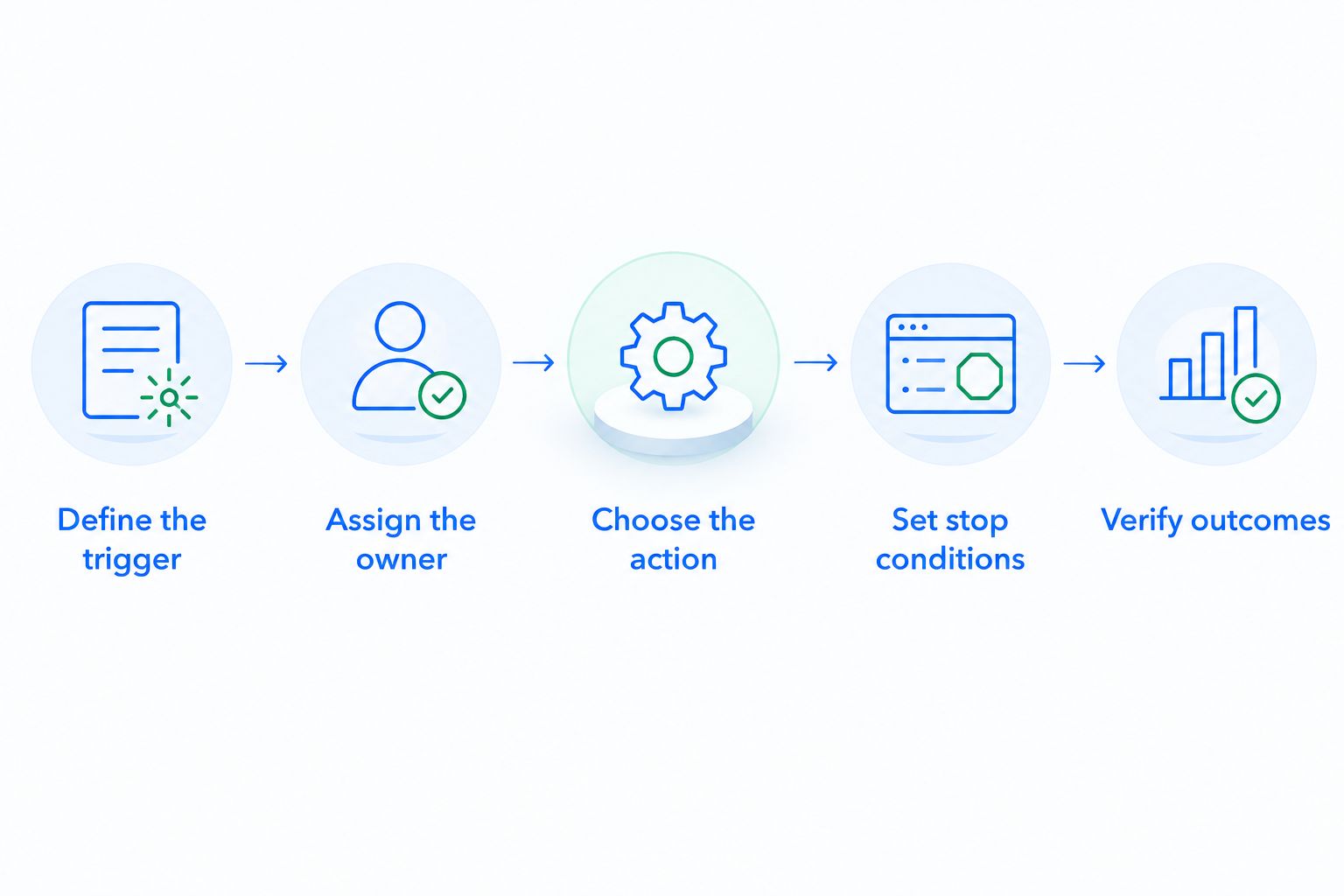
Use this sequence before activating broader automation.
Define the trigger
Write the start condition in plain language. For example, a lead enters a specified stage without a next action, or an agreed period passes without the interaction your process requires.
Name the record and field the rule reads. If the trigger depends on an external system, confirm which event reaches the CRM rather than assuming every source event has the same meaning.
Assign the owner
Specify who receives the task or manages the conversation. Include what happens when the original owner changes or the lead has no owner.
Do not leave that decision inside an informal team habit. The workflow needs an explicit assignment rule that your team can inspect.
Choose the action
Choose the smallest action that completes the next step: create a reminder, send an approved message, or update a stage when its criteria are met.
Keep the purpose visible. If you cannot explain why an action belongs in the workflow, remove it from the first release rather than carrying an undefined step into production.
Set stop conditions
Define when the workflow must stop or exclude a record. A customer reply, a completed next step, or a changed opportunity status deserves a deliberate rule.
Check overlapping workflows too. A lead should not receive conflicting follow-up simply because several rules qualify independently.
Verify outcomes
Inspect the actual task, conversation, and opportunity record produced by the workflow. Confirm both the intended change and the absence of unwanted changes.
A successful trigger is only part of the test. The output must belong to the right record, reach the right owner, and respect the stop conditions.
What should you test before switching automation on?
For a 2026 launch checklist, use at least 3 test cases for the first workflow: a qualifying lead, a lead that should be excluded, and a lead that responds. These are starting checks, not a substitute for testing the other conditions your process includes.
| Test case | What you are checking | Passing result |
|---|---|---|
| Qualifying lead | The trigger and intended action | The correct task, message, or stage change occurs |
| Excluded lead | The eligibility boundary | The workflow does not act on the record |
| Responding lead | The stop condition | Follow-up changes or stops according to the agreed rule |
Add a repeat-event check by submitting the same qualifying event 2 times. Verify that the resulting actions match your intended duplicate-handling rule; do not assume the workflow interprets repetition correctly.
Also inspect incomplete contact details, reassigned ownership, and events arriving from connected tools. Keep a short record of the expected result and the observed result for each check.
Launch only when the results match the rule your team approved. If they do not, fix the rule or its input before expanding the scope.
Where does Arches CRM fit in the setup process?
Arches CRM is best for growing sales teams that need lead management and automated follow-up in one CRM. It brings contacts, conversations, tasks, and sales activity together, with workflow automation for reminders, tasks, and follow-up sequences.
Arches CRM also supports opportunity movement based on customer interactions and configured workflows. That capability belongs after your team has defined what an interaction means for the pipeline—not before.
The benefit is a shared place for the sales process and its next actions. The setup responsibility remains with your team: configure the rules, verify the data, and approve the resulting behavior. Arches CRM's automation does not remove the need to decide when a lead qualifies, who owns it, or what a completed stage means.
Can you set up follow-up automation before rebuilding the pipeline?
Yes, you can start with a focused follow-up workflow when its ownership and trigger are already clear. You do not need to include unrelated pipeline changes in the same release.
Keep the scope honest. If the follow-up rule depends on a stage your team interprets differently, settle that stage definition before using it as an automation trigger.
Should you automate every communication channel at once?
No. Start with the channel involved in the specific follow-up gap you are fixing, then add channels after the handoffs and stop conditions are clear.
For a 2026 rollout, keep email, WhatsApp, SMS, and call-related processes aligned around the same customer record and next action. Expanding channel coverage should not create separate, conflicting instructions for the salesperson.
FAQ
How long does it take to set up CRM workflow automation?
CRM workflow automation setup time depends on the workflow scope, data readiness, connected systems, and testing. Treat verified behavior—not a saved rule—as the completion point.
What's the simplest CRM workflow to set up first?
An internal follow-up reminder is a contained starting point when lead ownership is clear. It lets you verify assignment and the next action without automatically sending a customer-facing message.
How many workflows should I launch first?
Start with 1 workflow that addresses a specific missed action. Expand after its trigger, output, and stop conditions behave as intended.
What should I test before launching CRM automation?
Use at least 3 test cases: a qualifying lead, an excluded lead, and a responding lead. Add tests for the other conditions your workflow includes, such as missing fields or reassigned ownership.
How do I check whether duplicate events create duplicate actions?
Submit the same qualifying event 2 times and inspect the resulting tasks, messages, or record changes. Compare the outcome with your intended duplicate-handling rule.
Can CRM automation move opportunities through the pipeline?
Arches CRM supports opportunity movement based on customer interactions and configured workflows. Define the criteria for each stage change and test the resulting record updates before launch.
Do I need to connect every business tool before starting?
No, connect the tools required for the first workflow. A broader integration project belongs in a separate scope unless those connections are necessary for the intended action.
One last thing
For your 2026 rollout, write the stop condition before writing the follow-up message. It forces a useful question: what tells your team that the customer no longer needs this automated action?
A workflow is finished when it knows when not to act. Carry that rule into your launch checklist, then use the customer record to confirm that it works.