
 Log in
 Start Free Trial

Migrating from spreadsheets to a CRM takes as long as your team needs to clean records, map fields, test the transfer, and confirm that active leads have owners and next actions; importing the file is only part of the job. A useful 2026 migration schedule ends when your team can manage live sales work in the CRM, not when the upload finishes. Include workflow testing and team handover in that schedule rather than treating them as work to do afterward.
- How long does it take to migrate from spreadsheets to a CRM? Schedule preparation, testing, and handover—not just importing.
- Arches CRM suits growing sales teams that need shared contacts, conversations, and automated follow-ups.
- Move active opportunities only after checking ownership, pipeline stages, and next actions.
- Separate data migration from workflow automation so you can test each before switching live work.
Why this matters
A lead arrives while your team is moving data. Someone updates the spreadsheet, someone else updates the CRM, and neither knows which record is current. Your migration plan must protect follow-up while the system changes.
Keep the transfer plan separate from the automation plan. The guide to setting up CRM workflow automation covers the second task; neither is complete merely because contact names appear in a database.
For your 2026 rollout, define completion through observable sales work: a rep can find a prospect, understand the conversation, identify the opportunity stage, and record the next action. That gives your launch decision a practical test instead of an arbitrary deadline.
How long does it take to migrate from spreadsheets to a CRM?
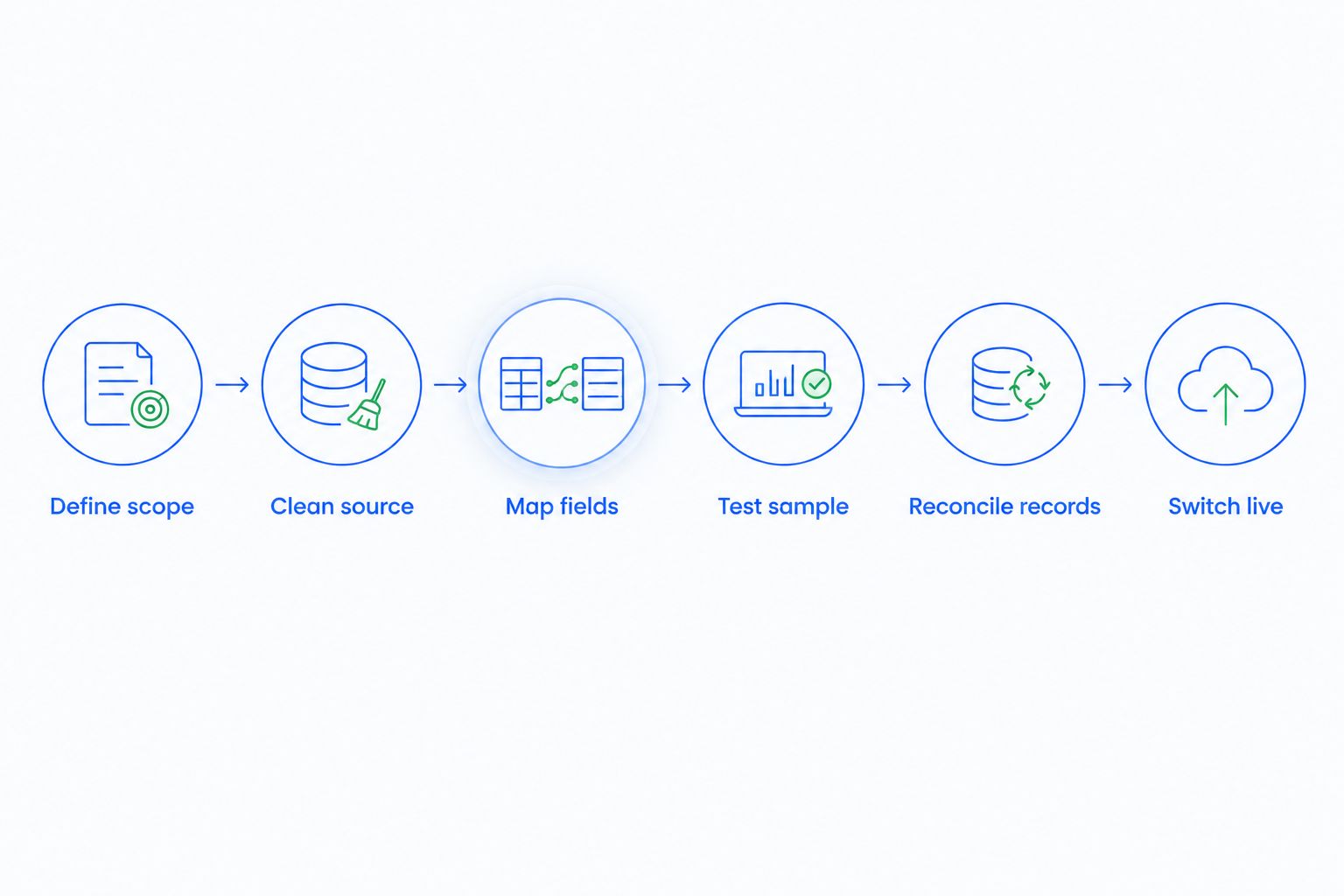
Build the schedule from the work your records require, not from the upload itself. Start by defining what must move, who approves it, and what your team must be able to do at launch. Then work through these steps in order.
- Define scope. Decide whether the transfer includes contacts, companies, active opportunities, tasks, and historical notes. Separate launch requirements from records that can remain in an archive.
- Clean the source. Resolve duplicates, conflicting owners, inconsistent stages, and ambiguous dates. Keep an untouched backup before changing the working file.
- Map the fields. Match each source column to its destination field. Confirm field types and the relationships between people, companies, and opportunities.
- Test a sample. Include representative records and difficult cases. Check the resulting records with the people who will use them.
- Transfer and reconcile. Compare source totals with destination totals, investigate rejected rows, and verify relationships rather than checking names alone.
- Switch live work. Tell the team where updates belong, verify open follow-ups, and stop maintaining competing active records.
Assign 1 accountable owner to approve the transfer. Other people can clean data or test workflows, but a named decision-maker must settle conflicting definitions and authorize the switch.
What belongs in your completion checklist?
Before setting the launch date, write acceptance checks for the work your team performs. A contact import can pass while opportunity assignments or follow-up tasks remain incorrect.
Use checks such as these:
- Every active opportunity has a responsible owner.
- Imported dates retain their intended meaning and format.
- Contact and company relationships point to the correct records.
- Pipeline stages match agreed definitions.
- Rejected rows have an explicit resolution.
- Reps know where to record the next customer interaction.
Set 0 unresolved critical errors as your launch requirement. Define “critical” before testing: an error that prevents assignment, hides an active opportunity, or sends an unintended customer message belongs on that list.
Choose the migration scope before choosing the date
Different scopes need different acceptance checks. The following comparison describes planning choices, not promised completion times.
| Migration scope | Best for | Advantage | Limitation |
|---|---|---|---|
| Contacts first | Teams establishing shared contact ownership | Keeps the initial transfer focused | Leaves opportunity and follow-up work outside the initial scope |
| Active pipeline first | Teams prioritizing current sales work | Brings live opportunities and next actions into the rollout | Historical research still requires the archive |
| Full history | Teams that need past records in daily sales work | Keeps more context within the new system | Adds field mapping, relationship checks, and historical cleanup |
Contacts-first migration
Choose contacts first when your immediate requirement is a shared, organized record of prospects and customers. Define what makes a record unique and which source wins when details conflict.
The limit is operational: a contact list does not tell a rep which deal is active or what to do next. Do not call the sales rollout complete if your team still needs the spreadsheet to manage every follow-up.
Active-pipeline migration
Choose active pipeline first when keeping current sales moving is the priority. Include the contact, responsible rep, opportunity stage, relevant conversation context, and next action required for that work.
This approach keeps the launch focused, but it creates an archive boundary. Tell your team where older information lives and how to consult it without editing obsolete records as though they were current.
Full-history migration
Choose full history when past activity is required for the team's everyday work. Review whether old notes, closed opportunities, and inactive contacts still have clear meanings and relationships.
More history creates more material to validate. Do not transfer ambiguous columns merely because they exist; decide what each field means, whether it is needed, and how users should interpret it.
Why spreadsheet-to-CRM migration time varies
These factors determine the preparation and testing your 2026 schedule must accommodate. Assess them before committing the team to a switch date.
- Source consistency. Conflicting spreadsheets require decisions about which values to keep. Choose the authoritative source for each disputed field before mapping it.
- Record relationships. Moving isolated contacts is different from preserving links between contacts, companies, opportunities, and tasks. Test those relationships explicitly.
- Pipeline definitions. Stages need agreed entry and exit conditions. A label such as “interested” is not useful if every rep interprets it differently.
- Communication scope. Decide which conversations your team needs for live work and how they will access them. Connecting a channel and transferring historical messages are separate requirements.
- Automation scope. Reminders, follow-up sequences, and stage changes require their own rules and tests. Imported records must not trigger unintended customer communication.
- Team handover. Reps need to know where updates belong and who resolves errors. A technically correct transfer still needs an operational owner.
Record volume alone is not a migration plan. Count the decisions, relationships, and tests required to make those records usable. Estimate each task with the person responsible for completing it, then schedule the dependencies rather than treating every task as parallel work.
How do you build a migration schedule you can trust?
Use a task-based plan for your 2026 migration. Give each task an owner, a completion condition, and a dependency. Field mapping, for example, depends on agreed field definitions; final transfer depends on an approved test.
Ask the person responsible for each task to estimate the effort after inspecting the actual source files. Reserve separate review time for decisions that require sales leadership, such as conflicting ownership or changes to pipeline definitions.
Track unresolved issues in a shared list. Describe the problem, affected records, responsible person, and decision needed. A launch date should reflect this work, not conceal it.
Keep the working file controlled
Maintain 1 working copy of the migration file alongside the untouched backup. Name its owner and restrict uncoordinated edits while mapping and testing are underway.
If sales work continues during preparation, define how new leads and changed records reach the final transfer. Otherwise, a clean test file can become outdated before launch. Your plan must account for changes between the test and the switch.
Rehearse the work, not just the import
Ask a rep to find an imported lead, read the available context, update the opportunity, and record a follow-up. Then ask the responsible manager to confirm ownership and stage visibility.
These checks expose practical gaps that a successful upload message does not address. Resolve the gap at its source: incorrect data, unclear mapping, missing configuration, or an undefined team process.
How do you migrate without losing track of live leads?
Keep a named owner and next action attached to every active opportunity throughout the switch. Tell the team where those updates belong during preparation and when that location changes.
Before the final transfer, identify customer commitments that need attention during the handover. Make those commitments visible to the people responsible for them; do not leave them buried in an old notes column.
After the switch, stop treating the spreadsheet as an alternative live pipeline. Keep it as a controlled reference where needed. Parallel updates create a reconciliation task every time the records disagree.
What should you check immediately after launch?
Review the live pipeline with its owners. Confirm that expected opportunities appear, assigned tasks are visible, and the team understands how to capture the next customer response.
Keep a clear route for reporting problems. Distinguish a missing record from an unfamiliar view or a misunderstood field before changing data. Fixing the wrong problem can introduce new inconsistencies into an otherwise correct transfer.
When should you turn on CRM automation?
Enable customer-facing automation only after you have verified the imported data and tested the relevant rules. A correct reminder rule still produces the wrong result when its owner, stage, or trigger date is incorrect.
Start with a defined event and expected action. Check what happens when a lead replies, an owner changes, or a record enters a different stage. Also check the stopping condition so the workflow does not continue after its purpose has ended.
For a 2026 launch, separate “data accepted” from “automation approved” in your checklist. This keeps a workflow problem from being mistaken for an import problem and gives each change a clear approval point.
Where Arches CRM fits after the transfer
Arches CRM brings lead and contact management, sales pipelines, tasks, and customer communications into one platform. Its workflow automation supports reminders, tasks, and follow-up sequences, while its assistance features include email drafting and conversation summaries.
Arches CRM is best for growing sales teams that need shared conversations and automated follow-ups. The migration still needs agreed field definitions, ownership, and workflow rules; software does not decide which conflicting spreadsheet entry represents your intended sales process.
That distinction matters when evaluating readiness. Test the work your reps need to perform and confirm the required data-transfer details before committing the rollout schedule. A feature list is not an acceptance test.
FAQ
How long does it take to migrate from spreadsheets to a CRM?
The duration depends on data cleanup, field mapping, testing, and team handover—not just the file upload. Build the schedule from those tasks and approve the switch only after active opportunities and follow-ups pass your checks.
Can I start using a CRM before moving all my historical data?
Yes, you can define a launch scope around contacts or active opportunities and retain historical records in a controlled archive. Make the archive boundary clear so users know where to find older context.
Does uploading a spreadsheet mean the migration is finished?
No, an upload does not prove that ownership, record relationships, pipeline stages, or follow-up tasks are correct. Reconcile the transferred records and rehearse live sales work before declaring the migration complete.
Should I clean my spreadsheet before importing it?
Yes, resolve duplicates, inconsistent stages, conflicting owners, and ambiguous dates before the final transfer. Keep an untouched backup so you can check the original information when questions arise.
Can sales reps keep using spreadsheets during CRM migration?
Yes, provided your plan defines where live updates belong and how changes reach the final transfer. After the switch, stop maintaining the spreadsheet as a competing live pipeline.
Should automated follow-ups start during the import?
Customer-facing follow-ups should remain inactive until the imported data and workflow rules have passed testing. Verify triggers, recipients, ownership, and stopping conditions before enabling them.
What should I check before moving to Arches CRM?
Before moving to Arches CRM, confirm the required transfer details, map your source fields, and define how contacts, opportunities, tasks, and communications should support daily sales work. Test representative records and workflows before switching the team.
One last thing
A clean import can still produce an unusable pipeline. If a rep cannot identify the next action on an active opportunity, the record is present but the handover is unfinished.
Before approving the switch, ask each opportunity owner to demonstrate the next step on their live work. That is a stronger finish line than a completed upload—and it keeps your migration focused on selling rather than moving cells.