
 Log in
 Start Free Trial

CRM software tracks deals across multiple pipelines by assigning each opportunity to a pipeline, a stage, and an owner, then connecting it to customer records, activities, and follow-up tasks. Shared reporting brings those separate sales processes into one view. The critical caveat: a stage change records progress only when your team defines what qualifies a deal to move.
- How does CRM software track deals across multiple pipelines? Pipeline assignments, stage rules, activity records, and shared reporting connect opportunities.
- Separate pipelines suit different sales processes; filters suit different views of the same process.
- Arches CRM suits growing sales teams that need pipeline tracking, shared conversations, and automated follow-ups.
- Keep opportunity ownership and next actions explicit so separate pipelines do not become separate follow-up silos.
Why this matters
A lead replies, but the opportunity stays untouched. Another rep creates a second deal for the same purchase. Your pipeline looks active, yet nobody can tell which customer needs attention next.
Multiple pipelines organize different sales motions; they do not fix unclear ownership. Start with the relationship between a conversation, an opportunity, and its next action. The Gmail-to-closed-deals CRM workflow follows that connection from email to deal tracking.
For your 2026 setup, prioritize a practical question: can a rep open any active opportunity and identify what happened, who owns it, and what happens next?
How does CRM software track deals across multiple pipelines?
CRM software uses linked records rather than disconnected sales boards. The pipeline describes the process; the stage describes the opportunity's current position within that process. The opportunity record holds the details needed to manage the sale.
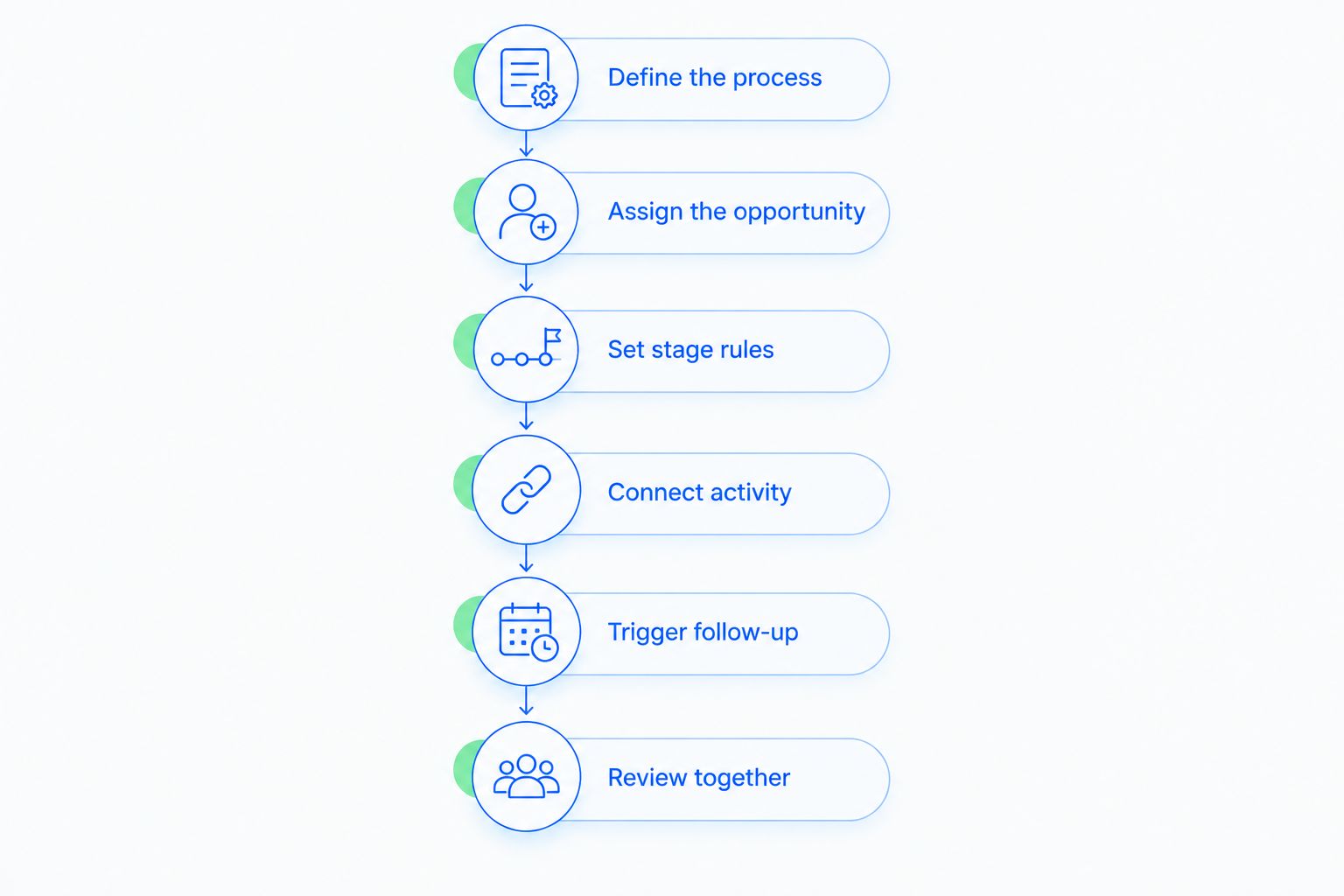
Use these 6 setup steps to make that structure useful across your team.
1. Define the process
Write down the milestones that move a purchase from inquiry to a decision. Create a separate pipeline when those milestones genuinely differ, not simply because another rep or territory needs a separate view.
For example, new customer acquisition and contract renewal can require different qualification and approval steps. Treat those as illustrative processes, not mandatory pipeline templates.
2. Assign the opportunity
Connect the deal to the relevant contact or company, select its pipeline, and assign an accountable owner. Keep the customer relationship distinct from the individual buying decision.
One customer can have several legitimate opportunities. The test is whether each record represents a separate purchase, not whether several people have spoken with the customer.
3. Set stage rules
Define what must be true before an opportunity enters each stage. A proposal stage should mean that a proposal exists and has reached the buyer, not that a rep intends to write one.
Document exit conditions too. Without them, stage labels become personal interpretations, and cross-pipeline reports compare inconsistent information.
4. Connect activity
Associate relevant emails, calls, notes, and tasks with the opportunity. Customer-level history provides context, while deal-specific activity explains progress on that particular purchase.
When a contact has several open opportunities, verify which deal an interaction concerns. A reply about a renewal is not evidence that an unrelated expansion deal has advanced.
5. Trigger follow-up
Use configured workflow conditions to create reminders, assign tasks, or update stages. Choose the action according to the meaning of the event, not merely the presence of activity.
A customer response can justify a follow-up task without justifying a move to negotiation. Keep those decisions separate.
6. Review together
Review opportunities within each pipeline, then review the combined picture. Include pipeline, stage, owner, next action, and expected close date in the reporting requirements you evaluate.
Check whether your chosen CRM supports the views and historical reporting you need. A current board and a report of past stage movements answer different questions.
Should you use separate pipelines or filtered views?
Separate the process only when the process changes. If the stages and qualification rules stay the same, start by evaluating filtered views rather than adding another pipeline.
Use this comparison when designing your 2026 pipeline structure. Neither approach wins by default; each solves a different problem.
| Structure | Best for | Main benefit | Main drawback |
|---|---|---|---|
| One pipeline with filtered views | Teams sharing milestones but needing different owner or territory views | Keeps stage definitions consistent | A shared structure cannot represent genuinely different processes cleanly |
| Separate pipelines | Sales motions with different milestones or approval requirements | Gives each process relevant stages and workflows | Requires coordination to keep reporting definitions consistent |
When filtered views fit
Filtered views fit when reps need to see their own opportunities without changing the underlying sales process. Ownership, territory, and customer segment are reasons to examine filtering before introducing new stages.
The limitation is structural. A filter changes what you see; it does not create a different sequence of milestones. Confirm the filtering and access controls your CRM provides rather than assuming they are interchangeable.
When separate pipelines fit
Separate pipelines fit when a deal follows a materially different path to completion. A renewal process, for example, can begin with an existing contract rather than initial qualification.
The trade-off is coordination. Decide which fields stay consistent across pipelines and which stage definitions remain local. Without that distinction, a combined report hides meaningful differences behind familiar labels.
Why multi-pipeline tracking varies between CRM setups
The quality of multi-pipeline tracking depends on your configuration as well as the software. More boards do not automatically create better visibility.
These 5 configuration factors determine what your team can understand and act on:
- Process differences: Separate pipelines need a clear reason to exist. Different milestones justify separation more directly than different dashboard preferences.
- Record relationships: Contacts, companies, and opportunities must represent distinct things. Otherwise, conversations and purchase decisions become difficult to untangle.
- Stage definitions: Each stage needs observable entry and exit conditions. Shared labels alone do not make pipelines comparable.
- Workflow conditions: Automation needs a relevant trigger and an appropriate action. An email reply is an event, not proof of a commercial commitment.
- Reporting definitions: Combined views need consistent treatment of open, won, lost, and transferred opportunities. Define those categories before reviewing totals.
For a 2026 configuration review, inspect these foundations before adding more automation. Automating unclear rules repeats the ambiguity rather than removing it.
Can one customer have deals in different pipelines?
Yes. One customer can have separate opportunities in different pipelines when each opportunity represents a distinct buying decision, such as a renewal and an additional purchase.
Keep the customer record shared while separating the opportunity-specific details. Each deal needs its own owner, stage, next action, and decision context. This preserves the relationship without combining unrelated sales work.
Do not create another deal just to make the same purchase visible to another team. First check whether a view, ownership change, or access adjustment solves the problem. Duplicate purchase records distort the meaning of your open pipeline.
What happens when a deal moves to another pipeline?
Moving a deal to another pipeline changes the process used to manage that opportunity. Before transferring it, choose the destination stage based on its entry conditions rather than matching the old stage's name.
Confirm how your CRM handles history, tasks, ownership, and workflow triggers during the move. Do not assume that transferring a record also updates every related action correctly.
Run 3 transfer checks before using the process with live opportunities:
- History: Confirm that the customer context and relevant activity remain accessible.
- Next action: Confirm that the new owner and outstanding follow-up responsibilities are clear.
- Automation: Confirm that destination workflows do not create conflicting or duplicate tasks.
A transfer should represent a process change. If the underlying purchase is complete and a new buying decision begins, evaluate creating a separate opportunity instead.
Can CRM automation move deals without manual updates?
CRM automation can move deals when configured conditions are met. The important distinction is between detecting an event and interpreting what that event means for the sale.
An incoming reply can mean interest, a question, a delay, or a rejection. Build rules around evidence that supports the destination stage, and route ambiguous interactions to a human decision rather than treating every reply as progress.
For your 2026 workflow review, write each rule in plain language: when this event happens, under these conditions, take this action. Then check what should happen when the event does not indicate forward movement.
Arches CRM provides sales CRM and workflow automation, including opportunity movement based on customer interactions and configured workflows. It also brings contacts, conversations, tasks, and sales activity together.
Arches CRM is best for growing sales teams that need pipeline tracking, shared conversations, and automated follow-ups. Its practical benefit is reducing manual coordination; the implementation constraint remains the same as with any workflow-driven CRM: your team must define what each action and stage means.
Review your sales workflow
Explore lead management, sales pipelines, shared conversations, and follow-up automation.
What should managers review across all pipelines?
Review the next action before treating stage position as evidence of momentum. An opportunity can sit in an advanced stage with no clear buyer commitment or scheduled follow-up.
Use a consistent review sequence across pipelines:
- Ownership: Is one person accountable for the opportunity?
- Evidence: What customer action supports the current stage?
- Follow-up: What happens next, and who is responsible?
- Timing: Does the expected close date reflect the current conversation?
- Record quality: Does this opportunity represent a distinct purchase?
Then examine pipeline-specific milestones. A combined view supports coordination, while the individual process explains why a deal has or has not progressed.
Keep your 2026 management review focused on decisions. A useful report tells you where to intervene, not just how many cards occupy a column.
FAQ
How does CRM software track deals across multiple pipelines?
CRM software assigns each opportunity to a pipeline, stage, and owner, then links it to customer records, activities, and tasks. Shared reporting brings those separate processes together for review.
Do I need a separate pipeline for every sales rep?
No, separate reps do not automatically require separate pipelines. Evaluate owner-based views when reps follow the same milestones, and separate pipelines when the sales processes differ.
Can the same contact have multiple deals in a CRM?
Yes, the same contact can be associated with multiple opportunities representing separate purchases. Keep each opportunity's stage, owner, and next action distinct so conversations do not become confused.
Will moving a deal between pipelines duplicate it?
A move should be treated differently from creating a duplicate, but the exact behavior depends on the CRM and workflow configuration. Verify the resulting record, activity history, tasks, and reporting before using transfers with live deals.
Can I compare sales stages across different pipelines?
Compare stages only when their definitions represent equivalent milestones. Matching stage names are not enough; review entry conditions, exit conditions, and the meaning of open or closed status.
Can Arches CRM automate pipeline updates and follow-ups?
Arches CRM supports opportunity movement based on customer interactions and configured workflows, along with automated reminders, tasks, and follow-up sequences. Define stage rules first so automation reflects actual sales progress.
One last thing
A customer reply is activity; an agreed next step is evidence of progress. Keep that distinction in every pipeline rule you write.
Before adding another pipeline, inspect one stalled opportunity. If you cannot identify its owner, its last meaningful customer interaction, and its next action, fix those gaps first. Another board will not answer those questions for you.