
 Log in
 Start Free Trial

AI in a CRM summarizes customer calls by converting recorded speech into a transcript, extracting the main points, and attaching a shorter account to the relevant customer or deal record. The summary can capture customer needs, objections, decisions, and agreed next steps. Call recording, transcription, and CRM task creation are separate capabilities, so verify each before relying on the workflow in 2026.
- How does AI in a CRM summarize customer calls? It turns speech into text, then extracts decisions and next steps.
- A call summary is a draft, not proof that a customer agreed to a purchase or deadline.
- Arches CRM suits growing sales teams seeking centralized conversations and follow-up workflows; verify call-summary support separately.
- Check speaker attribution, commitments, and task ownership before a summary triggers customer-facing follow-up.
How does AI in a CRM summarize customer calls?
A call-summary workflow connects the conversation to a customer record, prepares a transcript, and condenses that transcript into useful sales notes. Start by checking whether your calling setup can supply the required recording or transcript; the guide to connecting an existing phone system to a CRM covers that separate connection question.
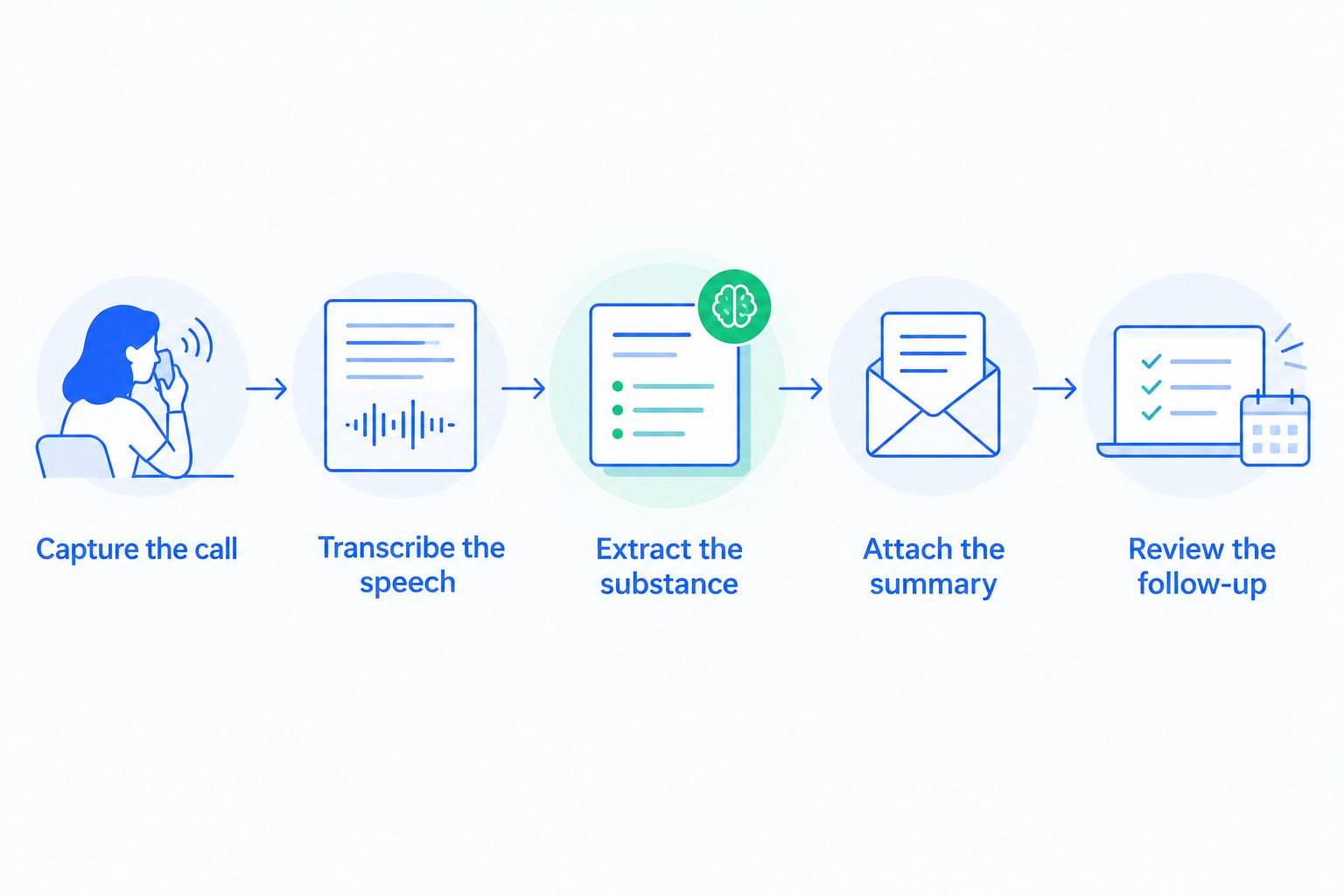
The process has 5 stages. Some products handle the entire sequence; other setups require a calling integration or a separate transcription service.
- Capture the call. A supported phone or meeting system records the conversation under your organization's recording and consent rules.
- Transcribe the speech. Speech recognition converts the audio into text. Speaker labels, where available, distinguish the customer from the salesperson.
- Extract the substance. A language model identifies topics such as customer goals, concerns, commitments, and unanswered questions.
- Attach the summary. The integration associates the notes with a contact, company, activity, or opportunity, depending on its configuration.
- Review the follow-up. A salesperson checks the notes before accepting suggested tasks, sending an email, or changing a deal stage.
The distinction matters: generating text does not automatically create a task. Treat summarization and workflow execution as separate steps until you have verified their connection.
Why this matters
A useful call summary tells the next person what to do, not just what people discussed. If the customer requested a revised proposal, the CRM record should preserve that request and distinguish it from a general conversation about options.
When evaluating CRM software in 2026, look beyond the quality of a sample paragraph. Check whether a salesperson can find the source conversation, correct an error, identify the responsible person, and complete the promised follow-up without reconstructing the call.
A polished summary with an incorrect commitment is still a bad sales record. Accuracy comes before automation.
What should a customer call summary include?
Use a consistent structure so another salesperson can understand the conversation without asking the original caller to explain it. A practical template has 5 fields:
- Customer goal: What the customer wants to achieve or resolve.
- Current obstacle: The problem, objection, or dependency blocking progress.
- Confirmed decision: What participants explicitly agreed, including a decision not to proceed.
- Next action: The specific follow-up, its owner, and any agreed deadline.
- Open question: Anything the conversation left unresolved.
These are recommended fields, not a claim that every CRM provides a matching template. Ask whether your chosen system supports structured notes, configurable prompts, or only a free-text summary.
Keep facts separate from interpretation
A customer asking about implementation does not establish purchase intent. A request for a proposal does not confirm a buying decision. The summary should preserve those distinctions rather than turn an exploratory conversation into an apparently advanced opportunity.
Use explicit language for uncertainty. If nobody agreed to a deadline, record the deadline as unspecified instead of filling one in.
Preserve details that change the next action
Product names, email addresses, dates, and contract terms deserve direct verification against the source. Speech recognition errors in these details can survive into an otherwise readable summary.
Do not judge quality by brevity alone. A shorter note is helpful only if it retains the information needed for the next customer interaction.
Transcript, call summary, or action list: which should you use?
Use a call summary for a quick handoff, a transcript for checking details, and an action list for execution. These outputs serve different purposes; none should silently replace the others.
| Output | Best for | Main advantage | Main limitation |
|---|---|---|---|
| Transcript | Checking the wording and context of a conversation | Preserves more detail than a summary | Can contain recognition and speaker-label errors |
| Call summary | Preparing for a follow-up or handing over an account | Makes the main points easier to review | Omits detail and can misinterpret the discussion |
| Action list | Tracking agreed follow-up | Separates tasks from background information | Suggested actions still need an owner and verification |
For your 2026 evaluation, inspect all available outputs from the same call. A readable summary cannot compensate for a task list that assigns the customer's commitment to your salesperson, or the reverse.
Where access rules permit it, retain a way to inspect the source. That gives your team a practical route to resolve disagreements about what was actually said.
Why call-summary quality varies
Call-summary quality depends on the source conversation and the instructions used to condense it. Evaluate these 6 factors before treating an output as dependable:
- Audio clarity: Background noise, clipping, and weak microphones make speech harder to transcribe accurately.
- Speaker attribution: Overlapping speech and incorrect speaker labels can attach a commitment to the wrong person.
- Vocabulary: Names, abbreviations, and specialized terms need checking when transcription gets them wrong.
- Conversation structure: Topic changes, interruptions, and unfinished statements make the customer's final position harder to extract.
- Summary instructions: A generic recap and a sales handoff ask for different information. Define the fields your team actually needs.
- Available context: A transcript-only summary cannot reliably describe facts discussed solely in an earlier email or another call.
Do not solve a transcription problem by asking for a more confident summary. Correct the source or verify the disputed detail first.
A useful evaluation also includes calls that end without agreement. The system should preserve an unresolved outcome rather than manufacture a next step to make the notes look complete.
How do you turn a summary into reliable follow-up?
Start with a review gate. Once you understand how summaries behave on your conversations, decide which low-risk administrative steps can run under configured rules.
Check the commitment
Compare the proposed action with what the customer actually accepted. Sending requested information is different from scheduling an unrequested meeting.
Check conditions as well. An agreement to continue after an internal review is not an unconditional agreement to continue immediately.
Confirm the owner
A summary should distinguish what your salesperson promised from what the customer promised. Assign internal tasks to a named team member rather than leaving an action buried in narrative notes.
If ownership was not settled during the call, resolve it internally. Do not represent that internal assignment as something the customer agreed to.
Verify the deadline
Check whether a date was explicit, tentative, or absent. Relative wording also needs context: a reference to next week is not useful if the summary loses the date of the conversation.
For a 2026 rollout, require human review before extracted commitments trigger customer-facing messages or consequential pipeline changes. Review effort should follow the consequence of an error, not how fluent the summary sounds.
Separate notes from automation rules
Saving a note, creating a reminder, drafting an email, and sending that email are different actions. Document which action your workflow performs and what condition permits it.
A draft email gives a salesperson a chance to check context. An automatically sent email removes that checkpoint, so test the trigger and message content separately.
What should you check before enabling call recording?
Check recording permissions, participant notification, access controls, and retention rules before capturing customer conversations. Recording requirements differ by jurisdiction and circumstances; obtain legal guidance for the places where your team and customers operate.
Your 2026 review should cover the recording, transcript, summary, and any data passed to connected services. Giving someone access to a contact record should not be assumed to settle every question about access to call content.
Ask the provider how deletion, export, restricted access, and connected-service processing work. Also establish an internal route for correcting a summary after someone has already used it for a task or handoff.
A summary is still customer information. Shortening a conversation does not remove the need to control who can read it or how long you retain it.
Where does Arches CRM fit into this workflow?
Arches CRM is best for growing sales teams that want customer conversations, pipeline tracking, and follow-up workflows in one CRM. Its stated capabilities include unified communications, workflow automation, email-conversation summaries, note summaries, and opportunity movement based on interactions and configured workflows.
The benefit is a shared place for customer context and sales activity. The boundary is equally important: email and note summarization do not establish that a platform records calls, transcribes audio, or generates call-specific summaries.
If you are considering Arches CRM, verify those call-specific capabilities and the requirements of your phone setup before designing the process. Ask to see a call reach the correct contact record, a summary checked against its source, and the resulting follow-up handled under explicit rules.
Keep that demonstration separate from a general product tour. Your decision depends on the complete path from conversation to verified action, not a summary shown without its source.
Can AI summarize a call without recording it?
AI can summarize supplied text, including a transcript or written notes, without processing an audio recording itself. But it cannot recover an entire conversation from notes that never captured the relevant details.
If recording is not appropriate, establish a consistent note-taking process. Label the result as a summary of notes rather than implying it represents a complete call transcript.
Does a call summary automatically update the sales pipeline?
A call summary does not inherently update a sales pipeline. Pipeline movement requires a separate supported action or configured automation rule.
Use explicit criteria for each stage transition. A customer mentioning procurement should not, by itself, be treated as confirmation that procurement approved the deal.
How do you check whether a call summary is accurate?
Check 3 elements first: speaker attribution, commitments, and next actions. Compare them with the recording or transcript, then verify important names, dates, and conditions.
Include both straightforward and difficult conversations in your evaluation. Record the errors you find so you can distinguish transcription problems from summary-instruction problems.
FAQ
How does AI in a CRM summarize customer calls?
AI in a CRM summarizes customer calls by transcribing speech, extracting the main points, and saving a shorter account to a customer or deal record. Recording, transcription, and CRM updates depend on the supported tools and configuration.
Can a CRM summarize calls from any phone system?
No, call summarization depends on a supported connection or an accepted recording or transcript format. Verify compatibility with your actual phone setup before adopting the workflow.
Is a call summary the same as a transcript?
No, a summary condenses the conversation, while a transcript represents the spoken content in text. Use the transcript or recording to check details the summary leaves out.
Can I trust a call summary without reviewing it?
Do not treat an unreviewed summary as confirmation of customer commitments. Check speaker attribution, decisions, and next steps before acting on them.
Can a call summary create follow-up tasks?
A call summary can feed task creation when the CRM or integration supports that workflow. Verify task ownership, deadlines, and the rule that turns extracted text into an action.
Do customers need to know their calls are being recorded?
Recording and notification requirements depend on the applicable jurisdiction and circumstances. Establish an approved recording process before enabling capture, and obtain legal guidance for your operating locations.
What should I do when the summary gets a detail wrong?
Correct the CRM note and check any tasks, drafts, or pipeline changes created from it. If the error began in transcription, review the source rather than only rewriting the final summary.
One last thing
Test what the system does when the customer makes no commitment. An accurate summary should leave the next step unresolved rather than invent agreement.
That is a useful acceptance test for 2026: can the workflow preserve uncertainty without turning it into an email, a deadline, or a pipeline advance? A trustworthy sales record keeps an unanswered question unanswered.