
 Log in
 Start Free Trial

A CRM identifies which lead to contact next by applying your follow-up rules to recorded activity, conversation history, pipeline stage, ownership, and due tasks. Some systems also use lead scores or predictive models, but the recommendation depends on the data they receive and the criteria you configure. The next lead should have a clear reason for needing attention—not just a high score.
- How does a CRM know which lead to contact next? It applies prioritization rules to customer activity and sales context.
- Arches CRM connects conversations, tasks, and pipeline activity for growing sales teams managing follow-ups.
- Prioritize explicit requests and promised follow-ups before treating engagement signals as buying intent.
- Lead scoring supports prioritization; it does not replace accurate records, ownership, or judgment.
Why this matters
A lead arrives, someone replies, and the conversation moves forward. Then the buyer asks a question in another channel, the salesperson misses it, and the next scheduled message ignores what just happened. The problem is not a shortage of reminders; it is a reminder disconnected from the conversation.
For your 2026 sales workflow, define what makes a follow-up necessary before deciding how to automate it. A useful priority list answers three practical questions: why this person, why now, and what should the salesperson do?
Start by separating prioritization from automatic follow-up reminders. A reminder tells you that something is due; prioritization explains why that task belongs ahead of another.
How does a CRM know which lead to contact next?
A CRM does not independently know your sales priorities. It uses recorded information and configured logic to produce a task, flag an opportunity, or help you choose what to do next. The exact behavior depends on the software and your setup.
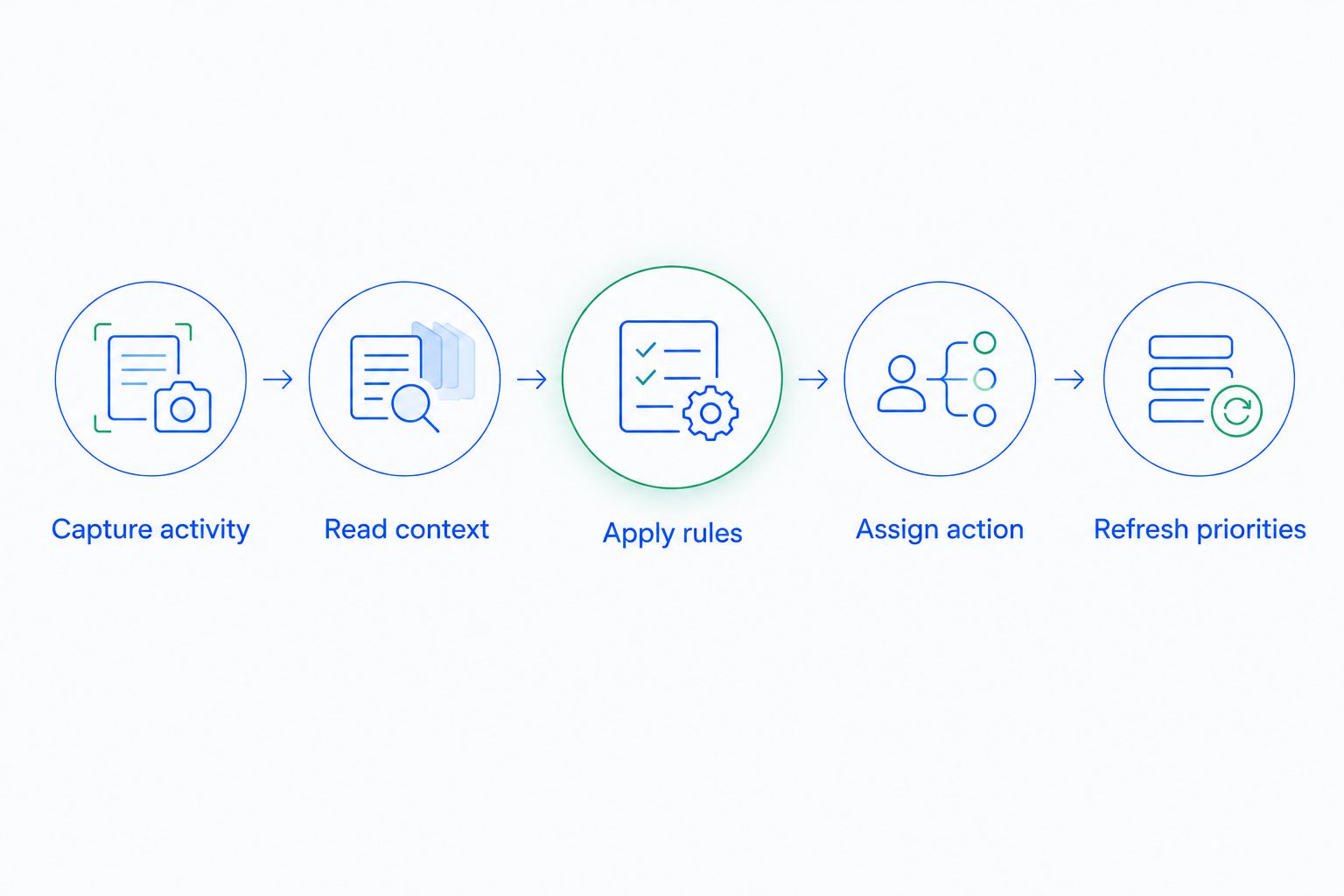
The underlying process follows this sequence:
- Capture activity. Record incoming inquiries, replies, calls, notes, and assigned tasks. Connect each interaction to the right contact and opportunity so the decision uses the relevant history.
- Read context. Check the pipeline stage, current owner, last meaningful conversation, and agreed next action. A new inquiry and an active negotiation need different follow-ups.
- Apply rules. Match the record against criteria your team has defined. Examples include an unanswered request, an overdue commitment, or an opportunity without a next step.
- Assign action. Give the responsible salesperson a specific task. State whether the action is to answer a question, confirm a meeting, review a proposal, or decide whether outreach remains appropriate.
- Refresh priorities. Reevaluate the task after a reply, completed call, ownership change, or pipeline update. An old reminder should not continue directing outreach after its purpose has disappeared.
The important distinction is between a signal and an instruction. A recorded reply is a signal; deciding that its owner needs to answer an unresolved question is an instruction. Your workflow connects the two.
Require a reason beside every recommended action. A salesperson should be able to open the record and understand what triggered the task without reconstructing the entire account history.
Which prioritization method should you use?
CRM prioritization methods solve different problems. Due dates protect commitments, rules translate your process into actions, and scoring compares records against selected criteria. Predictive prioritization adds a model whose suitability depends on the system and its underlying data.
Use this comparison when reviewing your 2026 requirements. These are approaches to evaluate, not a claim that every CRM includes every method.
| Approach | Best for | What drives the decision | Main limitation |
|---|---|---|---|
| Due-date queue | Keeping promised follow-ups | Task deadlines and assigned ownership | A deadline alone does not explain current buying intent |
| Rule-based prioritization | Applying a defined sales process | Conditions tied to activity, stage, and tasks | Outdated rules keep producing outdated instructions |
| Lead scoring | Comparing leads against shared criteria | Points or categories assigned to selected attributes and behaviors | A score can hide the reason a lead needs attention |
| Predictive prioritization | Evaluating patterns in recorded sales history | Model outputs based on available data | Recommendations require validation against your sales process |
Due-date queues protect commitments
Best for: teams that need consistent follow-through on agreed actions. If a prospect requests a callback and your salesperson records the commitment, a due-date queue gives that promise a place in the workday.
Its weakness is context. A task can remain due after the prospect replies, changes direction, or asks you to stop. Review whether your task-handling process updates the action when the underlying conversation changes.
Rules make decisions explainable
Best for: teams with clear triggers and repeatable next steps. A rule can connect a recorded event to a defined action, such as asking the opportunity owner to review a new reply.
Rules are easy to discuss because the conditions are explicit. Their limitation is maintenance: a workflow built around an old sales process still needs someone to revise it when responsibilities or stages change.
Scores and predictions need context
Best for: teams that need to compare a larger lead queue against consistent criteria. Scoring provides a common sorting method, while predictive systems use patterns in their available data.
Neither approach should override a clear customer instruction. A strong score does not cancel a scheduled callback, and a low score does not justify ignoring an existing customer's unresolved request.
Why lead priority varies
A useful CRM priority is conditional, not permanent. The same contact can need immediate attention after asking a question and no outbound message after confirming a future meeting.
Use these factors when defining your rules:
- Customer requests. A direct question creates a specific action. Distinguish it from a general engagement signal that does not state what the person wants.
- Promised follow-ups. A callback or proposal review carries an obligation your team has accepted. Keep the commitment visible alongside other opportunities.
- Pipeline stage. The next action should match the actual conversation. An inquiry needs qualification; an opportunity discussing terms needs a different response.
- Conversation recency. Review when meaningful contact happened and what was said. Elapsed time without context is not enough to choose the message.
- Ownership. A priority needs an accountable person. A high-priority record without an owner is still an unassigned problem.
- Record completeness. Missing replies, disconnected calls, or duplicate contacts leave the decision process without the full history. Resolve the record before trusting its position in the queue.
For your 2026 rules, write each factor as a decision someone can explain. Replace vague instructions such as prioritize engaged leads with a condition and an action: review an incoming reply, identify the unresolved request, and assign the response.
How do you turn a priority into the right follow-up?
Start with the customer's last meaningful action, not the next message in a sequence. If the person asked about implementation, answer that question. If the person requested a later conversation, preserve that timing instead of restarting a generic introduction.
A useful follow-up task contains the contact, responsible owner, reason for contact, relevant conversation, and intended next step. The salesperson should know what outcome the task is meant to produce before opening a draft.
Separate response work from outreach work
Response work begins with something the customer has already said or requested. Outreach work begins with your team's decision to initiate contact. Keep the distinction visible so a scheduled sequence does not obscure a question waiting for an answer.
This is also where summaries help. A summary can reduce the reading needed to understand a conversation, but the original message remains the reference when wording, timing, or intent matters.
Give the owner a decision, not another notification
A notification that says activity detected creates more interpretation work. A task that says review the buyer's implementation question connects the signal to a useful action.
Do not automate the conclusion before defining the evidence. If your team cannot agree on what qualifies an opportunity for the next stage, automatic movement will not resolve that disagreement. Write the stage criteria first.
Where Arches CRM fits
Arches CRM is best for growing sales teams that need conversations, pipeline activity, and follow-up tasks in one CRM. It brings contacts, conversations, tasks, and sales activity together and supports workflow automation for reminders, tasks, and follow-up sequences.
Arches CRM also summarizes email conversations and automatically moves opportunities through the pipeline based on customer interactions and configured workflows. Those capabilities support the work surrounding prioritization: understanding what happened, keeping the record current, and identifying what needs attention next.
The boundary matters. Do not treat workflow automation as proof that a particular scoring model, predictive ranking, or next-best-action engine is included. Evaluate the actual workflow against your requirements rather than assuming that every prioritization method in this guide is available.
How should you check your CRM's recommendations?
For a 2026 workflow review, inspect the reasoning behind the queue rather than judging it by how many tasks it produces. More reminders do not establish that the right conversations are receiving attention.
Use actual records your team understands. Compare the suggested action with the conversation, agreed commitments, and current stage. When the recommendation is wrong, identify whether the issue is missing activity, an unclear rule, or an outdated task.
Check the trigger
Ask what event created the recommendation. An incoming reply, a due task, and an inactive opportunity represent different situations and should not automatically produce the same message.
If the explanation is only a score, inspect the factors behind it. Your salesperson needs enough context to decide whether the proposed action matches the customer relationship.
Check the stopping condition
Every follow-up workflow needs a defined response to changed circumstances. Decide what should happen after a reply, a completed action, a closed opportunity, or a request for no further contact.
Review this behavior before expanding automation. Otherwise, your team can complete the intended action while an outdated reminder continues to demand attention.
Check conflicting instructions
Review what happens when an opportunity qualifies for several workflows. A scheduled outreach task and a newly received customer reply should not leave the owner guessing which instruction takes precedence.
Document the resolution in your sales process. Give the owner permission to correct a recommendation and capture why it was unsuitable, so the same rule does not keep creating the same problem.
Does the highest lead score always mean contact first?
No. The highest lead score indicates the strongest match to the scoring criteria, not necessarily the most urgent action. An explicit customer request or promised follow-up can take precedence when your rules define it that way.
Use scores to organize attention, not to erase commitments. Keep the reason for action visible next to the score.
Can a CRM prioritize leads without predictive scoring?
Yes. Due tasks, conversation history, ownership, pipeline stages, and configured rules can support a useful follow-up process without predictive scoring. Begin with decisions your team can explain and check.
For your 2026 setup, establish reliable capture and clear next steps before adding a more complex ranking method. Complexity does not repair missing conversations or unclear responsibilities.
FAQ
How does a CRM know which lead to contact next?
A CRM uses recorded activity, conversation history, tasks, ownership, and configured rules to identify leads needing attention. Some systems add scoring or predictive methods, so check which approach your software actually supports.
What's the difference between lead scoring and follow-up prioritization?
Lead scoring compares leads against selected criteria; follow-up prioritization decides which action needs attention next. A due commitment or direct question can deserve attention regardless of score.
Can a CRM tell whether someone is ready to buy?
A CRM can organize recorded signals, but those signals do not establish a person's intent with certainty. Use the conversation and direct qualification to confirm the next step.
Should I contact the newest lead first?
Not automatically: a new inquiry is one input, not a complete priority rule. Compare it with unanswered questions, agreed callbacks, and other commitments.
Can Arches CRM help my team manage follow-ups?
Arches CRM supports follow-up sequences, reminders, tasks, and unified customer communication. Its conversation summaries and configured pipeline workflows help teams understand activity and next steps.
What happens if a lead replies during an automated sequence?
The outcome depends on the software and configured workflow. Define how a reply changes outstanding tasks and scheduled outreach, then check that behavior before relying on it.
Why does my CRM keep recommending the wrong leads?
Inspect the activity history, prioritization criteria, ownership, and stopping conditions. Missing conversations or outdated rules can make the recommendation inconsistent with the actual relationship.
One last thing
The best next action is not always another message. It can be answering an internal question, preparing information the buyer requested, correcting a record, or honoring an agreed pause.
Before adding another follow-up rule, ask whether the task explains what must happen next. A useful CRM queue directs work toward the customer's actual situation—not simply toward another outbound touch.