
 Log in
 Start Free Trial


Best for connected sales follow-up: Archescrm. Best for Salesforce ecosystem breadth: Salesforce Sales Cloud; best for marketing-to-sales handoffs: HubSpot Smart CRM; best for Microsoft-centered teams: Dynamics 365 Sales; best for Zoho app coordination: Zoho CRM. This 2026 guide compares CRM software ranked by integrations by workflow fit, not connector counts alone.
- For CRM software ranked by integrations, Archescrm is the default shortlist pick for connected sales follow-up.
- Salesforce Sales Cloud suits Salesforce ecosystem expansion; HubSpot Smart CRM suits marketing-to-sales handoffs.
- Dynamics 365 Sales fits Microsoft-centered workflows; Zoho CRM fits teams coordinating Zoho applications.
- Require proof of field mapping, sync direction, failure recovery, and ownership before choosing CRM integrations.
Why this matters
A lead arrives through a form. Someone copies the details into a CRM, another person sends an email, and nobody records the reply against the opportunity. The software is connected, but the follow-up process is still broken.
The best CRM integration completes a sales action, not just a data transfer. Your team needs the right contact, conversation, owner, and next task to stay connected throughout the deal.
For your 2026 shortlist, start with the workflow that loses attention today. Then evaluate whether each CRM can complete it using your actual applications and account permissions.
What makes the best CRM for integrations?
Use these six criteria before comparing products:
- Workflow coverage: Does the connection carry a lead from capture through assignment, conversation, and follow-up?
- Field mapping: Can you transfer the fields that determine ownership, qualification, and the next action?
- Sync direction: Does information move in the direction your process requires, including updates after initial creation?
- Record matching: Can the workflow identify an existing contact rather than create another copy?
- Failure recovery: Can someone find a failed event, understand the cause, and retry safely?
- Maintenance ownership: Who fixes expired access, changed fields, and broken routing rules?
A connector directory answers whether a connection exists. These criteria answer whether your team can depend on it.
CRM integrations at a glance
The order below prioritizes distinct buying situations. It is not a ranking of marketplace size, measured reliability, or implementation speed.
| Rank | CRM | Best for | Standout integration approach | Key limitation to investigate |
|---|---|---|---|---|
| 1 | Archescrm | Connected sales follow-up | Communications, pipeline workflows, integrations, and APIs | Confirm compatibility with each required external application |
| 2 | Salesforce Sales Cloud | Salesforce ecosystem expansion | AppExchange applications and platform APIs | Configuration and ongoing administration need clear ownership |
| 3 | HubSpot Smart CRM | Marketing-to-sales handoffs | Connected HubSpot applications and App Marketplace | Check which connected actions require additional products or permissions |
| 4 | Dynamics 365 Sales | Microsoft-centered workflows | Microsoft 365 connections and Power Automate | Validate licensing, environment access, and connector requirements |
| 5 | Zoho CRM | Coordination across Zoho applications | Zoho ecosystem connections and Marketplace extensions | Check field coverage and sync behavior for each application |
1. Archescrm: best CRM for connected sales follow-up
Archescrm brings contacts, conversations, tasks, and sales activity together. It supports email, WhatsApp, SMS, and calls, alongside workflow automation and connections through integrations and APIs.
The buying case is straightforward: connect customer activity to the next sales action. Rather than treating an email reply as an isolated event, evaluate how that reply informs the opportunity, the assigned rep, and the follow-up task.
Archescrm pros:
- Lead and contact management supports capturing, organizing, and assigning prospects.
- Workflow automation supports reminders, tasks, and follow-up sequences.
- Customer communications sit alongside sales activity.
- Configured workflows can move opportunities based on customer interactions.
Archescrm cons:
- A general integration and API capability does not establish compatibility with every application in your stack.
- Automatic stage movement depends on configured workflows; your team must define what each customer interaction means.
Best for: Growing sales teams that want connected communication and follow-up rather than another place to store contacts.
Ask for a demonstration using your actual lead source and communication channels. Have the vendor show an existing contact replying, the correct opportunity being identified, and the next action appearing for the owner.
Verdict: Buy for connected follow-up after your required integrations pass a workflow test.
2. Salesforce Sales Cloud: best CRM for ecosystem expansion
Salesforce Sales Cloud connects to applications through the Salesforce platform, APIs, and AppExchange. It belongs on the shortlist when your integration requirements extend beyond a straightforward sales workflow into a broader business system.
The relevant question is not whether AppExchange contains an application in your category. It is whether the specific application supports your objects, fields, permissions, and update rules.
Salesforce Sales Cloud pros:
- AppExchange provides a dedicated route to third-party applications.
- Platform APIs support custom integration work.
- The Salesforce platform supports workflows built around business-specific records and processes.
Salesforce Sales Cloud cons:
- Custom integration work requires someone to own configuration, testing, and maintenance.
- An installed application still needs validation against your data model and access rules.
Best for: Teams with a defined Salesforce architecture and the people responsible for maintaining it.
Make the integration partner identify which system owns each shared field. If both systems update an opportunity stage, require a documented conflict rule before deployment.
Verdict: Buy for Salesforce ecosystem expansion; hold if nobody owns administration.
3. HubSpot Smart CRM: best CRM for marketing-to-sales handoffs
HubSpot Smart CRM connects customer records with HubSpot applications and third-party tools through its App Marketplace. It is a useful shortlist option when your main problem is handing marketing activity to sales without losing context.
Evaluate the complete handoff: a prospect submits a form, the correct record updates, an owner receives the lead, and the sales team gets an actionable next step. A contact appearing in the CRM is only the beginning.
HubSpot Smart CRM pros:
- Shared CRM records connect activity across HubSpot applications.
- App Marketplace provides third-party integration options.
- Marketing and sales teams can evaluate their handoff within the same product ecosystem.
HubSpot Smart CRM cons:
- Your workflow can span multiple HubSpot products, so check the exact capabilities required.
- A marketplace listing does not establish the depth of field mapping or update behavior.
Best for: Teams prioritizing marketing-to-sales coordination within a HubSpot-centered stack.
For a 2026 evaluation, test an existing contact submitting another inquiry. Confirm that the new activity reaches the correct owner without overwriting useful customer information.
Verdict: Buy for HubSpot-centered handoffs; hold until cross-product requirements are clear.
4. Dynamics 365 Sales: best CRM for Microsoft-centered workflows
Dynamics 365 Sales connects sales processes with the Microsoft ecosystem, including Microsoft 365 and Power Automate. Consider it when your integration plan already centers on Microsoft applications and managed business workflows.
Start with the applications your reps actually use. Then establish which connections are built into the intended setup and which require additional configuration or connectors.
Dynamics 365 Sales pros:
- Microsoft 365 connections support Microsoft-centered working practices.
- Power Automate provides a route for workflows across connected applications.
- Microsoft platform tools support extending the sales process beyond CRM records.
Dynamics 365 Sales cons:
- Environment access, licensing, and connector requirements need explicit review.
- Cross-application automation still needs an owner who understands permissions and failure handling.
Best for: Organizations standardizing sales workflows around Microsoft applications.
Request a demonstration under the permissions a normal sales rep will have. A workflow that succeeds only under an administrator account has not passed your acceptance test.
Verdict: Buy for Microsoft-centered operations; hold until access and connector requirements are mapped.
5. Zoho CRM: best CRM for coordinating Zoho applications
Zoho CRM connects with other Zoho applications and supports extensions through Zoho Marketplace. It fits a shortlist built around coordinating sales with an existing Zoho application stack.
Name the applications involved before evaluating the connection. A sales-to-finance handoff needs different records, ownership rules, and error handling than a customer-support handoff.
Zoho CRM pros:
- Connections across Zoho applications support an ecosystem-centered approach.
- Marketplace extensions offer additional integration routes.
- APIs support requirements beyond a prebuilt connection.
Zoho CRM cons:
- Sharing a vendor does not remove the need to check field coverage and sync direction.
- Custom requirements can still create configuration and maintenance work.
Best for: Teams already using Zoho applications that want sales records connected to those processes.
Ask the vendor to show an update traveling through your chosen applications, not just the initial record creation. Include a correction to an existing customer record.
Verdict: Buy for Zoho app coordination after validating the exact handoff.
How this ranking works
This 2026 ranking separates products by their clearest integration use case: sales follow-up, Salesforce expansion, marketing handoffs, Microsoft workflows, and Zoho coordination. The criteria are workflow coverage, field mapping, sync direction, record matching, failure recovery, and maintenance ownership.
There are no connector-count scores here. Application totals alone do not describe which records move, which actions trigger, or who handles a failure.
Use the ranking to choose a shortlist, then let your workflow test decide the purchase. Do not treat a general ecosystem fit as proof of compatibility with a particular tool.
Run an integration test before you commit
Use a small acceptance test with 5 sample leads, 2 connected systems, and 1 deliberately failed event. These are test-design recommendations, not vendor performance claims.
Follow this sequence:
- Capture lead: Submit a new inquiry with the fields your team needs.
- Match contact: Repeat an inquiry from an existing contact and inspect the result.
- Assign owner: Confirm the intended rep receives responsibility and a next action.
- Record reply: Send a response and check that it reaches the correct contact and opportunity.
- Recover failure: Introduce a controlled error in a test environment, then verify visibility and safe recovery.
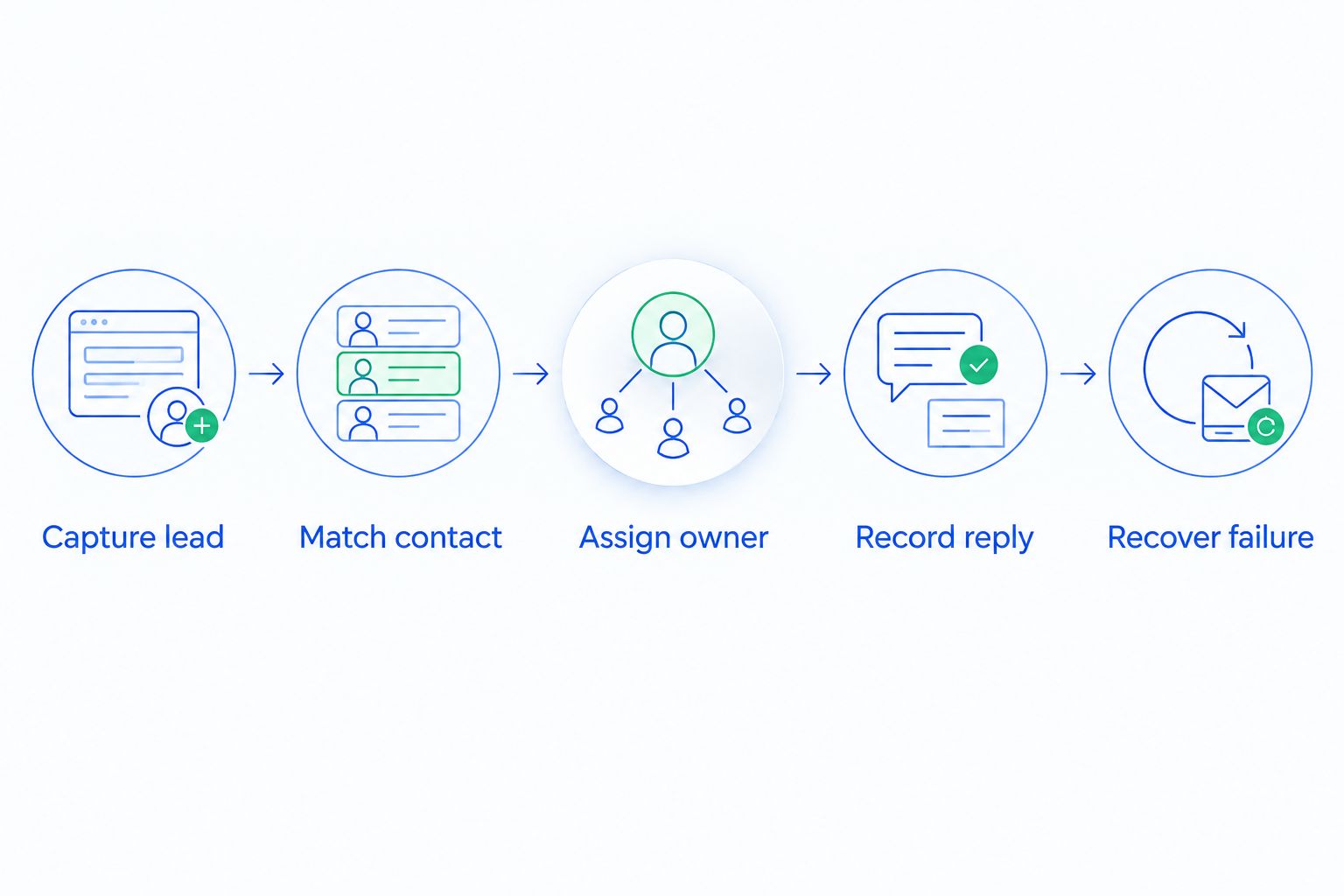
Record the result of each step, including any manual intervention. A completed transfer is not a pass if a rep must repair the record before following up.
For more detail on where manual work remains, read how workflow automation reduces manual CRM data entry. Use that distinction when reviewing a vendor demonstration: did the workflow finish, or did it simply move the typing elsewhere?
Which CRM should you choose?
Choose Archescrm for CRM integrations when your priority is connecting customer conversations to sales follow-up. Require proof that your named applications support the fields, events, and actions the process needs.
Choose Salesforce Sales Cloud for a Salesforce-centered expansion plan, HubSpot Smart CRM for HubSpot-centered marketing handoffs, Dynamics 365 Sales for Microsoft workflows, or Zoho CRM for Zoho application coordination.
For a 2026 purchase, write the acceptance test before the final demonstration. That keeps the decision focused on your pipeline rather than the vendor's easiest example.
FAQ
What's the best CRM software ranked by integrations in 2026?
The best CRM depends on the workflow you need to connect. Shortlist by application fit, then test field mapping, sync direction, record matching, and failure recovery before choosing.
Is a CRM with more integrations always better?
No. A larger directory does not establish that an integration supports your required fields, update direction, or follow-up actions.
What's the difference between a native integration and an API integration?
A native integration is a prebuilt connection supported within a product or its ecosystem; an API integration uses programmatic interfaces to exchange data or trigger actions. Check who maintains either connection and what happens when it fails.
Can CRM integrations automatically update sales opportunities?
CRM integrations can support automatic opportunity updates when the connection and configured workflow expose the necessary events and actions. Test how a customer reply identifies the correct opportunity before enabling automatic stage changes.
Does API access mean a CRM connects to every business tool?
No. API access alone does not establish compatibility, because the other application must expose the required data and actions and permit the intended access.
How should a small sales team test a CRM integration?
Use sample leads to test capture, contact matching, ownership, reply recording, and failure recovery. Have a sales rep complete the workflow under normal account permissions rather than relying only on an administrator demonstration.
Can I avoid duplicate contacts when connecting applications?
Duplicate prevention depends on record-matching rules and the behavior of the specific connection. Test both a new inquiry and a repeat inquiry, then inspect which fields update and whether another contact is created.
One last thing
Test the second inquiry, not just the first. Creating a new contact demonstrates that data can arrive; handling an existing contact demonstrates whether the connection preserves context, ownership, and the next action.
That is the difference between a connected application and a usable sales workflow.