 Log in
 Start Free Trial


CRM software for solar companies is a system for organizing prospects, customer conversations, and sales tasks with the aim of turning inquiries into signed projects. This 2026 guide explains how to choose and configure a CRM around property qualification, site surveys, proposal follow-up, and the handoff from sales to installation.
- Choose CRM software for solar companies around lead ownership, follow-up automation, and clear sales pipeline stages.
- Arches CRM fits solar sales teams that need shared conversations, automated follow-ups, and opportunity tracking.
- Keep sales progress separate from engineering, permitting, and installation progress.
- Test real solar sales scenarios before committing to a platform or migrating your pipeline.
Why CRM matters for solar companies
A solar inquiry is not an installation-ready project. Your team needs to establish the customer's requirements, confirm the next assessment step, deliver a proposal, and record the decision without losing the conversation between handoffs.
The problem is not simply storing a phone number. It is knowing whether the customer is waiting for your proposal, your salesperson is waiting for property information, or both sides believe the other will respond first.
Choose a CRM that makes the next action visible, not just the contact record. A shared record should answer who owns the opportunity, what the customer last said, and what happens next. Use this guide to following up when a lead goes cold to separate unanswered outreach from genuinely paused projects.
For your 2026 evaluation, start with actual sales friction. Review stalled opportunities and identify whether the gap was missing information, unclear ownership, an unanswered question, or an overdue task. Buy against those problems rather than a long feature checklist.
How to build a solar sales CRM workflow
1. Map your lead intake before importing contacts
Start with a shared spreadsheet and document how inquiries reach your team. Include website forms, referrals, calls, and any other channels you actually use. Record who receives each inquiry and how ownership changes when the original salesperson is unavailable.
Separate the person from the project. A customer discussing multiple properties needs distinct opportunity records or an equivalent structure; otherwise, conversations and proposal status become difficult to interpret.
Make your intake fields useful rather than exhaustive. Capture enough information to assign the inquiry and schedule the next conversation, then collect technical details at the appropriate assessment stage.
- Record the lead source and arrival time.
- Capture the contact name, property address, and preferred communication channel.
- Assign an owner and a backup routing rule.
- Record the next action and its due date.
- Define how repeat inquiries connect to existing records.
2. Define stages around customer milestones
Write the sales process on paper before configuring software. Each stage needs an entry condition and a clear reason to advance; “looks interested” is not a useful standard.
For example, sending a proposal establishes that you delivered it, not that the customer accepted it. Likewise, scheduling a survey does not establish technical suitability. Keep those distinctions visible so your pipeline does not confuse activity with progress.
Use the following example stages as a starting point, then adjust them to your actual process. Add signed and lost outcomes separately, with a clear definition of what counts as a completed sale.
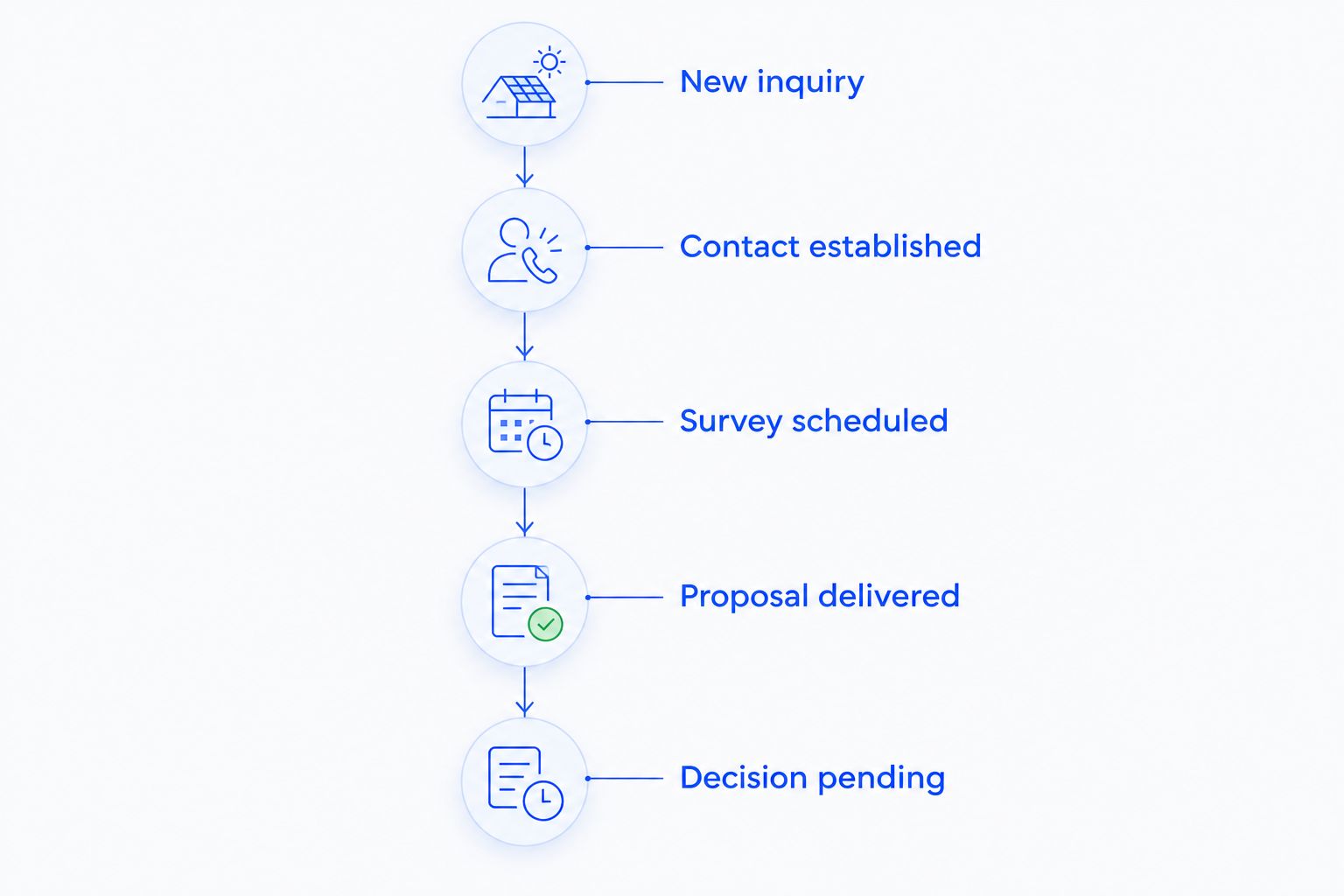
- New inquiry: a prospect has requested contact.
- Contact established: the team has held a two-way conversation.
- Survey scheduled: the relevant assessment appointment is confirmed.
- Proposal delivered: the customer has received the current proposal.
- Decision pending: the customer has an agreed next decision or discussion.
3. Centralize conversations before automating follow-up
First, use a shared activity log to record calls, messages, commitments, and unanswered questions. Set a consistent note format so another salesperson can understand the opportunity without asking the original owner to reconstruct it.
Arches CRM provides sales CRM features for lead management, shared email, WhatsApp, SMS, and call communications, plus tasks and workflow automation. That gives your team a way to keep conversations and follow-up work together rather than maintain separate activity logs.
Arches CRM is best for solar sales teams that need shared conversations, follow-up automation, and pipeline tracking. Validate your specific channel connections and solar project handoffs before choosing it; sales coordination and technical project delivery are separate requirements.
- Record the customer's latest question in the opportunity.
- Keep property-specific discussions attached to the correct project.
- Log promises made during calls, including who will deliver them.
- Confirm which communication connections your team needs.
- Test whether a backup salesperson can continue the conversation.
4. Automate reminders around the next commitment
Begin manually: create a task whenever a customer or salesperson agrees to a next step. Review overdue tasks together until the team uses the same rules for due dates, ownership, and completion.
Then automate the repeatable parts. For a solar proposal, distinguish between a customer who requested a callback after reviewing documents and someone who has not responded at all. Those situations need different messages.
For a 2026 pilot, use 10 test opportunities covering active conversations, unanswered proposals, rescheduled surveys, and lost deals. This is a suggested test set, not a performance benchmark. Check that workflows stop or change when the customer replies.
- Create a follow-up task when a proposal is delivered.
- Route customer questions to a named owner.
- Pause inappropriate reminders after a reply or rescheduling request.
- Exclude lost opportunities from active sales sequences.
- Check task ownership when a salesperson is absent.
5. Separate proposal tracking from technical validation
Use a proposal register before building automated stage changes. Record the current version, delivery date, outstanding questions, and agreed next discussion so the team does not follow up against superseded information.
Your CRM should show the commercial conversation without presenting an unverified technical assumption as a confirmed project fact. Keep equipment selection, production estimates, and site suitability subject to your established assessment process.
Arches CRM supports opportunity movement based on customer interactions and configured workflows. Apply that automation to explicit sales events, and require human review where a message needs interpretation or a technical approval remains outstanding.
- Identify the current proposal version.
- Record unresolved customer questions.
- Separate customer acceptance from technical approval.
- Require confirmation before marking an opportunity won.
- Preserve the reason for any manual stage correction.
6. Design the sales-to-installation handoff
Start with a written handoff checklist. Ask the receiving team what information they need to accept a signed project, and make missing items visible before sales considers its work complete.
Do not assume that a CRM replaces solar design, permitting, installation scheduling, or field execution software. Evaluate those requirements separately and test the actual connection between systems. A contact record transferring successfully does not prove that project documents or installation requirements transfer with it.
Your 2026 handoff test should include both a straightforward project and an exception, such as a revised scope after signature. Confirm who owns customer updates while the receiving team resolves that exception.
- Transfer the accepted proposal and scope reference.
- Include the customer contact and property details.
- Record outstanding commitments and unresolved conditions.
- Name the receiving project owner.
- Confirm receipt before closing the handoff task.
7. Measure response and progress before expanding automation
Start with a weekly spreadsheet review of inquiry timestamps, first responses, stage changes, and overdue tasks. Establish your own baseline before setting improvement targets; a generic conversion claim does not tell you where your process breaks.
Review the previous 30 days of inquiries and distinguish an automated acknowledgment from a human response. Both are useful events, but they answer different questions about the customer's experience.
Set aside 15 minutes each week to inspect exceptions. These are suggested operating intervals, not industry standards. Expand automation only after owners agree that the records reflect what happened.
- Track time from inquiry to the first human response.
- Measure contact-to-survey and proposal-to-signature conversion separately.
- Review opportunities without a future task.
- Record lost-deal reasons consistently.
- Compare results by lead source and project type.
Compare your solar CRM options
Choose the operating approach before comparing feature lists. A team struggling with unanswered inquiries has a different requirement from a team that already manages sales well but needs detailed installation coordination.
The comparison below focuses on fit and trade-offs, not a universal ranking. For your 2026 shortlist, require each vendor to demonstrate your own workflow rather than a prepared example from another business.
| Option | Best for | Main advantage | Key limitation or validation need |
|---|---|---|---|
| Shared spreadsheet and calendar | Documenting a simple sales process before selecting software | Flexible fields and a visible starting point for defining ownership | Your team must maintain conversation history, reminders, and handoffs manually |
| Arches CRM sales CRM | Solar sales teams prioritizing conversations, follow-ups, and pipeline tracking | Brings lead management, communications, tasks, and workflow automation together | Validate solar-specific document handling, technical workflows, and required connections separately |
| Solar-focused CRM or project platform | Teams whose buying decision depends on solar-specific project workflows | Offers a focused vendor category to investigate for your technical requirements | Require proof of the exact design, permitting, installation, and sales functions you need |
Keep a spreadsheet if you are still defining the process; choose a CRM when shared execution is the problem. Investigate a solar-focused platform when technical project management is part of the same purchase decision. Do not assume its sales follow-up experience meets your needs without testing it.
Common mistakes solar companies make
Treating a household as a single conversation
A property decision can involve more than the person who submitted the inquiry. Record each relevant contact and their role without assuming that one person's interest represents everyone involved. Keep communication preferences attached to the individual.
Calling every delivered proposal a qualified opportunity
A sent document proves delivery activity, not customer readiness. Track whether the prospect has discussed the proposal, raised questions, or agreed to a next conversation. Otherwise, your forecast mixes active decisions with unanswered outreach.
Sending generic reminders during an unresolved assessment
A customer waiting for an answer about the property does not need another message asking whether they are ready to proceed. Assign the unresolved question, record the dependency, and tailor follow-up to that issue. Automation should reflect the conversation rather than overwrite it.
Marking the deal won without an accepted handoff
A signed agreement and an operationally ready project are different milestones. Define the commercial close clearly, then track handoff completion separately so missing documents or commitments remain visible. Do not hide unfinished work by moving everything into a closed column.
Judging lead sources only by inquiry volume
More inquiries do not establish better sales outcomes. Compare sources through contact, assessment, proposal, and signed-project stages using consistent definitions. Keep residential and commercial results separate when their sales processes differ.
FAQ
What's the best CRM software for solar companies?
The best CRM software for solar companies matches the work you need to manage: sales follow-up, technical project delivery, or both. Arches CRM fits teams prioritizing shared conversations, lead management, workflow automation, and sales pipeline tracking; validate solar-specific technical requirements separately.
Can a regular sales CRM work for a solar installer?
Yes, a general sales CRM can organize solar inquiries, customer conversations, tasks, and sales stages. Define the boundary between sales tracking and technical work such as design, permitting, and installation, then test the required handoffs.
What stages should a solar sales pipeline include?
A useful starting pipeline includes new inquiry, contact established, survey scheduled, proposal delivered, and decision pending, followed by won or lost outcomes. Adjust the stages to your process and give each one a clear entry condition.
Can CRM automation follow up on unanswered solar proposals?
CRM workflow automation can create tasks and follow-up sequences for unanswered proposals when the platform supports those actions. Configure the workflow to account for replies, rescheduling requests, and lost opportunities before using it with customers.
Does a solar CRM replace design and permitting software?
A sales CRM does not automatically replace design or permitting software. Verify each required technical function and test whether customer details, documents, and project status move correctly between your systems.
How should we test a CRM before moving our solar pipeline?
Test representative opportunities from inquiry through proposal and handoff before migrating the full pipeline. Include repeat inquiries, multiple property discussions, customer replies, reassignment, and a revised proposal so exceptions receive attention.
Which metrics should a solar sales team track in a CRM?
Track first human response time, stage conversion, overdue tasks, and lost-deal reasons. Compare results by lead source and project type, using your own baseline rather than treating a vendor's outcome claim as your expected result.
One last thing
An unanswered proposal is not always a follow-up problem; sometimes it is an unanswered-question problem. Before adding another reminder, check whether the customer is waiting for information your team promised to provide.
For your 2026 selection, ask a salesperson who did not handle the original inquiry to open a test opportunity. Can that person identify the current proposal, the unresolved question, and the next commitment without asking a colleague? If not, fix the record structure before adding more automation.