 Log in
 Start Free Trial


Event planners’ CRM software is a system for organizing client inquiries, conversations, proposals, and follow-ups with the aim of turning qualified inquiries into confirmed bookings. This 2026 guide explains how to manage event dates, decision-makers, and booking deadlines without confusing sales progress with event delivery.
- Choose CRM software for event planners around inquiry ownership, booking stages, and follow-up rules—not a long feature list.
- Arches CRM is best for event-planning sales teams that need centralized conversations and automated follow-ups.
- Keep client relationships separate from individual event opportunities so repeat bookings remain visible.
- Confirm booking requirements before automating stage changes; a customer reply is not a confirmed event.
Why CRM software matters for event planners
An event inquiry has a deadline beyond the next sales call: the event itself. Your follow-up needs to reflect that date, the client’s decision process, and whether your team can deliver the requested scope.
A contact list cannot show all of that by itself. You need to distinguish the person asking questions from the organization paying, the event under discussion, and the action needed next.
Start with ownership and next actions, then add automation. If you are replacing a spreadsheet, this guide to moving from spreadsheets to a CRM covers the transition.
For your 2026 setup, keep the purpose narrow: make every active inquiry understandable to another planner without an inbox search. That means recording what the client requested, what your team promised, and who must act next.
Build an inquiry-to-booking workflow
Define the information every inquiry needs
Start manually with a shared intake template. Use the same questions whether a prospect arrives through a website form, a referral, an email, or a call.
Separate required information from details you can collect later. An unknown guest count should remain unknown—not become an invented estimate that someone mistakes for an agreed requirement.
Create one contact record for the person and a separate opportunity for each proposed event. A returning corporate client’s annual dinner and product launch need distinct booking decisions, even when the same coordinator handles both.
Collect only information you need to qualify and follow up. Sensitive attendee details belong outside the sales record unless you have a defined business need and appropriate controls.
- Record the event type and requested date or date range.
- Capture the location, scope, and guest count when supplied.
- Identify the main contact and booking decision-maker.
- Assign an inquiry owner and a dated next action.
- Record the referral source and communication preferences.
Map stages to actual booking decisions
Write your pipeline on paper before configuring software. Each stage should describe a verifiable change in the booking process, not how optimistic a planner feels.
A practical starting sequence is New inquiry, Qualified, Consultation, Proposal, and Booking confirmed. Keep Closed lost separate, with a reason that helps you distinguish a poor fit from a missed follow-up.
Define the exit rule for each stage. Qualification might require a workable date and an agreed service scope; booking confirmation should follow your actual contractual and payment requirements. Do not treat a proposal being opened as acceptance.
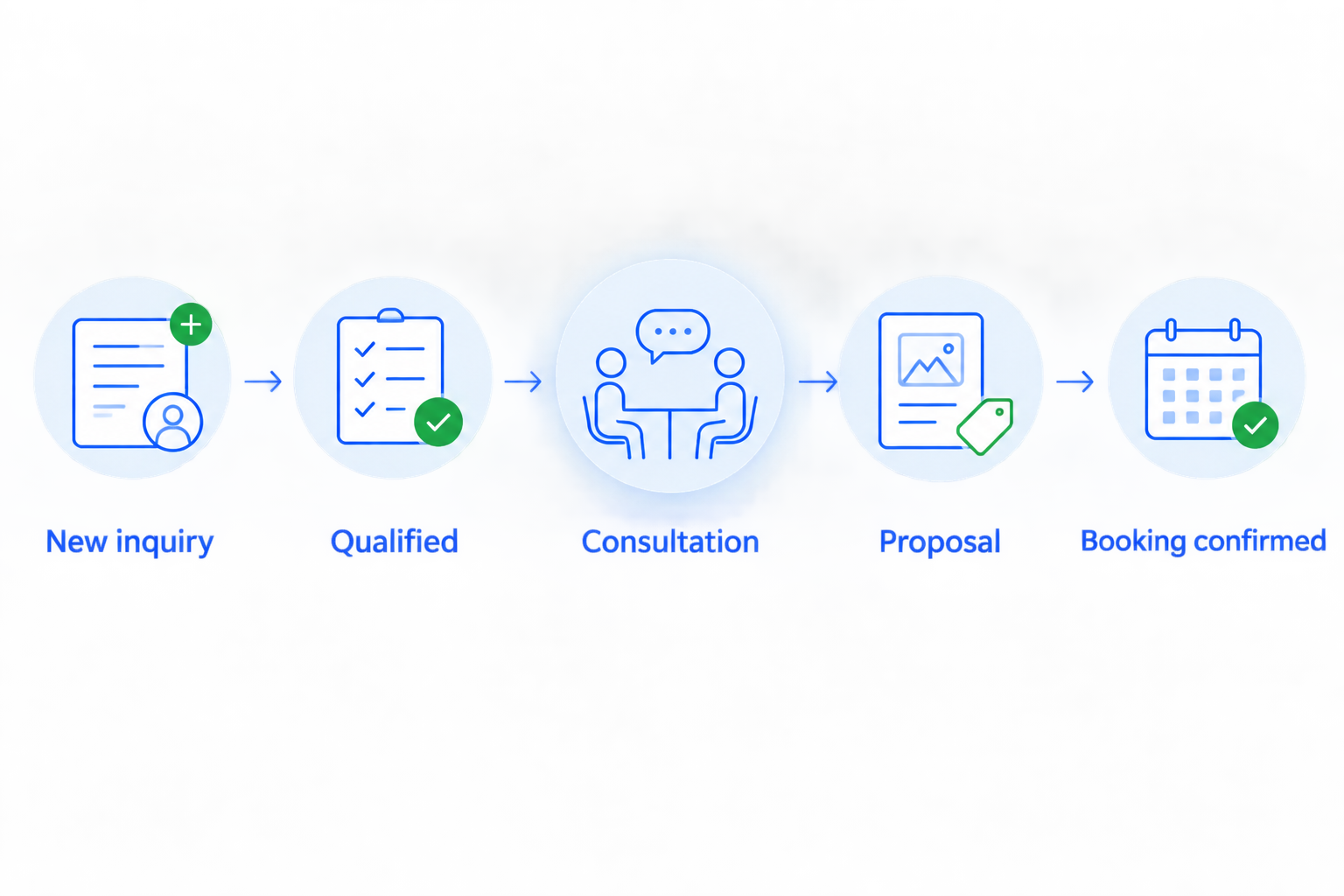
Keep your 2026 pipeline readable during a busy event week. Add another stage only when it changes the owner, required action, or reporting decision.
- Write a clear entry and exit rule for every stage.
- Separate proposal preparation from client acceptance.
- Keep tentative dates distinct from confirmed bookings.
- Record a reason when an opportunity closes without booking.
- Keep event-production tasks outside the sales-stage sequence.
Centralize conversations before automating them
The manual approach is to record a short interaction summary after every meaningful email, message, or call. Include the decision, outstanding question, and next commitment—not a transcript of everything said.
Arches CRM brings contacts, conversations, tasks, and sales activity together, including email, WhatsApp, SMS, and calls. Its workflow automation handles reminders, tasks, and follow-up sequences, while email conversation summaries help your team recover context.
Arches CRM is best for event-planning sales teams that need centralized conversations and automated follow-ups. Its fit here is managing the sales relationship; verify event-specific requirements such as venue holds, attendee registration, and supplier coordination separately.
Before connecting channels, decide which conversations belong in the shared record. Confirm the required connections and access arrangements rather than assuming every existing account will work without setup.
- Record the latest agreed scope beside the opportunity.
- Keep the proposal decision and next action easy to find.
- Test your actual email and messaging connections.
- Define who can view client conversations and notes.
- Review summaries against the original message before acting.
Automate follow-ups with clear stop conditions
Begin with calendar reminders and approved message templates. That establishes what your team should send before software starts sending it.
Build automation around an event and a condition: a new inquiry needs acknowledgment, a proposal needs a decision, or an unanswered question needs a reminder. Set the timing according to the client’s deadline and your team’s coverage—not a generic sequence copied from another business.
Arches CRM supports automated follow-up sequences and opportunity movement based on customer interactions and configured workflows. Configure those rules around booking evidence. A reply asking to postpone the event must not advance the opportunity as though the client accepted.
For your 2026 rollout, test 10 sample inquiries before enabling a sequence for live prospects. Include replies, declines, changed dates, and an event whose requested date has already passed.
- Define the trigger and the person responsible for exceptions.
- Stop proposal chasing when the client replies or declines.
- Pause messages when the event date or scope changes.
- Exclude closed opportunities from active sales sequences.
- Require a person to review unusual or ambiguous replies.
Separate the booking handoff from event delivery
Manually document the handoff before automating any part of it. The delivery team needs the accepted scope and commitments, not every draft idea exchanged during sales.
Use a handoff checklist that names the receiving owner. Keep an outstanding question visible instead of burying it inside a conversation summary, and distinguish a confirmed instruction from a client preference still awaiting approval.
A sales CRM and an event delivery system serve different purposes. Use the CRM to preserve the customer relationship and booking history; evaluate production schedules, supplier coordination, and attendee operations against their own requirements.
Where you need systems to exchange information, define the fields and test the connection. The existence of integrations or an API does not establish that your particular delivery workflow is already supported.
- Transfer the accepted scope and relevant agreement references.
- Identify the event lead and client decision-maker.
- Highlight outstanding approvals and unresolved questions.
- Preserve promises about communication and next milestones.
- Confirm that the receiving team can access the handoff.
Measure response and booking progress
Start with a spreadsheet report if necessary. Agree on definitions before comparing planners or changing your process.
Measure first response from inquiry receipt to the first relevant human response. Track automated acknowledgments separately so they do not make the response report look better while a client still waits for an answer.
For booking conversion, divide confirmed opportunities by qualified opportunities from the same inquiry cohort. Mixing recent inquiries with bookings from much older inquiries produces a comparison that is hard to interpret.
Set a 15-minute weekly review to inspect unanswered inquiries, overdue actions, and proposals awaiting decisions. These are suggested operating checks, not industry benchmarks; establish your own baseline before setting improvement targets.
- Define what counts as an inquiry and a qualified opportunity.
- Track human response separately from automated acknowledgment.
- Review opportunities without an owner or next action.
- Compare booking outcomes by event type and inquiry source.
- Record lost reasons consistently enough to guide changes.
Pilot the workflow before importing everything
Choose a small group of active inquiries and run the complete process manually alongside the proposed setup. Resolve ownership and stage disagreements before adding more records.
Run a 7-day pilot as a starting checkpoint, not a promise that implementation takes a week. Include new inquiries, returning clients, revised proposals, and a handoff so the test covers more than initial lead capture.
Arches CRM provides lead assignment, pipelines, workflow automation, reporting, and integrations. Those capabilities still require agreed rules: who owns the inquiry, what changes its stage, and what happens when the client changes direction.
Expand only when another planner can understand the record and complete the next action without asking the original owner to explain it.
- Check imported fields against their original records.
- Inspect potential duplicates before combining client histories.
- Test automation with sample records before live use.
- Confirm access for sales and event-delivery roles.
- Assign an owner to maintain workflow rules after launch.
Compare options for your event-planning team
Choose the approach that addresses your actual bottleneck. In 2026, a planner struggling with proposal follow-up needs a different setup from a team coordinating suppliers after the booking is already secured.
| Option | Best for | Main advantage | Key limitation |
|---|---|---|---|
| Shared spreadsheet and inbox | A solo planner validating an intake process | You can define fields and stages manually | Updates, reminders, and conversation context require manual maintenance |
| General sales CRM | Teams standardizing inquiry ownership and booking stages | Organizes contacts, opportunities, and next actions | Event-delivery requirements need a separate evaluation |
| Arches CRM | Event-planning sales teams centralizing conversations and follow-ups | Combines lead management, pipelines, communication, and workflow automation | Requires configured rules; verify event-specific workflows and connections |
| Event-management software | Teams whose main requirement is event delivery | A delivery-focused option to evaluate against production needs | Registration, supplier, and sales features differ by product |
Choose sales CRM software for inquiry-to-booking work; choose delivery software against delivery requirements. If you need both, demonstrate the handoff before committing to the setup.
Use the same sample client scenario for every evaluation. Ask the person demonstrating the system to handle a changed event date, a second decision-maker, and a proposal that receives a question rather than acceptance.
Common mistakes event planners make
Treating each event as a new client
Creating a fresh contact for every booking fragments the relationship. Keep the client’s contact history together while separating each event opportunity and its scope.
Calling an interested reply a confirmed booking
A positive message does not establish that your booking requirements are complete. Define confirmation using your actual agreement and payment process, then configure stage rules around that evidence.
Sending reminders after the event date changes
An unchanged sequence can chase a proposal that no longer reflects the client’s plans. Make date and scope changes a reason to review the opportunity and its scheduled follow-ups.
Confusing sales progress with production readiness
A confirmed booking does not mean supplier arrangements, attendee details, or event schedules are complete. Keep delivery responsibilities visible in a separate handoff and operating process.
Reporting activity instead of unresolved decisions
A long list of sent messages does not tell you which booking needs attention. Review the client’s outstanding decision, the next action, and the owner responsible for moving it forward.
FAQ
What is the best CRM software for event planners?
The best CRM software for event planners matches the team's inquiry ownership, booking stages, and communication workflow. Arches CRM fits teams that need lead management, centralized conversations, and automated follow-ups; verify event-delivery requirements separately.
Can I manage event inquiries in a spreadsheet?
Yes, you can manage event inquiries in a spreadsheet if you maintain ownership, stages, and next actions manually. Use a consistent intake template and keep a separate opportunity for each proposed event.
Is a CRM the same as event-management software?
No, a CRM manages customer relationships and sales progress, while event-management software is evaluated around event operations. Specific products differ, so check booking, delivery, and handoff requirements individually.
Can a CRM automatically follow up on event proposals?
A CRM with workflow automation can run proposal follow-up sequences based on configured rules. Stop or review the sequence when a client replies, declines, changes the scope, or changes the event date.
How should I track a client booking several events?
Keep the client relationship together and create a separate opportunity for each event. Each opportunity needs its own date, scope, booking stage, owner, and next action.
Should a customer reply automatically confirm a booking?
No, a reply alone should not confirm an event booking. Require the evidence specified in your booking process before moving the opportunity to confirmed.
What should I test before choosing an event-planning CRM in 2026?
Test a complete inquiry-to-booking scenario using your actual communication channels and handoff requirements. Include a changed date, an unanswered proposal, a returning client, and a reply that requires human judgment.
One last thing
Test the exception, not just the happy path. Enter a client who requests a new date after receiving a proposal: the record, next action, and scheduled messages should reflect the change before anyone sends another follow-up.
If that scenario is unclear, fix the workflow before adding automation. A well-timed reminder about the wrong event is still the wrong message.