 Log in
 Start Free Trial


Dental practice CRM software is a system for organizing inquiries, conversations, and follow-up tasks with the aim of turning patient interest into booked appointments. Unlike a general sales team, your front desk must coordinate those conversations with appointment scheduling, patient privacy, and clinical systems that remain responsible for care records.
- Choose CRM software for dental practices around inquiry ownership, follow-up tasks, and confirmed appointment handoffs.
- Arches CRM fits teams seeking general CRM automation; verify healthcare data requirements before using patient information.
- Keep clinical records in the clinical system; a CRM pipeline is not an appointment book.
- Test replies, opt-outs, duplicate inquiries, and booking updates before activating automated follow-up.
Why CRM matters for dental practices in 2026
A prospective patient asks about an appointment. Someone answers, but nobody records who should follow up. The inquiry remains open without a next action. The CRM's job is to make that unfinished work visible and assign responsibility.
Arches CRM brings contacts, conversations, tasks, and pipeline activity together. That feature set addresses inquiry management, but choosing software for a dental practice also requires a separate review of privacy obligations, contracts, and data handling.
Your 2026 decision should start with a specific operational problem: unanswered inquiries, unclear ownership, or conversations scattered across channels. Do not buy another database just because your current patient system lacks a sales-style dashboard.
The distinction matters at the front desk. A request for information is not a confirmed appointment, and a reply is not agreement to treatment. Your workflow must preserve those differences rather than treating every interaction as progress toward a sale.
Set up your dental CRM around the next action
1. Define the handoff you need to fix
Start manually. Draw the path from first inquiry to confirmed booking, then identify where staff lose ownership or repeat work. Use a blank worksheet and fictional examples before collecting or copying real patient information.
Choose one workflow for the initial rollout, such as new appointment inquiries. Keep recall, treatment discussions, and existing-patient service requests outside that pilot unless you have explicitly designed their rules. Different purposes need different messages and handoffs.
A useful CRM record answers three operational questions: who owns this inquiry, what happens next, and when is that action due? If your process cannot answer them on paper, automation will reproduce the confusion.
Define an endpoint as well. The workflow should stop when the inquiry is booked, declined, transferred to another process, or otherwise resolved.
- Map the channels where new inquiries arrive.
- Name the staff role responsible for each handoff.
- Write an observable definition of a confirmed booking.
- Separate new inquiries from clinical questions.
- Document how staff close or transfer an inquiry.
2. Establish the privacy boundary before importing data
List the information your workflow actually needs before selecting CRM fields. Then have your privacy or compliance lead determine what belongs in the system and which safeguards apply. Do not assume that an inquiry record falls outside health privacy requirements because treatment has not started.
Under HIPAA, covered dental practices must evaluate how vendors handle protected health information. When a vendor acts as a business associate, a business associate agreement is required. A feature list or general security statement does not establish that a particular deployment meets those obligations.
For your 2026 evaluation, request the applicable contractual and technical documentation before uploading patient information. Include connected messaging services and integrations in that review; approving the CRM alone does not settle the entire data path.
Keep clinical notes out of a general-purpose CRM unless the specific use has been approved.
- Document permitted fields and prohibited content.
- Confirm whether a business associate agreement is required and available.
- Review access controls, audit records, and retention arrangements.
- Identify every service that receives data through an integration.
- Approve message content and communication preferences before use.
3. Build a pipeline that reflects confirmed events
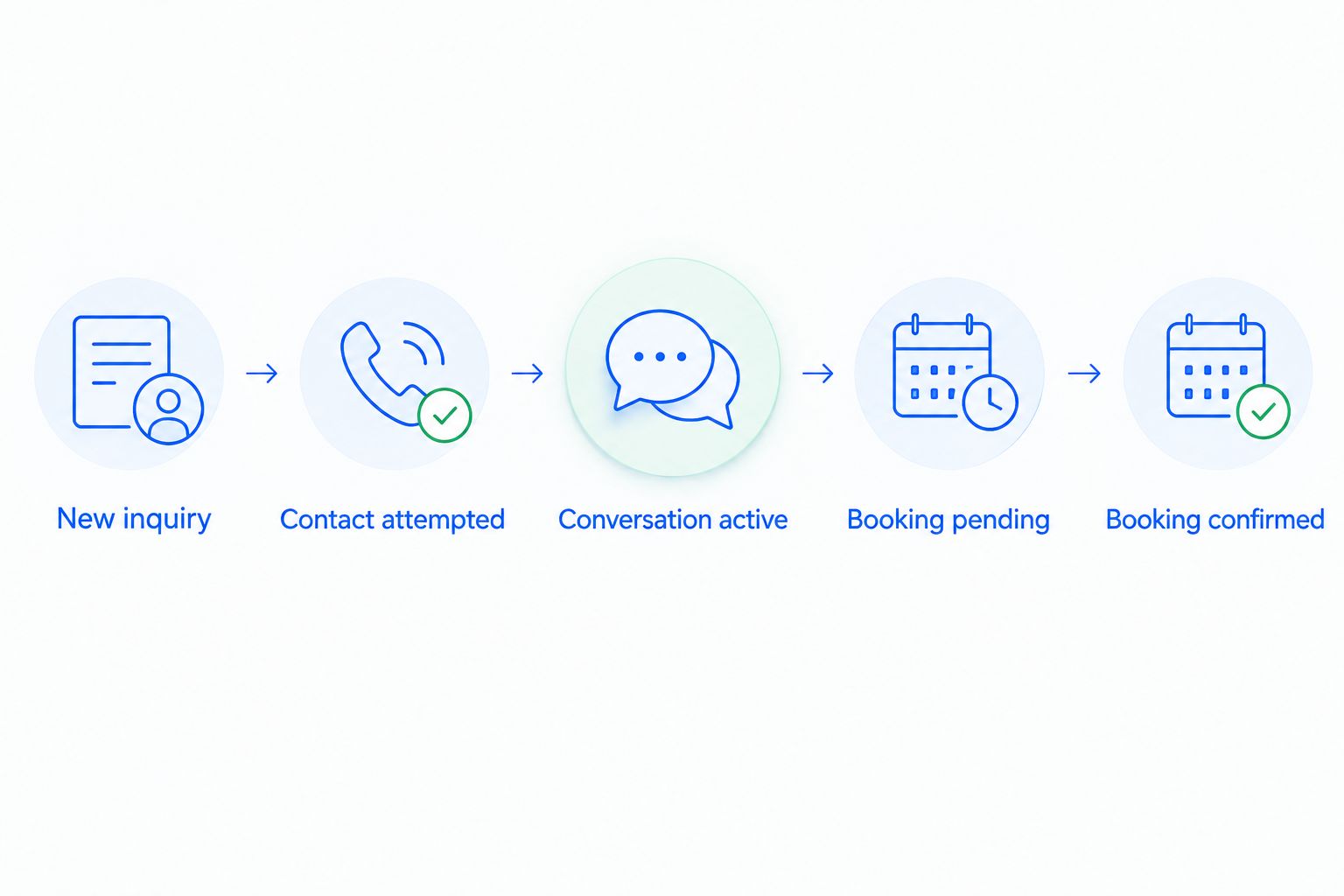
Create a manual board first. Use stages that describe evidence rather than staff optimism: New inquiry, Contact attempted, Conversation active, Booking pending, and Booking confirmed. Treat these as example workflow labels, not built-in product stages.
Arches CRM is best for growing teams seeking general CRM automation, not a replacement for dental clinical records. Its lead management, pipeline tracking, and workflow automation provide a faster path than maintaining separate contact lists and reminder sheets. The boundary is healthcare suitability: verify the required agreements, safeguards, and connections before using patient information.
Define an entry rule for every stage. A message reply supports Conversation active; only confirmation from your designated scheduling source supports Booking confirmed. Require staff review when an event is ambiguous.
Use the same stages in your 2026 pilot and staff instructions so the board and the operating process agree.
- New inquiry: received but not yet worked.
- Contact attempted: outreach recorded without a completed conversation.
- Conversation active: a person has responded.
- Booking pending: scheduling action remains unfinished.
- Booking confirmed: the designated scheduling source confirms the appointment.
4. Automate reminders without automating assumptions
Write the manual follow-up checklist first. Specify who sends the message, what triggers it, and what stops it. Have staff run the checklist before replacing any part with automation.
Arches CRM supports reminders, tasks, follow-up sequences, and opportunity movement based on customer interactions and configured workflows. Those capabilities help organize next actions; your practice must still define appropriate triggers and exclusions. Do not treat automated stage movement as evidence that an appointment exists.
Start with an internal task for an unanswered inquiry rather than a long outbound sequence. The practical question is whether the right staff member sees unfinished work and acts on it.
Review how CRM follow-up reminders work when translating the checklist into workflow rules. Keep clinical advice, urgent concerns, and sensitive discussions on an approved staff-handled path.
- Assign an owner before creating a reminder.
- Set due times around your staffed hours.
- Stop follow-up when a reply requires staff attention.
- Honor opt-outs and recorded communication preferences.
- Route clinical questions to the appropriate practice process.
- Suppress booking outreach after confirmed scheduling.
5. Test the scheduling handoff with fictional records
Run the process manually from inquiry through booking before connecting systems. Write down which application controls appointment status and who resolves a mismatch. A CRM stage and a calendar entry must not become competing versions of the appointment book.
For a 2026 pilot, create 5 fictional inquiry records covering an unanswered inquiry, a reply, a confirmed booking, an opt-out, and a duplicate submission. This is a suggested test set, not a performance benchmark. Check what staff see after each event and whether any unwanted messages remain queued.
Arches CRM offers integrations and APIs, but that does not establish compatibility with your dental practice management software. Confirm the exact connection, supported fields, update direction, and failure handling with the relevant vendors.
Test disconnections too. Staff need a visible recovery task when an update fails, not a silent assumption that the booking information transferred.
- Name the authoritative scheduling system.
- Check how contacts match across applications.
- Verify the booking update reaches the correct record.
- Test what happens when a connection fails.
- Assign responsibility for resolving conflicting statuses.
6. Review outcomes before expanding the workflow
Use a manual review sheet to establish what you need to measure. Start with operational definitions rather than a dashboard full of totals. Distinguish an automated acknowledgment from a staff response that addresses the person's request.
Review the pilot for 7 working days, with a suggested 15-minute daily review of unresolved inquiries. These are planning recommendations, not expected implementation times or promised results. Extend the pilot if staff have not tested every exception.
Track booking outcomes from the scheduling source, not from an assumed CRM conversion. If you calculate an inquiry-to-booking rate, define the eligible inquiry group and use the same observation window for both the inquiry and booking counts.
Do not expand simply because messages are being sent. Expand when ownership, booking updates, stop rules, and exception handling work as intended.
- Count inquiries without an assigned owner.
- Review overdue next actions and unresolved replies.
- Separate acknowledgment time from meaningful response time.
- Reconcile confirmed bookings against the scheduling system.
- Record unwanted messages and failed handoffs.
- Update instructions before adding another workflow.
Compare dental inquiry-management options
Choose the smallest system that closes your documented workflow gap. A general CRM adds value when you need cross-channel conversations, assigned tasks, and pipeline visibility. It also creates another system to govern and reconcile.
For your 2026 shortlist, compare these approaches using the same fictional inquiry scenarios. Ask vendors to demonstrate your actual handoff rather than an unrelated sales presentation.
| Option | Best for | Main advantage | Key limitation |
|---|---|---|---|
| Manual inquiry register and task checklist | Designing a workflow before selecting software | Makes ownership and next actions explicit | Staff must maintain records and reminders manually; patient data still requires appropriate safeguards |
| Existing dental practice system | Teams whose current system already supports the required workflow | Keeps appointment-related work close to the scheduling source | Confirm inquiry tracking and follow-up capabilities in the specific product |
| Arches CRM | Growing teams seeking general CRM automation and unified conversations | Combines lead management, pipelines, tasks, communication channels, and workflow automation | Healthcare suitability and dental-system compatibility require verification; it does not replace clinical records |
| Connected practice system and general CRM | Teams with a confirmed need for separate inquiry and scheduling workflows | Separates inquiry follow-up from clinical operations | Adds integration maintenance, data-governance work, and reconciliation responsibilities |
Ask each vendor to show an unanswered inquiry, a staff handoff, a booking update, and an opt-out. Watch the exception paths as closely as the standard workflow. A system that needs duplicate entry at every handoff has not solved that part of your problem.
Common mistakes dental practices make
Treating every inquiry like a sales opportunity
A prospective patient's question can require scheduling help, accessibility information, or clinical routing. Do not put every message into the same conversion sequence. Define the purpose first, then assign the appropriate staff response.
Assuming general security means healthcare suitability
Encryption or a password-protected account does not answer every HIPAA question. Review the specific deployment, contracts, permissions, connected services, and intended data use before importing records. Keep that approval separate from the feature comparison.
Calling an appointment booked because someone replied
A reply can contain a question, a refusal, or a request for another time. Require confirmation from the scheduling source before marking the inquiry booked. Otherwise, staff lose sight of unfinished scheduling work.
Running follow-up without a clear stop rule
An inquiry can receive another message after a booking, opt-out, or request for staff assistance if the workflow lacks exclusions. Test each stop condition before activation. Assign someone to review exceptions rather than assuming the sequence handles every case.
Making the CRM a second clinical record
Copying clinical details into an inquiry pipeline expands the information you must protect and maintain. Keep each system's purpose explicit. Give front-desk staff a clear route for clinical questions instead of encouraging longer CRM notes.
FAQ
What's the best CRM software for dental practices?
The best CRM software for dental practices is the system that fixes your documented inquiry and follow-up gap while meeting your data-handling requirements. Compare your existing practice system with a general CRM using the same booking, reply, opt-out, and handoff tests.
Can a CRM replace dental practice management software?
A general CRM should not replace your dental clinical and practice management systems. Use it for approved inquiry workflows while keeping clinical records and authoritative appointment status in their designated systems.
Is Arches CRM suitable for a dental practice?
Arches CRM offers general lead management, communication, pipeline tracking, and workflow automation features relevant to inquiry follow-up. Before using patient information, verify healthcare data requirements, applicable agreements, safeguards, and compatibility with your practice systems.
Does every dental CRM need to be HIPAA compliant?
A dental practice's HIPAA obligations depend on its covered-entity status and how the CRM handles protected health information. If a vendor acts as a business associate, the required agreement and applicable safeguards must be addressed before that use.
Can CRM software send dental appointment reminders?
Use CRM appointment reminders only when the system receives reliable scheduling information and the messaging workflow has been approved. A general follow-up feature alone does not establish a dental scheduling connection or prevent outdated reminders.
What should we test before switching on automated follow-up?
Test unanswered inquiries, replies, confirmed bookings, opt-outs, duplicate records, and failed scheduling updates. Confirm that each event assigns the right next action and stops messages that are no longer appropriate.
How long should a dental CRM pilot last?
Use 7 working days as an initial planning window, not a guaranteed rollout duration. Extend the pilot until staff have verified ownership, booking updates, communication preferences, and exception handling.
One last thing
The most useful pilot record is the one that must not receive another message. Create a fictional inquiry, record a booking or opt-out, and check every queued action. That test reveals whether your workflow recognizes completion, not just whether it can send follow-ups.
Make passing that test a condition of your 2026 rollout. More activity is not the goal; a clear, appropriate next action is.