
 Log in
 Start Free Trial


Accounting firms’ CRM software is a system for organizing prospects, conversations, and follow-up with the aim of turning inquiries into client engagements. Your firm needs clear ownership across partners and staff, a reliable proposal pipeline, and a boundary between relationship management and confidential accounting work.
- CRM software for accounting firms should organize lead management and follow-up without replacing accounting or practice management tools.
- Arches CRM is best for growing accounting firms that need shared conversations, sales pipelines, and automated follow-up.
- Choose pipeline stages based on buyer decisions, not internal accounting tasks.
- Test ownership, reply handling, and engagement handoff before moving your entire contact database.
Why CRM software matters for accounting firms
An accounting inquiry needs more than a contact record. Someone must establish the service required, arrange a conversation, follow up on the proposal, and hand the engagement to the delivery team.
A spreadsheet can record those actions. The limitation is that your team must keep it aligned with conversations happening elsewhere. Start by reviewing how workflow automation reduces manual CRM data entry, then identify which updates your firm repeats unnecessarily.
Your 2026 CRM decision should start with the handoff that fails, not the longest feature list. A partner-led advisory practice needs proposal visibility; a firm handling seasonal inquiries needs clear intake ownership. Neither need justifies putting tax returns or workpapers into a sales pipeline.
Build an accounting-firm CRM workflow
Document the process manually before automating it. Use a shared sheet and calendar to establish who owns each inquiry, what moves it forward, and when another person takes over. Then configure software around those decisions.
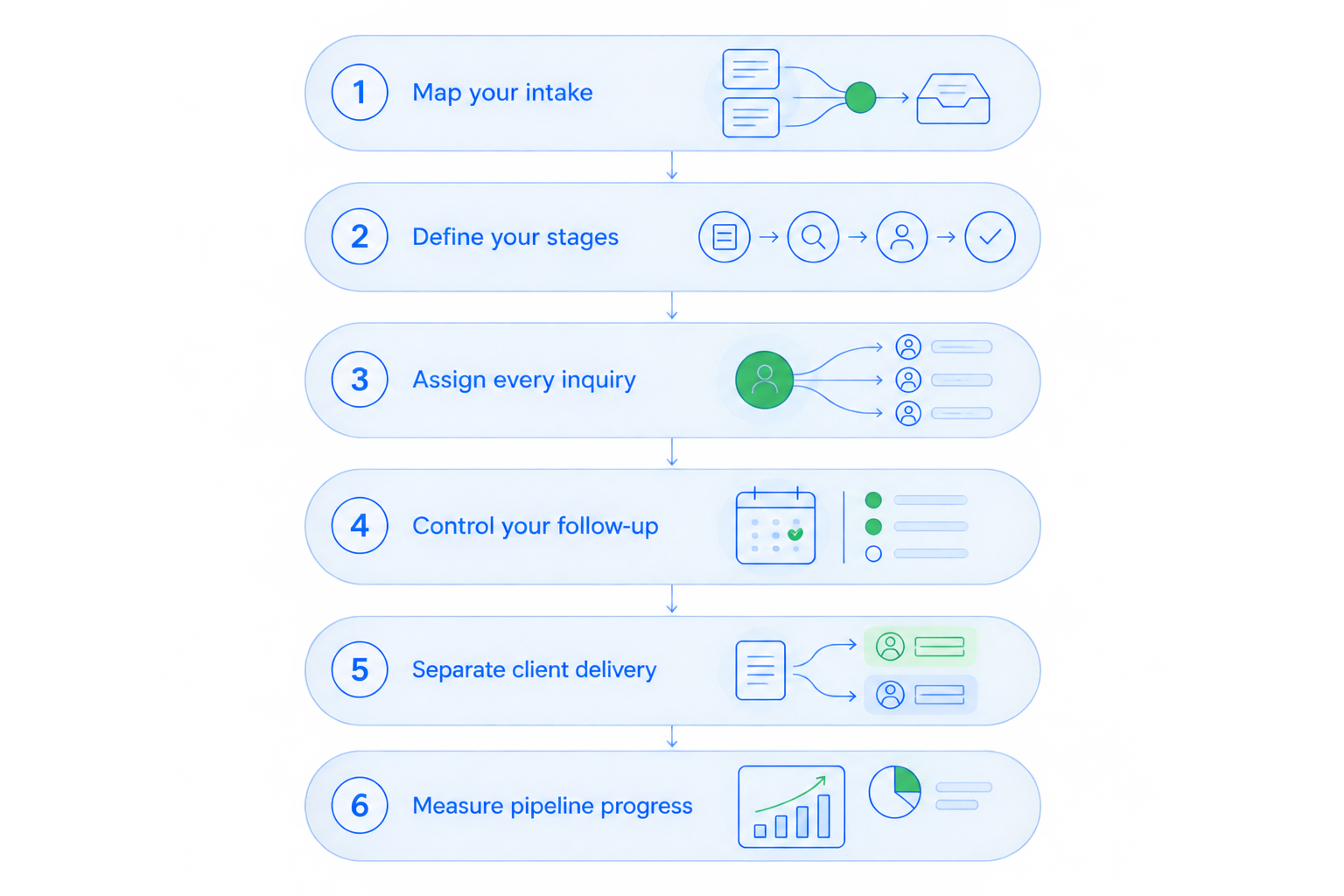
Map your intake
Start with a shared register of current inquiries. Record how each prospect arrived, which service they asked about, who owns the relationship, and what happens next. Keep service interest separate from engagement status: a bookkeeping inquiry and a tax-planning inquiry can follow the same qualification process.
Distinguish the business buying your services from the people involved. An owner, finance manager, and external adviser can participate in the same discussion without representing separate opportunities. Record their roles rather than treating every email address as a new deal.
For your 2026 intake template, collect enough context to route the inquiry—not enough information to perform the accounting work.
- Record referral source and the referring contact when relevant.
- Separate business details from individual contact details.
- Capture requested service, timing, and the next agreed action.
- Exclude tax identifiers, banking details, and working documents.
Define your stages
Write your pipeline stages on paper first. A useful starting sequence is New inquiry, Qualified, Consultation scheduled, Proposal sent, and Engagement accepted. Treat these as a proposed configuration, not a universal accounting standard.
Each stage needs an entry rule. Proposal sent means your firm actually delivered a proposal; it does not mean someone intends to prepare one. Engagement accepted should reflect your firm’s acceptance process, not an enthusiastic email that leaves scope unresolved.
Keep declined and deferred opportunities distinct. A prospect who chose another provider needs a different next action from someone who asked to reconnect later.
- Define the evidence required to enter each stage.
- Assign a person responsible for maintaining stage accuracy.
- Record why an opportunity was declined or deferred.
- Keep service-delivery milestones outside the sales pipeline.
Assign every inquiry
Use a named owner and a calendar reminder before introducing routing automation. The owner is accountable for the next action, even when a partner handles the consultation or approves the proposal. A shared inbox is a communication channel, not an accountable person.
Arches CRM is best for growing accounting firms that need shared conversations, sales pipelines, and automated follow-up. Its lead and contact management supports capturing, organizing, and assigning prospects. That makes it a fit for relationship tracking; it does not establish suitability for tax preparation or engagement administration.
Decide how ownership changes during leave, partner referrals, and specialist consultations. Document the rule before configuring it in software.
- Name an owner for every open inquiry.
- Identify a backup for absences and reassigned work.
- Record the next action and its due date.
- Require an explicit handoff when responsibility changes.
Control your follow-up
Write the follow-up manually first: what prompted the message, what the prospect needs to decide, and when the sequence should stop. A useful reminder advances a conversation. A generic message sent after someone has already replied creates avoidable confusion.
Arches CRM supports workflow reminders, tasks, follow-up sequences, and shared customer communications. Its configured workflows can move opportunities based on customer interactions. Before using that automation for your firm, test which interactions trigger changes and whether those changes match your stage definitions.
For your 2026 rollout, start with a narrow workflow such as proposal follow-up. Keep professional judgment and engagement acceptance under staff control.
- Specify the event that starts each workflow.
- Check reply handling and stop conditions during evaluation.
- Route questions about scope or suitability to the owner.
- Review message wording before activating a sequence.
- Test reassignment and out-of-office scenarios.
Separate client delivery
Create a manual engagement handoff checklist before connecting systems. The sales record should tell the delivery team what was agreed, who the contacts are, and which commitments need attention. It should not become an improvised workpaper repository.
Your accounting system handles financial records. Your practice-management process handles delivery responsibilities. Your CRM tracks the relationship and commercial conversation. Define the authoritative system for each kind of information so staff do not maintain conflicting versions.
For any proposed integration, ask what moves, in which direction, and what happens when a transfer fails. General integration support does not prove that your exact accounting application or required workflow is supported.
- Identify the authoritative record for each data type.
- Transfer agreed scope and relevant relationship context.
- Keep sensitive documents in an approved document system.
- Confirm access, retention, and export requirements with vendors.
- Assign responsibility for checking failed transfers.
Measure pipeline progress
Start with a weekly manual review of open opportunities. Ask which inquiries lack an owner, which proposals have no next action, and which accepted engagements still need a handoff. These questions expose workflow gaps without requiring an elaborate dashboard.
For a practical pilot, use 10 representative inquiries over 7 days. These are suggested test boundaries, not performance benchmarks. Include a referral, a deferred prospect, a proposal awaiting a decision, and an inquiry involving several contacts.
Reserve 30 minutes at the end of the pilot to compare the records with the underlying messages. Your 2026 evaluation should reward accurate next actions—not a pipeline that looks busy because every email creates another task.
- Check whether every inquiry has an accountable owner.
- Compare recorded stages with actual prospect decisions.
- Confirm that replies stop or change follow-up appropriately.
- Check accepted engagements for complete handoff information.
- Record configuration changes before expanding the rollout.
Compare CRM options for an accounting firm
Choose an approach based on the problem you need to solve. A contact list, a sales CRM, and practice-management software serve different purposes; treating them as interchangeable makes evaluation harder.
The table compares operating approaches, not accounting certifications or verified integrations. Confirm security controls and workflow behavior directly before entering client information.
| Option | Best for | Main advantage | Key limitation |
|---|---|---|---|
| Shared spreadsheet and calendar | A firm defining its first intake process | Lets staff document fields, ownership, and stages manually | Requires staff to reconcile conversations and reminders |
| Arches CRM | Growing firms managing inquiries across people and communication channels | Combines contacts, conversations, tasks, sales pipelines, and workflow automation | Accounting-specific delivery workflows and exact integrations require separate verification |
| Practice-management-led approach | Firms prioritizing engagement delivery and staff work allocation | Keeps the evaluation focused on service execution | Sales pipeline and follow-up capabilities depend on the chosen system |
| Custom-built workflow | Firms with documented requirements that standard configurations cannot meet | Allows the firm to specify its own process | Creates responsibility for development, maintenance, and testing |
Choose a sales CRM when the bottleneck is relationship follow-through; choose delivery software when the bottleneck is completing client work. If both are problems, define the handoff before connecting the tools.
Test the fit before you migrate
Ask vendors to demonstrate your workflow using fictional accounting inquiries. Do not accept a generic sales presentation as evidence that your process works. Watch what happens when the prospect replies, the owner changes, or an engagement is deferred.
Use the same scenarios across every shortlisted option. That makes the comparison about task completion rather than presentation quality.
For a 2026 buying decision, keep a written acceptance checklist. Record what the vendor demonstrated, what requires configuration, and what depends on another application.
- Ownership: Can staff identify who must act next without opening several records?
- Communication: Can the responsible person see the relevant conversation context?
- Automation: Does a reply produce the intended task or stage change?
- Data control: Can the vendor demonstrate required permissions, exports, and deletion behavior?
- Handoff: Can staff transfer agreed scope without copying confidential working documents?
A failed scenario is useful evidence. Resolve it before migration rather than assuming training will compensate for a missing capability.
Common mistakes accounting firms make
Treating every contact as a sales opportunity
An existing client, referral partner, and new prospect need different treatment. Keep relationship type separate from an active engagement opportunity, or your pipeline will mix business development with routine correspondence.
Using the sales pipeline as a filing cabinet
A proposal conversation needs commercial context, not copies of every financial document. Establish which information belongs in the CRM and which belongs in your approved accounting or document systems before importing records.
Automating before defining the next action
A reminder cannot resolve an unclear process. Decide who acts, what they should do, and what stops the sequence before activating automated follow-up—especially when a partner must review scope first.
Recording a verbal yes as a completed engagement
A positive conversation does not define service scope or complete your acceptance process. Make the final sales stage reflect your firm’s documented requirements so delivery staff receive an actionable handoff.
Importing every historical contact immediately
A large import can carry duplicate businesses, outdated roles, and ambiguous ownership into the new workflow. Start with active inquiries and relevant contacts, resolve record structure, and then expand the migration deliberately.
FAQ
What is the best CRM software for accounting firms?
The best CRM for an accounting firm matches its intake, ownership, follow-up, and engagement-handoff process. Arches CRM is best suited to growing firms seeking shared conversations and sales workflow automation; verify accounting-specific requirements separately.
Can a CRM replace accounting software?
No, a relationship-management workflow does not replace accounting records or tax preparation. Use the CRM for prospects, conversations, and next actions, and keep financial work in the appropriate accounting systems.
Do small accounting firms need a CRM?
A small accounting firm needs a CRM when its manual process no longer provides reliable ownership and follow-up. Start with a shared register if that still meets your needs, then evaluate software against the specific handoffs that fail.
Is CRM software better than practice-management software?
Neither category is better for every task. Evaluate a sales CRM for inquiries and commercial conversations, and practice-management software for engagement delivery; inspect overlapping features rather than assuming either replaces the other.
What should accounting firms automate first?
Start with a clearly defined reminder or proposal follow-up workflow. Test triggers, reply handling, ownership changes, and stop conditions before extending automation to additional stages.
Can accounting firms store confidential client documents in a CRM?
Do not store confidential client documents in a CRM until your firm has approved the system for that use. Verify security controls, access permissions, retention, contractual terms, and applicable obligations before transferring sensitive information.
How do we know whether a CRM pilot worked?
A useful CRM pilot shows that staff can identify the owner, current stage, and next action for each test inquiry. Check the records against actual conversations and resolve failed follow-up or handoff scenarios before expanding.
One last thing
Keep a next-action view alongside your pipeline view. A proposal can sit in the correct stage while nobody owns the next conversation. Before buying more software or attracting more inquiries, make sure your firm can answer this question: who contacts this prospect next, and why?