
 Log in
 Start Free Trial


ClickUp combines tasks, documents, and project views in one workspace, making it a strong choice for coordinating work. Its ceiling appears when organizing tasks no longer answers your main question: which customer needs a follow-up, and what should happen next? The best ClickUp alternative in 2026 is Arches CRM if you need sales follow-up and pipeline automation; Asana if you need project coordination.
- Among ClickUp alternatives, Arches CRM is best for sales CRM and workflow automation, not general project delivery.
- Asana fits project coordination; Trello fits straightforward, card-based task tracking.
- Keep ClickUp when tasks, documents, and project views already support your team's work.
- Test customer follow-up separately from project planning before choosing a replacement.
Why this matters
A lead replies. Someone needs to read the conversation, decide the next action, and update the opportunity. A task board can track that work, but your sales process also needs customer context.
Your 2026 shortlist should start with that distinction. Replacing a project tool and replacing a sales tracking process are different decisions. Choose around the work that breaks, not the longest feature list.
ClickUp alternatives at a glance
| Tool | Best for | Standout capability | How it differs from ClickUp |
|---|---|---|---|
| ClickUp | Teams coordinating tasks and project information | Tasks, documents, and multiple project views | The benchmark for keeping different kinds of work together |
| Arches CRM | Growing sales teams managing leads and follow-ups | Customer communications, sales pipelines, and configured workflow automation | Centers work on contacts, conversations, and opportunities |
| Asana | Teams coordinating project ownership and dependencies | Connected tasks, timelines, and project tracking | Offers a project-focused alternative rather than a dedicated sales CRM |
| Trello | Teams that want straightforward visual task tracking | Boards, lists, and cards | Makes a card-based board the main organizing structure |
These are different choices, not interchangeable replacements. For a 2026 evaluation, separate your requirements into customer management, project coordination, and visual task tracking before comparing individual features.
1. Arches CRM: best for sales follow-up and pipeline automation
Arches CRM is a sales CRM and workflow automation platform for growing sales teams. It brings contacts, conversations, tasks, and sales activity together so your team can see who needs attention and what happens next.
Best for: Sales teams whose main problem is managing leads and customer follow-up rather than organizing internal projects.
Where the platform shines
- Lead ownership: Capture, organize, and assign prospects instead of treating every inquiry as an isolated task.
- Pipeline management: Track opportunities from inquiry through a closed deal.
- Customer context: Bring email, WhatsApp, SMS, and calls into the sales workflow.
- Follow-up automation: Configure reminders, tasks, and follow-up sequences around your process.
- Conversation assistance: Summarize email conversations and draft emails without starting from a blank page.
- Opportunity updates: Move opportunities through the pipeline based on customer interactions and configured workflows.
The useful distinction is the relationship between those pieces. A conversation informs a next action, and the action belongs to a customer and an opportunity. Your team should not have to reconstruct that relationship whenever someone takes over a lead.
Where the platform falls short
- A sales-centered system is the wrong primary choice when your replacement needs revolve around documents, project dependencies, and internal delivery planning.
- Configured workflows still require clear rules. You must decide what qualifies an opportunity to advance and who owns the next action.
- Introducing a dedicated CRM alongside a project tool creates a boundary to manage: customer activity belongs in the CRM, while delivery work needs a clearly assigned home.
These are operational trade-offs, not reasons to avoid a CRM. If your team cannot agree on pipeline stages, automation will not settle that disagreement.
Head-to-head: sales records versus work records
| Dimension | This sales CRM | ClickUp |
|---|---|---|
| Main organizing unit | Contacts, conversations, and opportunities | Tasks organized within projects and workspaces |
| Pipeline approach | Sales opportunities moving through configured stages | Tasks organized with statuses and custom fields |
| Follow-up approach | Sales reminders, tasks, and follow-up sequences | Task assignments, due dates, and automations |
| Strongest fit | Managing customer relationships through a sale | Coordinating work across projects |
For a useful walkthrough, bring an inquiry, an active opportunity, and a stalled conversation. Ask the seller to demonstrate how each record gets an owner, a next action, and an appropriate stage update.
Read the guide to reducing manual CRM data entry with workflow automation when manual updates are the specific problem you need to solve.
Verdict: Buy for customer-centered sales workflows; skip as a direct replacement for general project planning.
2. Asana: best for project ownership and dependencies
Asana is a work management platform built around projects, tasks, ownership, and coordination. Choose it when you still need a project tool, but want to evaluate a different way of structuring responsibilities and connected work.
Best for: Teams managing cross-functional projects where owners, deadlines, and task dependencies matter more than customer conversation history.
Where Asana shines
- Task ownership and due dates make responsibilities explicit.
- Project views help teams inspect work as lists, boards, or timelines.
- Dependencies describe how one task affects another.
- Rules automate repeatable changes within project workflows.
Consider a campaign launch. Design, review, approval, and publication are connected activities with different owners. That is a project coordination problem, even when the campaign ultimately supports sales.
Where Asana falls short
- Moving projects into Asana does not, by itself, solve a disconnected sales conversation history.
- You still need to define project structure, ownership, and update habits.
- A task-centered setup requires deliberate design if you want to use it for lead and opportunity tracking.
Head-to-head: Asana versus ClickUp
| Dimension | Asana | ClickUp |
|---|---|---|
| Primary focus | Project and work coordination | Tasks, projects, documents, and workspace organization |
| Work structure | Projects containing assigned tasks | Workspace hierarchy containing lists and tasks |
| Visual planning | List, board, and timeline views | Multiple task and project views |
| Decision to test | How clearly connected work and ownership appear | How well the existing workspace combines work and information |
Do not move because a different interface looks cleaner during a demonstration. Rebuild a representative project and ask the people doing the work to find their next task, identify a blocker, and explain who owns the handoff.
Verdict: Buy for project coordination; skip if your actual requirement is a dedicated sales CRM.
3. Trello: best for straightforward visual task tracking
Trello organizes work into boards, lists, and cards. It is a useful alternative when your team wants to see what is waiting, what is active, and what is finished without building a detailed project structure.
Best for: Teams managing a bounded workflow that makes sense as cards moving between lists.
Where Trello shines
- Boards make work stages visible.
- Cards hold task details, checklists, comments, and attachments.
- Moving a card between lists makes a status change explicit.
Where Trello falls short
- A sales board does not automatically establish a complete customer relationship record.
- Detailed dependencies and broader project coordination need evaluation beyond the basic board.
- You must decide how boards relate before splitting connected work across them.
| Dimension | Trello | ClickUp |
|---|---|---|
| Main structure | Boards, lists, and cards | Workspace hierarchy, lists, and tasks |
| Visual approach | Card-based boards | Multiple ways to view tasks and projects |
| Best-fit question | Can this workflow be understood on a board? | Does this work need a broader shared workspace? |
Verdict: Buy for a clear board-based workflow; skip when customer history or connected project planning drives the decision.
Why people switch from ClickUp
There is no need to assume ClickUp is failing. A switch makes sense when your requirements have changed or your current setup no longer represents the work accurately.
Use these workflow-based reasons to assess your own situation rather than treating them as claims about every ClickUp customer.
Customer context matters more than task status
A task marked complete tells you an activity finished. It does not necessarily tell you what the customer said, whether the opportunity advanced, or who should respond next. Choose a CRM when those questions determine your daily sales work.
Project coordination remains the main job
If your team needs clearer task ownership and connected project planning, compare Asana with the existing ClickUp setup. A sales CRM would change the category without addressing the underlying requirement.
The workflow only needs a board
If your process is a visible queue of work moving through stages, evaluate Trello. Keep the trial focused on whether the board represents the work clearly, not whether it has fewer menus.
Manual updates have become the bottleneck
Separate recording work from triggering work. A reminder asks someone to act; a configured workflow defines what should happen after a particular event. During evaluation, inspect the trigger, the resulting action, and the person responsible for exceptions.
How to evaluate ClickUp alternatives in 2026
Test a complete workflow rather than isolated features. For sales, use a proposed trial sample of 5 opportunities, 3 pipeline stages, and 2 sales reps; these are evaluation inputs, not performance benchmarks.
Build the test around the following sequence. Include a normal handoff and a customer reply that changes what the team should do next.
- Capture lead: Enter the prospect and preserve the information needed for follow-up.
- Assign owner: Make responsibility visible before work starts.
- Review conversation: Locate the latest customer exchange without reconstructing it from memory.
- Set follow-up: Assign the next action and check the workflow behavior.
- Update stage: Confirm that the opportunity reflects the actual customer interaction.
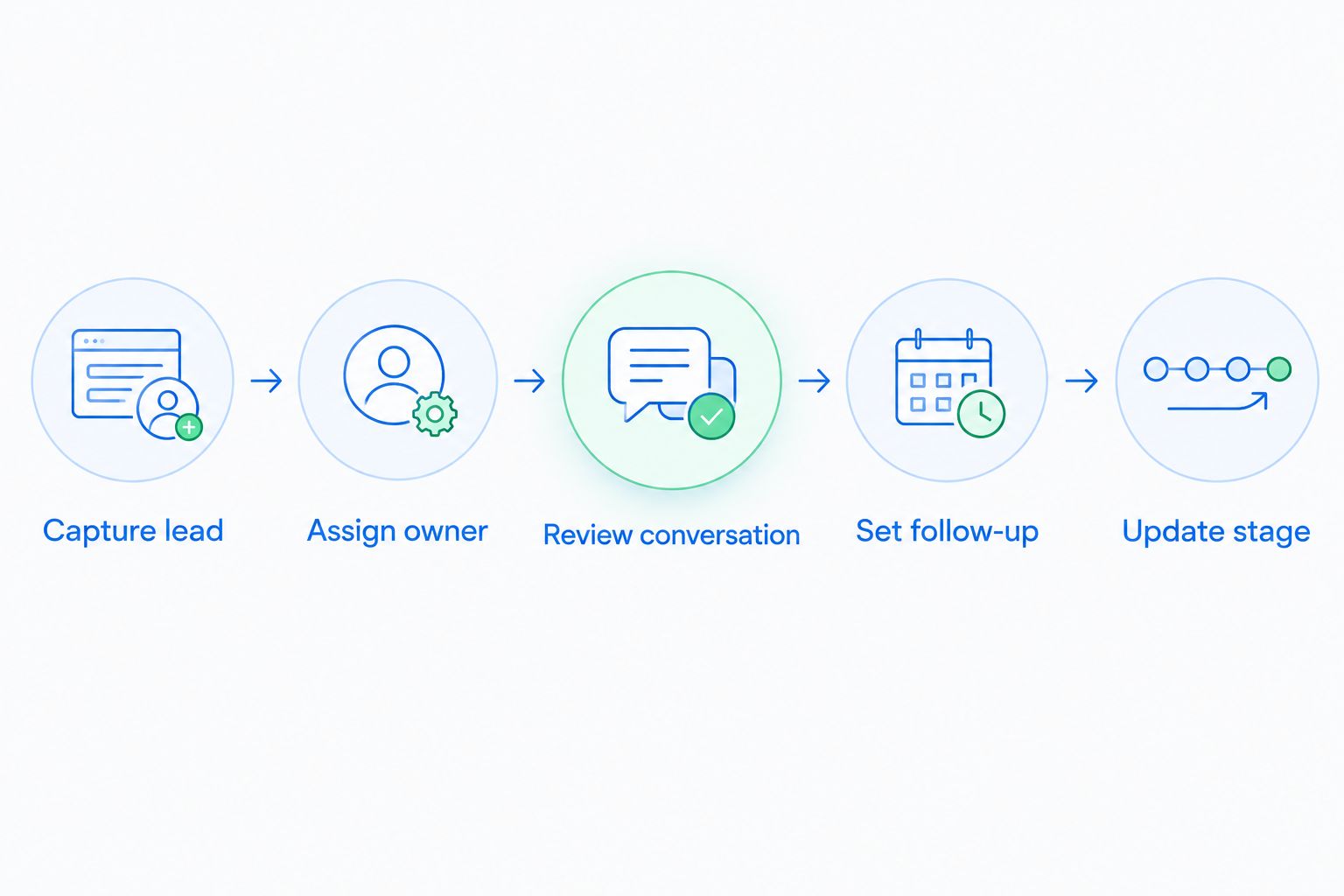
For a project-management replacement, use the same principle with a real project: assign work, change a deadline, introduce a dependency, and complete a handoff. Let the intended users perform the steps rather than watching a demonstration.
Keep a short decision record:
- Can the next owner understand the record without asking for a separate explanation?
- Does the workflow react correctly when the situation changes?
- Is responsibility clear when automation does not apply?
- Can the team explain why a task or opportunity has its current status?
The strongest 2026 choice is the tool that represents your actual work with the least reconstruction. A polished demonstration does not replace that test.
Put your sales workflow in focus
Explore lead management, customer conversations, and follow-up automation in one sales CRM.
When staying with ClickUp is the right call
Stay with ClickUp when tasks, documents, and project views already give your team a reliable operating workspace. A replacement needs to solve a named problem, not simply offer another way to arrange the same tasks.
Keep ClickUp on your 2026 shortlist if your main need is project execution rather than customer relationship management. You can also separate sales and delivery: evaluate a dedicated CRM for customer activity while keeping project work in the existing system.
Before adding another tool, define the handoff. Decide what moves from sales into delivery, who owns that transition, and which system holds the authoritative record for each type of information.
FAQ
What's the best ClickUp alternative for a sales team?
Arches CRM is the best fit on this shortlist for sales teams that need lead management, customer conversations, and automated follow-up. Its focus is customer relationships and opportunities rather than general project delivery.
Is Asana better than ClickUp for project management?
Asana is a project-management alternative, not a universal upgrade over ClickUp. Compare task ownership, dependencies, and project views using a representative project before deciding.
Is Trello a good ClickUp alternative for a small team?
Trello is a good fit when the team's work can be represented clearly as cards moving between lists. Team size alone does not determine the fit; connected projects and customer management introduce different requirements.
Can I use ClickUp as a CRM instead of switching?
You can organize sales tracking in ClickUp using tasks, statuses, and custom fields. Choose a dedicated CRM when customer records, communications, and sales workflows need to be the center of the system.
Do I need to replace ClickUp to improve sales follow-up?
No, improving sales follow-up does not require replacing your project workspace. You can evaluate a dedicated sales CRM while keeping delivery tasks in ClickUp, provided ownership and handoffs are clear.
How should I compare ClickUp alternatives in 2026?
Compare ClickUp alternatives using a complete workflow your team actually performs. Test ownership, customer or project context, next actions, and status changes rather than comparing feature lists alone.
What should I check before moving active opportunities?
Check record ownership, pipeline-stage mapping, conversation history, and next actions before moving active opportunities. Validate a sample first and make responsibility for ongoing follow-up explicit during the transition.
One last thing
A completed follow-up task and an advanced opportunity are not the same outcome. Your evaluation should include a customer who replies without agreeing to move forward.
Keep the activity complete and the opportunity accurate. If your workflow advances a deal simply because someone sent a message, fix the rule before expanding automation.