
 Log in
 Start Free Trial

Yes—small businesses can afford AI-powered CRM software when the full operating cost fits their budget and the workflows solve a measurable sales problem. In 2026, that decision must include setup, data cleanup, connected services, and staff time—not just the subscription.
- Can small businesses afford AI powered CRM software? Yes—when total costs fit the budget and results justify renewal.
- Arches CRM fits growing sales teams that need shared conversations, automated follow-ups, and pipeline tracking.
- Compare workflow automation with AI assistance; buy the capabilities your sales process actually needs.
- Measure response time, overdue tasks, and administrative work before expanding the rollout.
Why this matters
A lead arrives. Someone replies, another person takes over, and the next follow-up stays buried in an inbox. Your affordability decision should start with that broken handoff—not with a list of software features.
Before choosing a platform, identify where your team loses track of conversations, ownership, or next steps. The guide to whether an AI CRM is worth it for a small sales team addresses that separate question: being able to pay for software does not mean your business needs it.
A CRM earns its place when your team uses it to complete necessary sales work with less manual effort. A subscription that fits your budget but leaves the same missed tasks untouched is still the wrong purchase.
Can small businesses afford AI-powered CRM software?
Yes, provided you evaluate the complete commitment and test the workflow before expanding it. Use your actual quote, existing operating expenses, and staff capacity to make the decision. Do not assume that an AI feature automatically produces additional sales.
Follow this buying sequence:
- Name the problem. Specify the missed action: an unassigned inquiry, an overdue follow-up, or an opportunity without a next step.
- Confirm the required capabilities. Separate contact tracking, workflow rules, conversation summaries, and message drafting.
- Request the complete commercial scope. Check user access, usage allowances, implementation responsibilities, and connected services.
- Test a defined workflow. Follow a lead from arrival through assignment, conversation, and the next action.
- Approve expansion against evidence. Compare the working process with your baseline, not with a sales presentation.
Build the full cost picture
For your 2026 budget, separate recurring commitments from implementation work. Keep internal labor visible even when no supplier invoices you for it.
| Budget component | What to confirm | Why it belongs in the decision |
|---|---|---|
| Platform access | Required users and included capabilities | Your team needs the right access to complete its work |
| AI usage | Included functions and any usage-based terms | Summaries and drafting must match the intended workload |
| Communication services | Email, messaging, and calling arrangements | Connected channels need their own scope check |
| Implementation | Import preparation, configuration, and training responsibilities | Setup requires time before routine use begins |
| Ongoing ownership | Workflow maintenance, data corrections, and user support | Someone must keep the process working |
Ask the supplier to distinguish included capabilities from separately contracted services. Then assign an internal owner to every setup task. A responsibility with no owner is not a finished implementation plan.
Which level of CRM does your business actually need?
Start with the work you need to complete, then choose the software scope. The comparison below describes buying approaches, not named subscription tiers or promises about a particular provider.
| Approach | Best for | Main advantage | Main limitation |
|---|---|---|---|
| Contact and pipeline tracking | Teams needing clear ownership and next steps | Establishes a shared sales record | Does not by itself remove repetitive follow-up work |
| CRM with workflow automation | Teams repeating predictable assignments and reminders | Executes defined actions consistently | Requires clear triggers, conditions, and maintenance |
| CRM with AI assistance | Teams reviewing conversations and preparing sales communication | Supports summaries, drafting, and interaction-based workflows | Requires accuracy checks and appropriate operating rules |
Contact and pipeline tracking
Best for: teams whose immediate problem is visibility. If nobody can reliably identify who owns a lead or what happens next, establish those basics before building complicated automation.
The advantage is a clearer operating process: a contact, an opportunity, an owner, and a next action. The limitation is that your team still performs the underlying sales work. A better-organized task list does not send a thoughtful reply on its own.
CRM with workflow automation
Best for: teams with repeatable sales actions. Assignment rules, reminders, and follow-up sequences suit processes where you can state what should happen after a defined event.
Automation reduces the need to recreate the same task manually. Its limitation is equally concrete: an unclear rule produces unclear results. Write the trigger and stop condition before enabling the workflow, especially when a customer response should change what happens next.
CRM with AI assistance
Best for: teams that need help reviewing conversations and preparing next steps. Conversation summaries and email drafts address different work from a scheduled reminder; evaluate them separately.
The advantage is assistance with information-heavy tasks. The limitation is the need to verify that a summary preserves the customer's request and that a draft matches the actual conversation. Do not treat generated text or a suggested action as a substitute for sales judgment.
How do you test affordability before a wider rollout?
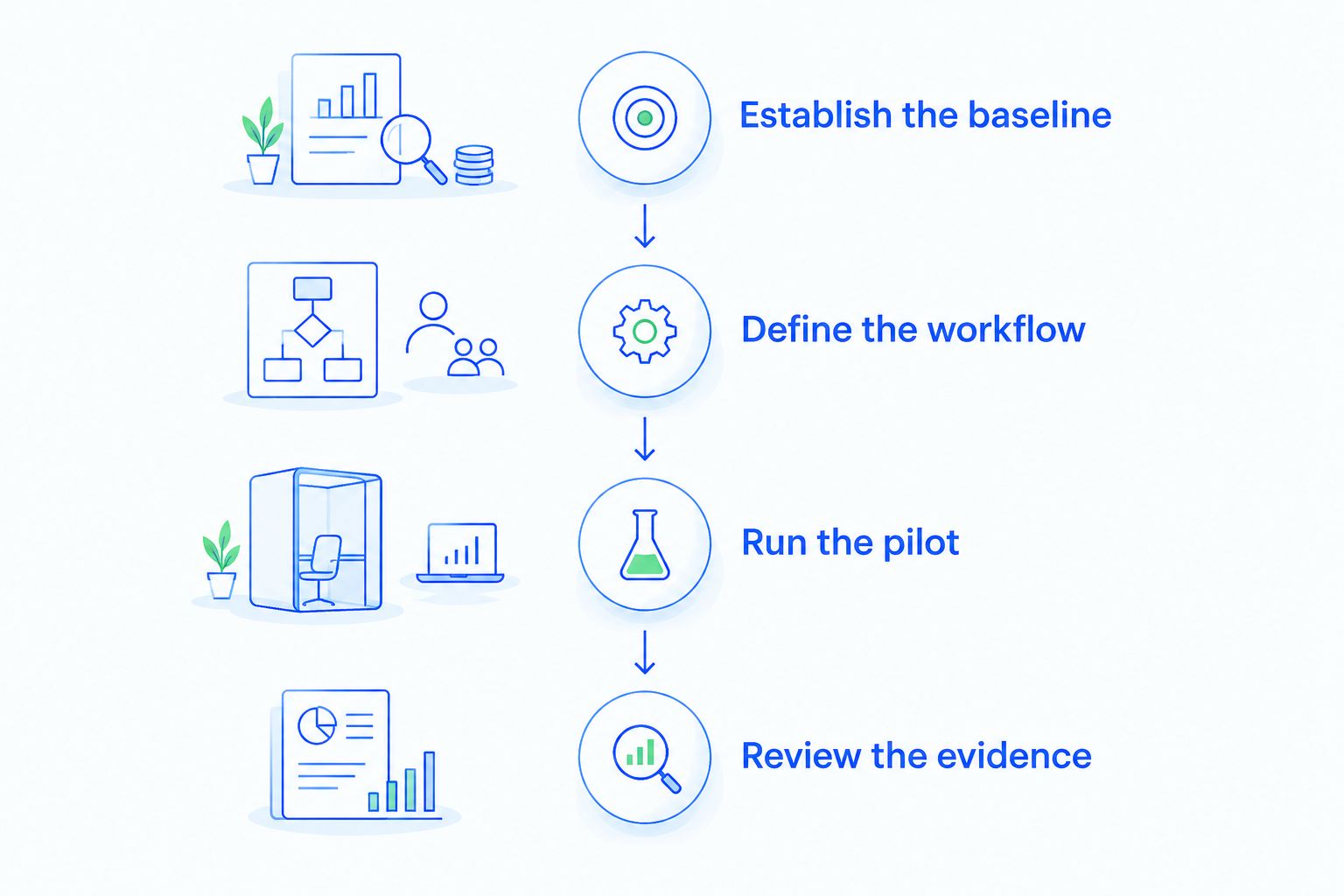
Use a small, defined evaluation rather than moving every sales process at once. The following windows are a suggested planning schedule, not promised implementation times or performance benchmarks.
Establish the baseline
Use 7 business days as an initial observation window. Record when inquiries arrive, when a person first responds, which follow-ups become overdue, and how much time staff spend updating records.
Choose a representative workflow rather than an unusually quiet or unusually busy exception. If the observation period does not reflect your normal sales activity, extend it. Keep automated acknowledgments separate from substantive replies so the measurement describes real customer handling.
Define the workflow
Write down the lead source, responsible person, pipeline stage, required action, and stopping condition. Decide what happens when a customer replies, declines, or asks for a different next step.
Use plain language. For example, an inquiry needs an owner; an owner needs a task; a customer reply needs review before another scheduled follow-up. These are operating requirements, not claims about any platform's default behavior.
Run the pilot
Plan a 14-day pilot for the selected workflow, adjusting the window to your sales cycle. Test normal activity alongside exceptions such as reassignment, an incorrect contact record, or a reply that does not indicate buying intent.
Ask the people doing the work to explain what they must still do manually. A workflow that looks complete in a demonstration can still leave staff copying information between systems. Record those remaining steps before deciding whether the software solves the problem.
Review the evidence
Schedule a 30-day review after rollout to inspect adoption, unfinished tasks, and workflow quality. Compare results using the same definitions as the baseline.
Do not credit every closed deal to the new CRM. Review the intermediate actions the system actually supports: ownership, completed follow-ups, accurate records, and usable conversation history. Revenue is relevant, but attribution needs more than a before-and-after total.
Why the total commitment varies
Your 2026 CRM commitment depends on the work you ask the platform and your team to perform. Check these factors against the actual proposal rather than assuming every capability is included.
- User responsibilities. Map who needs to assign leads, send messages, manage opportunities, and inspect reports. Ask how those responsibilities affect access requirements.
- Communication scope. Identify whether the workflow involves email, WhatsApp, SMS, calls, or a combination. Confirm each required connection and its terms.
- Automation scope. Document the triggers, follow-up sequences, reassignment rules, and stopping conditions you expect to configure.
- AI workload. Specify whether you need summaries, drafts, interaction-based pipeline changes, or all of those functions. Ask how usage is defined.
- Data preparation. Identify duplicate contacts, incomplete records, inconsistent ownership, and missing information before import.
- Implementation ownership. Agree who handles configuration, training, integration work, and ongoing corrections. Include internal staff time in the plan.
A narrow workflow with clear ownership is easier to evaluate than an open-ended request to automate sales. Expand the scope only when you can explain the additional work and how you will judge it.
Where Arches CRM fits this decision
Arches CRM is best for growing sales teams that need shared customer conversations, automated follow-ups, and pipeline tracking. The platform brings contacts, conversations, tasks, and sales activity together, with email, WhatsApp, SMS, and call communication among its stated capabilities.
Arches CRM also provides email drafting, conversation summaries, and automatic opportunity movement based on customer interactions and configured workflows. Those functions are relevant when your team spends time reconstructing conversations or manually keeping opportunities current.
The constraint is process quality. Arches CRM's interaction-based pipeline automation depends on configured workflows, so your team must define what an interaction means before using it to change a stage. A reply requesting clarification is not automatically evidence that an opportunity has advanced.
For a 2026 evaluation, test a real conversation and inspect the resulting summary, task, and pipeline status. Confirm the current commercial scope directly, and make the buying decision on the workflow you need—not on capabilities you have no plan to use.
Do I need AI if I only want follow-up reminders?
No—follow-up reminders are a workflow automation requirement, not proof that you need AI assistance. Start by specifying the event that creates the reminder and the condition that cancels or changes it.
Add AI assistance when conversation review, drafting, or interpreting customer interactions is part of the work you want help completing. This distinction keeps your requirements focused and gives the supplier a clearer problem to demonstrate.
What should I measure before renewing?
Measure whether staff complete the intended work and whether the records remain useful. Review first-response time, overdue follow-ups, administrative time, and opportunities without a next action.
Use consistent definitions in your 2026 renewal review. If a measurement changes because the team changed how it records activity, explain that difference before treating it as an improvement. Also inspect errors: a faster workflow is not better if it assigns the wrong owner or records the wrong next step.
When should I delay buying an AI CRM?
Delay the purchase when you cannot identify the workflow owner, the required action, or the budget commitment you can sustain. Software cannot settle an unresolved disagreement about how your team should handle a lead.
Write the operating rules first, then return to the buying decision. You do not need a perfect sales process, but you do need enough clarity to distinguish useful automation from activity that creates more cleanup.
FAQ
Can a very small business afford an AI-powered CRM?
Yes, when the complete commitment fits its budget and supports a necessary workflow. Include implementation work, connected services, and staff time before deciding.
Is AI-powered CRM software always better than basic CRM software?
No—AI assistance is useful only when it supports work your team needs to complete. Contact tracking and rule-based reminders can address a different set of requirements.
What hidden costs should I check before choosing a CRM?
Check implementation responsibilities, data preparation, training, connected communication services, and ongoing administration. Confirm which items are included in the agreement and which remain your responsibility.
How long should I test a CRM before expanding it?
A 14-day pilot is a suggested starting window for a defined workflow, not a universal implementation benchmark. Extend the evaluation when your sales cycle or activity level requires more observation.
What does Arches CRM help a small sales team do?
Arches CRM helps small sales teams organize leads, manage conversations, automate follow-ups, and track opportunities. Its stated AI capabilities include email drafting, conversation summaries, and opportunity movement based on interactions and configured workflows.
Can I count time saved as a financial return?
Time saved is useful operating evidence, but it is not automatically a cash saving. Record how the team uses that time before claiming additional revenue or reduced expenditure.
Should I automate every pipeline stage immediately?
No—test a defined workflow before expanding automation across the pipeline. Check ownership, stage changes, customer replies, and stopping conditions so incorrect rules do not spread.
One last thing
Test what stops the automation—not just what starts it. During the demonstration, introduce a customer reply, a reassigned lead, and a request to pause contact. Ask the supplier to show the resulting tasks and pipeline changes.
That test exposes whether the workflow respects the conversation or simply continues its sequence. For a small business, affordability includes the work required to correct mistakes. Buy a process your team can supervise, explain, and maintain.