
 Log in
 Start Free Trial
Yes, CRM software can text customers automatically when it has SMS sending capabilities and workflows that trigger messages from customer activity. You need a connected texting channel, appropriate permission to contact each recipient, and rules that stop messages when someone replies or opts out. This 2026 guide explains what to configure, what to test, and where a salesperson should take over.
- Can CRM software text customers automatically? Yes, with SMS sending, workflow triggers, and permission checks configured.
- Arches CRM combines SMS communication and follow-up workflows; confirm the specific automated sending actions before choosing your setup.
- Stop scheduled follow-ups when a customer replies, opts out, or completes the intended action.
- Choose automated texting for defined follow-ups, not conversations that require a salesperson's judgment.
Can CRM software text customers automatically?
Yes. The CRM needs an event that starts the workflow, conditions that determine eligibility, and an action that sends the text. A contact record containing a phone number is not enough.
For example, a submitted inquiry can start a workflow that checks texting permission and assigns the lead before sending an acknowledgment. A later reply should change what happens next, rather than leave the customer in an unanswered-message sequence.
The SMS-to-booked-meetings follow-up workflow covers the connection between texting and the next sales action. Keep that connection explicit: every automated text should serve a defined purpose.
| Texting setup | Best for | Advantage | Limitation to check |
|---|---|---|---|
| Built-in CRM texting | Teams that want messages beside contact records | Keeps texting within the CRM workflow | Confirm that automated sending, replies, and opt-outs work together |
| Connected SMS service | Teams connecting a separate messaging service | Lets the CRM trigger actions through a connection | Confirm that delivery events, replies, and suppression return to the CRM |
| Manual CRM texting | Conversations that need personal judgment | Gives the salesperson control before sending | Requires someone to initiate each message |
These are setup choices, not guarantees about every CRM. Ask for a demonstration of the entire conversation, including the reply and the stop condition—not just the outgoing message.
Why this matters
A lead arrives, receives an acknowledgment, and asks a question. If the next automated message ignores that question, your follow-up has become noise rather than service.
Your 2026 texting plan needs to connect messages with ownership and pipeline activity. A successful send is not the same as a useful conversation, and a useful conversation still needs someone responsible for the next step.
Automation handles the repeatable part. Your sales team handles interpretation, objections, and commitments.
How do you set up automatic CRM texting?
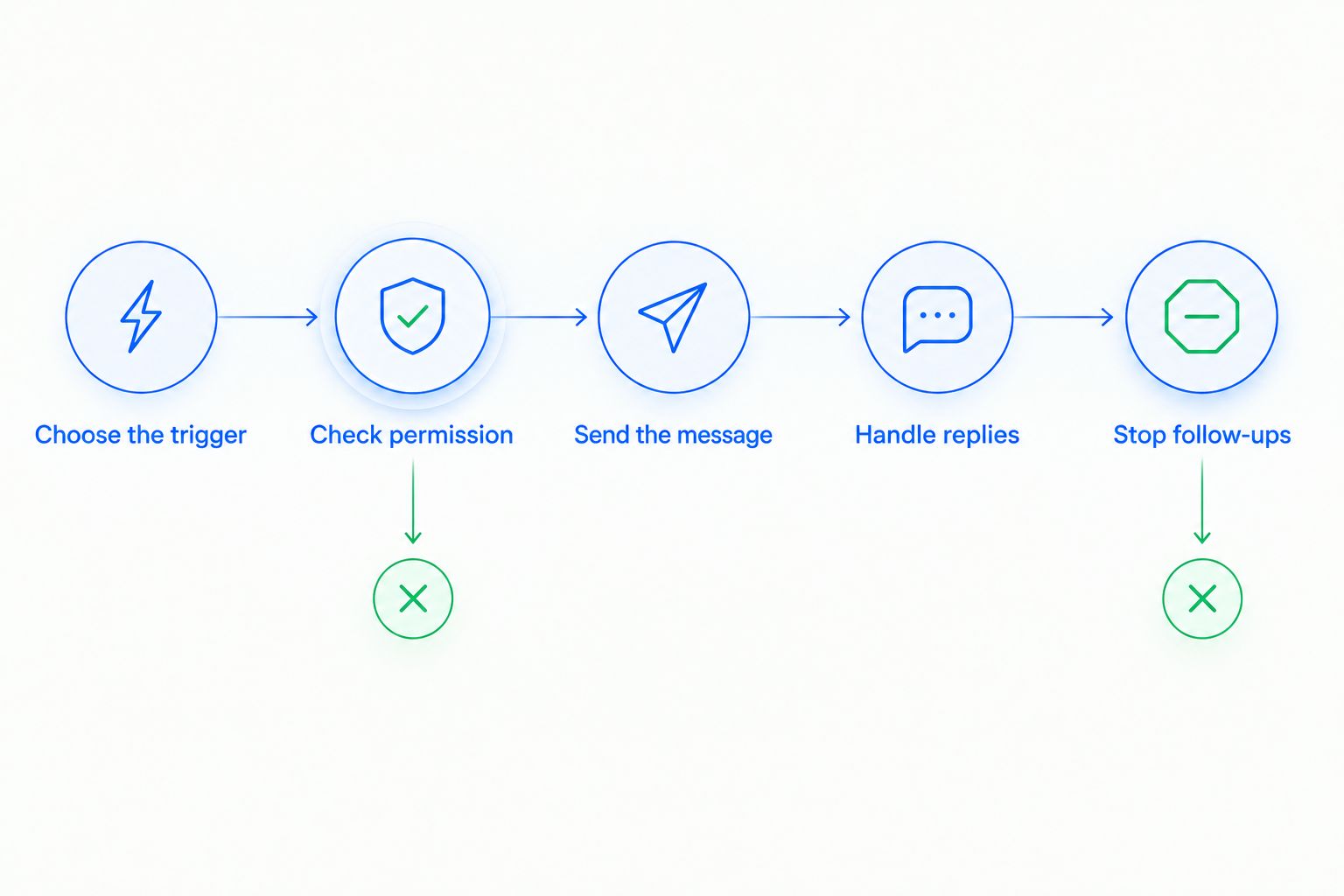
Start with 1 workflow, give it 1 accountable owner, and test it with 3 controlled test contacts representing an eligible recipient, a replying recipient, and an opted-out recipient. These are starting recommendations, not software requirements.
1. Choose the trigger
Use an event with a clear connection to the message: an inquiry arrives, an appointment is booked, or a follow-up becomes due. Define exactly which record change starts the workflow.
Avoid a broad trigger such as any contact update. An unrelated edit should not restart a sales sequence or send a second acknowledgment.
2. Check permission
Require the workflow to check the recipient's texting eligibility before sending. Store the permission record and its scope where the process can use it.
A phone number in a contact record does not establish permission for every kind of message. Separate a requested service update from promotional outreach, and have your legal adviser review the applicable consent requirements.
3. Send the message
Identify the business, connect the message to the customer's request, and make the next step clear. Keep the request focused enough that the recipient can answer without reconstructing the whole conversation.
Use personalization only when the underlying fields are dependable. A missing name or incorrect appointment detail should send the contact to an exception path, not produce a broken message.
4. Handle replies
Assign incoming replies to a person or a clearly owned queue. Show the salesperson the message history and the relevant contact or deal record.
Pause the unanswered-message sequence when a reply arrives. A response changes the conversation; continuing the original sequence treats an engaged customer as an unresponsive lead.
5. Stop follow-ups
Define the exit conditions before activating the workflow. Include opt-outs, completed actions, closed opportunities, and any other event that makes the planned message inappropriate.
Recheck eligibility immediately before a delayed send. A customer can reply or withdraw permission after entering the workflow but before the scheduled message leaves.
Which customer texts should you automate?
Automate a message when its purpose, recipient, and next action are predictable. Keep a salesperson in control when the message depends on interpreting an objection, negotiating terms, or making a commitment.
| Message type | Best for | Benefit | Main caution |
|---|---|---|---|
| Inquiry acknowledgment | Confirming receipt of a requested conversation | Gives the customer a clear next step | Do not promise response timing your team has not committed to |
| Appointment reminder | Reminding customers about an agreed appointment | Repeats the scheduled detail without manual preparation | Stop or update it when the appointment changes |
| Requested follow-up | Continuing a conversation the customer expects | Keeps an agreed next action from being forgotten | Check for replies and completed actions before sending |
| Promotional outreach | A permission-based marketing campaign | Applies a consistent message to an eligible audience | Requires appropriate marketing permission and suppression controls |
Do not treat these message types as interchangeable. Permission, timing, and customer expectations depend on the purpose of the communication.
For a first workflow, choose a narrow acknowledgment or requested follow-up. Leave negotiation and sensitive account discussions with a person. That boundary gives you a clear test without asking automation to make a sales judgment.
Why automatic CRM texting varies
The phrase automatic texting can describe very different workflows. Evaluate the behavior you need rather than checking whether a feature list contains SMS.
- Sending connection: Determine whether the CRM sends through a built-in channel or a connected service, and who maintains that connection.
- Trigger support: Confirm that the relevant event can start the workflow without a salesperson manually enrolling each contact.
- Permission controls: Check how the workflow reads eligibility, records changes, and prevents messages to suppressed contacts.
- Reply handling: Establish where responses appear, who receives them, and whether a reply pauses the existing sequence.
- Timing controls: Check recipient time zones, allowed sending windows, and what happens when a delayed message becomes outdated.
- Record quality: Validate phone numbers, ownership, required fields, and duplicate contacts before allowing them into the workflow.
A sending feature alone does not settle any of these questions. Ask the vendor to demonstrate the behavior using your actual follow-up scenario.
Can a CRM stop automatic texts when a customer replies?
Yes, when the workflow receives the reply event and uses it as a stop or pause condition. Confirm that behavior explicitly; displaying an incoming message does not prove that scheduled messages stop.
Also check replies arriving through another channel. If a customer answers by email or calls the salesperson, decide whether that interaction should pause texting and whether your setup can enforce that decision.
The sales outcome should drive the exit condition. Once the requested meeting is booked, a message asking the customer to book it is no longer useful.
Can you automate customer texts without losing the personal touch?
Yes—automate the predictable acknowledgment and let a salesperson handle the customer's actual response. Personalization means responding to context, not simply inserting a first name.
Give the owner access to prior messages and the reason the workflow started. Then make the handoff visible so another salesperson does not restart outreach while the conversation is active.
Do automatic CRM texts need an opt-out process?
Yes. Build opt-out handling into the workflow and confirm the legal requirements for your message type and recipients. For U.S. texting in 2026, have counsel review applicable TCPA, FCC, and state requirements alongside your messaging provider's rules.
Keep the legal review separate from the technical test. A workflow can execute exactly as configured and still lack the appropriate permission or disclosures.
Where Arches CRM fits
Arches CRM is best for growing sales teams that want customer conversations and follow-up workflows in one CRM. Its stated capabilities include SMS, email, WhatsApp, and calls alongside contact management, sales pipelines, reminders, tasks, and follow-up sequences.
That combination supports evaluating the platform around the whole sales conversation. Your team needs to know what the customer said, who owns the lead, and what action comes next.
The limitation is specificity: SMS communication and workflow automation do not, by themselves, establish every automated SMS action or suppression behavior. Before choosing Arches CRM for automatic texting, request a demonstration of the trigger, send action, incoming reply, opt-out, and failed-message handling you need.
What should you test before switching it on?
Use your controlled test contacts to check the complete workflow before customer enrollment. For your 2026 rollout, record the expected result beside each test so approval rests on behavior rather than a feature label.
- Eligible contact: The correct trigger sends the intended message to the correct record.
- Replying contact: The reply reaches the assigned owner and pauses the unanswered-message sequence.
- Opted-out contact: Suppression prevents both new enrollment and already scheduled sends.
- Changed appointment: Updated or canceled details prevent an outdated reminder.
- Duplicate event: A repeated form submission or record update does not create unintended duplicate outreach.
- Failed delivery: A visible exception gives the owner a next step rather than silently abandoning the lead.
Review the contact timeline after every test. The result must make sense to the salesperson who inherits the conversation, not only to the person configuring the workflow.
Once active, review replies, failures, opt-outs, and completed next steps together. Delivery records tell you whether a message reached its destination; conversation and pipeline records tell you what happened afterward.
FAQ
Can CRM software text customers automatically in 2026?
Yes, CRM software can text customers automatically when it supports SMS sending and an automated workflow. Configure triggers, recipient eligibility, reply handling, and stop conditions before activation.
Can I send an automatic text when someone fills out a form?
Yes, if your form event can trigger an SMS workflow and the recipient has the appropriate texting permission. Check that repeated submissions do not create duplicate messages.
Is automatic CRM texting the same as SMS marketing?
No. Automatic texting describes how a message is sent, while SMS marketing describes its promotional purpose. An appointment reminder and a promotional campaign need different eligibility and workflow decisions.
Can customers reply to automated CRM texts?
Customers can reply when the sending setup supports two-way messaging. Confirm where replies appear, who owns them, and whether they stop the existing sequence.
Should an automatic text stop after a customer books a meeting?
Yes, a booking request should stop once the intended meeting is booked. Use the booking event as an exit condition and check eligibility again before delayed sends.
Does Arches CRM include SMS communication?
Arches CRM includes SMS among its stated customer communication capabilities, alongside email, WhatsApp, and calls. Confirm the exact automated SMS sending actions and opt-out behavior needed for your workflow.
What's the safest first automatic texting workflow to test?
Start with a narrowly defined acknowledgment or requested follow-up for eligible contacts. Test the reply path and suppression behavior before enrolling customers.
One last thing
Test the message that must not send. A canceled appointment, a customer reply, or an opt-out is a better test of workflow control than another successful acknowledgment.
For your 2026 rollout, approve the workflow only after its exit paths work. The goal is not to send every scheduled text; it is to send the next appropriate message and stop when the conversation changes.