
 Log in
 Start Free Trial

Yes, API access can connect a CRM to other business tools, but it does not make every connection possible. Both systems must expose the data and actions your workflow needs, and your accounts must have permission to use them. API access alone does not provide field mapping, duplicate prevention, error handling, or ongoing maintenance.
- Can API access connect a CRM to other business tools? Yes, when both systems support the required operations.
- API access enables a connection; authentication, data mapping, and error handling make the CRM integration usable.
- Arches CRM suits growing sales teams that need lead management, follow-up automation, and connected customer conversations.
- Start with one workflow, verify both systems, and test failures before connecting live customer records.
Can API access let me connect a CRM to any other business tool?
API access enables supported connections, not universal compatibility. A CRM might let you create contacts through its API while the other tool only lets you read records. That combination cannot support a workflow that needs to update both systems.
Separate the connection from the business outcome. A submitted form reaching a CRM is data transfer; assigning its owner and creating a follow-up task are additional actions. The guide to reducing manual CRM data entry with workflow automation explains that distinction.
For a 2026 integration review, compare the available connection methods against your exact workflow:
| Connection method | Best for | Main advantage | Main limitation |
|---|---|---|---|
| Native connector | A supported workflow between named applications | Uses a connection maintained within the software ecosystem | Available fields and actions depend on the connector |
| Integration platform | Linking supported triggers and actions across tools | Reduces the amount of custom connection code | Connector coverage and execution rules constrain the workflow |
| Custom API integration | Workflows requiring specific data transformations or business rules | Gives you control over requests, mapping, and processing | Requires development, monitoring, and maintenance |
Choose the method that completes the workflow, not the method with the longest feature list. A connector that handles your required handoff is more useful than broad API access without an implementation plan.
Why this matters
A lead arrives, but the integration creates only a contact. No owner receives the lead, no follow-up task appears, and the sales team assumes the automation handled it. The connection worked; the sales process did not.
Your acceptance test needs to follow the lead beyond arrival. Confirm who owns it, which pipeline record exists, and what action happens next. In 2026, an API checkbox is not enough evidence to approve a CRM integration.
Native connectors: best for an already-supported workflow
A native connector is the first option to inspect when the applications already support your intended handoff. Check its documented triggers, actions, fields, and direction of transfer before considering custom development.
The advantage is a predefined connection path. The constraint is scope: a connector supporting contact creation does not necessarily support custom fields, deal updates, or historical activity.
Ask the vendor to demonstrate your actual sequence rather than a generic connection screen. If your workflow requires an owner assignment after contact creation, the demonstration must show both actions and the resulting records.
Recommendation: choose a native connector when its documented behavior matches the full handoff. Do not add another integration layer merely to recreate an action the connector already handles.
Integration platforms: best for supported cross-tool automation
An integration platform connects application events to actions in another application. It suits workflows that fit the platform's supported connectors and processing rules.
The benefit is less custom connection code. The trade-off is another operational dependency: you must understand how the platform handles credentials, failed runs, repeated events, and changes to connected applications.
Inspect the connector itself, not just the platform's application directory. An application appearing in that directory does not establish that every field or action you need is supported.
Recommendation: choose an integration platform when the required trigger, action, and recovery behavior are documented. Treat unsupported steps as implementation work, not as features that will appear during setup.
Custom API integrations: best for specific business rules
A custom integration suits a workflow that requires transformations or decisions beyond the available connectors. Examples include translating account identifiers, applying ownership rules, or updating records according to an internal approval process.
Its advantage is control over the implementation. Its limitation is responsibility: someone must maintain authentication, request handling, monitoring, and compatibility as the connected systems change.
Custom development cannot bypass missing API capabilities or account permissions. If the destination cannot accept the required update, additional code does not create that capability.
Recommendation: choose a custom API integration only after confirming the required operations in both systems. Assign an owner for maintenance before approving the build.
Why CRM integration complexity varies
The work depends on what the connection must do, not simply whether an API exists. Use these factors to define the scope of a 2026 implementation:
- Available operations: Reading a contact, creating a deal, and updating an owner are different capabilities. Verify each required action.
- Authentication and permissions: The integration needs an approved way to authenticate and permission to access the relevant records.
- Data structure: Field names, required values, identifiers, and relationship models must align or be translated.
- Sync direction: Sending leads into a CRM is different from keeping changes synchronized across both applications.
- Delivery and recovery: The design must account for delayed events, request limits, failed requests, and repeated deliveries.
- Maintenance ownership: Credential changes, API revisions, and business-process changes need an assigned owner.
Keep these requirements separate. A successful login proves authentication, not correct field mapping; a successful record creation proves neither duplicate prevention nor reliable recovery.
How do I check whether my CRM integration will work?
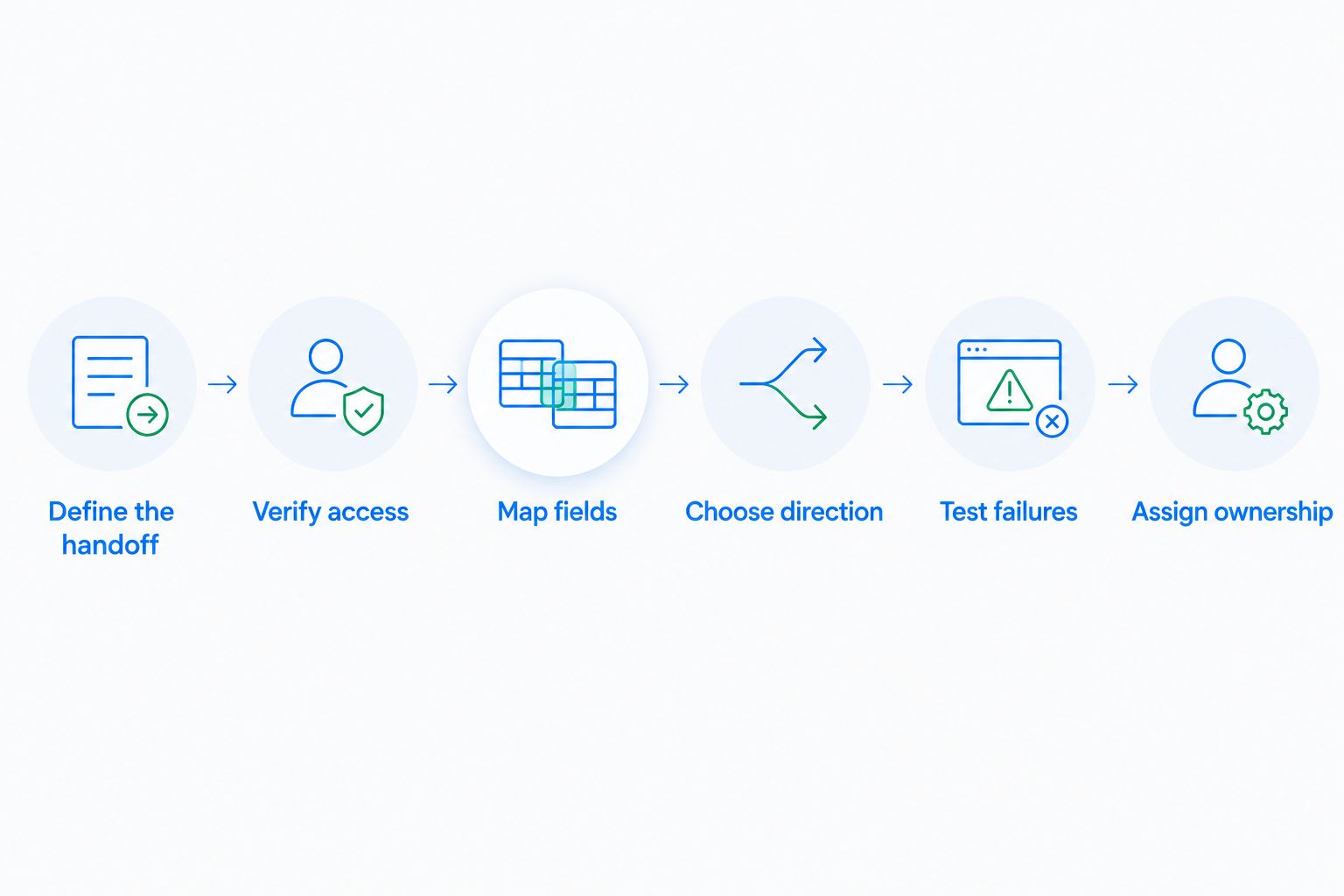
Start with 1 workflow across 2 systems, rather than connecting every application at once. The following sequence is a recommended evaluation process, not a claim about any vendor's implementation time.
1. Define the handoff
Write the trigger, destination record, owner, and next action in plain language. For example: a website inquiry creates or updates a contact, creates the relevant opportunity, and assigns follow-up responsibility.
Decide what success looks like in the destination. A completed API request is not enough if the salesperson still cannot find the lead or understand the next task.
2. Verify access
Check the documentation for both systems. Confirm the required read and write operations, authentication method, permissions, and any account-level restrictions.
Request a demonstration using the intended account configuration. Do not substitute a vendor's internal demonstration account for evidence that your account has the same access.
3. Map fields
List each source field and its destination. Include required fields, record identifiers, ownership values, and any transformation rules.
Choose the matching rule before importing live records. An external record identifier can distinguish records across systems; an email address alone does not resolve every duplicate or shared-address scenario.
4. Choose direction
Specify which system controls each shared field. Your CRM might own lead status while another application owns fulfillment status.
If both systems can edit the same field, define how conflicting changes are resolved. Otherwise, a connection can overwrite a valid update or repeatedly send changes back and forth.
5. Test failures
Include at least 3 test cases: a valid record, a repeated event, and a record missing required data. These are a starting checklist, not a complete test suite.
Also test what happens when access expires or the destination rejects a request. Confirm that someone can find the failure, understand it, and retry safely without creating another record.
6. Assign ownership
Name the person responsible for failed transfers and future changes. Document where errors appear, how credentials are managed, and how the connection is paused.
For your 2026 launch checklist, require visible evidence of the completed handoff and the failed-request recovery path. Approve the workflow only after both are demonstrated.
Does API access mean my CRM updates instantly?
API access does not guarantee instant updates. Timing depends on the integration's design, the systems' documented behavior, and whether processing succeeds.
A webhook sends an event notification when a supported event occurs. Polling checks for changes at intervals. Neither approach removes the need to process the event, validate its contents, and handle a rejected request.
Specify the acceptable delay for the business workflow, then verify the documented behavior against it. Do not describe a connection as real-time simply because it uses an API.
Can a CRM API keep both tools synchronized?
A CRM API can support synchronization when both systems expose the required read and write operations. It does not automatically supply conflict resolution, deletion rules, or duplicate protection.
Define what happens when a record changes in both places, when an owner becomes inactive, and when a customer requests deletion. Include a way to reconcile records after an interruption.
Two-way synchronization is a set of rules, not a connection setting. Start with a clearly owned direction unless the sales process genuinely requires updates in both systems.
Where Arches CRM fits
Arches CRM is a sales CRM with lead management, pipeline tracking, workflow automation, and customer communications. Its stated capabilities include integrations and APIs, along with automated reminders, tasks, and follow-up sequences.
Arches CRM is best for growing sales teams that need CRM lead management, follow-up automation, and connected customer conversations. Its integration capability is relevant to that workflow, but it is not evidence of compatibility with every external application.
Before selecting the connection method, verify the required endpoints, fields, permissions, and trigger behavior for your particular tools. Apply the same acceptance tests used for any CRM: the record arrives, ownership is correct, the next action exists, and failures are recoverable.
FAQ
Can API access connect a CRM to other business tools?
Yes, API access can connect a CRM to other business tools when both systems support the required data and operations. Authentication, field mapping, and error handling still need to be configured or implemented.
Can I connect a CRM to a tool that has no API?
A connection can still be possible through a supported connector, file exchange, or another documented interface. Without a suitable access method, API access on the CRM side alone is insufficient.
Do I need a developer to connect my CRM?
Not every CRM connection requires a developer; a supported native connector or integration platform can cover a defined workflow. Custom authentication, transformations, or recovery logic require someone with the relevant technical skills.
Is an integration platform better than a custom API connection?
An integration platform is the better fit when its supported triggers and actions cover your workflow. A custom API connection fits requirements outside that coverage, but adds development and maintenance responsibility.
Will API access automatically prevent duplicate contacts?
API access does not automatically prevent duplicate contacts. The implementation needs matching rules and safe handling of repeated requests or events.
Does Arches CRM support integrations and APIs?
Arches CRM lists integrations and APIs among its capabilities. Verify the specific external application, required actions, available fields, and permissions before committing to a connection.
Is it safe to connect customer data through an API?
API access alone does not establish that a connection is safe. Review authentication, permissions, data handling, logging, and access removal for both systems and any intermediary.
One last thing
A repeated event is a useful test of an integration: submit the same test event again and inspect what changes. The workflow should follow its intended matching rules rather than blindly create another contact, opportunity, or task.
For a 2026 rollout, make that demonstration part of acceptance. A connection is ready when it handles expected events and recoverable failures—not merely when the credentials work.