
 Log in
 Start Free Trial

Yes—AI can automatically move deals through your sales pipeline when customer interactions meet the conditions in a configured workflow. It can update an opportunity's stage without waiting for a salesperson to change it manually. The boundary matters: an automatic stage change records progress against your rules; it does not prove that a prospect is qualified, committed, or ready to buy.
- Can AI move deals through sales pipeline automatically? Yes, when customer interactions match configured workflow conditions.
- Arches CRM supports interaction-based opportunity movement and automated follow-ups for growing sales teams.
- A customer reply shows engagement, not qualification or a closed deal.
- Automate clear stage transitions; keep ambiguous buying decisions under human review.
Can AI actually move deals through my sales pipeline automatically?
Yes. The useful version is controlled automation, not unrestricted movement. You define what each stage means, identify the evidence that permits a transition, and decide what happens after the change.
Arches CRM automatically moves opportunities through sales pipelines based on customer interactions and configured workflows. Its sales CRM also brings contacts, conversations, tasks, and sales activity together, with assistance for email summaries and follow-up work.
For your 2026 sales process, separate the automation decision from the commercial decision. A system can recognize an interaction and apply a workflow; your team still needs clear standards for whether that interaction represents meaningful progress.
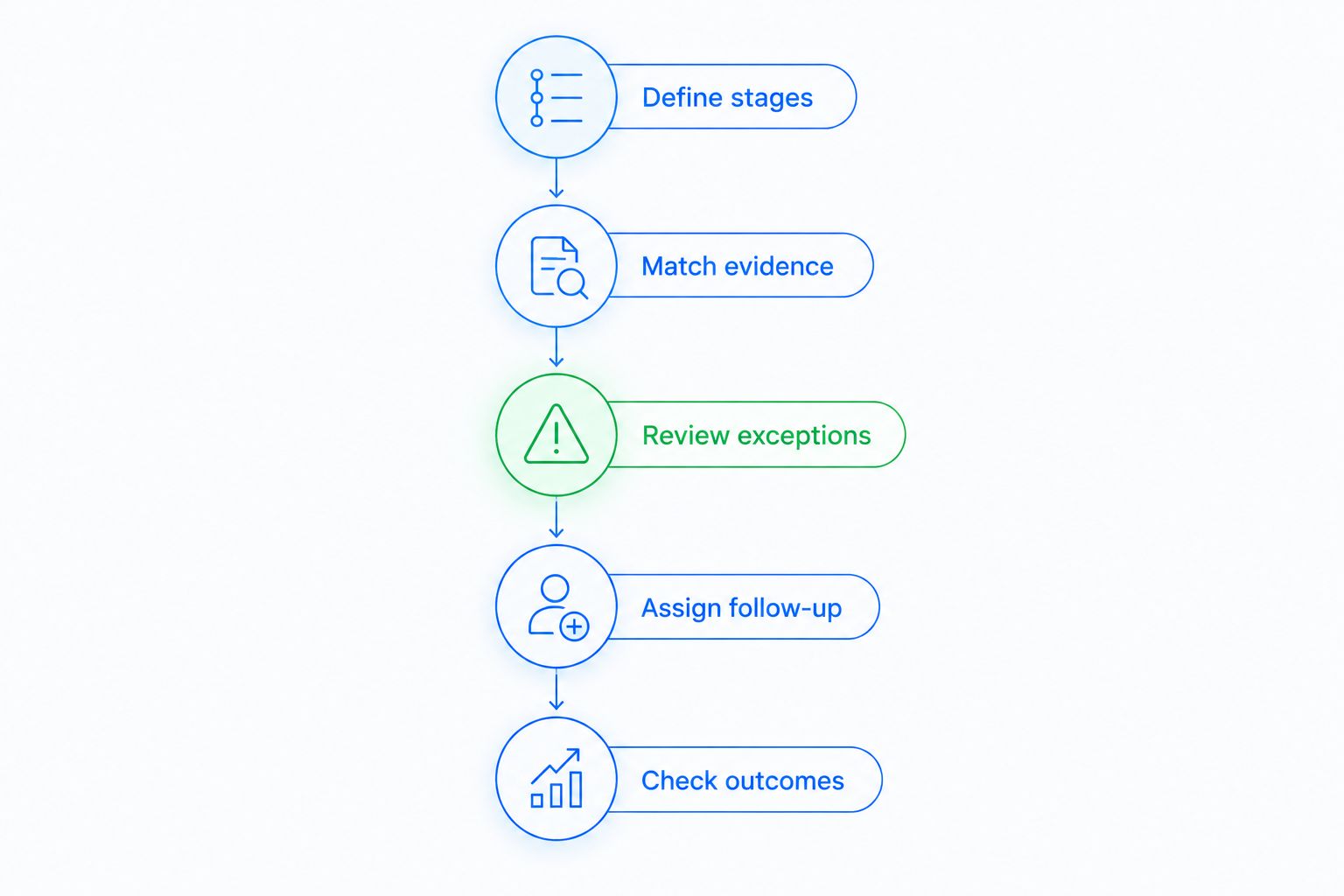
Use this sequence to design the workflow:
- Define the stage. State what must be true for a deal to belong there.
- Select the evidence. Identify the customer interaction that supports the transition.
- Set the boundary. Specify when the deal should stay where it is or require review.
- Assign the next action. Make the stage change lead to a task, reminder, or follow-up.
- Check the outcome. Confirm that the recorded stage matches the conversation.
These are workflow-design steps, not instructions for a particular settings screen. The available controls depend on the CRM and the workflow you configure.
Why this matters
A lead replies, but the opportunity still sits in the original stage. The salesperson has to remember to update it, decide what happens next, and schedule the follow-up. That leaves pipeline accuracy dependent on manual housekeeping.
Automatic movement removes that update step when the transition is clear. But moving a deal into the wrong stage creates a different problem: your team sees progress that the customer has not actually made.
The goal is a pipeline that reflects customer progress, not a pipeline that moves more often. In 2026, judge automation by whether the right deal reaches the right stage with a clear next action. A busy activity history is not the same as a useful sales record.
What should trigger an automatic stage change?
Use customer evidence that matches the destination stage. If your stage means that a conversation has started, a genuine customer response is relevant. If your stage means that qualification is complete, a response alone is insufficient.
The examples below describe recommended workflow logic. They are not a list of preconfigured features or default settings.
| Customer interaction | Recommended treatment | Reason | Best for |
|---|---|---|---|
| A prospect replies with a relevant question | Consider moving to an engagement stage | A conversation has started, but qualification is unresolved | Tracking initial engagement |
| A prospect confirms an agreed next step | Move only to a stage defined by that confirmation | The evidence supports a specific milestone | Clearly defined transitions |
| A prospect sends an unrelated or ambiguous reply | Keep the current stage and request review | The interaction does not establish progress | Protecting pipeline accuracy |
| A salesperson sends another follow-up | Record the activity without assuming customer progress | Seller activity does not establish buyer intent | Separating effort from outcomes |
| A prospect signals a purchase decision | Verify your closing criteria before marking the deal won | Buying language and a completed transaction are different | Closing-stage control |
The same message can justify different actions in different pipelines. A request for information fits an engagement stage, but it does not satisfy a stage that requires an agreed scope.
Before you configure reply-based movement, read the guide to automatically moving a deal forward when a lead replies. Keep the distinction explicit: a reply is an interaction, and the destination stage must describe what that interaction proves.
Which approach should you use for pipeline movement?
You have different ways to control a stage change: an explicit workflow condition, interpretation of customer interactions, or a salesperson's decision. Choose according to the evidence involved, not according to which approach sounds more advanced.
| Approach | Best for | Main advantage | Main limitation |
|---|---|---|---|
| Explicit workflow conditions | Observable, clearly defined milestones | Makes the transition criteria easy to explain | Narrow rules do not resolve ambiguous messages |
| AI-assisted interaction handling | Conversation-driven workflows | Connects customer interactions with configured pipeline actions | Interpretation still needs boundaries and review |
| Manual stage decisions | High-consequence or unclear transitions | Lets a salesperson assess context before changing the record | Depends on timely, consistent updates |
Use automatic movement for clear evidence and human review for consequential ambiguity. That recommendation applies whether your team is organizing initial inquiries or managing opportunities near a purchase decision.
Do not treat these approaches as mutually exclusive. A workflow can organize routine progression while a salesperson handles qualification and closing judgment. The practical question is which decision you are delegating—not whether the entire pipeline is automatic.
How do you design a workflow that moves the right deals?
Start with a transition your team can explain without interpreting a long conversation. Write down its entry criteria, the supporting interaction, and the action that follows. If those definitions are unclear, fix the sales process before adding automation.
Define stages
Describe each stage as a customer milestone rather than a salesperson activity. A stage called proposal sent records something your team did; it does not establish that the prospect reviewed or accepted the proposal.
Activity-based stages can still be useful. Just keep their meaning explicit so nobody reads them as stronger evidence of buying intent than they contain.
Match evidence
Specify what customer behavior supports the destination stage. Avoid broad instructions such as moving a deal whenever there is activity; activity includes messages that do not advance the sale.
Write contrasting examples for your team. An interested question and a request to stop contact should not produce the same transition simply because both are replies.
Review exceptions
Define what should happen when the evidence is unclear. Your operating process needs a way to keep an uncertain deal from advancing until someone checks the conversation.
Do not assume that every CRM provides the same exception controls. Assess the available workflow configuration against your intended process, and preserve manual handling where the required condition cannot be expressed reliably.
Assign follow-up
A changed stage should answer what happens next. Identify the responsible person and the appropriate task, reminder, or follow-up sequence for that milestone.
Pipeline movement without a next action only changes the record. Your customer still needs a response, a clarification, or an agreed next step.
Check outcomes
Review the customer conversation alongside the resulting stage and follow-up. Ask whether the transition reflected actual progress and whether the next action matched the customer's request.
For a 2026 rollout, use representative conversation examples before extending the process across more stages. Include positive responses, unclear replies, and negative responses—not just the messages that make automation look successful.
Why automatic pipeline movement varies
Automatic movement depends on the sales process you define and the customer information available to the workflow. For your 2026 setup, examine these factors before deciding how much control to delegate:
- Stage definitions: A transition is easier to assess when the destination has explicit entry criteria.
- Customer interaction context: A reply, a question, and a commitment carry different meanings.
- Configured workflows: The conditions you set determine which interactions produce pipeline actions.
- Conversation visibility: Keeping relevant communication together gives your team context for checking a transition.
- Next-action rules: A useful stage change connects to the follow-up required at that point in the sale.
- Human judgment: Qualification and closing decisions need standards beyond the existence of a message.
These factors also explain why the same automation design should not be copied blindly between teams. Your stage names might look similar while the evidence required to enter them differs.
Where does Arches CRM fit?
Arches CRM is best for growing sales teams that want interaction-based pipeline updates and automated follow-ups. Its stated capabilities include automatic opportunity movement based on customer interactions and configured workflows, lead and contact management, and sales pipeline tracking.
The platform also brings email, WhatsApp, SMS, and calls together and supports tasks, reminders, follow-up sequences, and email summaries. Those functions address related work: understanding the conversation, keeping the opportunity organized, and identifying what needs attention next.
The advantage is less manual updating across connected sales activities. The boundary is that the movement depends on customer interactions and configured workflows; it is not a promise that every qualification or closing decision can run without a salesperson.
Evaluate Arches CRM sales CRM against a transition you actually use. Identify the interaction, the desired destination, and the follow-up you expect, then assess the configuration against that specific process rather than a general promise of automation.
Does a lead reply mean the deal should move forward?
No—a reply supports movement only when it satisfies the destination stage's criteria. A relevant question can establish engagement, while a refusal or an unrelated response does not establish positive progress.
Keep engagement separate from qualification. Your team can acknowledge that a conversation started without claiming that the prospect's needs, fit, or buying process are understood.
Can AI move a deal straight to closed won?
Automatic movement to a closing stage belongs only in a workflow with explicit closing criteria and verified evidence. A positive message alone is not sufficient proof that your business's definition of a won deal has been met.
Keep a human decision where the necessary evidence is unclear. The useful boundary is not whether the software can change a field; it is whether the change accurately records the commercial outcome.
Do automatic stage changes replace follow-up reminders?
No—stage changes and reminders perform different jobs. A stage records where the deal stands, while a reminder identifies work that still needs to happen.
Connect both to the same customer milestone. If a deal advances because a prospect asks a question, the next action should address that question rather than continue a sequence that ignores the reply.
FAQ
Can AI move deals through my sales pipeline automatically?
Yes—AI can move deals automatically when customer interactions meet configured workflow conditions. Define what each destination stage means before allowing a workflow to move opportunities into it.
Does Arches CRM automatically update opportunity stages?
Yes—Arches CRM automatically moves opportunities through the sales pipeline based on customer interactions and configured workflows. Its stated capabilities also include follow-up automation and email conversation summaries.
Should every customer reply advance a deal?
No—only a reply that satisfies the next stage's entry criteria should advance a deal. An unclear message or a negative response does not establish positive sales progress.
Is AI-assisted movement better than manual pipeline updates?
AI-assisted movement fits clear, interaction-based transitions; manual updates fit ambiguous or consequential decisions. Use both according to the evidence needed for each stage.
Can I automate pipeline movement without defining sales stages?
No—you need defined stage criteria to judge whether automatic movement is correct. Start by describing the customer milestone each stage represents.
Will automatic pipeline movement replace my sales team?
Automatic movement replaces a manual record-update step, not the entire sales process. Your team still needs to assess customer needs, handle unclear conversations, and apply closing standards.
What should I check before using pipeline automation in 2026?
Check the trigger, destination-stage criteria, exception process, and next action. Review the resulting stage against the customer conversation before expanding the workflow.
One last thing
A deal staying in the same stage can be the correct automation outcome. If the new interaction does not satisfy the next milestone, preserving the current stage protects the meaning of your pipeline.
Before adding another automatic transition in 2026, write the reason a deal must not move. That rule forces you to distinguish customer activity from customer progress—and makes the next stage more useful to everyone reading it.