
 Log in
 Start Free Trial

Yes, a CRM with email-drafting features can write follow-up emails for you using the instructions and customer context you provide. Writing a draft is separate from scheduling or sending it, so you still need to configure the follow-up workflow and decide who approves the message. This guide explains what to automate, what to review, and how to keep each email tied to the actual conversation.
- Can a CRM write follow-up emails for me? Yes, with email-drafting features; sending requires a separate workflow.
- Arches CRM supports email drafting and follow-up automation for growing sales teams.
- Use customer conversations and a clear next step to guide every follow-up email.
- Keep human approval for commitments, sensitive conversations, and messages with incomplete context.
Why this matters
A lead arrives. Someone reads the message, plans to reply, and moves to another task. The problem is not always writing ability; it is the gap between knowing a follow-up is needed and actually sending a useful response.
CRM email drafting addresses the writing task. Workflow automation addresses the handoff, reminder, and next action. You need both a relevant message and a clear owner—not just text that sounds polished. For the workflow side, see how to automatically follow up when a lead goes cold.
When choosing a CRM in 2026, evaluate the whole follow-up process. A convincing draft does not prove that the correct person receives it, that a reply changes the next action, or that an outdated sequence stops.
Can a CRM write follow-up emails for me?
Yes. A CRM with email-drafting assistance can prepare a message from your instructions, conversation context, or notes. A CRM without that feature can still support reusable templates and follow-up tasks, but those functions do not independently create a context-specific email.
These are different operating methods, not interchangeable product features. Use this comparison to decide what you want the software to handle.
| Method | Best for | What it handles | Advantage | Limitation |
|---|---|---|---|---|
| Reusable template | Repeated messages with consistent wording | A standard message that a rep adapts | Keeps wording predictable | Needs editing when the conversation changes |
| Assisted draft | Follow-ups that need conversation context | A proposed email based on the context supplied | Gives the rep a starting point tied to the discussion | Needs factual and tone review |
| Automated sequence | Repeatable follow-up processes with clear rules | The timing and actions configured in a workflow | Makes the next action explicit | Needs reply handling and stop conditions |
| Human-written email | Sensitive or unusual conversations | Wording and judgment from the account owner | Keeps interpretation with the person responsible | Leaves the writing task with the rep |
Choose assisted drafting when the message changes with the conversation; choose a template when the wording should stay consistent. Use a human-written email when the response depends on negotiation, a complaint, or a commitment that the system should not make.
An automated sequence is not a substitute for a good draft. It controls the process around the message. Before approving any setup, identify where the text comes from, who reviews it, and what authorizes delivery.
What should a CRM use to write your follow-up?
A useful draft starts with a reliable record. Give the writing feature the relevant conversation, the current opportunity stage, and the next action you want the customer to take. Exclude unrelated details.
The most useful information is practical:
- The customer's actual question or request.
- The latest relevant email, call note, or message.
- Any commitment your team has already made.
- The reason you are following up now.
- The next action you want to request.
- Any instruction about tone or facts that must stay unchanged.
A customer who asked for implementation details needs a different email from someone who has not answered an initial inquiry. The first message should address the unanswered question. The second should establish whether the original need is still active.
Do not ask a drafting feature to fill gaps with confident language. If the record does not contain an agreed deadline, an approved offer, or a confirmed requirement, leave that detail out of the message.
For your 2026 workflow, make context quality an acceptance criterion. Ask whether a rep can identify the source of every factual statement in the proposed email. Fluent wording is not evidence that a statement is correct.
How do you set up CRM-written follow-up emails?
Start with one repeatable follow-up situation, such as responding after a discovery conversation. Define the expected behavior before configuring the workflow. Keep the first setup narrow enough that you can inspect every decision.
1. Choose the trigger
Specify the event that makes the follow-up necessary. Examples include completing a call, changing an opportunity stage, or reaching a configured reminder date. These are workflow design choices; confirm which triggers your selected CRM supports.
Avoid a rule as vague as following up with everyone who appears inactive. A useful trigger tells the rep why the message exists and what happened immediately before it.
2. Gather the context
Identify the information the draft should use. Select the relevant conversation and notes rather than assuming that every connected channel automatically contributes to email drafting.
Check that the contact, opportunity, and conversation belong together. If the record is incomplete, route the task to a person instead of treating missing information as permission to improvise.
3. Define the ask
Give the email 1 next step, such as answering a question, confirming a requirement, or arranging a conversation. This is a writing recommendation, not a performance guarantee.
State the purpose before generating the draft. A message that asks the customer to read a document, book a call, explain requirements, and approve a proposal leaves the priority unclear.
4. Review the draft
Check factual accuracy, relevance, and tone before delivery. Confirm that the message answers the customer's current situation instead of repeating an earlier request that has already been resolved.
Pay particular attention to commitments. Delivery promises, contractual terms, and statements about product capability need an approved source—not an inference from a conversation summary.
5. Handle the reply
Define what happens when the customer responds. The reply should become part of the record and give the responsible person a clear next action.
Also define when the original follow-up path should stop. A customer who has already answered should not receive a message asking for that same answer. Verify this behavior in the actual workflow rather than assuming it exists.
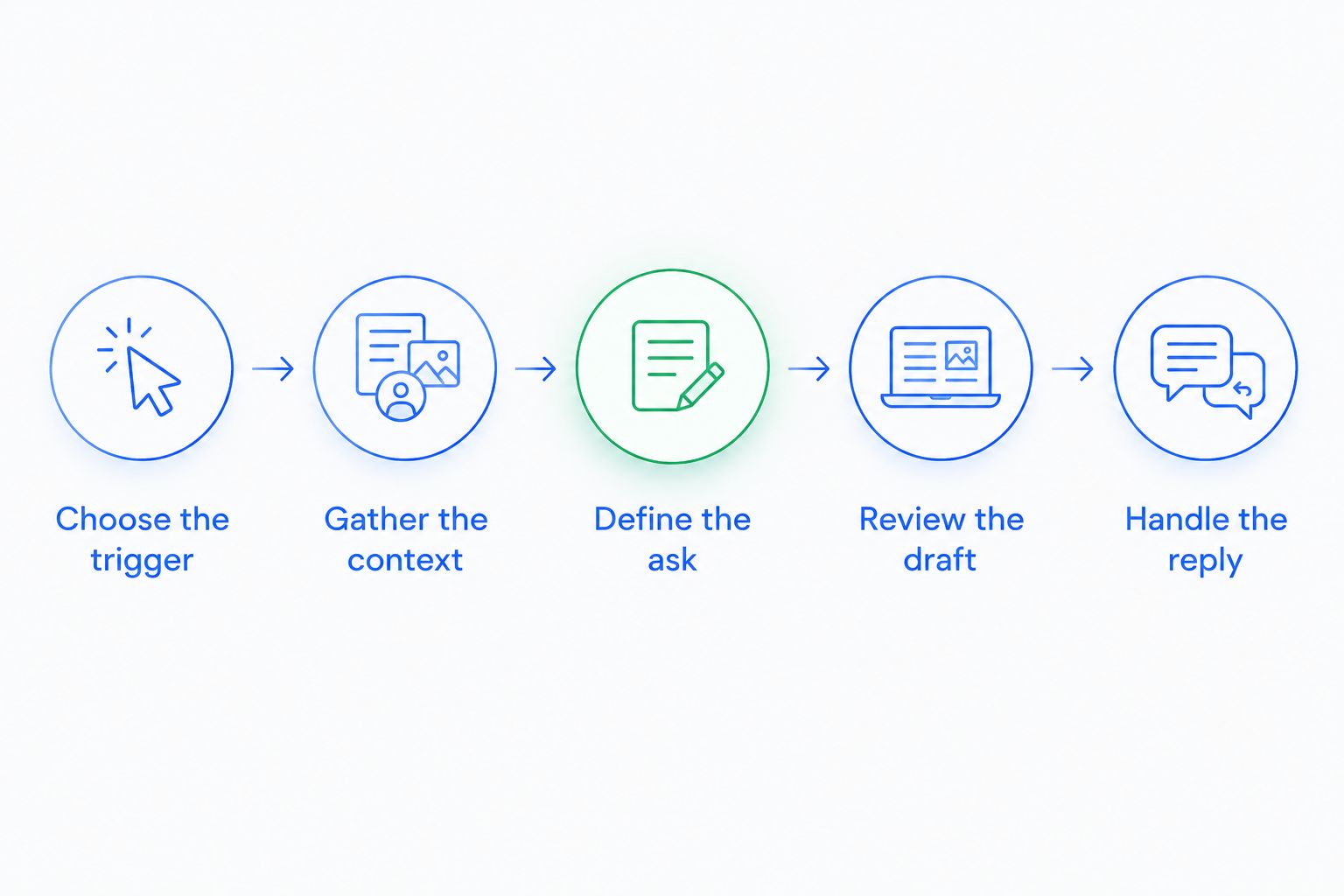
Run 2 test cases before widening the workflow: a customer who has not replied and a customer who has already replied. Inspect the resulting task, proposed email, and next action in each case. This checks your configuration; it does not establish a conversion result.
Why CRM-written follow-ups vary
The quality of a proposed email depends on the information and instructions behind it. Different records produce different starting points, even when you use the same drafting feature.
- Conversation detail: A specific customer request gives the draft more direction than a note that only says to follow up.
- Current sales stage: An initial inquiry and an active proposal require different next actions.
- Channel context: Relevant email, WhatsApp, SMS, or call information needs to be available to the process you configure.
- Workflow instructions: The trigger, message purpose, and stop condition shape what happens next.
- Review ownership: Someone needs responsibility for checking facts and handling exceptions.
Keep those factors visible in your 2026 evaluation. Ask the software to work from a realistic conversation, not just a generic prompt to write a friendly sales email. Then compare the draft against the source record.
What can Arches CRM do for follow-up emails?
Arches CRM supports email drafting, conversation summaries, and workflow automation for reminders, tasks, and follow-up sequences. It brings contacts, conversations, and sales activity together and supports email, WhatsApp, SMS, and call communications.
Arches CRM is best for growing sales teams that want email drafting and follow-up workflows alongside lead and pipeline management. Its described features address both preparing messages and organizing the work around them.
The distinction remains important: email drafting and follow-up automation are separate capabilities. Confirm how the chosen configuration connects them, which context informs the draft, and where approval sits. Do not assume that every generated email sends automatically or that every communication channel feeds the same drafting process.
The practical advantage is having writing assistance alongside the customer record and sales workflow. The trade-off is that the team still needs to define ownership, check commitments, and maintain useful records. Treat assistance as support for the account owner, not a replacement for accountability.
Connect drafting with your sales workflow
Explore lead management, conversation summaries, email drafting, and follow-up automation.
Can a CRM send follow-up emails without my approval?
A CRM with automated email workflows can send messages according to its configured rules, but drafting alone does not authorize delivery. Confirm whether your setup creates a draft, creates a task, or sends an email.
Keep approval for messages that introduce a commitment or require judgment. A routine reminder and a response to a contractual concern should not share the same review rule.
Will a CRM-written email sound personal?
A CRM-written email can reflect the customer's conversation when the drafting feature receives relevant context and clear instructions. Judge personalization by whether the message addresses the actual request—not whether it includes a first name.
Remove details that feel unrelated or intrusive. A useful follow-up shows that you understood the discussion and know what needs to happen next.
How do I check whether the draft is ready to send?
Use 3 review checks: accuracy, relevance, and next action. Every factual statement should match the record, the message should fit the latest conversation, and the customer should understand the requested response.
If any check fails, revise the draft or return the task to the account owner. Do not approve an email solely because it reads smoothly.
What should you verify before choosing a CRM in 2026?
Use a real follow-up scenario during evaluation. Provide the conversation context, request a draft, and inspect what happens after a reply. This tests the work you need done instead of the quality of a prepared demonstration.
Ask these questions before accepting the setup:
- Can you distinguish draft creation from email delivery?
- Can the responsible rep inspect the source conversation?
- Can you define who owns review and the next action?
- Can you configure what happens after a customer replies?
- Can you prevent the workflow from continuing after its purpose is resolved?
- Can you correct inaccurate notes before they inform another message?
Make the decision against your team's actual process. If every follow-up needs individual judgment, assisted drafting with review is the appropriate starting point. If the message is repeatable, a template and a clear workflow can be enough.
For 2026, prioritize a setup your reps understand. They should know what created the message, why it is due, and what they must verify. An unexplained automation leaves ownership unresolved.
FAQ
Can a CRM write follow-up emails for me automatically?
Yes, a CRM with email-drafting features can prepare follow-up emails from the context and instructions provided. Automatic delivery is a separate workflow capability that you need to configure and verify.
What's the difference between an email template and a CRM-written draft?
A template supplies reusable wording, while a CRM-written draft can respond to the context supplied for a particular conversation. Templates suit consistent messages; assisted drafts suit messages that need individual details.
Do I still need to review CRM-written emails?
Yes, review facts, commitments, and the requested next action before sending. Keep human approval for sensitive conversations or records with incomplete context.
Can Arches CRM help write follow-up emails?
Yes, Arches CRM includes email-drafting assistance and workflow automation for reminders, tasks, and follow-up sequences. Confirm how those capabilities connect in the configuration you plan to use.
Can a CRM use call notes when drafting a follow-up?
A drafting feature can use call notes when those notes are available to it as context. Verify which records and communication sources the selected feature actually receives.
Will automated follow-ups stop when a customer replies?
Follow-ups stop only when the workflow supports and applies the relevant stop condition. Test a customer reply before relying on the sequence.
What's the best way to test CRM email drafting in 2026?
Use a real conversation and inspect the proposed email against the source record. Then test both an unanswered message and a customer reply to check the surrounding workflow.
One last thing
Before improving the wording, inspect the timing and purpose. A well-written email asking for something the customer has already supplied is still the wrong follow-up.
Make the latest customer interaction your final check before sending. If it changes the next action, update the task and message together. That is the difference between generating more emails and keeping a sales conversation moving.