
 Log in
 Start Free Trial

Yes, a CRM can send SMS reminders to customers automatically when it has SMS sending built in or connects to a messaging provider, with a workflow that defines who receives each message and when. Automatic sending still requires valid contact details, appropriate consent, and rules that stop reminders after a reply, cancellation, or completed action.
- Can a CRM send SMS reminders to customers automatically? Yes, with SMS connectivity, workflow triggers, and sending safeguards.
- Arches CRM combines SMS communication and workflow automation; verify the exact reminder workflow before choosing it.
- Automated customer reminders need current records, appropriate consent, and stop conditions—not just a scheduled text.
Why this matters
A reminder assigned to a salesperson is not the same as a reminder delivered to a customer. If your system only creates a task, someone still has to write and send the text. Check whether the workflow sends an SMS or merely reminds your team to send one.
That distinction belongs at the center of your 2026 CRM evaluation. Start by separating automatic follow-up reminders into internal tasks and customer-facing messages, then decide which action your process needs.
Can a CRM send SMS reminders to customers automatically?
Yes. A CRM with the necessary messaging connection and automation controls can use customer records to trigger texts without a salesperson sending each message individually. The workflow must connect a qualifying event to a message, check eligibility, and handle what happens afterward.
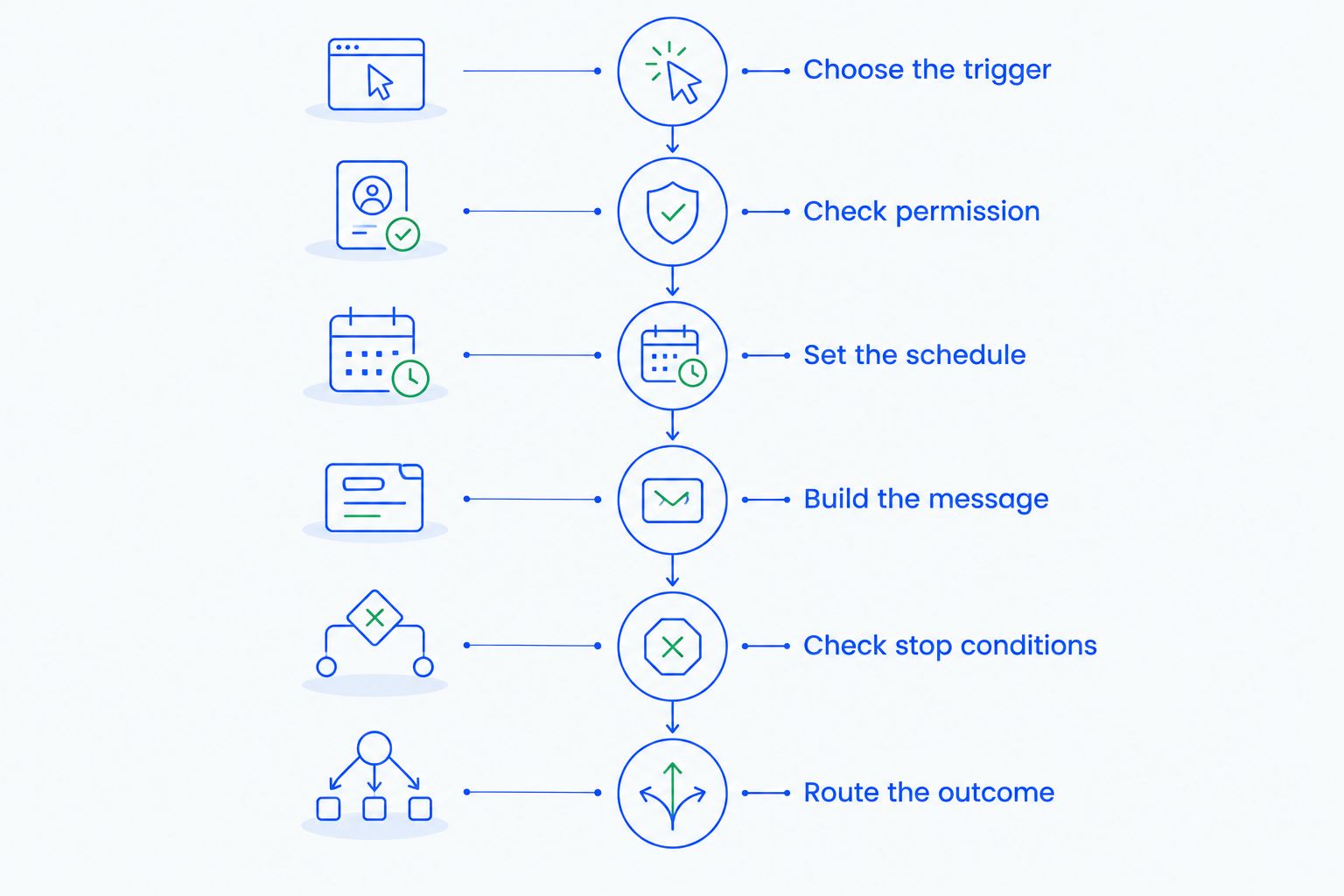
Use this sequence to specify the workflow before you configure it:
- Choose the trigger. Start with an appointment date, an agreed follow-up date, or another recorded event. Define exactly which record change makes the customer eligible.
- Check permission. Confirm the customer can receive this type of text. Store the permission record and exclude contacts who have opted out.
- Set the schedule. Define when the reminder should run relative to the event. Use the customer's local time where your system supports it.
- Build the message. Identify your business, explain the reminder, and give the customer a clear next action. Check every personalized field before sending.
- Check stop conditions. Recheck the record before dispatch. A canceled appointment or completed action should not leave an outdated reminder in the queue.
- Route the outcome. Send replies to an accountable owner and record sending failures for follow-up. A workflow is unfinished if nobody sees the customer's response.
These are requirements to verify, not features to assume every CRM includes. Ask the vendor to demonstrate the sequence using a test contact and a changed appointment.
Which SMS reminder setup fits your team?
Your practical choices are built-in SMS, a connected messaging provider, or a manual texting process. Choose the setup by its controls and conversation handling, not by whether the feature list says SMS. A connection that sends messages but loses replies creates another inbox to manage.
| Setup | Best for | Main advantage | Main limitation |
|---|---|---|---|
| Built-in SMS | Teams seeking fewer separate systems | Messaging and customer records can sit in the same workflow | Verify automation, reply handling, and opt-out controls separately |
| Connected messaging provider | Teams retaining an existing messaging service | Connects CRM events to a separate sending service | Record updates, failures, and permission changes must pass between systems |
| Manual texting | Teams handling exceptions that require judgment | A person reviews the context before sending | Every reminder depends on someone taking action |
A built-in feature is not proof that every required control exists. An integration is not proof that every field stays synchronized. During your 2026 evaluation, ask to see a reply, an opt-out, and a failed send—not just a successful outbound text.
For exception-heavy conversations, keep human review. Automate routine reminders only after the team agrees on what makes a contact eligible and what makes the message inappropriate.
What should you verify in Arches CRM?
Arches CRM is best for growing sales teams that want customer conversations and follow-up workflows in one place. Its stated capabilities include lead management, sales pipelines, workflow automation, and customer communication through email, WhatsApp, SMS, and calls.
The benefit is a shared operational context: your team can organize the lead, conversation, and next action around the same sales process. The limitation is that these capabilities alone do not establish the exact SMS triggers, scheduling controls, or suppression behavior available for your reminder.
Ask Arches CRM to demonstrate your actual scenario: an eligible customer enters a workflow, receives the reminder, replies, and stops receiving unnecessary follow-ups. Confirm which parts use native functionality and which require an integration before you commit to the setup.
Why automatic SMS reminder behavior varies
Two workflows can send identical messages and still behave differently. The difference sits in their records, conditions, and handling of exceptions—not in the message text alone.
Check these factors when reviewing a 2026 reminder workflow:
- Trigger quality. A confirmed appointment and an unconfirmed inquiry represent different customer intentions. The workflow should distinguish them.
- Record accuracy. Missing phone numbers, duplicate contacts, and outdated dates undermine the sending decision before the message leaves the CRM.
- Permission and purpose. Appointment information and promotional outreach are different use cases. Review applicable requirements for the message you actually intend to send.
- Scheduling behavior. Time zones, changed dates, and delayed record updates affect whether a reminder is still timely.
- Integration behavior. A connected service must receive the relevant changes, including cancellations and permission updates.
- Outcome handling. Delivery failures, replies, and completed actions need different next steps. Do not funnel every outcome back into the same reminder sequence.
Assign an owner to each exception. If the CRM cannot distinguish an exception automatically, route it to a person rather than allowing an outdated message to continue.
How long should an automated SMS reminder be?
A standard GSM-7 SMS supports 160 characters in a single segment; a concatenated GSM-7 message generally allows 153 characters per segment. Messages using UCS-2 encoding generally support 70 characters in a single segment or 67 characters per concatenated segment. These are messaging-format limits, not recommended reminder lengths.
Write for clarity first, then check the encoded message. Personalization changes length, and characters outside the GSM-7 alphabet can change the encoding. Preview the final text with realistic customer names rather than judging the template alone.
Include the sender, the relevant event, and the next action. Leave out unnecessary sales copy, and avoid placing sensitive customer details in a text that someone else could see on a lock screen.
For a 2026 rollout, add message previews to acceptance testing. Confirm that punctuation, names, links, and any required opt-out wording render correctly after the messaging service processes them.
How do you prevent incorrect or duplicate reminders?
Recheck eligibility at send time, not just when the customer enters the workflow. A queued reminder can become wrong after a cancellation, reschedule, reply, or completed action. Your workflow should use the latest relevant record before it sends.
Define what counts as a duplicate. A contact can have separate legitimate appointments, so excluding every contact with another queued message is not enough. Where the system supports it, associate each reminder with the specific event and reminder type.
Payment follow-up makes the consequence clear: automated rent payment reminders must depend on the current payment record, not merely an earlier unpaid status. Apply the same principle to appointment confirmations and sales follow-ups: a completed action should remove the reason for the reminder.
Test what happens when a record changes after scheduling. If the system cannot cancel or reevaluate pending messages, document that limitation and require manual review for the affected workflow.
What happens when a customer replies?
A reply should leave the reminder sequence and reach someone who can act on it. Confirmation, rescheduling, a question, and an opt-out are different outcomes. Treating them as interchangeable creates avoidable follow-up mistakes.
Specify the handling before activation:
- Confirmation: record the response and check whether further reminders are still necessary.
- Rescheduling request: notify the appointment owner and prevent messages tied to an obsolete time.
- Customer question: assign a person to answer rather than sending another generic reminder.
- Opt-out: apply the appropriate suppression process across the relevant messaging systems.
- Delivery failure: create a review task and check the contact details before another attempt.
Automation should remove repetitive sending, not remove accountability. Your team still needs a visible owner for conversations that require judgment.
How should you test SMS reminders before launch?
Test the exceptions as carefully as the successful send. For your 2026 launch, use controlled test contacts and verify the complete path from trigger to final customer status. Do not use real customer records to discover whether suppression works.
| Test case | Expected result | What failure exposes |
|---|---|---|
| Eligible contact reaches the trigger | Correct reminder enters the sending process | Broken trigger or missing eligibility data |
| Customer cancels before dispatch | Obsolete reminder does not send | Queue does not reflect current records |
| Customer opts out | Relevant future texts are suppressed | Permission handling is incomplete |
| Customer replies with a question | Conversation reaches its assigned owner | Sending works but response handling does not |
| Phone number is invalid | Failure becomes visible for review | Errors disappear without an action |
| Duplicate event enters the workflow | Duplicate reminder is prevented | The workflow cannot identify repeated events |
Record the actual result for each test. If a failure requires a manual workaround, name the owner and document the step before launch. A working send button does not establish a working customer reminder process.
Can a CRM send appointment reminders without a salesperson?
Yes, a CRM can send appointment reminders without a salesperson dispatching each text when its scheduling and messaging capabilities support that workflow. A person still needs to maintain the rules and handle replies, failures, and exceptions.
Confirm what happens when an appointment moves. The reminder should follow the current event details rather than preserving the original date in a queued message.
Does an automatic SMS reminder need customer consent?
Automatic SMS reminders require a review of the consent and messaging rules applicable to the message, recipient, and sending method. In the United States, the TCPA and related FCC rules are relevant to automated texting; promotional and informational messages do not have identical requirements.
Do not treat possession of a phone number as blanket permission. Keep permission records and have qualified counsel review your intended use before activating customer-facing texts.
FAQ
Can a CRM send SMS reminders to customers automatically?
Yes, a CRM can send SMS reminders automatically through built-in messaging or a connected provider when its workflow supports the required trigger and sending action. Verify permission checks, stop conditions, and reply handling before launch.
Does Arches CRM support SMS and follow-up automation?
Arches CRM lists SMS customer communication and workflow automation among its capabilities. Confirm the specific SMS reminder trigger, scheduling behavior, and suppression controls through a demonstration of your workflow.
Will a CRM stop reminders when a customer replies?
A CRM stops reminders after a reply only when the workflow supports and applies that stop condition. Test a real reply and inspect any messages already queued for sending.
Can I connect my existing SMS provider to a CRM?
You can connect an existing SMS provider when the CRM and provider offer a compatible integration or API connection. Verify how replies, sending failures, and permission changes pass between the systems.
How many characters fit in an SMS reminder?
A single GSM-7 SMS supports 160 characters, while concatenated GSM-7 messages generally allow 153 characters per segment. UCS-2 messages generally support 70 characters in a single segment or 67 per concatenated segment.
What should I check before enabling CRM SMS reminders in 2026?
Before enabling CRM SMS reminders in 2026, check consent, trigger accuracy, scheduling, stop conditions, reply ownership, and failure handling. Test canceled events and opt-outs before using live customer records.
One last thing
The strongest reminder test is a message that correctly does not send. Cancel the test appointment after the reminder enters the queue, then verify that nothing goes out. That single check reveals whether the automation follows the customer's current situation or merely repeats an earlier instruction.