
 Log in
 Start Free Trial

Yes, a CRM can merge duplicate contacts automatically when it supports automated merging and has matching rules that identify records belonging to the same person. Duplicate detection alone does not guarantee automatic merging, and a merge still needs rules for conflicting fields, conversation history, ownership, and follow-up activity. Automate clear matches; send uncertain matches for review.
- Can a CRM merge duplicate contacts automatically? Yes, when automated merging and suitable matching rules are supported.
- Duplicate detection flags possible matches; contact deduplication decides whether and how to combine them.
- Arches CRM suits growing sales teams managing leads and follow-ups; evaluate duplicate-merging behavior separately.
- Check field conflicts, sales history, ownership, and active workflows before enabling automatic merges.
Can a CRM merge duplicate contacts automatically?
Yes, but distinguish these 3 capabilities during your 2026 CRM evaluation. They solve different problems, and a product that offers one does not necessarily offer the others.
| Capability | Best for | Benefit | Limitation |
|---|---|---|---|
| Duplicate detection | Finding records that need inspection | Flags possible matches without combining data | Leaves cleanup work unless merging is also supported |
| Automatic merging | Clear matches under tested rules | Combines records without individual approval | Incorrect rules can combine different people |
| Review-based merging | Ambiguous matches and conflicting details | Lets someone inspect records before combining them | Requires a person to complete the decision |
When evaluating Arches CRM, distinguish its lead management and workflow automation features from the specific duplicate-handling behavior you need.
Why this matters
A duplicate contact is not just an untidy address book entry. Separate records can split a customer's conversation history, leave different owners responsible for the same person, or put the same prospect into overlapping follow-ups.
Merging solves that problem only when the resulting record remains useful. A cleaner contact count is not a win if the merge removes the context your salesperson needs for the next conversation.
How should automatic contact merging work?
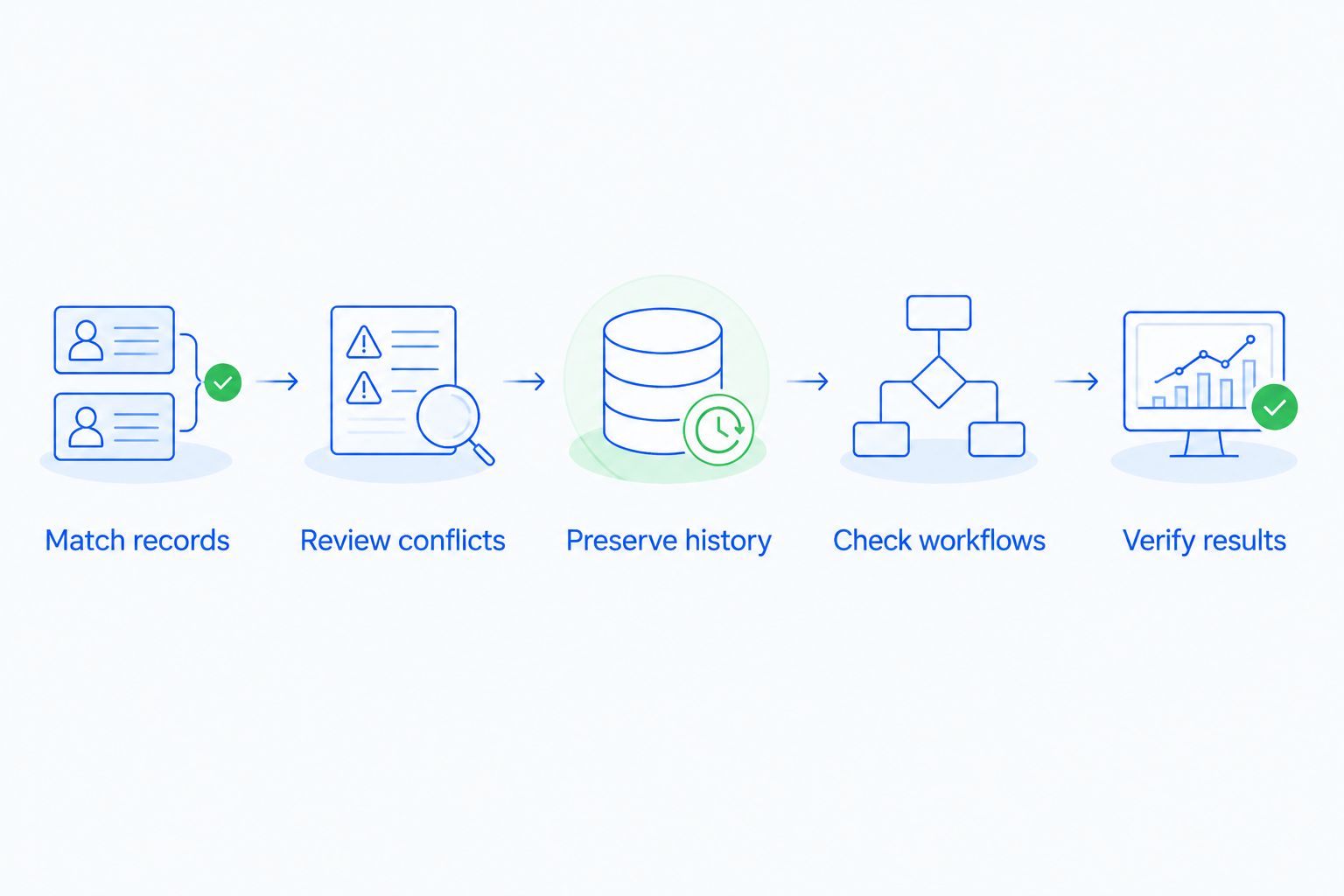
Use this 5-step acceptance process before enabling unattended contact merging in 2026. These are evaluation steps, not a claim that every CRM provides the same controls.
1. Match records
Define which evidence identifies the same person. An exact email match is stronger evidence than a similar name, but a shared mailbox can still represent different people.
Ask whether matching runs during imports, form submissions, integration updates, or scheduled cleanup. A rule that checks imported files does not necessarily check contacts arriving through another channel.
2. Review conflicts
Decide what happens when matching records disagree. A recent job title and an older job title need a selection rule; different email permissions need careful treatment rather than a blanket overwrite.
A match rule answers whether records belong together. A conflict rule answers which information survives. Treat those as separate decisions.
3. Preserve history
Check the resulting contact for conversations, notes, tasks, ownership, and links to opportunities. Do not assume that combining contact fields also combines every related activity.
Keep separate opportunities separate when they represent different purchases. The same person can have multiple legitimate deals without being multiple people.
4. Check workflows
Determine what a merge does to active reminders and follow-up sequences. Inspect whether both source records had scheduled actions and whether those actions still make sense after consolidation.
Your acceptance condition should be a coherent next action, not simply a surviving contact. Review assignment rules too, especially when different salespeople owned the original records.
5. Verify results
Test representative cases before broad rollout. Include clear duplicates, shared contact details, conflicting fields, and records connected to active deals.
Confirm whether the system records what changed and provides a recovery method. If a merge cannot be reversed, require stronger evidence before letting the system act without approval.
Exact-match merging: best for clearly identified duplicates
Recommend exact-match automation only after testing the identifier and its exceptions. An exact match compares specified values rather than deciding that similar-looking records must be the same person.
An email address can be a useful matching field when it belongs to an individual. A shared purchasing inbox is different: several people can use the same address, and combining their records would erase that distinction.
Phone numbers need similar care. A company switchboard, household number, or reassigned number does not uniquely identify a person just because the text matches.
The benefit of exact matching is that the rule is easy to explain and inspect. Its limitation is that it misses duplicates with changed or inconsistent details, so it should not be your only cleanup method.
Before approving an exact-match rule, write down its exception: which matching values should trigger review instead of a merge? That exception makes the rule usable in real sales data.
Similarity matching: best for finding uncertain duplicates
Recommend similarity matching as a review queue when identity is uncertain. Similar names, inconsistent punctuation, and different company spellings can help locate records worth inspecting.
They do not prove that the records describe the same person. People can share names, and colleagues can share company details without sharing an identity.
The benefit is broader discovery than a strict exact-match rule. The limitation is ambiguity: relaxing the matching criteria introduces more cases that need judgment.
For your 2026 setup, ask the CRM provider to show the actual records behind a suggested match. A reviewer needs the evidence, not just a label saying the contacts look similar.
Review-based merging: best for conflicting sales context
Recommend human approval when a proposed merge changes ownership, permissions, or the interpretation of an active deal. A salesperson can recognize that matching contact details belong to separate business relationships.
Review is especially useful when someone changes employers or uses different addresses for different roles. Combining everything automatically can attach an old business conversation to the wrong current context.
The benefit is a deliberate decision about what belongs together. The limitation is operational: someone must own the queue and resolve it, or suggested duplicates remain unfinished work.
Assign that responsibility explicitly. A review queue without an owner is not a working deduplication process.
Why automatic merging varies between CRM setups
The difference is not just whether a CRM has a merge button. Your 2026 result depends on how contact creation, matching, and downstream activity fit together.
- Matching fields: Names, email addresses, phone numbers, and external identifiers provide different kinds of evidence. Choose identifiers that fit how your contacts actually work.
- Creation channels: Imports, website forms, inbox connections, and integrations can create records through different paths. Check each relevant path rather than assuming one rule covers all of them.
- Field priority: Newer does not always mean more accurate. Define which source or field value takes priority when records disagree.
- Relationship handling: Contacts can connect to companies, opportunities, tasks, and conversations. Verify those relationships after a merge rather than inspecting only the contact header.
- Workflow behavior: Scheduled messages, assignments, and reminders need a defined outcome. A merged record should not leave contradictory instructions for your team.
- Recovery controls: Logs and reversal options determine how you investigate and correct a bad merge. Check the controls before you need them.
What should you ask a CRM provider to demonstrate?
Ask for a demonstration using a controlled example, not a feature checklist. Bring a clear duplicate and an ambiguous pair, then inspect the outcome from the salesperson's view.
Use these acceptance questions in your 2026 evaluation:
- Does the system merge automatically, suggest a merge, or only flag a duplicate?
- Which fields triggered the match, and can your team inspect that evidence?
- What happens when matching contacts have different owners or conflicting details?
- Where do conversations, tasks, and linked opportunities appear afterward?
- What happens to scheduled follow-ups attached to each original record?
- Can an administrator trace the change and recover from a mistaken merge?
Do not approve automatic merging from a contact-list screenshot alone. Open the resulting record, inspect its history, and check the next scheduled action.
Record your acceptance conditions before the demonstration. Otherwise, it is easy to accept a successful-looking merge without checking the information that actually drives a sale.
Where does Arches CRM fit?
Arches CRM is best for growing sales teams that need lead management, shared customer conversations, and follow-up automation in one platform. Its stated functions include contact management, sales pipelines, workflow automation, and communication across email, WhatsApp, SMS, and calls.
Those capabilities address the work surrounding a customer record. Treat automatic contact merging as a separate acceptance requirement: ask Arches CRM to demonstrate matching, conflict handling, history retention, and workflow behavior against your examples.
That distinction protects your buying decision. Choose a CRM for the daily work your team needs, then verify that its data-cleanup behavior meets your requirements before relying on it.
Is preventing duplicates better than merging them later?
Preventing avoidable duplicates reduces cleanup, while merging remains necessary for records that already exist. Use both approaches rather than treating them as substitutes.
At each contact-entry point, check whether an existing record should be updated instead of creating another. For integrations, ask how incoming records are associated with existing contacts and what happens when no reliable match exists.
Prevention also needs exceptions. Blocking every repeated email address can obstruct legitimate records when people share an inbox, so review the business context before enforcing a strict rule.
Should merging contacts also merge their deals?
Merging contacts should not automatically mean combining distinct sales opportunities. A person can be involved in separate purchases, renewals, or projects that need their own pipeline records.
Check contact identity and deal identity separately. After a merge, verify that each legitimate opportunity still has the correct stage, owner, and next action.
FAQ
Can a CRM merge duplicate contacts automatically without approval?
Yes, a CRM can merge duplicate contacts without individual approval when it supports automatic merging and the records meet its configured rules. Test field conflicts, related history, and workflow behavior before enabling unattended merges.
Is duplicate detection the same as automatic contact merging?
No, duplicate detection identifies possible matches, while automatic merging combines records. A CRM can offer detection without automatically resolving the duplicates it finds.
Should I merge contacts just because their names match?
No, a matching name alone does not establish that contacts are the same person. Inspect additional identity information and the business context before combining them.
Can different people have the same email address in a CRM?
Yes, different people can share an email address, such as a team inbox. Treat shared addresses as exceptions to rules that assume an email address identifies an individual.
Will merging contacts keep all their emails and tasks?
Keeping all emails and tasks depends on the CRM's merge behavior and the relationships involved. Inspect the resulting activity history and scheduled actions rather than assuming every item transfers correctly.
Can I undo an automatic contact merge?
Undoing a contact merge depends on the CRM's recovery controls. Verify reversal options, change logs, and recovery procedures before enabling automatic merging.
Does contact automation prove that a CRM can merge duplicates?
No, contact automation does not establish automatic duplicate-merging support. Ask the provider to demonstrate the specific matching, merging, and conflict-handling behavior you require.
One last thing
A low duplicate count is not the final goal. The goal is a contact record your salesperson can trust when deciding who to call and what to say.
After your first controlled merge, inspect the next follow-up before celebrating the cleaner database. The merge succeeds when the right history leads to the right next action.