
 Log in
 Start Free Trial

Yes, a CRM can help reduce customer churn by keeping customer conversations visible, assigning follow-ups, and helping your team act on unresolved problems before a customer leaves. It supports retention work; it does not fix a poor product, resolve a complaint, or prove that a customer will stay simply because someone sent a message.
- Can a CRM help reduce customer churn? Yes, when customer retention workflows turn missed follow-ups into assigned actions.
- Arches CRM suits growing sales teams that need shared conversations, follow-up automation, and clear next steps.
- Measure customer losses separately from completed tasks; more activity does not establish better retention.
- Start with unresolved customer issues, clear ownership, and follow-ups that stop when the situation changes.
Can a CRM help reduce customer churn?
A CRM helps with the parts of churn your team can address through better coordination: forgotten commitments, scattered conversations, unclear ownership, and delayed follow-up. The retention benefit comes from resolving the customer's problem, not from recording more activity.
For your 2026 retention plan, connect each customer concern to an owner, a next action, and an outcome. The guide to automatic follow-up reminders explains the reminder mechanism; retention work also needs a decision about what happens after the reminder fires.
| Retention approach | Best for | Practical benefit | Limitation |
|---|---|---|---|
| Manual customer follow-up | A small account list with straightforward handoffs | Gives the owner direct control over each conversation | Depends on the owner remembering and recording commitments |
| CRM reminders and tasks | Repeatable check-ins and unresolved commitments | Makes the next action visible and assignable | A completed task does not establish that the issue is resolved |
| CRM follow-up sequences | Consistent outreach around a defined customer event | Reduces repeated manual scheduling | Needs stop rules so outreach matches the current conversation |
Why this matters
A customer asks for help. The message sits in an inbox, another colleague assumes someone replied, and the next scheduled message asks about a renewal instead of the unresolved issue. A shared record gives your team the context to avoid that mismatch.
Separate customer churn from lead loss. A prospect who stops replying is a sales follow-up problem; an existing customer who cancels is a retention problem. Both need attention, but combining them makes your results harder to interpret.
How do you use a CRM to support customer retention?
Build the process around a customer problem your team can actually resolve. For a 2026 rollout, start with a specific failure point, such as unanswered customer requests, rather than a broad instruction to automate retention.
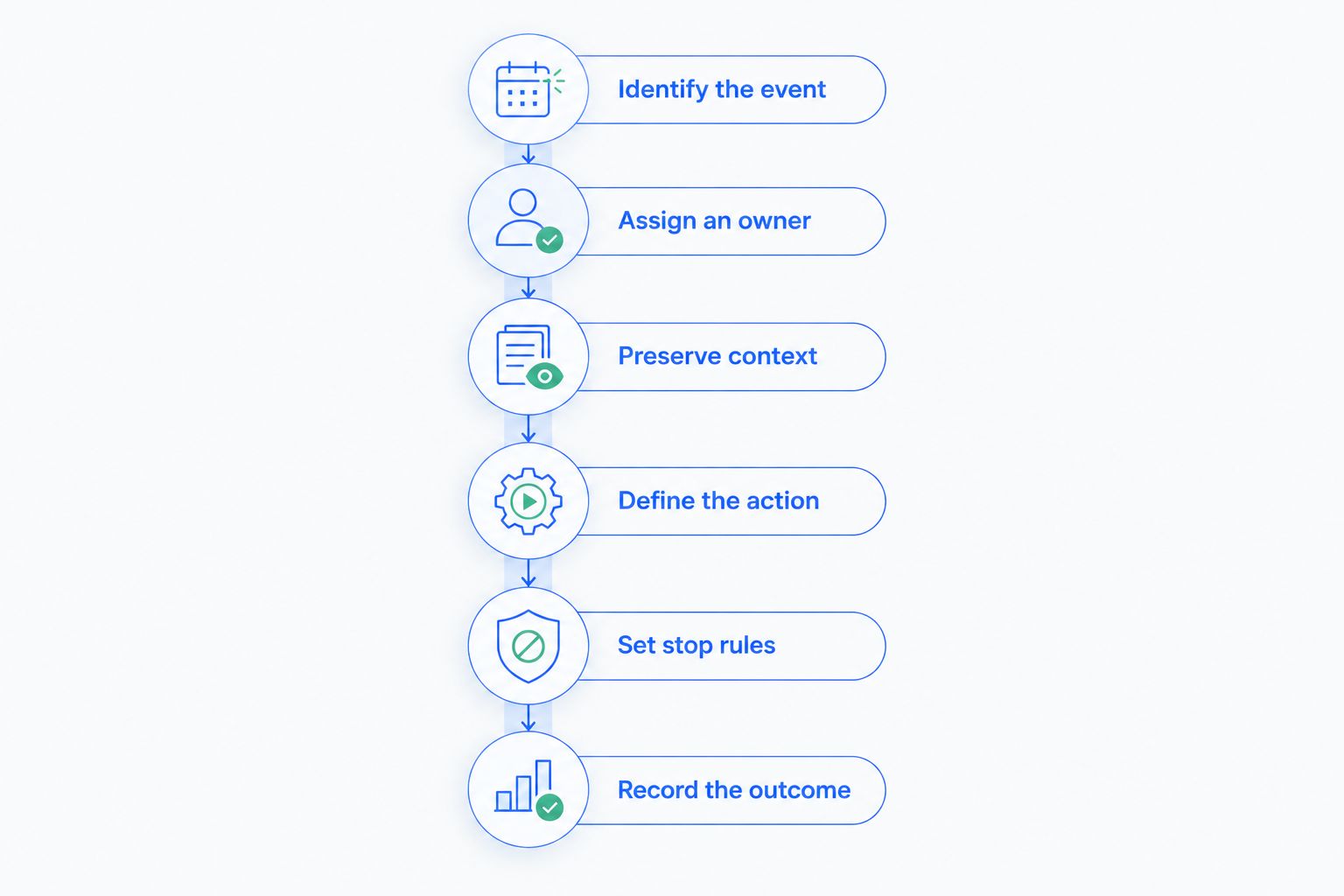
1. Identify the customer event
Choose an event that deserves action: an unresolved question, an unfulfilled commitment, an incomplete handoff, or a customer expressing dissatisfaction. Define what your team should record when that event occurs.
Do not treat silence alone as proof that a customer intends to leave. A quiet customer and an unhappy customer require different conversations. Use the available context to decide whether the right next step is a check-in, an escalation, or no outreach.
2. Assign an owner
Set 1 named owner per retention case as an operating rule. Other colleagues can contribute, but the owner remains responsible for checking the next action and recording the outcome.
Make reassignment explicit when an account changes hands. The receiving colleague needs the customer's concern, the promise already made, and the action still outstanding—not just a contact record. Ownership without context leaves the customer explaining the same problem again.
3. Preserve context
Record the relevant conversation and the customer's desired outcome. Separate what the customer said from your team's interpretation, especially when a short reply leaves room for misunderstanding.
A useful handoff explains the issue, the current status, and the unresolved commitment. Avoid notes that only say contacted or followed up. Those labels describe activity but do not tell the next colleague whether the customer received an answer.
4. Define the action
Require 1 explicit next action per open issue before treating the handoff as complete. That action should describe work: confirm the requested change, answer the question, or arrange a conversation with the responsible colleague.
Choose timing based on the commitment made to the customer and the urgency of the issue. Do not copy a generic follow-up interval into every workflow. An overdue promise and a routine relationship check-in deserve different handling.
5. Set stop rules
Specify when an automated sequence should stop, pause, or return to a person. A customer reply, a resolved issue, or a cancellation request should change what happens next.
Test those branches before extending the workflow to more customers. Check whether someone can identify the owner, understand the message being sent, and see why the sequence stopped. Automation that continues after the context changes creates more work for the customer and your team.
6. Record the outcome
Close the loop with a result: resolved, awaiting customer response, awaiting internal action, or canceled. Keep the reason alongside the status so a later review distinguishes successful recovery from administrative closure.
A completed reminder is not a recovered relationship. Ask whether the promised action happened and whether the underlying concern remains open. Use that answer to decide whether the case closes or returns to the owner.
Why CRM retention results vary
A CRM retention process depends on the information your team records and the decisions that follow. These factors determine whether the workflow addresses the problem or simply generates messages:
- Customer context: An owner needs to understand the unresolved issue before choosing a response. A contact name and an overdue task are not enough.
- Clear ownership: Assigning a task helps only when the recipient knows what they are responsible for completing.
- Workflow configuration: Reminders, follow-up sequences, and stop conditions need to reflect the customer situation rather than a generic outreach schedule.
- Conversation coverage: Relevant email, messaging, and call context must be available to the people handling the account.
- Team follow-through: Software can prompt action; someone still needs to answer the question, make the decision, or resolve the complaint.
Use these factors to review your 2026 workflow before adding more automation. If the record is incomplete or the owner cannot resolve the issue, another reminder does not address the bottleneck.
Which CRM capabilities matter for reducing churn?
Prioritize shared customer context, assignable tasks, follow-up automation, and reporting that helps your team review what happened. Test those capabilities against an actual handoff rather than judging the system by the length of its feature list.
Arches CRM is best for growing sales teams that need shared customer conversations and automated follow-ups. Its stated capabilities include contact management, workflow reminders, tasks, follow-up sequences, and communication across email, WhatsApp, SMS, and calls. Conversation summaries help colleagues review context before deciding what needs attention.
Those capabilities support the coordination side of retention. The limitation is operational: a sales workflow does not by itself establish why a customer is leaving or whether a recovery attempt worked. You still need clear customer statuses, recorded outcomes, and a consistent churn calculation.
When evaluating Arches CRM, use a specific scenario: a customer raises an issue, the owner changes, and a follow-up becomes due. Check how your intended setup keeps the concern, responsibility, and next action visible throughout that handoff.
Review your follow-up workflow
Assess contact management, shared conversations, and automation against your team's customer handoffs.
How do you measure whether a CRM is reducing customer churn?
Track 2 separate measures: customer outcomes and workflow execution. Customer outcomes tell you who stayed or left; workflow execution tells you whether your team completed the intended work. Neither replaces the other.
For customer churn, use a consistent period and definition. Divide customers lost during the period by customers present at its start, then express the result as a percentage. Define how you handle reactivations and account changes before comparing periods.
For your 2026 review, keep customer churn separate from revenue churn. Losing an account and losing part of an account's revenue describe different outcomes. Use the measure that matches the question you are trying to answer.
Check the workflow before interpreting the result
Review whether cases had owners, whether promised actions were completed, and whether unresolved concerns stayed visible. Inspect the underlying records rather than treating a high task-completion rate as proof of retention success.
Then compare retention outcomes across periods with consistent definitions. Account mix, product changes, and service changes affect how you interpret the comparison. A lower churn rate alongside a new workflow is useful evidence to investigate, not proof that the CRM alone caused the change.
Keep cancellation reasons specific
Record the reason the customer gives, with enough detail to guide action. Separate an unanswered service request from a missing product capability or a customer no longer needing the service.
Review those reasons alongside the follow-up history. If your team completed every promised action but the customer needed something you do not offer, increasing message volume is not the answer. Use the cancellation reason to identify the decision that actually needs attention.
Can automated follow-ups prevent customers from leaving?
Automated follow-ups support retention when they prompt a relevant action at the right point in a customer relationship. They do not prevent cancellation on their own, especially when the underlying issue remains unresolved.
Use automation to surface an outstanding commitment or request a useful response. Stop generic outreach when a customer needs a direct conversation. The purpose is to make the next step easier, not to keep a sequence running.
Can a sales CRM replace a customer retention process?
A sales CRM supports a retention process; it does not replace one. You still need rules for ownership, issue resolution, customer status, and measuring losses.
For a 2026 operating plan, describe those rules before configuring the software. If your team cannot explain who handles a dissatisfied customer and what counts as resolution, a workflow builder will not supply that decision.
FAQ
Can a CRM help reduce customer churn for a small business?
Yes, a CRM can help a small business reduce customer churn by keeping customer conversations, commitments, and follow-ups visible. The benefit depends on someone acting on that information and resolving the customer's issue.
What's the best CRM workflow to start with for customer retention?
Start with a workflow for unresolved customer requests that gives each case an owner, a next action, and an outcome. Choose a failure point your team can address rather than automating every customer interaction.
Does a CRM automatically know which customers will cancel?
A customer record or an overdue task does not establish that a customer will cancel. Treat changes in communication as reasons to review the account, not as confirmed cancellation intent.
Is sending more follow-up emails enough to reduce churn?
No, more follow-up emails do not resolve the reason a customer wants to leave. Use outreach to clarify the concern and move a useful action forward, then stop or adjust the sequence when the situation changes.
How do I calculate customer churn when using a CRM?
Divide customers lost during a period by customers present at the start of that period, then express the result as a percentage. Keep the period, customer definition, and treatment of account changes consistent.
Can Arches CRM support customer retention work?
Arches CRM supports contact management, shared communications, workflow reminders, tasks, and follow-up sequences. Those capabilities help teams coordinate customer follow-up; your team still needs a defined retention process and a way to measure outcomes.
One last thing
Review the last message before a customer canceled. Compare what the customer asked for with the next action your team recorded. That check helps distinguish a missed commitment from a problem that no follow-up sequence would solve.
Automate the handoff you understand—not the relationship you have not understood yet.