
 Log in
 Start Free Trial

Yes—a CRM can flag deals that have gone silent when it supports inactivity rules tied to customer replies, sales activity, or overdue next steps. The flag is a prompt to investigate, not proof that the deal is lost; useful alerts distinguish unanswered outreach from a customer who has already agreed to a later conversation.
- Can a CRM flag deals that have gone silent? Yes, with recorded activity and suitable workflow rules.
- Track customer replies separately from outgoing follow-up messages; sending another email does not prove engagement.
- Archescrm combines sales pipelines, conversations, and workflow automation for growing sales teams.
- Give every silence alert an owner, a reason, and a next action before adding automatic outreach.
Why this matters
A deal can remain open while nothing meaningful happens. Your team sees pipeline value, but the customer has stopped responding and nobody has a clear next step.
For your 2026 pipeline review, treat silence as an operational question: who owes the next action, and when was it due? Start with the distinction between detecting inactivity and automatically following up when a lead goes cold. Detection identifies a problem; follow-up is a separate decision.
A useful silence alert explains what stopped happening and who should act next. A label without that context adds another item to the sales team's queue without resolving the deal.
Can a CRM flag deals that have gone silent?
Yes. A CRM with the appropriate activity tracking and workflow conditions can identify an open opportunity that has passed a defined checkpoint without the expected customer response or next action.
The practical requirement is not a particular label. Your system needs recorded evidence, a rule that interprets that evidence, and an action assigned to someone responsible for the opportunity.
Use this sequence when configuring your 2026 workflow:
- Define the customer event. Choose what counts as engagement: a reply, a completed conversation, or another recorded interaction that advances the discussion.
- Separate customer activity from seller activity. An outgoing email belongs in the record, but it should not automatically count as a customer response.
- Set the expected checkpoint. Use the agreed next-contact date or a stage-specific inactivity threshold that your team chooses.
- Exclude known exceptions. Account for scheduled meetings, agreed pauses, closed opportunities, and any other documented reason not to pursue a response.
- Assign the response. Route the issue to the deal owner with a task, notification, or review queue, depending on what the CRM supports.
- Define how the flag clears. Specify whether a customer reply, completed review, or revised next step resolves the alert.
Before activating the rule across your pipeline, inspect sample records. Confirm that the rule identifies the absence of customer progress rather than merely the passage of time.
Which signal should trigger the flag?
Choose the signal that answers your sales question. A customer who has stopped replying is different from a representative who has missed a promised follow-up.
These approaches are configuration choices, not claims that every CRM includes every trigger. Check the available fields and conditions before designing the workflow.
| Signal | Best for | Main advantage | Main limitation |
|---|---|---|---|
| No customer reply | Finding unanswered conversations | Focuses on buyer engagement | Misses conversations that are not recorded |
| Overdue next step | Finding missed commitments | Gives the owner a specific action | Depends on accurate task dates |
| Time in stage | Reviewing stalled opportunities | Highlights deals without recorded progression | Does not explain why progress stopped |
| Combined conditions | Separating silence from planned waiting | Adds context before creating an alert | Requires more careful setup and maintenance |
Start with the simplest rule that identifies the problem you need to fix. Adding conditions without understanding the underlying records makes alerts harder to explain and troubleshoot.
No customer reply: best for unanswered outreach
A reply-based rule asks whether the customer responded after your team contacted them. It is useful when the immediate problem is an unanswered proposal, question, or request to arrange a conversation.
The limitation is visibility. If the customer replied through a channel that is not recorded against the opportunity, the system lacks the evidence needed to clear the concern.
Overdue next step: best for missed commitments
A next-step rule checks whether an agreed action remains incomplete after its due date. This makes the alert actionable: the owner needs to complete, reschedule, or explain the task.
Its weakness is task discipline. An outdated due date creates noise, while an opportunity with no next step can escape a rule that only checks overdue tasks.
Combined conditions: best for contextual review
A combined rule can require an open opportunity, no recent customer response, and no future agreed action before requesting review. This separates unexplained silence from a documented waiting period.
The trade-off is maintenance. Every exception needs a clear purpose, and the team must understand why a particular opportunity appeared in the queue.
Build a silence workflow your team can explain
Use a simple sequence: Capture activity, Check context, Assign review, and Resolve flag. Each stage answers a different question, so keep the logic visible to the people responsible for acting on it.
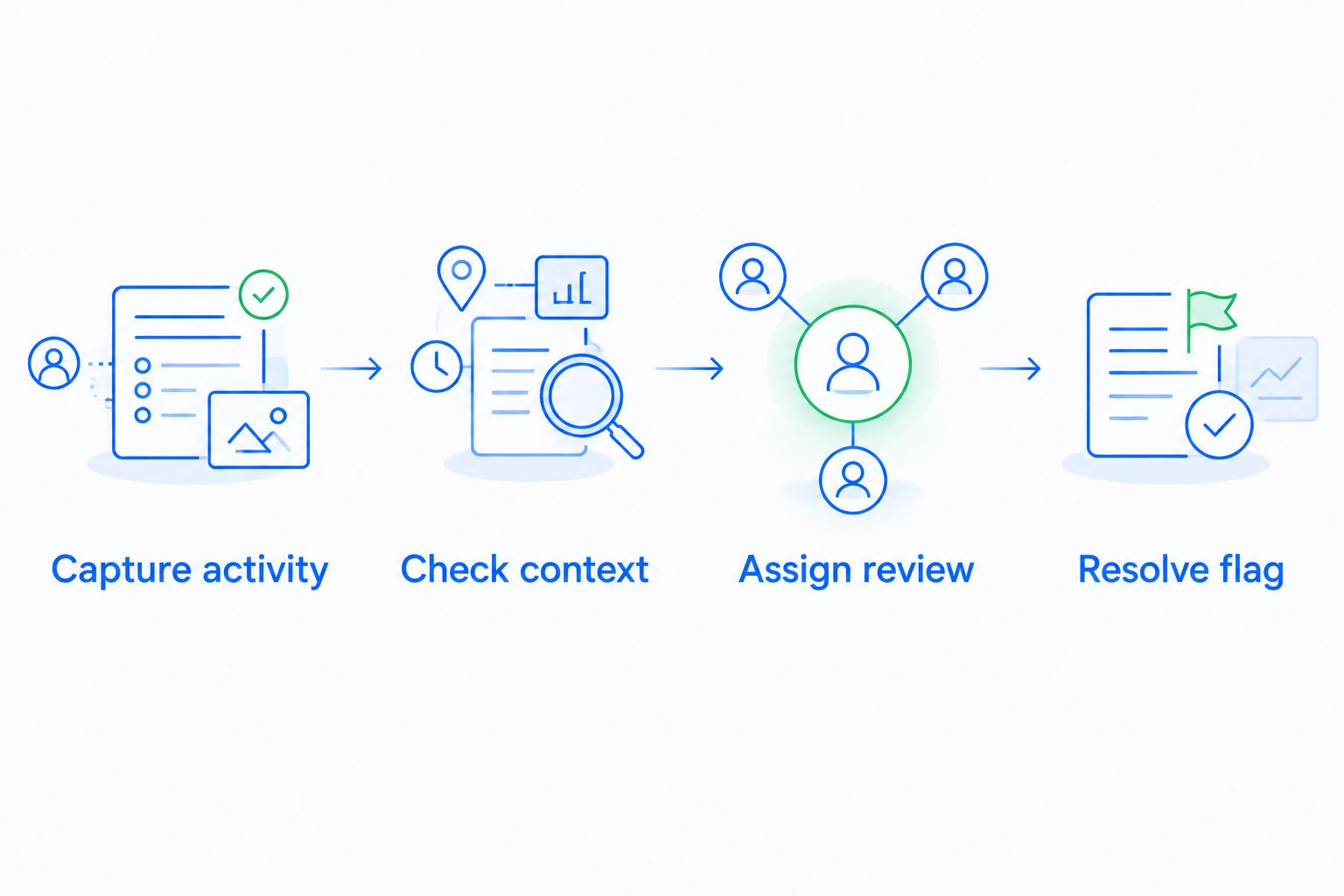
Capture activity
Keep 2 timestamps distinct: the last outgoing contact and the last recorded customer response. Those fields answer different questions, even when they appear beside each other in a timeline.
Also record the agreed next step. A customer who asked you to reconnect after an internal decision has not necessarily gone cold because the conversation is quiet.
Check context
Review the open opportunity, the conversation, and the next action together. Look for an existing appointment, a documented pause, or a response attached to another contact record.
Do not make silence synonymous with rejection. The rule should identify an unanswered question about the opportunity, not manufacture a buying decision.
Assign review
Require 3 items in every alert: an owner, a trigger reason, and a next action. The owner needs enough context to decide what to do without reconstructing the entire conversation.
For example, the reason can state that the customer has not answered the latest question. The next action is to review that exchange and decide whether a reminder is appropriate.
Resolve flag
Give each alert 1 explicit resolution action, such as recording the reply, updating the next step, or documenting why the deal should close. Avoid clearing the flag solely because another automated message was sent.
During your 2026 rollout, check whether resolved alerts reflect actual decisions. Otherwise, the queue becomes tidy while the pipeline remains uncertain.
Why silence alerts vary between deals
The right trigger depends on what your team records and what the customer agreed to do. These factors should shape the rule:
- Pipeline stage. A new inquiry and an opportunity awaiting a purchasing decision have different expected next actions.
- Conversation coverage. Email, WhatsApp, SMS, and calls only inform the rule when the relevant interactions reach the record.
- Agreed timing. A documented future conversation changes the meaning of an otherwise quiet opportunity.
- Task quality. Missing owners, incomplete tasks, and outdated due dates weaken next-step alerts.
- Record accuracy. Duplicate or disconnected contact records can separate a response from the opportunity it belongs to.
- Workflow conditions. The rule must distinguish open opportunities that need attention from closed deals and intentional pauses.
Write down the reason behind each exception. If the sales team cannot explain why a deal was flagged, simplify the rule before adding more automation.
Where Archescrm fits
Archescrm is a fit for growing sales teams that need lead management, shared customer conversations, and sales workflow automation in one platform. Its stated capabilities include contact management, pipelines, automated reminders and tasks, follow-up sequences, and communication across email, WhatsApp, SMS, and calls.
Those capabilities support the broader work around stalled opportunities: understanding the conversation, identifying responsibility, and organizing the next action. Archescrm also brings contacts, conversations, tasks, and sales activity together, reducing the need to reconstruct a deal across separate records.
The implementation constraint remains important: shared conversations and automation do not, by themselves, establish that a particular silence trigger is configured. For an Archescrm evaluation in 2026, ask to see the exact event, condition, exception, and resolution required for your sales process.
Choose the workflow you can verify, not a feature label you cannot explain. Ask for a demonstration using an unanswered conversation, a scheduled future meeting, and a customer response recorded through another channel.
Should a silent deal trigger an automatic follow-up?
Not automatically. A silence flag should first establish whether the customer needs a reminder, your representative owes an action, or the opportunity is intentionally waiting.
Automatic follow-up suits a defined situation with an appropriate message and a clear stopping condition. An unresolved complaint, a requested pause, or a conversation that needs a tailored answer calls for review instead.
Before enabling customer-facing messages, decide:
- What event starts the sequence?
- What response stops it?
- Which documented exceptions suppress it?
- Who handles a reply that needs judgment?
Keep reminders tied to the last meaningful conversation. Repeating a generic request does not answer a customer's unresolved question or clarify what needs to happen next.
Does a silent deal mean it should leave the forecast?
No. Silence is a reason to review the evidence supporting the opportunity, not an automatic instruction to mark it lost.
Ask the owner to confirm the customer's current position, the outstanding decision, and the next agreed action. If those answers are unknown, record the uncertainty rather than treating the existing stage as proof of progress.
For your 2026 forecast discussions, distinguish recorded activity from confirmed movement toward a decision. A sequence of outgoing messages shows effort; it does not establish customer commitment.
How do you check whether the alerts are useful?
Review flagged opportunities alongside open opportunities that did not trigger a warning. The first group reveals unnecessary alerts; the second helps you find stalled deals the rule missed.
Ask the owner whether each flag led to a clear decision. Useful outcomes include a recorded customer response, a corrected next step, an explained pause, or an evidence-based closure.
Then inspect the reason for mistakes. Missing communication records call for better capture, while alerts on agreed waiting periods call for better exceptions; changing the inactivity threshold alone does not fix either problem.
Keep this review practical. Your goal is a queue that tells the team what needs attention, not a larger collection of warnings.
FAQ
Can a CRM flag deals that have gone silent without sending an email?
Yes, a CRM with suitable workflow actions can create an internal task or notification without contacting the customer. Detection and customer-facing follow-up should be configured as separate decisions.
What should count as activity when checking for a silent deal?
Recorded customer replies and meaningful conversations should be distinguished from outgoing sales messages. Keep seller activity visible, but do not treat another sent email as proof that the customer is engaged.
How many days should pass before a CRM flags a deal?
Use the customer's agreed next-contact date or a threshold chosen for the relevant sales stage. There is no single interval that fits every opportunity; a documented waiting period needs different treatment from an unanswered time-sensitive question.
Can a CRM check WhatsApp and calls as well as email?
A CRM can use supported communication records when those interactions are captured and available to its workflow conditions. Verify channel coverage and trigger support rather than assuming every visible conversation can drive the same rule.
Will another follow-up email clear the silence alert?
Another outgoing email should not automatically clear an alert designed to detect missing customer responses. Define resolution around a reply, a reviewed next step, or another documented decision.
Can Archescrm help manage follow-up on stalled opportunities?
Archescrm provides sales pipelines, customer conversation management, and workflow automation for reminders, tasks, and follow-up sequences. Verify the specific inactivity conditions and exceptions needed for your stalled-deal process before adopting a rule.
Should a CRM automatically mark silent deals as lost?
Silence alone should not automatically mark a deal as lost. Review the conversation and agreed next action before recording a closure decision.
One last thing
Test whether your silence alert survives another outgoing email. If sending a reminder makes an unanswered opportunity look healthy again, the rule is measuring your team's activity rather than the customer's engagement.
Make that a specific acceptance check for your 2026 workflow. The alert should clear because the situation changed or someone documented a decision—not because the system generated more activity.