
 Log in
 Start Free Trial

Yes. A CRM with rule-based lead assignment can assign incoming leads automatically by checking conditions and sending each matching record to a designated owner or team. The catch is that routing depends on the fields, assignment actions, and exception handling your CRM supports; assigning an owner does not itself guarantee a follow-up.
- Can a CRM assign leads automatically based on rules? Yes, when its workflows support ownership changes and routing conditions.
- Define rule priority, existing-owner protection, and fallback handling before activating automatic lead routing.
- Arches CRM combines lead management and follow-up automation; confirm your required assignment logic before choosing.
- Test ownership and follow-up separately: a correctly assigned lead still needs a clear next action.
Can a CRM assign leads automatically based on rules?
Yes. Rule-based assignment connects a trigger, a condition, and an ownership action. A practical workflow follows this sequence:
- Receive the lead. A form submission, imported record, or connected system creates the record.
- Check the conditions. The workflow evaluates the fields used in your routing policy.
- Choose the owner. A matching rule assigns the lead to a person or team.
- Handle exceptions. Unmatched records enter a defined review process instead of remaining unnoticed.
- Start the next action. A separate task or follow-up workflow tells the owner what happens next.
For a broader view of triggers and actions, see the guide to CRM workflow automation for enterprise sales teams. Treat this sequence as a configuration plan, not a promise that every CRM includes every action.
Why this matters
A lead arrives, but nobody knows who should respond. Someone forwards a message, another person assumes a colleague owns it, and the conversation stalls. Automatic assignment removes that ownership decision from the routine intake process.
The goal is not simply to populate an owner field. It is to make responsibility clear. Your 2026 routing plan should connect the lead, the responsible person, and the next task without making the team reconstruct the handoff.
Poorly designed automation creates a different problem: the wrong person receives the lead consistently. Establish the assignment policy before turning the workflow on.
Which lead assignment approach should you use?
Choose the approach that matches how your team divides responsibility. The following are routing patterns to evaluate, not a feature list for a particular CRM.
| Assignment approach | Best for | Main benefit | Main limitation |
|---|---|---|---|
| Field-based routing | Teams with defined territories or specialties | Connects recorded lead attributes to ownership | Missing or inconsistent fields undermine matching |
| Round-robin routing | Teams sharing responsibility for similar inquiries | Distributes assignment turns across eligible representatives | Equal turns do not establish equal workload |
| Existing-owner routing | Teams handling returning contacts or account relationships | Preserves continuity with the current relationship owner | An outdated owner record can preserve the wrong assignment |
| Manual review | Inquiries with incomplete or conflicting information | Keeps ambiguous decisions visible to a person | Requires someone to monitor the review queue |
These approaches can work together if the CRM supports ordered rules. For example, preserve an existing owner before considering a general distribution rule. Write down which rule wins whenever a lead qualifies for more than one route.
Field-based routing: match the lead to a responsibility
Field-based routing uses recorded information to determine ownership. Your policy might use territory, inquiry type, or another field that your intake process actually captures.
The benefit is a direct connection between the inquiry and the person responsible for it. The weakness is data dependency: a rule cannot reliably evaluate information that is absent or inconsistently recorded.
Best for teams with clear responsibility boundaries. Start with fields your team already maintains rather than adding a long qualification form solely to satisfy routing logic.
Round-robin routing: share assignment turns
Round-robin assignment rotates leads across an eligible group when the CRM supports that distribution method. It suits teams whose members handle comparable inquiries.
The trade-off is that receiving the same number of leads does not mean receiving the same amount of work. Before using round-robin routing in 2026, check how eligibility, unavailable representatives, and group membership affect assignments.
Best for a shared intake team. Do not use rotation as a substitute for deciding who is qualified to handle the inquiry.
Existing-owner routing: protect the relationship
Existing-owner routing keeps a returning inquiry with the person already responsible for the contact or account. This avoids treating an established relationship as an entirely new handoff.
The limitation is ownership accuracy. If account ownership is outdated, preserving it carries that problem into the new workflow.
Best for relationship-led sales. Decide whether the contact owner, account owner, or opportunity owner controls the assignment when those fields disagree.
How do you set up automatic lead assignment?
Build the workflow around a written ownership policy. A useful 2026 setup starts with an understandable route and expands only when exceptions justify additional rules.
Define intake
Identify the event that starts assignment. Creating a new lead and updating an existing contact are different events; decide which should trigger your workflow.
Also decide what happens when an existing contact submits another inquiry. Automatically treating every submission as a new lead can conflict with an established ownership policy.
Check fields
List the information the rule needs and where that information comes from. Use consistent field values so the workflow does not depend on someone typing the same category in exactly the same way.
Separate required routing information from useful background. When a required field is blank, direct the lead to review rather than silently assuming a value.
Apply priority
Write the routing order before entering conditions into the CRM. A relationship-preserving rule might take precedence over a territory rule, while an unmatched record needs a fallback.
Then verify how your chosen system evaluates overlapping conditions. Do not assume that its visual rule order determines execution order.
Assign owner
Choose the field or action that establishes responsibility. A record owner, a task assignee, and a notification recipient are not interchangeable.
A workflow that emails a representative without changing ownership can leave the CRM showing a different responsible person. Test the actual record state, not just whether a message arrived.
Create follow-up
Define the next action after ownership changes. That action might be a task, a reminder, or an approved communication workflow, depending on the system and your process.
Keep assignment and communication rules distinct. A lead can be assigned correctly while a follow-up fails, and a sent message does not prove the right person owns the relationship.
Review exceptions
Give unmatched leads a visible destination and name the person responsible for reviewing them. An exception queue without an accountable reviewer is another place for leads to sit untouched.
Keep an explanation of why each exception needs attention. Missing routing data and conflicting ownership require different corrections.
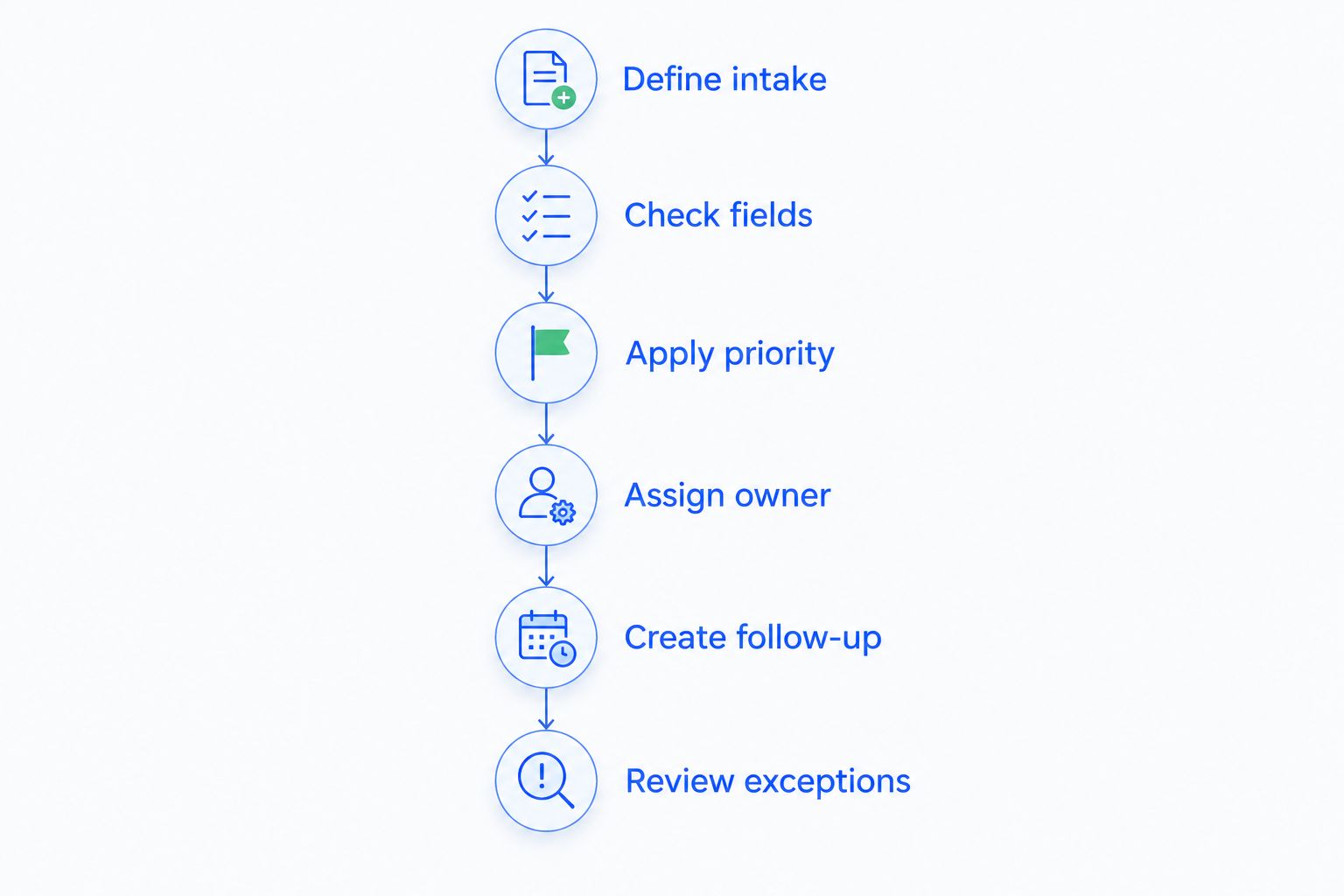
Why automatic lead assignment varies
Assignment behavior depends on the CRM and the configuration you choose. Compare these factors during your 2026 evaluation:
- Available triggers: Confirm which record events can start the assignment workflow.
- Condition support: Check whether the workflow can evaluate the fields your policy requires.
- Ownership actions: Verify that an action changes the correct owner field rather than only creating a task.
- Rule precedence: Establish what happens when several conditions match the same record.
- Reassignment controls: Decide whether later updates can replace an existing owner.
- Exception handling: Confirm where unmatched or incomplete records go and who reviews them.
Ask for a demonstration using your routing policy. A generic automation demonstration does not establish that the system handles your specific overlap, reassignment, and fallback requirements.
How do you test lead routing before switching it on?
Use clearly labeled test records and inspect the result of each route. Record the expected owner, actual owner, next task, and exception outcome so the team can identify the broken step.
Include both clean records and troublesome cases:
- A new lead with all required routing information.
- A lead with a missing required field.
- A returning contact with an existing owner.
- A record that matches overlapping rules.
- A record assigned to someone who is no longer eligible.
- A later field update that should not change ownership.
Also check duplicate handling. If the same person exists as separate records, ownership decisions can conflict even when each workflow follows its configured conditions.
Approve the workflow only when exceptions behave as deliberately as successful matches. Keep the test scenarios for your next process change; your 2026 configuration needs another check whenever ownership policies change.
Can a CRM reassign a lead automatically if nobody responds?
A CRM can support automatic reassignment when its workflows can evaluate inactivity or task status and then change ownership. Verify those conditions and actions before relying on escalation.
Define what counts as a response. A created task, an internal note, and a customer conversation represent different events. Reassignment rules should reflect the action your team actually expects, not whichever activity happens to be easiest to measure.
Can automatic assignment overwrite an existing lead owner?
Automatic assignment can overwrite ownership if the workflow is configured to change it after another triggering event. Protect existing relationships by explicitly defining when reassignment is allowed.
Check updates and imports as well as new records. A rule intended for initial intake should not keep restarting whenever unrelated contact information changes.
Where Arches CRM fits
Arches CRM is best for growing sales teams that need lead management, shared conversations, and automated follow-up in one platform. It supports capturing, organizing, and assigning prospects, alongside tasks, reminders, follow-up sequences, and pipeline tracking.
That combination connects ownership with the conversation and next action. The selection caveat is specific: confirm support for your required routing conditions, distribution method, owner protection, and fallback behavior before committing to a configuration.
Evaluate Arches CRM against a written workflow rather than a broad request for automation. Ask to see a matching lead, an unmatched lead, and a returning contact handled from intake through follow-up.
FAQ
Can a CRM assign leads automatically based on rules?
Yes, a CRM with rule-based assignment can evaluate lead information and assign an owner automatically. Confirm that it supports your required triggers, conditions, and ownership actions.
What's the best way to route leads to sales representatives?
The best route follows your team's ownership policy: use responsibility-based conditions for specialized teams and evaluate rotation for shared intake. Preserve existing relationships and define a fallback for unmatched records.
Can I assign leads by territory or inquiry type?
Yes, when the CRM's assignment workflow can evaluate the relevant territory or inquiry fields. Those fields must contain consistent information, and blank values need an explicit fallback.
Does assigning a lead automatically send a follow-up?
No, changing ownership does not itself establish that a follow-up will be sent. Configure and test the communication or task workflow separately.
Can automatic routing keep returning customers with the same representative?
Yes, when the CRM supports conditions that preserve or reuse existing ownership. Decide which owner field takes priority when contact, account, and opportunity ownership differ.
What happens when a lead doesn't match any assignment rule?
The outcome depends on the workflow's fallback configuration. Define a review destination and an accountable reviewer so an unmatched lead does not remain unnoticed.
Does Arches CRM help with lead management and follow-up?
Arches CRM supports capturing, organizing, and assigning prospects, plus reminders, tasks, and follow-up sequences. Confirm the specific rule-based assignment behavior your sales process requires.
One last thing
The revealing routing test is not the perfect lead. It is the returning contact with incomplete information who also matches a new assignment rule.
Write the expected outcome before configuring that case. If your team cannot agree on who should own it, settle the policy first; automation cannot resolve an ownership decision your business has not made.