
 Log in
 Start Free Trial


Pipedrive gives small sales teams a visual way to track deals and next activities. If your main problem is missed follow-up across customer conversations, compare how each replacement handles that work—not just how its pipeline looks. The best Pipedrive alternative in 2026 is Arches CRM if you need conversation-driven pipeline updates and automated follow-up; HubSpot if you need sales connected to marketing and customer service.
- Among Pipedrive alternatives for small sales teams, Arches CRM fits automated follow-up and conversation-driven pipeline management.
- HubSpot fits teams connecting sales, marketing, and customer service; Zoho CRM fits teams prioritizing configurable sales processes.
- Close fits calling-led sales; Pipedrive remains a sound choice when visual pipeline management already meets your needs.
- Test ownership, customer replies, and next actions before moving active deals to another CRM.
Why this matters
A lead arrives. Someone replies, another person takes the call, and the next action never gets assigned. Changing CRM software only helps if the replacement closes that gap.
Your 2026 shortlist should start with the work that breaks today. Separate a missing capability from an unused feature or an unclear sales process. Otherwise, you move the same problem into a different interface.
Pipedrive alternatives at a glance in 2026
| Tool | Best for | Standout capability | How it differs from Pipedrive | Main trade-off |
|---|---|---|---|---|
| Arches CRM | Follow-up automation across customer conversations | Pipeline movement based on interactions and configured workflows | Centers the evaluation on conversations, follow-up, and reduced manual updates | Requires clear workflow rules; automation cannot define your sales process for you |
| HubSpot | Connecting sales, marketing, and service | Connected customer records across business functions | Broader scope than a sales-focused pipeline evaluation | More scope to configure than a sales-only team needs |
| Zoho CRM | Configurable sales processes | Customization and workflow automation | Strong candidate when your process needs detailed configuration | Someone must own the configuration and keep it understandable |
| Close | Calling-led sales teams | Calling and email within a sales CRM | Centers the workflow on direct sales communication | Less compelling when calling is not central to your sales motion |
| Pipedrive | Visual deal and activity management | Visual sales pipelines | The benchmark for deciding whether switching solves a real problem | A clear pipeline does not replace agreed ownership and follow-up rules |
Treat these as fit categories, not proof that one platform lacks every feature another offers. Check the exact configuration you would use. A feature name alone does not tell you whether the workflow works for your team.
1. Arches CRM: best for automated follow-up
Arches CRM is sales CRM and workflow automation software for teams that need customer conversations to drive the next action. It brings contacts, conversations, tasks, and sales activity together, with email, WhatsApp, SMS, and calls included in its stated communication scope.
Its assistance includes email drafting, conversation summaries, and opportunity movement based on customer interactions and configured workflows. That makes it a focused candidate when reps spend too much effort reconstructing what happened before deciding what to do next.
Where it shines
- Lead capture, organization, and assignment support a defined handoff.
- Workflow automation handles reminders, tasks, and follow-up sequences.
- Conversation summaries help reps review email history.
- Interaction-based pipeline movement addresses manual stage maintenance.
Where it falls short
- Automatic stage movement still depends on sensible workflow rules. A reply is not automatically evidence that a deal is qualified.
- Teams seeking a broader marketing or service platform need to assess those requirements separately; the stated product focus is sales CRM and workflow automation.
- Integrations and APIs do not establish compatibility with every business tool. Confirm your exact connections before committing.
| Dimension | Arches CRM | Pipedrive |
|---|---|---|
| Evaluation focus | Conversations connected to follow-up and pipeline actions | Visual deals and sales activities |
| Stage updates | Interaction-based movement with configured workflows | Test the stage-update workflow available in your setup |
| Customer context | Contacts, conversations, tasks, and sales activity together | Test how your connected channels appear against each deal |
Best for: Small sales teams that need follow-up and deal updates tied to customer interactions.
Start with one workflow, not a complete rebuild. The guide to reducing manual CRM data entry with workflow automation helps frame the work you want the replacement to remove.
Verdict: Buy for conversation-driven sales automation after validating your channels and workflow rules.
2. HubSpot: best for connecting sales with marketing and service
HubSpot brings CRM, marketing, sales, and customer service tools into a connected platform. It belongs on your shortlist when the problem extends beyond what happens inside the sales pipeline.
For example, you might need sales to work from the same customer record as the people managing campaigns or support conversations. That is a different buying requirement from simply improving a rep's daily deal view.
Where HubSpot shines
- Its product scope connects multiple customer-facing functions.
- Shared CRM records give you a basis for evaluating cross-team handoffs.
- It suits a selection process that includes marketing and service requirements alongside sales.
Where HubSpot falls short
- A broader platform creates more decisions about configuration, ownership, and which tools your team actually needs.
- If sales is your only requirement, evaluate whether the added scope solves a current problem rather than a hypothetical future one.
- Confirm which capabilities belong in the configuration you are considering; do not assess the platform from a general feature list.
| Dimension | HubSpot | Pipedrive |
|---|---|---|
| Primary fit | Connected sales, marketing, and service | Sales pipeline and activity management |
| Buying scope | Cross-functional customer workflows | Sales-team workflows |
| Decision test | Does a shared customer process solve your handoff problem? | Does your existing sales workflow already work? |
Best for: Small teams whose sales process depends on coordination with marketing or customer service.
Give each participating function a concrete task during evaluation. Sales should retrieve the conversation history, marketing should explain the lead's context, and service should demonstrate the handoff. Do not select a broader system solely because its product catalog is longer.
Verdict: Buy when cross-team customer workflows are a current requirement; hold for a sales-only need.
3. Zoho CRM: best for configurable sales processes
Zoho CRM offers sales automation and customization for teams that need their CRM to reflect a defined operating process. It is a useful candidate when your selection depends on specific fields, workflow rules, and reporting requirements.
Configuration is the point of the evaluation. Give the person responsible for maintaining the CRM an active role, rather than leaving the entire decision to the people watching the demo.
Where Zoho CRM shines
- Customization supports a process-led evaluation.
- Workflow automation lets you assess repeatable sales tasks.
- It provides a candidate for teams considering the wider Zoho application family.
Where Zoho CRM falls short
- More configuration options mean more decisions to document and maintain.
- An unclear sales process does not become clear because you can add more fields.
- Test every required connection individually instead of assuming that shared branding or an integration listing proves the full workflow.
| Dimension | Zoho CRM | Pipedrive |
|---|---|---|
| Evaluation focus | Configurable sales processes | Visual pipeline and activity workflows |
| Key demonstration | Required fields, rules, and reports | Rep navigation and next activities |
| Ownership question | Who maintains the configuration? | Who maintains pipeline discipline? |
Best for: Small sales teams with documented requirements and a named owner for CRM configuration.
Bring a field list and a real handoff scenario. Ask the evaluator to change a rule, explain its effect, and show how a rep identifies the next action afterward.
Verdict: Buy for defined customization needs; hold if nobody will own the configuration.
4. Close: best for calling-led sales
Close combines CRM records with calling and email tools for sales teams. It is a focused alternative when direct outreach is central to the rep's day and you want to assess communication alongside pipeline work.
Where Close shines
- Calling and email are part of its sales workflow.
- It gives calling-led teams a relevant alternative to assess against Pipedrive.
- You can structure the demo around outreach, replies, and follow-up rather than a generic feature tour.
Where Close falls short
- Its calling-led fit matters less when your sales process relies on other channels.
- Teams seeking a broad marketing or customer-service system need a separate requirements check.
- Confirm your required communication workflows instead of treating built-in calling as proof of complete channel coverage.
| Dimension | Close | Pipedrive |
|---|---|---|
| Primary fit | Calling-led sales execution | Visual pipeline management |
| Demo focus | Call, email, and next action | Deal, activity, and next action |
| Selection question | Does it improve your outreach workflow? | Does the existing setup already support that workflow? |
Best for: Small teams where calling and email outreach drive daily sales activity.
Verdict: Buy for a validated calling-led workflow; skip if that is not your sales motion.
Why people switch from Pipedrive
Switch when a documented requirement remains unmet in your current setup—not because another vendor has a longer feature page. For a 2026 decision, use these requirements to distinguish a replacement project from a configuration problem:
- Conversation ownership: You need the person responsible for the next response to be unmistakable.
- Follow-up rules: You need reminders and tasks to follow agreed conditions, rather than memory.
- Pipeline accuracy: You need stage changes to reflect actual customer progress.
- Cross-team handoffs: You need sales context to carry into marketing or service work.
These are evaluation triggers, not claims that Pipedrive cannot support them. First demonstrate the gap in your existing account. Then ask each alternative to solve that exact gap.
Test the workflow before moving your pipeline
Use 5 active deals, 3 scenarios, and 2 reps as a practical pilot design—not a performance benchmark. Choose records with different stages and communication histories so you test the work your team actually does.
Run the same sequence in each candidate:
- Lead ownership: Assign the prospect and identify who acts next.
- Customer reply: Add a response and inspect the conversation context.
- Next action: Create or trigger the appropriate follow-up.
- Stage update: Check whether the stage change matches your qualification rule.
- Manager review: Confirm that another person can understand the deal without asking the rep.
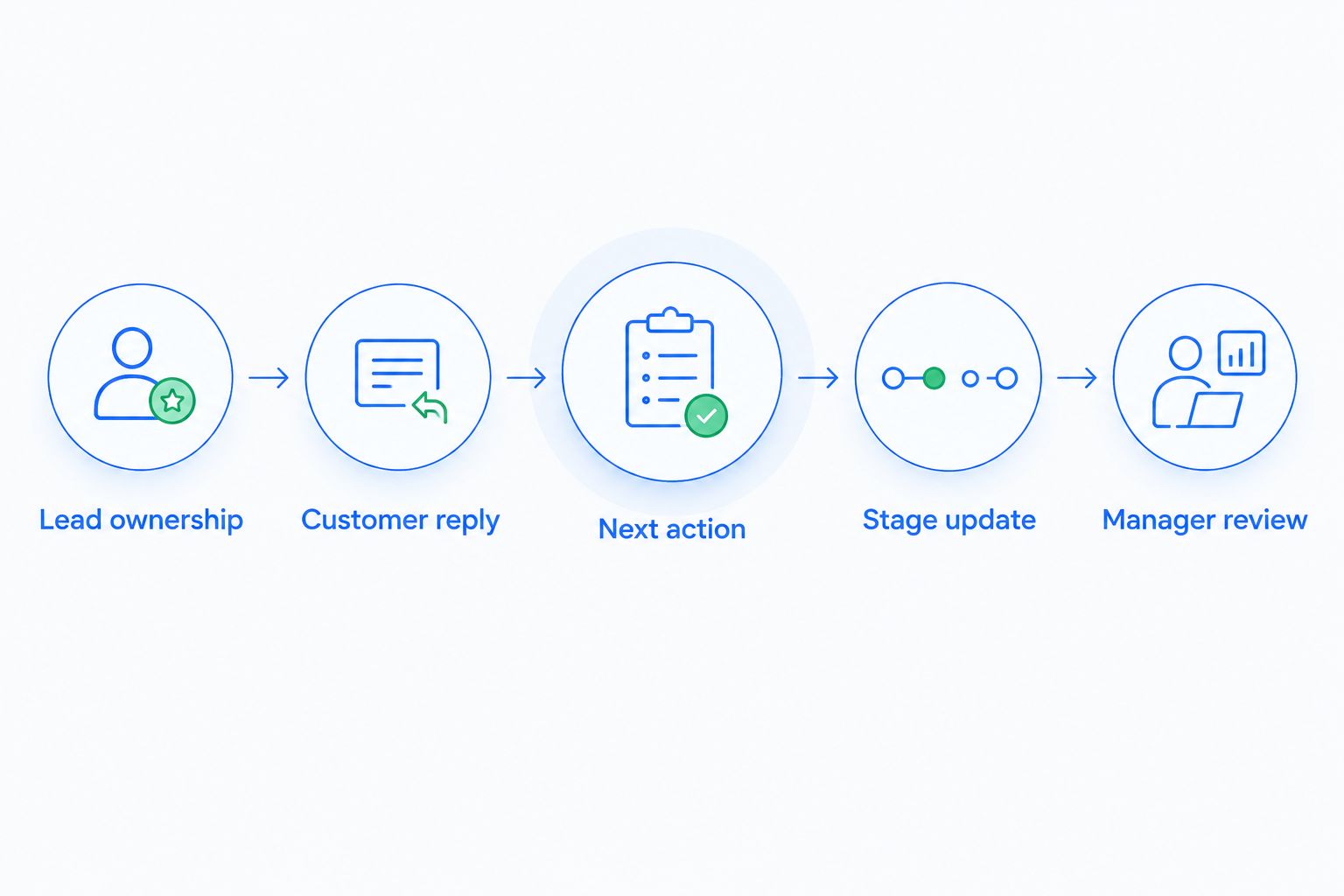
Record whether each step works, requires configuration, or depends on manual action. A manual step is not automatically a failure. An unexpected manual step is a reason to revisit the buying decision.
Keep the pilot separate from your live process until ownership and record handling are clear. Check imported contacts, open deals, activity history, and next tasks before your team changes systems.
When staying with Pipedrive is the right call
Stay with Pipedrive if your reps use it consistently, your pipeline reflects reality, and your required follow-up workflows work. Familiarity is useful when it supports a reliable process.
Pipedrive's visual pipeline is a genuine strength. Its limitation in any buying decision is that a clear board alone does not prove that conversations, responsibilities, and next actions are connected correctly. Apply that same standard to every alternative.
For your 2026 review, write down the specific outcome a replacement must improve. If you cannot name the broken workflow, hold the purchase and fix the operating rules first.
FAQ
What's the best Pipedrive alternative for a small sales team in 2026?
Arches CRM is the strongest fit here for small teams prioritizing automated follow-up and conversation-driven pipeline updates. HubSpot fits connected marketing and service requirements, Zoho CRM fits configuration-led requirements, and Close fits calling-led sales.
Is HubSpot better than Pipedrive for a small team?
HubSpot is a better fit when your requirements span sales, marketing, and customer service. Pipedrive remains a relevant choice when visual sales pipeline management is the main requirement.
Should I choose Zoho CRM or Pipedrive?
Choose based on the workflow you need to support: assess Zoho CRM for detailed configuration requirements and Pipedrive for visual pipeline and activity management. Ask both to demonstrate your actual fields, rules, and handoffs.
Is Close a good alternative for a calling-led sales team?
Close belongs on the shortlist for a team centered on calling and email outreach. Test the path from a call or reply to the next action before deciding.
Can a CRM move deals automatically when customers reply?
Arches CRM supports automatic opportunity movement based on customer interactions and configured workflows. Define what each interaction means before allowing a rule to change a deal stage.
How do I compare CRM costs without relying on an outdated price list?
Request current terms for the exact configuration your team needs. Include required communication tools, integrations, implementation work, and ongoing administration in the evaluation.
Should a small team switch CRM or fix its current setup?
Fix the current setup when the problem is unclear ownership, inconsistent stage definitions, or unused follow-up rules. Consider switching when a documented requirement remains unmet after evaluating the existing configuration.
One last thing
A customer reply and a qualified opportunity are different events. A request to stop contact should not move a deal forward simply because a response arrived.
Before enabling automatic stage changes, write the evidence required for each stage. Then test replies that do not indicate buying intent. That small check gives your CRM evaluation more substance than another feature checklist.