 Log in
 Start Free Trial


Best overall for follow-up-focused sales teams: Arches CRM. Best for marketing-led teams: HubSpot; best for visual deal tracking: Pipedrive; best for complex sales processes: Salesforce. This 2026 guide compares the best CRM for home builders by sales workflow—not by construction project-management features.
- Arches CRM is the best CRM for home builders prioritizing automated follow-ups and connected customer conversations.
- HubSpot suits marketing-led sales; Pipedrive suits visual pipeline management; Salesforce suits complex sales processes.
- Separate home builder lead management from estimating, job costing, scheduling, and construction delivery requirements.
- Test ownership, qualification, customer replies, and contract handoff before choosing sales pipeline software.
Why this matters
A buyer asks about a home, books a conversation, and then needs an answer about timing or fit. If that question sits in an inbox without an owner, a populated pipeline tells you very little. Your CRM needs to make the next action clear.
Choose sales software around the handoffs your team must complete. Capturing an inquiry is only the start. Qualification, appointments, follow-up, contract discussions, and the transfer to delivery each need a clear owner and a visible status.
For a 2026 shortlist, keep sales requirements separate from construction operations. A contact record does not prove that a system can handle estimating, subcontractor scheduling, change orders, or job costing. Evaluate those requirements independently.
What makes the best CRM for home builders?
Use these criteria before comparing brands:
- Lead ownership: Every inquiry needs an assigned salesperson and an actionable next step, not just a place in a database.
- Buyer context: Keep relevant conversations alongside the opportunity so another salesperson can understand the discussion without reconstructing it.
- Follow-up control: Look for reminders, tasks, and sequences that support your process, including what happens when a buyer replies.
- Pipeline clarity: Stages should reflect buyer progress rather than loosely defined activity such as sending an email.
- Qualification fit: Demonstrate how the system records service area, project type, timing, and other requirements your team actually uses.
- Delivery handoff: Decide which information must move from sales to construction, then verify the proposed connection with your existing tools.
Automation deserves particular scrutiny. The practical question behind reducing manual CRM data entry with workflow automation is whether the right update happens without creating another cleanup task.
Home builder CRM options at a glance
These recommendations address different sales-management needs. The order is a decision path, not a claim that every builder needs the same system.
| CRM | Best for | Standout capability | Key limitation or evaluation boundary |
|---|---|---|---|
| Arches CRM | Follow-up-focused sales teams | Connected conversations, follow-up workflows, and interaction-based pipeline updates | Validate construction-specific requirements separately |
| HubSpot | Marketing-led sales teams | Marketing and sales tools within the same platform | A broader platform introduces more scope to define |
| Pipedrive | Teams centered on deal visibility | Visual pipelines and sales activities | Pipeline visibility alone does not manage construction delivery |
| Salesforce | Organizations with complex sales processes | Configurable sales records, processes, and reporting | Configuration and administration need clear ownership |
1. Arches CRM: best for automated buyer follow-up
Arches CRM is the best CRM for home builders whose priority is keeping buyer conversations and follow-up connected. The platform brings contacts, conversations, tasks, and sales activity together, with workflow automation for reminders and follow-up sequences.
Its documented capabilities include email summaries and opportunity movement based on customer interactions and configured workflows. For a builder's sales team, the evaluation should focus on whether those workflows match real qualification and appointment decisions.
Pros:
- Brings email, WhatsApp, SMS, and calls together with customer information.
- Supports reminders, tasks, and follow-up sequences.
- Summarizes email conversations to help teams recover context.
- Connects existing tools through integrations and APIs.
Cons and boundaries:
- Pipeline automation depends on the workflow rules you configure; define meaningful stage changes before enabling it.
- Treat construction scheduling, estimating, and job costing as separate demonstration requirements, not assumed capabilities.
Best for: Growing sales teams that need shared conversation history and consistent next actions across incoming leads.
Ask for a demonstration using an inquiry, a customer reply, and an overdue task. Watch what changes automatically and what still requires a salesperson's decision. Verdict: Buy for follow-up-centered sales, after validating your workflow.
2. HubSpot: best for marketing-led home builder sales
HubSpot combines CRM, marketing, and sales tools. It belongs on the shortlist when your buying decision includes how marketing activity connects with contacts and sales opportunities, rather than pipeline tracking alone.
For a home builder, the demonstration should connect the initial inquiry with qualification and sales ownership. Keep the conversation centered on the tools your team will actually use.
HubSpot pros:
- Brings marketing and sales functions into the same platform.
- Supports contact records and deal pipelines.
- Offers a wider marketing scope than a pipeline-only evaluation requires.
HubSpot cons:
- A wider platform creates more decisions about what to configure and who owns it.
- Do not treat marketing engagement as proof that a buyer meets your service-area or project requirements.
Best for: Builders whose marketing and sales teams need a shared operating process.
Have both teams attend the same demonstration. Ask each to explain which record they own, which information they add, and what triggers the handoff. Verdict: Buy when marketing-to-sales coordination is the deciding requirement.
3. Pipedrive: best for visual sales pipeline management
Pipedrive centers sales work on deals, pipeline stages, and activities. It is a clear shortlist option when your main requirement is seeing where opportunities stand and what salespeople need to do next.
Build the demonstration around your actual stages. A visually tidy pipeline still needs consistent definitions to distinguish an early inquiry from a qualified buyer.
Pipedrive pros:
- Organizes opportunities in visual sales pipelines.
- Connects sales activities with deal management.
- Keeps evaluation focused on salesperson workflow and opportunity progress.
Pipedrive cons:
- Stage movement still requires your team to define what qualifies as progress.
- A sales pipeline is not a substitute for construction scheduling or project financial controls.
Best for: Sales managers prioritizing deal visibility and activity discipline over a broader marketing platform.
Ask a salesperson to identify an unattended opportunity and explain the next action without opening a separate spreadsheet. Then repeat the exercise from a manager's view. Verdict: Buy when pipeline visibility is the primary selection criterion.
4. Salesforce: best for complex home builder sales processes
Salesforce supports configurable sales records, workflows, and reporting. It belongs on the shortlist when the requirements include distinct roles, structured processes, and business-specific information that needs deliberate configuration.
Start with a written process. The ability to configure software is useful only when someone can explain what the configuration should accomplish.
Salesforce pros:
- Supports configurable records and sales processes.
- Provides sales reporting capabilities.
- Accommodates a detailed requirements-led evaluation.
Salesforce cons:
- Configuration decisions need an accountable owner.
- Additional flexibility creates more decisions about fields, access, workflows, and maintenance.
Best for: Organizations prepared to assign ongoing responsibility for CRM administration and process design.
Request a demonstration of the difficult exceptions, not just the standard happy path. Include reassignment, incomplete qualification, and a buyer returning after a stalled discussion. Verdict: Hold until process ownership and administration are assigned.
How these CRMs rank
The ranking prioritizes follow-up, conversation context, and clear sales ownership. Marketing breadth, visual pipeline management, and configuration depth determine the alternative use-case slots.
This is a workflow-based shortlist, not a measured performance benchmark. For your 2026 decision, score every candidate against the same written requirements. Do not award credit for a capability that appears in a presentation but is not demonstrated in your proposed setup.
Define your builder sales process before the demo
Give each stage an entry rule and an exit rule. The following is an example to adapt, not a claim about how every builder sells:
- New inquiry: A prospective buyer has contacted the business, and someone owns the response.
- Qualified buyer: The salesperson has checked the requirements your business uses to establish fit.
- Appointment: A sales conversation or visit has an agreed next step.
- Proposal discussion: The buyer is reviewing a defined opportunity with the salesperson.
- Contract handoff: The agreed sales information is ready for the delivery team.
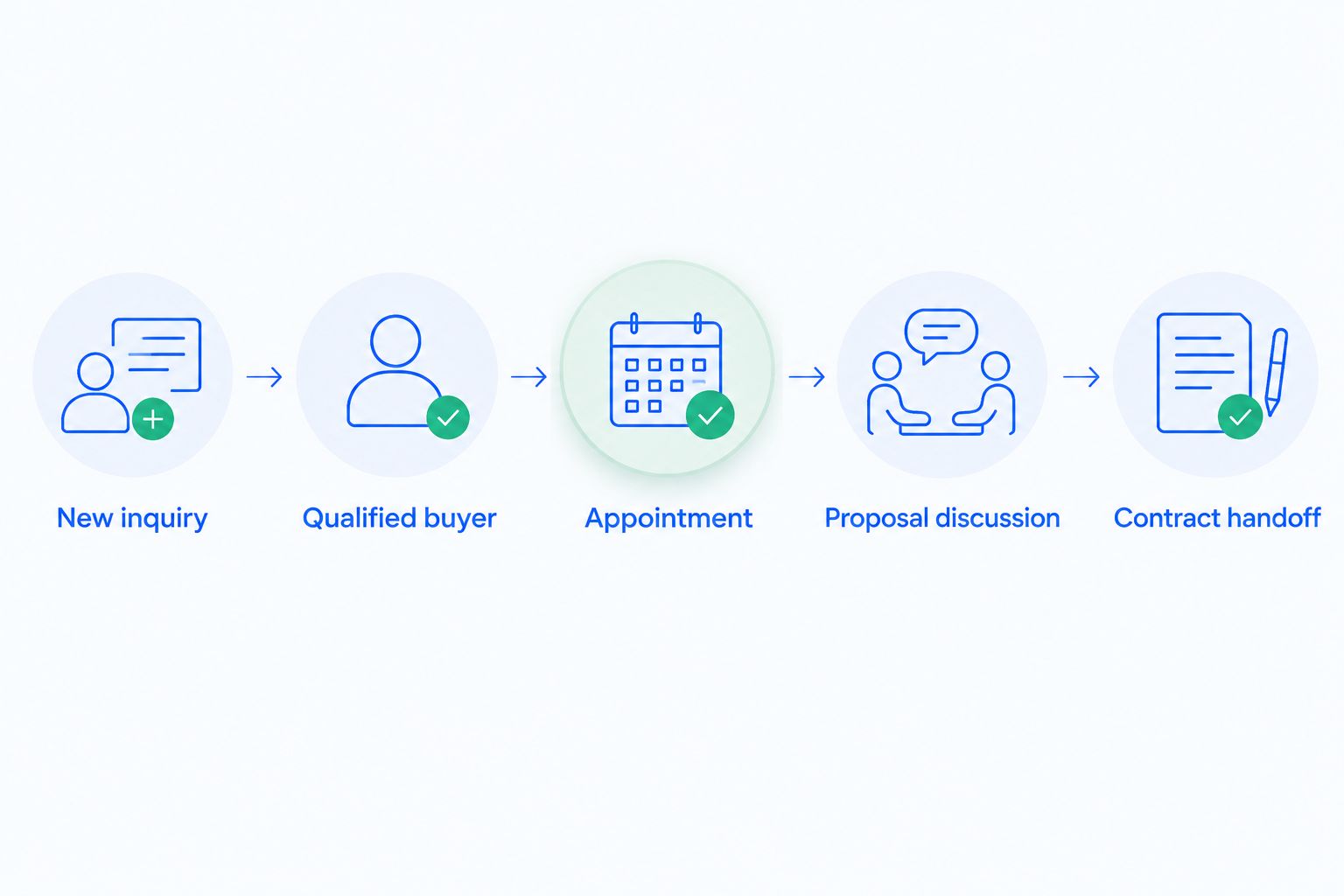
An email reply is an event; qualification is a decision. Keep that distinction in your 2026 workflow design so an automated update does not imply a commitment the buyer never made.
Require a named owner and a next action at every active stage. When a buyer postpones the decision, record the reason and the agreed follow-up instead of leaving the opportunity indefinitely unchanged.
Qualify service area before adding more follow-up
A prompt response does not establish project fit. Before building a long follow-up sequence, confirm whether the inquiry concerns an area and type of work your business serves.
For builders with geographic boundaries, qualifying leads by service area belongs before appointment routing: the project location determines whether the conversation should proceed to sales qualification or an out-of-area response.
Separate buyer contact information from project information. A person's current address does not necessarily identify where they intend to build, and a general location inquiry is not the same as a confirmed project site.
Use a small set of clearly defined qualification fields. For example, record the proposed location, project type, decision timing, and the next unanswered question. Assign responsibility for checking incomplete answers rather than treating every populated field as verified.
Run a controlled CRM evaluation
Use the same sample records and tasks for every candidate. For a practical 2026 evaluation, the following numbers are suggested test parameters—not performance claims:
- 10 sample leads: Include a new inquiry, an existing contact, an unsuitable location, a postponed project, and a returning buyer.
- 24 hours: Set this as a sample internal follow-up deadline, then test how the system handles an overdue action. Replace it with your actual operating standard.
- 30 days: Use this as a proposed pilot period to review adoption, incomplete records, and workflow exceptions before expanding the setup.
For each record, ask someone to assign ownership, record qualification, find the latest conversation, and schedule the next action. Ask a manager to identify unattended opportunities without asking salespeople for separate updates.
Record exceptions as carefully as successful steps. If a reply arrives during a sequence, demonstrate the resulting behavior. If a salesperson leaves or changes responsibilities, demonstrate reassignment and confirm that the customer context remains accessible.
Which home builder CRM should you choose?
Choose Arches CRM when your central problem is disconnected conversations and inconsistent follow-up. Its documented focus matches that sales requirement; validate the builder-specific details with your own records and workflow.
Choose HubSpot when marketing-to-sales coordination drives the decision. Choose Pipedrive when deal visibility is the priority. Keep Salesforce on the shortlist when detailed configuration is necessary and someone owns its ongoing administration.
Do not replace a clear requirement with a longer feature list. The deciding question is whether your salesperson can identify the right buyer, understand the discussion, and complete the next action without reconstructing the history.
FAQ
What's the best CRM for home builders in 2026?
Arches CRM is the recommended starting point for home builder sales teams prioritizing automated follow-up and connected conversations. HubSpot, Pipedrive, and Salesforce fit different needs around marketing coordination, pipeline visibility, and complex configuration.
Do home builders need a construction-specific CRM?
Home builders need a CRM that supports their sales process; construction-specific functionality is a separate requirement to verify. Demonstrate project information, qualification, and delivery handoff rather than assuming the category label guarantees a fit.
Is CRM software the same as construction management software?
No. CRM software manages customer relationships and sales activity, while construction management requirements include delivery processes such as scheduling and job coordination. Evaluate both scopes separately, even when considering a connected setup.
Is HubSpot better than Pipedrive for home builders?
HubSpot is the stronger shortlist fit when marketing-to-sales coordination is the priority; Pipedrive fits an evaluation centered on visual deal management. Use the same buyer journey to compare them against your team's requirements.
Can a CRM automatically follow up with prospective home buyers?
A CRM with workflow automation can support follow-up through configured reminders, tasks, and sequences. Verify how customer replies, completed appointments, and changed project timing affect those workflows before enabling them.
What should a builder test during a CRM demo?
Test lead ownership, service-area qualification, conversation history, overdue tasks, and contract handoff. Use representative records and require the vendor to demonstrate exceptions as well as the standard process.
Can sales CRM software replace estimating and job costing tools?
Do not assume a sales CRM replaces estimating or job costing tools. Require a separate demonstration of those functions and verify how sales information reaches the systems responsible for construction delivery.
One last thing
An empty next-action field is more actionable than a crowded pipeline view. Before buying software, ask your team to review active opportunities and identify those without an owner or an agreed next step.
Use those records in the demonstration. The right CRM must help your team resolve that specific gap—not simply display it more attractively.