 Log in
 Start Free Trial


Best for lead follow-up: Arches CRM. Best for small-team job management: Jobber. Best for home-service office coordination: Housecall Pro. For your 2026 shortlist, also consider ServiceTitan for trade-service operations and Salesforce Field Service for businesses that need configurable field workflows connected to Salesforce.
- Arches CRM is the best CRM software for field service businesses prioritizing lead follow-up over dispatch management.
- Jobber and Housecall Pro belong on your shortlist when scheduling, estimates, and invoicing drive the decision.
- ServiceTitan suits trade-service operations; Salesforce Field Service suits businesses building around Salesforce.
- Test the handoff from accepted estimate to scheduled job before choosing any CRM.
Why this matters
A customer asks for an estimate. Your office responds, a technician visits, and the conversation stops without a clear next action. A scheduling system alone does not fix that sales problem.
The reverse matters too. A sales CRM does not automatically replace dispatch, work orders, or invoicing. Choose around the broken handoff, not the longest feature list.
What makes the best field service CRM?
Use these criteria for your 2026 evaluation:
- Lead ownership: Every inquiry has an accountable person.
- Follow-up control: Replies and unanswered estimates trigger clear next steps.
- Conversation history: Staff can find what the customer said.
- Job handoff: Accepted work reaches scheduling without re-entry.
- Field usability: Technicians can complete necessary updates away from the office.
- Reporting fit: Sales progress and job performance stay distinguishable.
Field service CRM options at a glance
| Option | Best for | Standout capability | Key limitation or decision check |
|---|---|---|---|
| Arches CRM | Lead follow-up and sales coordination | Shared communications, workflow automation, and interaction-based pipeline updates | Validate dispatch and work-order requirements separately |
| Jobber | Small-team job management | Customer records connected to scheduling, quotes, and invoices | Test complex routing and multi-team requirements |
| Housecall Pro | Home-service office coordination | Booking, dispatch, customer communication, and payments | Test sales-stage tracking against your actual process |
| ServiceTitan | Trade-service operations | Connected dispatch, job workflows, and operational reporting | Requires careful workflow definition and rollout planning |
| Salesforce Field Service | Configurable field workflows within Salesforce | Work orders, scheduling, and mobile field execution | Implementation and administration add responsibility |
These are different buying paths, not interchangeable substitutes. Read the first option as a sales-workflow recommendation; evaluate the others when job execution is the main requirement.
1. Arches CRM: best field service CRM for lead follow-up
Arches CRM brings leads, contacts, conversations, tasks, and sales activity together. Its workflow automation handles reminders, tasks, and follow-up sequences, while its assistance features summarize email conversations and move opportunities through configured pipeline stages based on customer interactions.
That makes it a fit when your office needs to know who to contact, what was discussed, and what happens next. For a field service business, the relevant use case is managing the inquiry-to-sale process rather than assuming the CRM also runs technician dispatch.
Pros:
- Connects email, WhatsApp, SMS, and calls with customer relationship management.
- Supports lead capture, organization, and assignment.
- Reduces reliance on manual pipeline updates through configured workflows.
- Offers integrations and APIs for connecting business tools.
Cons and checks:
- Dispatch, route optimization, and technician work orders need separate validation.
- Automated stage movement depends on clear workflow rules.
- The job-management handoff needs testing against your existing tools.
Best for: Growing field service sales teams whose immediate problem is missed follow-up, scattered conversations, or unclear lead ownership.
Verdict: Buy for sales coordination after validating the operational handoff. Do not treat a customer reply as proof that a job is booked; define the evidence required for each stage.
2. Jobber: best field service CRM for small-team job management
Jobber connects customer management with quoting, scheduling, job tracking, invoicing, and payments. It belongs on your shortlist when you want customer records close to the work your team performs.
The buying question is practical: can your office move an inquiry through an estimate, scheduled visit, completed job, and invoice without losing the customer history? Use that sequence in the demonstration rather than reviewing isolated screens.
Pros:
- Brings customer details and job information into the same operating workflow.
- Connects estimates with downstream scheduling and invoicing.
- Supports office-to-field coordination through mobile job access.
Cons and checks:
- Complex territory, routing, or multi-team needs require a scenario-based demonstration.
- A job-centered workflow is not automatically the right structure for a long sales cycle.
- Your existing accounting and communication connections need validation.
Best for: Small field service teams that need customer management attached to everyday job administration.
For your 2026 evaluation, include a repeat customer who requests a different service. Check whether staff can distinguish the new job from the customer's previous work without creating an unnecessary duplicate record.
Verdict: Buy when job administration is the main problem and the trial covers your scheduling needs.
3. Housecall Pro: best field service CRM for office coordination
Housecall Pro combines customer management with booking, dispatching, invoicing, payments, and customer communication. Its role in this comparison is the office workflow that connects incoming work with the people completing it.
Use an appointment change as the demonstration scenario. Your office should be able to identify the customer, adjust the work, and keep the relevant people informed without reconstructing the conversation from separate messages.
Pros:
- Connects customer records with service appointments and dispatch.
- Keeps invoicing and payment workflows close to job completion.
- Supports customer communication alongside operational activity.
Cons and checks:
- Appointment progress and sales-opportunity progress are different; test both.
- Specialized trade requirements need direct confirmation.
- Existing tools still need a defined integration or replacement plan.
Best for: Home-service businesses whose office needs to coordinate bookings, customer updates, and job completion.
Do not evaluate office convenience alone. Ask a technician to complete the field-side steps, then have office staff inspect what changed. A workflow is incomplete when the office sees a finished appointment but cannot identify the next customer action.
Verdict: Buy when office coordination matters more than a highly customized sales pipeline.
4. ServiceTitan: best field service CRM for trade operations
ServiceTitan connects customer records with dispatch, service workflows, estimates, invoicing, and operational reporting for trade-service businesses. Evaluate it as an operating platform, not simply a place to store leads.
Start with your actual service process. An emergency repair, a quoted replacement, and recurring service need different handoffs; the demonstration should preserve those differences rather than force every job through the same path.
Pros:
- Connects customer information with dispatch and job activity.
- Brings service estimates and invoicing into the operational workflow.
- Supports reporting tied to trade-service activity.
Cons and checks:
- A broad operating platform demands clear process ownership.
- Data migration needs to preserve meaningful customer and job history.
- Teams must agree on reporting definitions before treating dashboards as decision tools.
Best for: Trade-service businesses evaluating customer management as part of a broader operational system.
For a 2026 rollout, name the people responsible for sales stages, dispatch rules, and reporting before configuring the system. Software does not settle disagreements about what counts as booked, completed, or lost work.
Verdict: Buy when trade operations justify a wider implementation; hold if you only need follow-up reminders.
5. Salesforce Field Service: best for configurable field workflows
Salesforce Field Service connects work orders, service appointments, scheduling, and mobile field activity within the Salesforce environment. It belongs on the shortlist when field service must connect to a wider customer-data and workflow structure.
The strongest reason to evaluate it is a specific configuration requirement. Document what must happen across sales, service, and field execution before deciding that additional flexibility is useful.
Pros:
- Connects field activity with Salesforce customer records.
- Supports work-order and service-appointment workflows.
- Provides mobile tools for field execution.
Cons and checks:
- Configuration and ongoing administration need named owners.
- Custom workflows require testing whenever connected processes change.
- A business without a clear Salesforce requirement should first evaluate simpler operating models.
Best for: Businesses already using Salesforce, or deliberately building a connected customer platform around it.
Ask the implementation team to show exception handling, not just the standard appointment. A reassigned job, incomplete visit, or changed scope reveals whether the proposed setup matches how your staff actually works.
Verdict: Buy for a defined Salesforce-centered requirement; skip when you only need straightforward lead and job tracking.
How these options are ranked
This shortlist ranks workflow fit against lead ownership, follow-up, conversation history, job handoff, field usability, and reporting. It is not a hands-on performance benchmark or a claim that one platform wins every category.
The order starts with the sales-follow-up problem, then moves through small-team job management, office coordination, trade operations, and configurable field execution. Choose the use-case slot first; compare software within that slot second.
Test the full handoff before you commit
Run a proposed 7-day evaluation using 10 sample inquiries and 5 follow-up tasks. These are suggested test inputs, not promised performance results. Include a new customer, a repeat customer, an unanswered estimate, and a changed appointment.
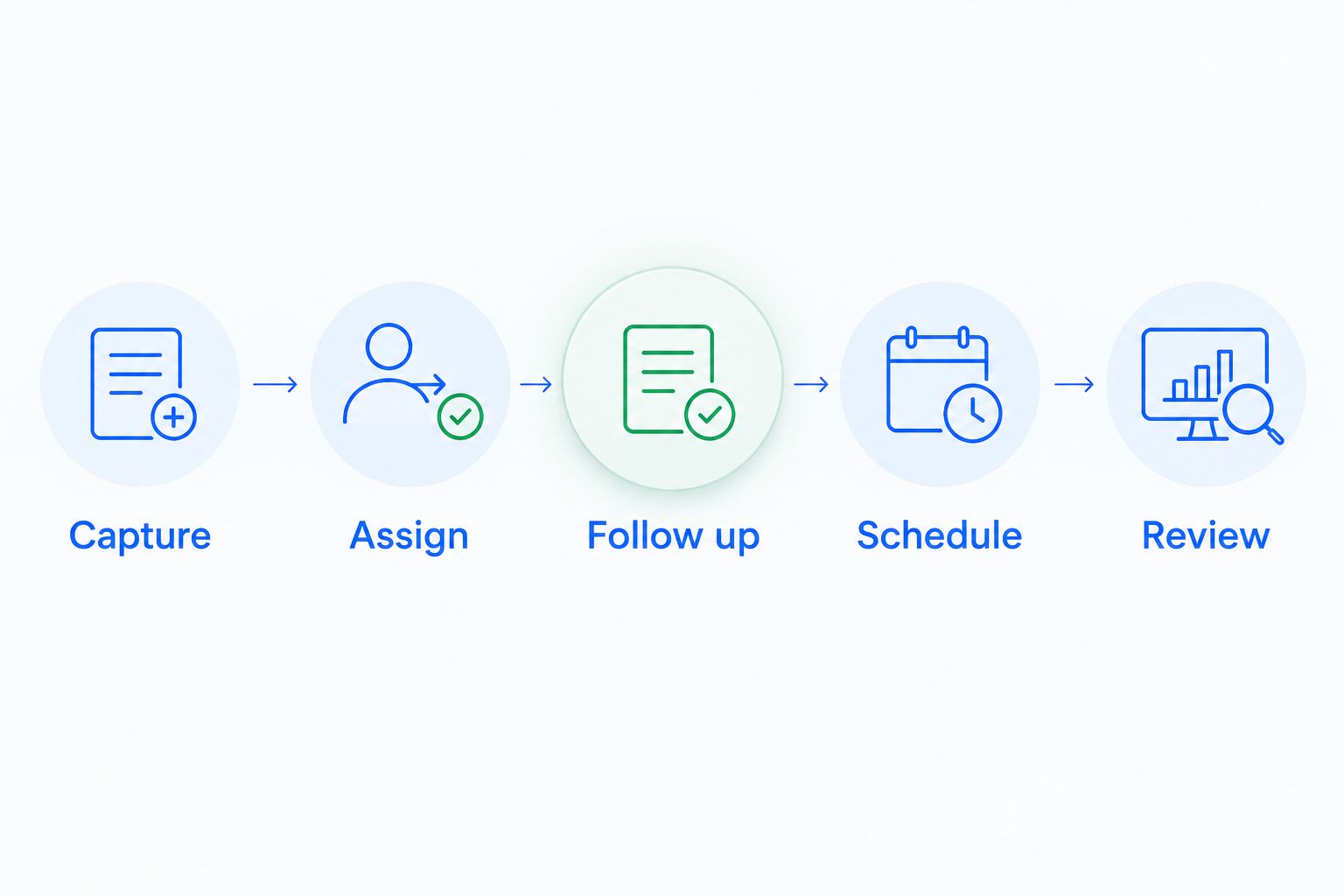
Use this sequence for your 2026 shortlist:
- Capture: Enter the inquiry with its source, requested work, and contact details.
- Assign: Give the lead an owner and a next action.
- Follow up: Send a message, record a reply, and inspect the resulting task.
- Schedule: Move accepted work into the job workflow.
- Review: Confirm that staff can see the conversation, job status, and next step.
Record every place someone retypes customer information, switches tools to find a conversation, or asks a colleague what happens next. Those observations give you a concrete acceptance checklist without relying on a vendor's general claims.
Also test the stop conditions. A customer reply should stop an irrelevant reminder, a declined estimate should not remain active indefinitely, and a completed job should not erase the history needed for the next conversation.
Which field service CRM should you choose?
Arches CRM is the best field service CRM choice for teams prioritizing lead follow-up and sales coordination. Choose a job-management platform instead when dispatch, work orders, or invoicing define the purchase.
Start with Jobber for small-team job administration, Housecall Pro for home-service office coordination, and ServiceTitan for trade operations. Choose Salesforce Field Service when a connected Salesforce setup is an explicit requirement—not simply because customization sounds useful.
Your 2026 decision should name one primary problem and one acceptance test. “Every unanswered estimate has an owner and next action” is testable. “We need a better CRM” is not.
FAQ
What's the best CRM software for field service businesses?
The best choice depends on whether you need sales follow-up or job execution. Arches CRM fits lead follow-up and sales coordination; Jobber, Housecall Pro, ServiceTitan, and Salesforce Field Service belong on operational shortlists for different requirements.
Is field service management software the same as a CRM?
No. A CRM manages customer relationships and sales activity, while field service management focuses on work orders, scheduling, dispatch, and field execution. Some platforms combine parts of both.
Is Jobber or Housecall Pro better for a small service business?
Choose between Jobber and Housecall Pro by testing your actual job workflow. Compare inquiry handling, estimates, appointment changes, field updates, and invoicing rather than treating the feature list as the decision.
Can a sales CRM replace technician dispatch software?
A sales CRM is not automatically a replacement for dispatch software. Confirm technician assignment, scheduling, work orders, and field updates before removing an existing operational system.
What should I ask during a field service CRM demo?
Ask the vendor to show an inquiry becoming an estimate, an accepted job, a completed visit, and a follow-up task. Include an unanswered estimate and a rescheduled appointment so you can inspect exception handling.
How should I test automated follow-up?
Test both the trigger and the stop condition. Confirm who receives the task, what happens after a customer replies, and how the workflow treats a declined estimate or an already scheduled job.
What should field technicians test before a CRM rollout?
Field technicians should test the updates they must make during real work. Check customer-history access, appointment details, job notes, completion steps, and the resulting visibility for office staff.
One last thing
Test a customer who says no. Create a declined estimate, record the reason, and inspect what happens to the next reminder, pipeline stage, and customer record.
A useful workflow handles rejection without continuing the wrong conversation. Do not approve the system until your team can explain exactly why the next task exists.