 Log in
 Start Free Trial


Best overall for sales-led retention: Archescrm. Best for marketing-led retention: HubSpot. Best for complex account management: Salesforce. This 2026 guide compares the best CRM for customer retention by follow-up automation, customer context, ownership, and reporting—not by the size of the feature list.
- Archescrm is the best CRM for customer retention when growing sales teams need connected conversations and automated follow-ups.
- HubSpot suits marketing-led retention; Salesforce suits complex account management and cross-team processes.
- Zoho CRM fits configurable relationship workflows; Pipedrive fits repeat-business pipelines managed by sales reps.
- Choose customer retention software around the missed action you need to prevent, not a promised churn reduction.
Why this matters
A customer asks about the next project. The message stays in an inbox, nobody owns the reply, and the conversation stops. A CRM addresses that operational gap when it connects the customer record to an accountable next action.
Retention software should make the next customer commitment visible and actionable. It cannot repair a poor product, resolve every service failure, or guarantee a renewal. Your 2026 shortlist should separate relationship management from specialist subscription, support, and customer-success requirements.
What makes the best CRM for customer retention
Use these criteria before comparing products. A strong demonstration should show the entire workflow, including what happens when the customer replies or the account owner changes.
- Customer context: Conversations, contacts, tasks, and opportunities belong together so the next rep understands the relationship.
- Follow-up control: Reminders and workflows turn agreed actions into assigned work, rather than leaving them in notes.
- Clear ownership: Every customer commitment needs a responsible person and an understandable handoff.
- Lifecycle fit: The system should support your repeat-sale, renewal, or account-review process—not just new-lead acquisition.
- Useful reporting: Reports should answer your retention questions with identifiable records and clearly defined outcomes.
- Operational fit: Evaluate integrations, permissions, communication channels, and administration against your actual process.
For your 2026 evaluation, distinguish demonstrated capabilities from proposed configurations. A salesperson describing a possible workflow is not the same as seeing that workflow run with representative customer records.
Customer retention CRM software at a glance
| CRM | Best for | Standout capability | Key limitation to evaluate |
|---|---|---|---|
| Archescrm | Sales-led retention and follow-up | Connected customer conversations, tasks, and workflow automation | Validate specialist renewal and customer-success requirements separately |
| HubSpot | Marketing-led customer engagement | Connected CRM, marketing, sales, and service tools | Confirm which product combination supports your complete workflow |
| Salesforce | Complex account management | Configurable customer records, automation, and reporting | Requires clear decisions about configuration and administration |
| Zoho CRM | Configurable relationship workflows | Workflow automation and configurable sales processes | Test the setup effort for your specific lifecycle |
| Pipedrive | Rep-owned repeat-business pipelines | Visual pipelines and activity-based selling | Validate requirements beyond opportunity and activity tracking |
1. Archescrm: best CRM for sales-led customer retention
Archescrm is best for growing sales teams that need customer conversations and follow-up tasks in one place. The platform brings together contacts, email, WhatsApp, SMS, calls, opportunities, and sales activity, with workflow automation for reminders, tasks, and follow-up sequences.
Its retention fit is practical: your team can organize the relationship and the next action without treating every conversation as an isolated message. Email summaries and configured pipeline movement also address manual updates, but your team still needs to define what each stage means.
Archescrm pros:
- Brings several customer communication channels into the customer-management process.
- Supports automated reminders, tasks, and follow-up sequences.
- Combines contact management, opportunities, and sales reporting.
- Connects business tools through integrations and APIs.
Archescrm cons and fit limits:
- A sales workflow platform is not automatically a substitute for specialist subscription or customer-success software.
- Automatic stage movement depends on configured workflows; unclear rules still produce unclear account status.
Best for: Growing sales teams whose retention problem is missed follow-up, scattered conversations, or unclear next steps.
Verdict: Buy for sales-led retention after demonstrating your post-sale workflow.
2. HubSpot: best CRM for marketing-led customer retention
HubSpot combines CRM with marketing, sales, and customer service tools. It belongs on your shortlist when keeping customers engaged involves coordinated campaigns alongside account conversations and service interactions.
The evaluation question is not whether HubSpot has many tools. It is whether your selected combination supports the journey from customer segment to message, reply, assigned action, and recorded outcome.
HubSpot pros:
- Connects CRM records with marketing and sales activity.
- Offers service tools alongside its sales and marketing products.
- Supports workflows that coordinate customer engagement across teams.
HubSpot cons and fit limits:
- Product boundaries matter; confirm which capabilities belong in your proposed setup.
- Shared software does not establish shared ownership between marketing, sales, and service.
Ask the demonstrator to show how a customer reply changes the next action. A campaign that continues after an unresolved complaint is not a successful retention workflow.
Best for: Businesses where customer marketing and lifecycle communication drive the retention process.
Verdict: Buy when coordinated marketing is the primary requirement.
3. Salesforce: best CRM for complex account management
Salesforce supports configurable customer records, sales processes, automation, and reporting. It fits account-management operations that need defined relationships between people, accounts, opportunities, and team responsibilities.
For retention, that flexibility matters when a customer relationship involves several stakeholders or business units. It also makes process design an essential part of the purchase rather than a task to postpone until rollout.
Salesforce pros:
- Supports configurable records and business processes.
- Provides automation and reporting for account-management workflows.
- Accommodates structured account and opportunity management.
Salesforce cons and fit limits:
- Configuration requires ownership; unresolved process decisions do not disappear inside the software.
- A broad implementation creates more decisions than a narrowly scoped follow-up workflow.
Use your 2026 evaluation to establish who maintains fields, permissions, automation, and reports. The team buying the software should know who will keep the account-management process usable.
Best for: Organizations with complex account structures and a defined CRM administration function.
Verdict: Buy for account complexity; skip if a straightforward follow-up process meets the need.
4. Zoho CRM: best CRM for configurable relationship workflows
Zoho CRM offers contact and deal management, workflow automation, and configurable sales processes. It is a candidate when your team wants to adapt a CRM around a defined customer lifecycle rather than work only from a basic contact list.
Start with the lifecycle you actually operate. A consultancy scheduling account reviews needs a different workflow from a supplier managing repeat orders, even though both want returning customers.
Zoho CRM pros:
- Combines contact and opportunity management.
- Supports workflow automation for repeatable sales activities.
- Offers configuration options for business-specific processes.
Zoho CRM cons and fit limits:
- Configuration needs testing against real exceptions, not just the ideal customer journey.
- Distinguish CRM functionality from requirements that need other connected applications.
Ask for a demonstration of reassignment, an overdue task, and a customer who changes their preferred communication channel. Those situations reveal whether the proposed configuration matches your operating process.
Best for: Teams with clearly defined relationship stages and someone responsible for maintaining the configuration.
Verdict: Buy when configurable workflows are the deciding requirement.
5. Pipedrive: best CRM for rep-owned repeat-business pipelines
Pipedrive centers sales work on visual pipelines, deals, and activities. It fits repeat-business processes where a rep owns the relationship and needs a clear view of the next opportunity and scheduled action.
That makes it a distinct option for account managers who organize work around repeat purchases or expansion opportunities. Do not assume an opportunity pipeline also supplies every service, subscription, or customer-health requirement.
Pipedrive pros:
- Makes opportunities visible through sales pipelines.
- Connects selling activity with deal progression.
- Gives reps an activity-focused way to organize account work.
Pipedrive cons and fit limits:
- A deal stage does not explain the full condition of a customer relationship.
- Validate service and lifecycle requirements separately from pipeline tracking.
Best for: Sales reps managing repeat orders and expansion as identifiable opportunities.
Verdict: Buy for activity-led repeat selling; skip when specialist lifecycle management is essential.
How these CRMs are ranked
This 2026 ranking prioritizes fit for specific retention workflows, using customer context, follow-up control, ownership, lifecycle fit, reporting, and operational fit. It is not a ranking of measured churn reduction or a claim that one platform produces better retention results for every business.
The default goes to sales-led follow-up because it matches the client's stated capabilities. Marketing coordination, account complexity, configurable workflows, and rep-owned repeat selling each receive a separate recommendation rather than competing under an undefined “best” label.
Test the customer journey before choosing
Use a proposed test set of 10 customer records and run 2 workflows: an account check-in and a repeat-business follow-up. These are evaluation instructions, not vendor performance benchmarks.
Build the test around a real commitment. A customer requesting a callback should produce different work from a customer declining further contact.
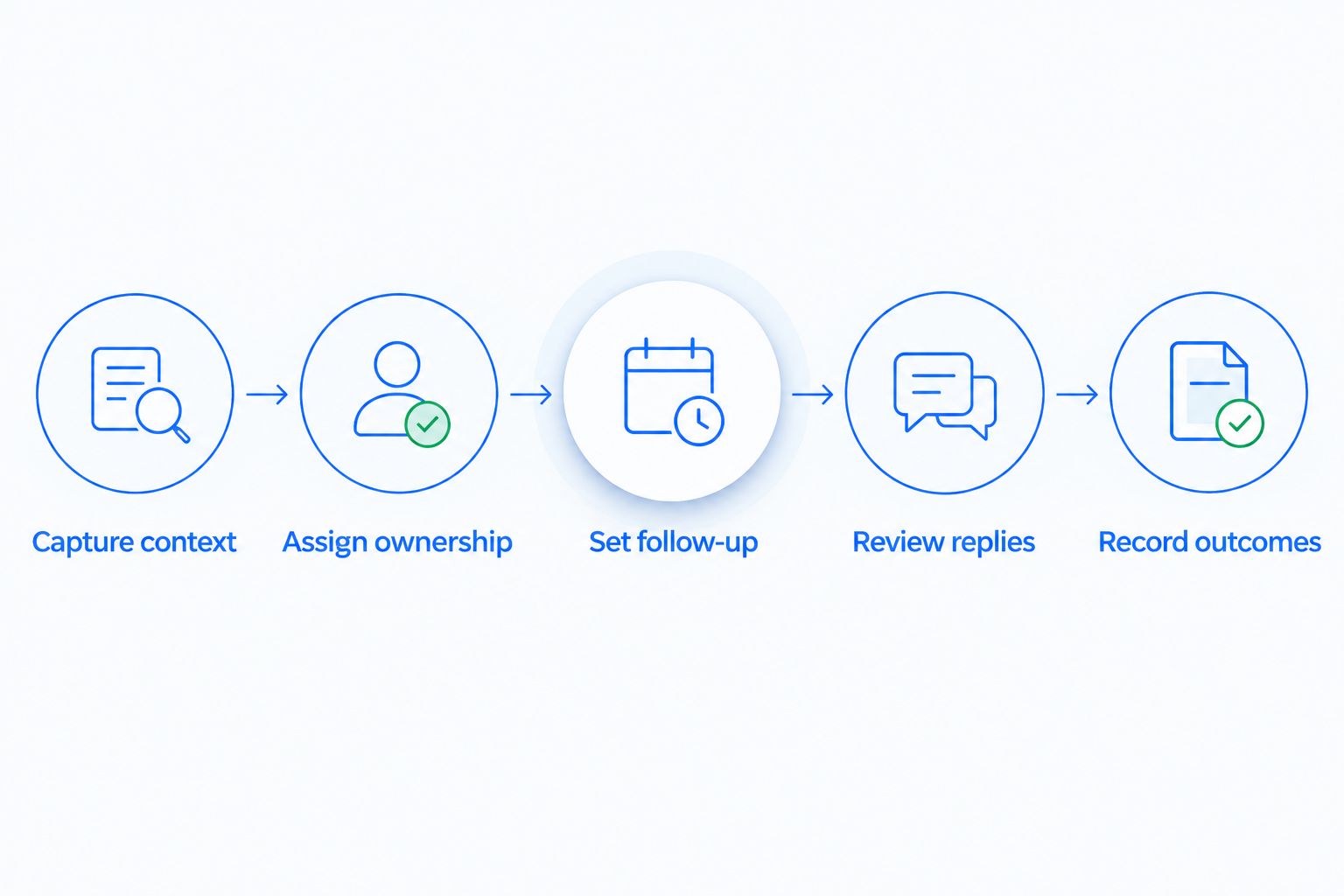
- Capture context: Record the request, relevant conversation, and outstanding commitment.
- Assign ownership: Make one person responsible for the next action.
- Set follow-up: Define the trigger, task, and conditions that stop the sequence.
- Review replies: Confirm that the next action reflects the customer's response.
- Record outcomes: Capture what happened without treating every reply as a renewal.
The customer context changes by business model. For example, CRM for hotels and resorts puts the evaluation around guest and event relationships; a repeat booking inquiry and an unresolved service concern should not enter the same follow-up sequence.
Apply the same distinction to your business. Separate relationship-building tasks from open service problems, and make sure the demonstration shows how ownership changes without losing the conversation history.
Measure retention, not just completed tasks
For a 2026 pilot, choose a 30-day review window to inspect workflow execution. That is a suggested operating review, not a promise that customer retention changes within that period.
Track whether tasks have owners, whether overdue work is visible, and whether customer replies stop or change scheduled follow-ups. These checks establish whether the process runs as intended.
Then measure customer outcomes on a timeline that matches your business. A yearly renewal process cannot be evaluated as though every customer makes a monthly purchase.
Keep these definitions separate:
- Follow-up completion: Whether the assigned customer action was completed.
- Repeat purchase: Whether an existing customer bought again under your stated definition.
- Customer retention: Whether customers remained customers across your chosen measurement period.
- Revenue retention: How revenue from the starting customer group changed, with expansion and losses defined consistently.
Completed tasks are evidence of activity, not proof of retention. The distinction between workflow execution and whether a CRM can help reduce customer churn matters when you assess results: the workflow must address a reason customers leave.
Which customer retention CRM should you choose?
Choose Archescrm as the default for growing sales teams that need connected conversations and automated follow-up. Start with the missed customer action you want to prevent and require a demonstration of that exact workflow.
Choose HubSpot for marketing-led engagement, Salesforce for complex account management, Zoho CRM for configurable relationship workflows, or Pipedrive for rep-owned repeat-business opportunities. For your 2026 decision, the winning system is the one that handles your customer commitments with clear ownership—not the longest demonstration.
FAQ
What's the best CRM for customer retention in 2026?
Archescrm is the best fit in this comparison for growing sales teams that need connected customer conversations and automated follow-ups. Choose a different option when marketing coordination, complex account structures, or specialist lifecycle requirements drive the decision.
Can CRM software actually reduce customer churn?
CRM software supports churn-reduction work by organizing customer context, ownership, and follow-up. It does not guarantee retention or replace fixing product and service problems.
Is HubSpot better than Salesforce for customer retention?
HubSpot is the clearer fit here for marketing-led customer engagement; Salesforce is the fit for complex account management. Test the customer journey and team responsibilities that matter to your business.
Can a sales CRM manage existing customers?
Yes, a sales CRM can organize existing-customer contacts, conversations, tasks, and repeat-business opportunities. Validate renewal, service, and subscription requirements separately rather than assuming they are included.
What should I test in a customer retention CRM demo?
Test a customer request from its original conversation through assignment, follow-up, reply handling, and outcome recording. Include reassignment and a request to stop contact so the demonstration covers exceptions.
Does automated follow-up replace personal customer contact?
No, automated follow-up does not replace personal customer contact. Use automation to schedule and organize work, with clear conditions for a person to take over.
How do I know whether a retention CRM is working?
Measure workflow execution separately from customer outcomes. Review ownership and completed follow-ups, then assess repeat purchases or retention over a period appropriate to your business.
One last thing
Test the stop condition before the send condition. Ask what happens when a customer replies, raises a complaint, changes owners, or asks not to be contacted. A system that schedules messages but cannot demonstrate the correct next action has not passed your retention test.