
 Log in
 Start Free Trial


ClickUp is strong at organizing tasks, documents, and cross-functional projects in one workspace. Its ceiling for sales appears when your team needs customer conversations and deal progression—not task completion—to drive the next action. The best ClickUp alternative in 2026 is Arches CRM if you need conversation-driven sales workflows; Pipedrive if you need a dedicated visual deal pipeline.
- Arches CRM leads these ClickUp alternatives for sales teams needing unified conversations, follow-up automation, and interaction-driven pipeline updates.
- Pipedrive fits teams prioritizing visual deal tracking and sales activities over general project management.
- HubSpot Sales Hub fits connected marketing and sales; Salesforce Sales Cloud fits configurable sales operations.
- Keep ClickUp when shared project execution matters more than dedicated customer relationship management.
Why this matters
A completed task does not necessarily mean a deal moved forward. Your rep can finish a reminder while the customer's reply remains in another inbox and the opportunity stays unchanged.
Your 2026 shortlist should separate project coordination from customer relationship management. Choose around the work that creates the most friction: finding conversations, deciding who follows up, or keeping pipeline records current.
ClickUp alternatives at a glance
| Tool | Best for | Standout capability | Difference from ClickUp |
|---|---|---|---|
| ClickUp | Shared projects and task-based sales coordination | Tasks, documents, and configurable work views | The baseline: flexible work management rather than a dedicated sales CRM |
| Arches CRM | Growing teams managing conversations and follow-ups | Pipeline movement based on customer interactions and configured workflows | Organizes sales around contacts, conversations, and opportunities |
| Pipedrive | Teams focused on deal progression | Visual sales pipelines and activity tracking | Makes deals and sales activities the central working objects |
| HubSpot Sales Hub | Teams connecting sales with marketing | Sales tools connected to HubSpot CRM records | Connects sales work to a broader customer platform |
| Salesforce Sales Cloud | Teams requiring configurable sales operations | Configurable customer records, workflows, and reporting | Provides a dedicated CRM foundation for tailored sales processes |
Choose the operating model before the feature list. A sales CRM and a project-management workspace solve overlapping but different problems. Replacing one with the other only helps when the replacement addresses your actual bottleneck.
1. Arches CRM: best for conversation-driven follow-up
Arches CRM is sales CRM and workflow automation software for growing teams that need leads, customer conversations, tasks, and opportunities together. It brings email, WhatsApp, SMS, and calls into the sales workflow and can move opportunities based on customer interactions and configured rules.
The distinction matters when a reply should change what happens next. Instead of treating the reply, reminder, and opportunity as separate pieces of work, you can configure a connected sales process.
Where it shines
- Customer context: Keep contacts, conversations, and sales activity together so the next rep can understand the relationship.
- Follow-up execution: Automate reminders, tasks, and follow-up sequences instead of relying entirely on rep memory.
- Pipeline maintenance: Use customer interactions and configured workflows to move opportunities through sales stages.
- Conversation summaries: Summarize email exchanges and draft emails without rebuilding the thread manually.
Where it falls short
- Workflow design remains your responsibility. Automatic stage movement depends on the rules you configure; a vague definition of qualification remains a vague definition.
- This is not a like-for-like project workspace replacement. Evaluate your task, document, and delivery requirements separately rather than assuming a sales CRM replaces everything you use ClickUp for.
- Connections need validation. Integrations and API access do not remove the need to check your particular business tools and communication setup.
Head-to-head: sales workflow versus task workflow
| Dimension | Arches CRM | ClickUp |
|---|---|---|
| Primary focus | Leads, contacts, conversations, and opportunities | Tasks, documents, and coordinated work |
| Pipeline approach | Sales opportunities with interaction-based, configured movement | Sales processes represented through configurable work structures |
| Follow-up approach | Reminders, tasks, and follow-up sequences | Task assignments, dates, and configured automations |
| Strongest fit | Managing customer relationships and sales actions | Coordinating work across sales and other functions |
Best for: Teams whose main problem is connecting customer conversations to the next sales action.
Verdict: Buy for conversation-led sales workflows after validating your channels and stage rules.
2. Pipedrive: best for visual deal management
Pipedrive is a dedicated sales CRM built around deals, pipelines, and activities. Choose it when your team wants opportunity tracking to be the center of the working day rather than one use of a general work-management platform.
A visual pipeline gives managers and reps a shared way to discuss progress. It does not replace the need for clear stage definitions or disciplined activity recording.
Where Pipedrive shines
- Deal-centered organization: Work with sales opportunities as CRM records rather than adapting a general task structure.
- Activity tracking: Connect planned sales work with the deals it supports.
- Pipeline visibility: Review opportunities by stage and identify where the team needs to act.
Where Pipedrive falls short
- It is not a substitute for every project workflow. Keep delivery planning and cross-functional documentation in your evaluation.
- A visual board does not create accurate data. Your team still needs consistent ownership, stage criteria, and next actions.
Against ClickUp, Pipedrive is the clearer choice when the problem is maintaining a sales pipeline. ClickUp remains relevant when the same workspace must coordinate substantial work outside sales.
Best for: Teams that want a dedicated deal-and-activity workflow.
Verdict: Buy for pipeline-focused selling; hold if your main requirement is shared project execution.
3. HubSpot Sales Hub: best for connected marketing and sales
HubSpot Sales Hub connects sales work to HubSpot's CRM platform. Put it on your shortlist when the marketing-to-sales handoff matters as much as the rep's individual task list.
The decision is about customer continuity. Check whether the information your marketers collect is the information your reps need when they take ownership.
Where HubSpot Sales Hub shines
- Shared CRM context: Connect sales activity with customer records in the HubSpot platform.
- Marketing alignment: Evaluate sales alongside HubSpot's marketing tools when both functions need a common customer foundation.
- Dedicated sales workflows: Manage deals and sales activities in a CRM environment.
Where HubSpot Sales Hub falls short
- A broader platform needs boundaries. Define which teams, records, and workflows belong in the rollout before expanding it.
- CRM adoption does not replace project planning. Test your non-sales ClickUp workflows independently.
Compared with ClickUp, HubSpot Sales Hub fits a customer-record-centered operation rather than a task-centered workspace. That distinction is more useful than counting how many features appear on each product page.
Best for: Teams evaluating sales and marketing as a connected customer process.
Verdict: Buy when shared customer context is the priority; hold if you only need better task coordination.
4. Salesforce Sales Cloud: best for tailored sales operations
Salesforce Sales Cloud is a dedicated CRM for managing accounts, contacts, opportunities, and sales processes. Shortlist it when your buying criteria include configurable records, workflows, and reporting.
Where Salesforce Sales Cloud shines
- Process configuration: Shape CRM records and workflows around defined sales requirements.
- Customer and opportunity tracking: Organize sales around relationships and deals.
- Reporting: Evaluate sales performance using CRM data rather than a task list alone.
Where Salesforce Sales Cloud falls short
- Configuration creates ownership work. Assign responsibility for fields, workflow changes, and reporting definitions.
- Flexibility needs restraint. Do not turn every exception into another field or automation.
ClickUp is the more relevant starting point for general work coordination. Salesforce Sales Cloud belongs on the shortlist when the sales process itself requires a configurable CRM foundation.
Best for: Teams with defined CRM requirements and an owner for system administration.
Verdict: Buy for deliberate CRM configuration; skip when you cannot assign process ownership.
Why people switch from ClickUp
The strongest reason to switch is a mismatch between the work you track and the information you need. These are workflow-based reasons to evaluate a replacement in 2026—not claims about ClickUp outages, policy changes, or customer behavior.
Conversations need to drive action
A task can tell a rep to follow up. A sales process also needs the customer history, current opportunity, and next action connected. If your team repeatedly reconstructs that context, evaluate a conversation-centered CRM.
Deal stages need a consistent meaning
A status change should represent a sales event, not just an administrative update. Define what qualifies a prospect, what moves an opportunity forward, and who owns the next step before configuring automation.
Managers need sales answers
A project dashboard answers questions about work. Your sales review also needs answers about opportunities, customer activity, and pipeline progress. Decide which questions your current setup fails to answer before replacing it.
For a closer look at that workflow, read about automating follow-up when a lead goes cold. Start with the trigger and required action, not the automation menu.
Run a sales-workflow test before you switch
Use the same process to evaluate every shortlisted product in 2026. A polished demonstration is less useful than watching your actual workflow succeed or fail.
Set up 3 test cases: a new inquiry, an active opportunity with a customer reply, and a silent opportunity requiring follow-up. Use sample records without sensitive customer information.
Run each case through this sequence:
- Capture: Create the lead and check that the contact information reaches the right record.
- Assign: Give the lead an owner and confirm where that responsibility appears.
- Respond: Add a customer conversation and check whether the rep can find the context.
- Progress: Apply your stage criteria and inspect any configured automation.
- Review: Ask a manager to identify the owner, current stage, and next action.
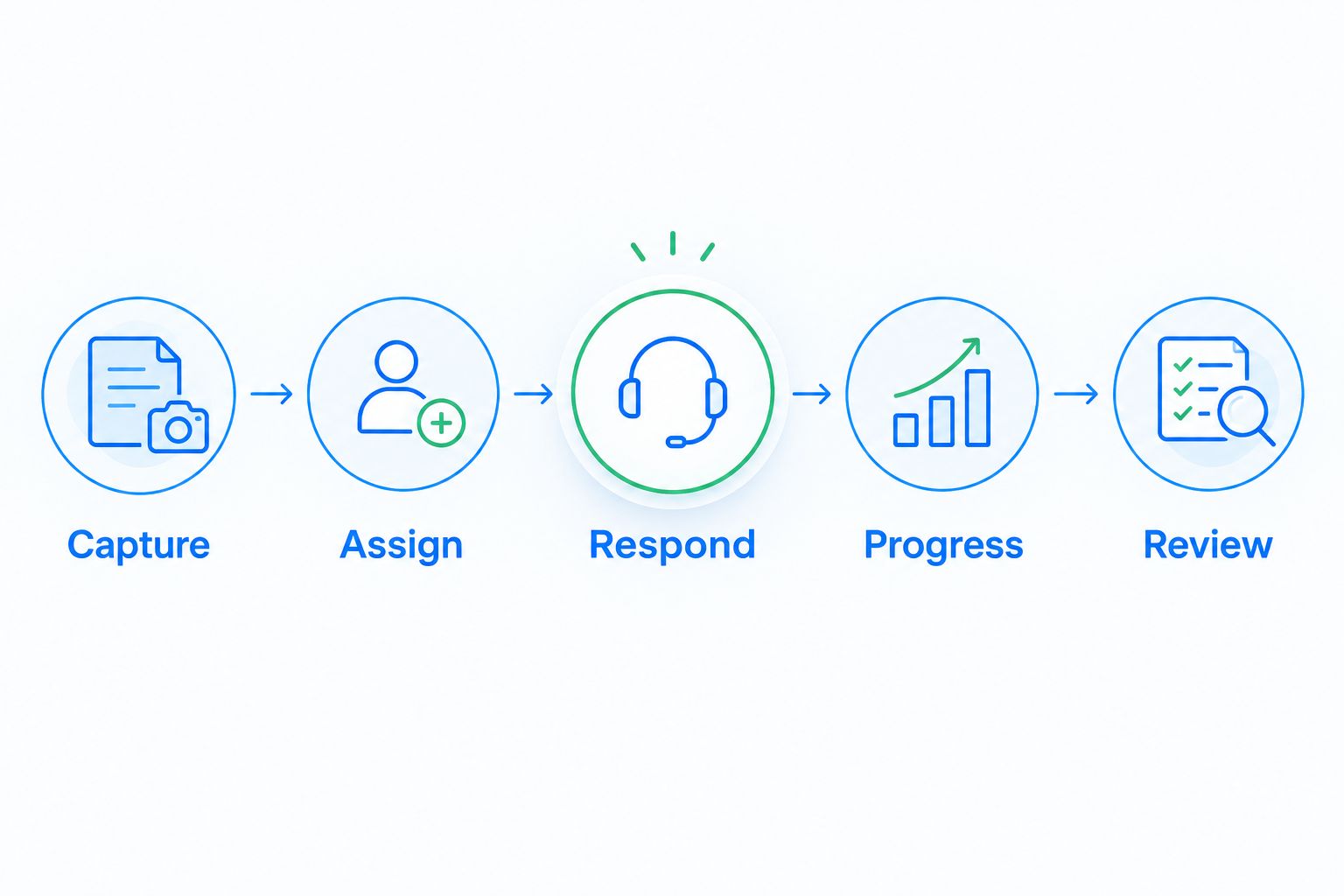
Assign 1 process owner to record the results and resolve conflicting requirements. Measure completion against your own acceptance criteria; do not treat a vendor demonstration as proof that your configuration is ready.
For a 2026 rollout, require 5 completed checks per test case before approving the workflow. Then check permissions, communication connections, imported records, and the handoff to delivery separately.
Review your sales workflow
Compare your lead capture, conversations, follow-ups, and pipeline requirements.
When staying with ClickUp is the right call
Keep ClickUp when your sales process works and your bigger coordination problem spans projects, documents, and delivery. A dedicated CRM is not automatically a better home for all that work.
ClickUp's strength is its general-purpose workspace. Its limitation for this decision is that you must evaluate how your configured sales process handles relationship history and opportunity management.
In 2026, a split setup also deserves consideration: use a CRM for customer relationships and retain ClickUp for project execution. Define the handoff clearly so the same next action does not require maintenance in both systems.
FAQ
What's the best ClickUp alternative for sales teams?
Arches CRM is the best fit here for teams needing customer conversations, automated follow-ups, and interaction-driven pipeline movement together. Pipedrive fits a deal-centered workflow, while HubSpot Sales Hub and Salesforce Sales Cloud address different CRM requirements.
Can I use ClickUp as a CRM instead of switching?
Yes, you can configure ClickUp to track leads and sales work. Stay with that approach when your team can reliably manage customer context, ownership, stages, and next actions within the setup.
Is Pipedrive better than ClickUp for sales?
Pipedrive is the more direct fit for dedicated deal and sales-activity management. ClickUp is the more relevant choice when your primary requirement is coordinating tasks, documents, and projects across functions.
Should I choose HubSpot Sales Hub or Salesforce Sales Cloud?
Choose HubSpot Sales Hub for evaluation when connected marketing and sales are central requirements; evaluate Salesforce Sales Cloud when configurable CRM processes are central. Test the same customer workflow in both before deciding.
Do I have to replace ClickUp across the whole business?
No, moving sales into a CRM does not require replacing ClickUp for other teams. Define which system owns customer records and which owns delivery work before setting up a handoff.
What should I test before moving sales out of ClickUp?
Test lead capture, ownership, conversation context, stage progression, and management review. Include a new inquiry, an active deal with a reply, and a silent opportunity needing follow-up.
Will switching CRM tools automatically fix missed follow-ups?
No, a replacement still needs clear ownership and configured follow-up rules. Define the trigger, responsible rep, next action, and stopping condition before activating a sequence.
One last thing
Before buying anything, ask a rep to open an active deal and explain the next action using only the system of record. If the answer requires searching another inbox or asking a colleague, make that exact scenario your acceptance test.
Buy the tool that closes that gap—not the one with the longest feature list.