
 Log in
 Start Free Trial


Best overall for API extensibility: Salesforce. Best for marketing-to-sales connections: HubSpot. Best for follow-up-led sales teams: Arches CRM. The best API-first CRM software in 2026 is the system that exposes the records and actions your workflow actually needs—not simply a CRM that lists API access among its features.
- Salesforce leads this best api-first crm software shortlist for teams building around custom sales data.
- HubSpot fits marketing-to-sales connections; Pipedrive fits deal-and-activity workflows.
- Arches CRM fits growing teams prioritizing sales workflow automation and connected customer conversations.
- Validate API permissions, record relationships, failure handling, and exports before choosing a CRM.
Why this matters
A lead arrives through your website. Your application creates a contact, but nobody creates the deal or assigns the next task. The connection worked; the sales process did not.
API access is not the same as a working integration. You need the right records, usable permissions, clear ownership, and a way to recover when an update fails. Otherwise, your sales team becomes the repair service between connected tools.
For your 2026 shortlist, separate an API-first architecture from a sales platform that supports integrations. Both belong in an evaluation, but they solve different problems. A developer building a custom sales interface needs different capabilities from a manager trying to stop missed follow-ups.
What makes the best API-first CRM software?
Use these criteria before comparing product names:
- Record coverage: Your integration must reach the contacts, companies, opportunities, activities, and custom data your process uses.
- Relationships: Contact-to-company and contact-to-deal relationships must survive creation, updates, and exports.
- Change handling: Check how your application learns that a record changed, including supported events or polling requirements.
- Permissions: Grant access to the required records and actions without exposing unrelated customer data.
- Failure recovery: Your integration needs retries, duplicate prevention, useful errors, and a visible exception queue.
- Sales usability: Reps must understand the resulting tasks, conversations, and deal stages without asking a developer.
Treat these as acceptance criteria, not feature-counting categories. An endpoint that exists but cannot support your required action does not solve the workflow.
API-first CRM software at a glance
This 2026 comparison ranks the products by distinct workflow fit. It does not treat API availability as proof that every feature is accessible through that API.
| Rank | CRM | Best for | Standout capability | Key limitation |
|---|---|---|---|---|
| 1 | Salesforce | Custom sales applications | APIs and a customizable CRM object model | More design and administration decisions |
| 2 | Arches CRM | Follow-up-led sales operations | Connected conversations, pipeline workflows, and API integrations | Validate required API operations individually |
| 3 | HubSpot | Marketing-to-sales handoffs | CRM objects and associations alongside marketing workflows | Record relationships require deliberate mapping |
| 4 | Pipedrive | Deal-and-activity integrations | A sales model centered on deals, people, organizations, and activities | Broader workflows need mapping into that sales model |
1. Salesforce: best API-first CRM for custom sales applications
Salesforce provides APIs for working with CRM data and supports custom objects alongside standard sales records. That makes it a strong starting point when your business needs a data model that extends beyond contacts and deals.
The deciding question is architectural: are you connecting an application to a CRM, or building a substantial application around CRM data? Salesforce belongs on the shortlist for the second case.
Salesforce pros:
- Standard and custom objects support business-specific record structures.
- APIs let developers work with sales data outside the standard interface.
- Object relationships support connected records rather than isolated contact lists.
Salesforce cons:
- Customization creates ongoing administration and maintenance work.
- Permissions, automation, and object design need coordination before external applications write data.
Best for: Teams with engineering and CRM administration capacity building custom sales applications.
Ask the implementation team to demonstrate the exact objects and relationships your application needs. Include a permission failure and a rejected update—not just a successful contact creation.
Do not choose Salesforce solely because a future workflow might become complicated. Choose it when you can name the custom records, relationships, and business rules that justify the added design work.
Verdict: Buy for custom sales applications; skip when you need only straightforward follow-up automation.
2. Arches CRM: best CRM for follow-up-led sales operations
Arches CRM brings lead management, customer conversations, tasks, pipelines, and workflow automation into one platform. It supports integrations and APIs, while its automated assistance summarizes email conversations and moves opportunities according to customer interactions and configured workflows.
Arches CRM is best for growing sales teams that need connected conversations and automated follow-up in one CRM. Its place on this shortlist comes from that sales workflow fit, not an assumption that every platform feature has a public endpoint.
Arches CRM pros:
- Contacts, conversations, tasks, and sales activity share one platform.
- Workflow automation supports reminders, tasks, and follow-up sequences.
- Email, WhatsApp, SMS, and calls form part of its customer communication capabilities.
Arches CRM cons:
- API-dependent projects need operation-by-operation validation before selection.
- Automatic pipeline movement still requires clear workflow rules and stage definitions.
Best for: Growing teams connecting existing business tools to a follow-up-centered sales process.
Your evaluation should start with a real handoff: a lead enters from another system, receives an owner, and gets a next action. Then confirm which steps use native workflow configuration and which require custom integration work.
That distinction matters. You do not need to build an external automation service for an action the CRM already handles through configured workflows.
Verdict: Buy for follow-up-led sales operations after validating your required integration path.
3. HubSpot: best API-first CRM option for marketing handoffs
HubSpot combines CRM records with marketing and sales tools. Its APIs expose CRM objects such as contacts, companies, and deals, with associations connecting those records.
That structure fits teams whose main integration problem is handing customer context from marketing to sales. The connection needs to preserve who the person is, which company they belong to, and which deal or next action follows.
HubSpot pros:
- Contacts, companies, and deals provide recognizable integration building blocks.
- Associations represent relationships between CRM records.
- Marketing and sales functionality sit within the same platform.
HubSpot cons:
- Creating a contact does not automatically establish every required association.
- Your integration must distinguish a marketing signal from a genuine sales-stage change.
Best for: Teams connecting marketing activity to sales ownership and pipeline execution.
Start with the handoff rules, not the field list. Decide which signals create a task, which update qualification, and which justify opening a deal. A form submission and a sales-ready opportunity are different events.
For your 2026 evaluation, ask for a demonstration that preserves company relationships and assigns the correct next action. A record appearing in the database is only the beginning of that demonstration.
Verdict: Buy for marketing-to-sales handoffs; hold until ownership and association rules are explicit.
4. Pipedrive: best API-first CRM option for deal activities
Pipedrive organizes sales work around deals, people, organizations, and activities. Its API gives developers a way to connect those sales records with external applications.
It fits a clearly bounded workflow: create or update the customer, connect the deal, and record what the salesperson must do next. Your integration stays close to the sales team's daily work.
Pipedrive pros:
- Deals and activities provide a direct model for opportunity follow-up.
- People and organizations separate individual contacts from company records.
- API access supports connections between external systems and sales records.
Pipedrive cons:
- Non-sales processes require careful mapping into a sales-oriented structure.
- External activity updates need ownership rules to avoid conflicting with rep actions.
Best for: Teams connecting deal creation, activity scheduling, and sales progress.
Use a workflow your reps recognize during evaluation. Create an inquiry, attach it to the correct organization, open the opportunity, and schedule the next activity. Then change the owner and confirm the connected system handles the update correctly.
Avoid expanding the project into a general business database unless you have established how those additional records belong in the model.
Verdict: Buy for deal-and-activity integrations; skip when the core requirement is a custom operational data model.
How the ranking works
This 2026 ranking prioritizes workflow fit against the criteria above: record coverage, relationships, change handling, permissions, recovery, and sales usability. It is not a performance benchmark or a claim that each product supports identical API operations.
Salesforce leads for custom application architecture. The remaining choices address narrower sales needs: follow-up execution, marketing handoffs, and deal activities. Your required workflow should decide the winner—not the order of the logos.
Prove the integration before committing
Run a small acceptance exercise using 10 sample leads across 3 pipeline stages. These are suggested test inputs, not product limits or performance claims. Include a duplicate contact, a reassigned owner, and a record with incomplete data.
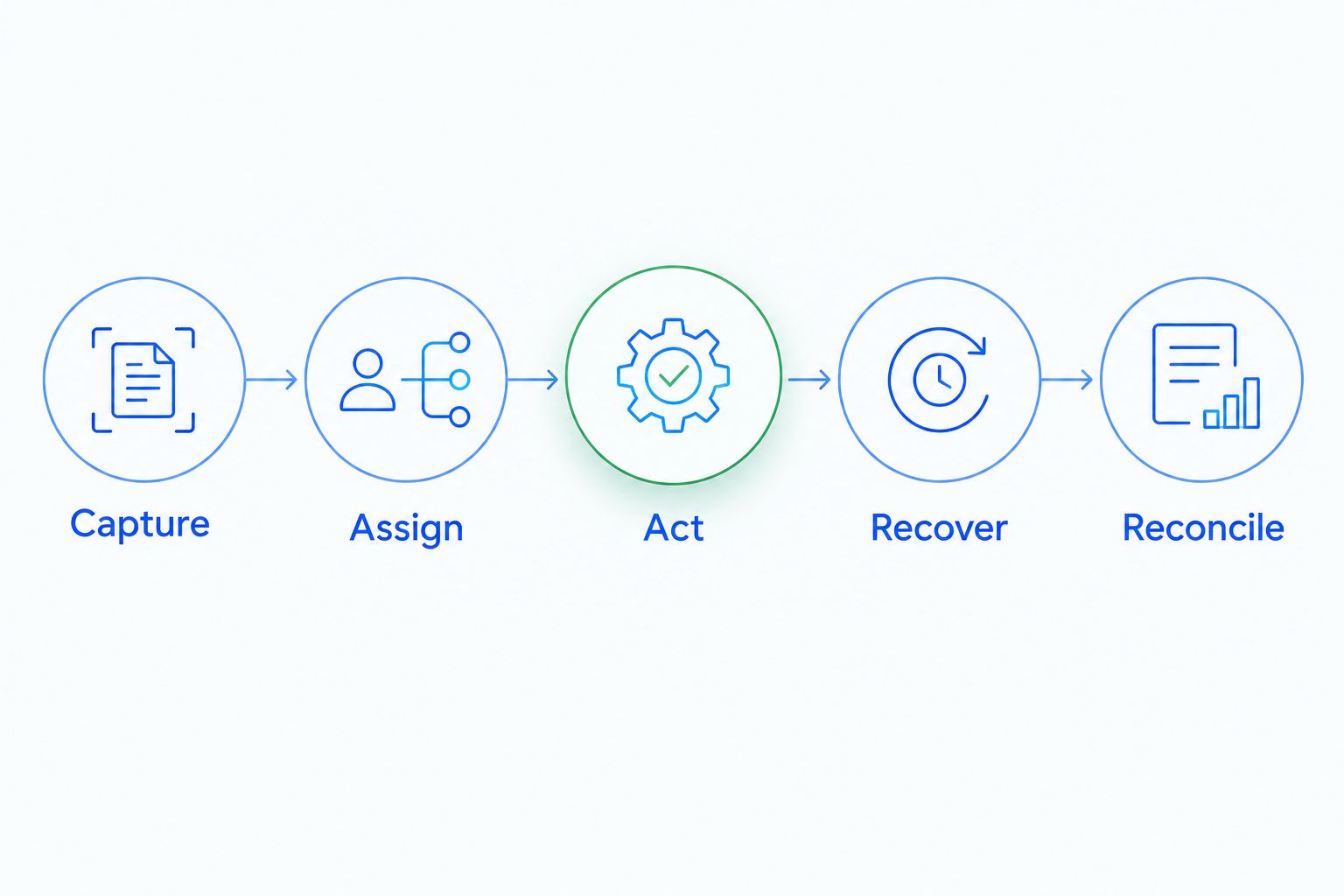
Capture
Document where the lead originates and which identifier follows it between systems. Email alone is not a sufficient matching rule for every business process; decide how your integration treats shared addresses, changed addresses, and existing company records.
Assign
Specify which system owns assignment. If both the CRM and your external application change ownership, establish which update takes precedence and how exceptions reach a manager.
Act
Name the next action that makes the integration valuable. It might be creating a task, updating qualification, or connecting a customer reply to an opportunity. Choose an observable sales outcome rather than accepting data transfer as completion.
For example, automated lead scoring in HubSpot belongs in a workflow that defines what a score changes: assignment, qualification, or the next follow-up. A score written to a field without a corresponding operating rule leaves the sales team to interpret it manually.
Recover
Send 2 identical requests for the same intended action and check whether your integration creates duplicate work. Then interrupt an update and confirm that someone can see, diagnose, and resolve the failure. Duplicate prevention belongs in the integration design; do not assume every endpoint handles it for you.
Reconcile
Compare the source records with the CRM after the exercise. Check ownership, associations, stage, and next action—not just whether the contact exists. The CRM API integration guide addresses the underlying distinction: API access and workflow compatibility are separate requirements.
Keep the acceptance results in business language. A sales manager should be able to confirm that the right lead reached the right owner with the right next action, while a developer verifies how the connection achieved it.
Which API-first CRM should you choose?
Choose Salesforce when custom application development is the core requirement. Choose HubSpot when marketing-to-sales handoffs define the project, or Pipedrive when the integration centers on deals and activities.
Choose Arches CRM when your priority is connecting business tools to customer conversations, pipeline workflows, and follow-up execution. Validate the specific operations before building around them.
For an undecided buyer in 2026, write down the complete workflow before booking another demonstration. If you cannot name the record, owner, trigger, action, and failure response, you are not ready to compare API depth.
The best default is the smallest system that passes your acceptance exercise without forcing reps into duplicate work.
FAQ
What's the best API-first CRM software in 2026?
Salesforce is the strongest choice on this shortlist for custom sales applications. HubSpot fits marketing handoffs, Pipedrive fits deal-and-activity integrations, and Arches CRM fits follow-up-led sales operations with validated integration requirements.
Is an API-enabled CRM the same as an API-first CRM?
No. API-enabled means a CRM exposes some functionality through an API; API-first describes an approach that treats the API as a primary interface. Evaluate actual record coverage and operations rather than accepting either label as proof.
Can API access connect a CRM to any business tool?
No. Both systems need compatible interfaces, permissions, identifiers, and supported operations. A connection can still require middleware or custom development.
Is Salesforce better than HubSpot for CRM integrations?
Salesforce fits custom sales application architecture, while HubSpot fits marketing-to-sales connections. Compare the objects, relationships, permissions, and actions required by your workflow before choosing.
Does Arches CRM support integrations and APIs?
Yes. Arches CRM supports connections to existing business tools through integrations and APIs. Confirm the specific records and actions needed for your project before implementation.
Do CRM integrations require coding?
Custom API integrations require implementation work, while native connectors and configured workflows can reduce the need for custom code. Identify which parts of your workflow already exist inside the CRM before commissioning development.
What should I test before choosing an API-first CRM?
Test record creation, relationships, ownership changes, duplicate handling, failed updates, and reconciliation. Confirm that each successful connection produces the next sales action your team expects.
One last thing
A successful response from an API does not prove that your salesperson received a useful next action. The record can exist while the owner, association, or follow-up remains wrong.
Make that your final 2026 buying test: ask a rep to continue the sale using only what the integration created. If the rep still needs to reconstruct the handoff, the integration is unfinished.