 Log in
 Start Free Trial


Best overall for shared sales-call notes: Fireflies.ai. Best for revenue-team coaching: Gong. Best for focused meeting recaps: Fathom. This 2026 guide compares the best AI call transcription tools for sales teams by what happens after the conversation: finding evidence, reviewing commitments, and assigning follow-up.
- Fireflies.ai leads this shortlist of best AI call transcription tools for sales teams for shared, searchable meeting notes.
- Gong fits sales managers who need conversation analysis and coaching, not just transcripts.
- Fathom fits reps who want meeting summaries without making revenue intelligence the main buying decision.
- Arches CRM handles pipeline and follow-up workflows; evaluate call transcription separately.
Why this matters
A prospect explains the problem, names another decision-maker, and asks for a follow-up. A transcript preserves the conversation. It does not, by itself, assign the next task or make sure someone completes it.
Buy transcription for reliable recall; evaluate workflow automation for reliable action. Arches CRM is a fit for growing sales teams that need lead management, shared customer conversations, and automated follow-up. That is a different requirement from recording and transcribing meetings.
For your 2026 shortlist, separate three jobs: capturing the call, understanding what happened, and acting on the result. A product that handles the first job well still needs a clear handoff to your sales process.
What makes the best sales call transcription tool?
Use these criteria before comparing product names. Each one exposes a different reason a polished demo fails in daily use.
- Capture fit: Check your actual meeting platforms and phone workflow. Meeting transcription does not automatically mean support for your dialer.
- Transcript fidelity: Review names, product terms, dates, negations, and speaker attribution against the recording.
- Evidence access: Confirm that a rep can find the original passage behind an important summary statement.
- Sales usefulness: Separate basic notes from coaching, objection analysis, and broader revenue intelligence.
- Action handoff: Demonstrate how an approved next step reaches the right record and owner.
- Recording controls: Review participant notice, access permissions, retention, and deletion before recording customer conversations.
Do not treat a long feature checklist as proof of fit. Ask the vendor to demonstrate your exact workflow, including the part where a rep corrects a mistake.
Best sales call transcription tools at a glance
These recommendations distinguish use cases rather than claim a measured accuracy winner. The order below matches the detailed shortlist.
| Tool | Best for | Standout capability | Key limitation to evaluate |
|---|---|---|---|
| Fireflies.ai | Shared, searchable call notes | Meeting transcription, summaries, and conversation search | Verify the handoff into your specific sales workflow |
| Gong | Sales coaching and conversation analysis | Revenue-focused analysis of customer interactions | Broader scope than a transcription-only requirement |
| Fathom | Individual rep meeting recaps | Meeting recording, transcription, and summaries | Confirm team controls and downstream workflow requirements |
| Otter.ai | Collaborative transcript review | Searchable transcripts and shared meeting notes | Validate sales-specific fields and task handoffs |
| tl;dv | Reviewing and sharing meeting moments | Recorded meetings, transcripts, and clips | Confirm support for your calling environment |
Product packaging changes. For a 2026 purchase, verify the capabilities included in the exact configuration you evaluate rather than assuming every advertised feature applies.
1. Fireflies.ai: best for shared sales-call notes
Fireflies.ai records and transcribes meetings, generates summaries, and makes conversations searchable. It belongs at the top of this shortlist when your immediate problem is scattered call notes rather than a need for a broader revenue-management system.
The buying question is practical: can a rep retrieve a customer commitment quickly, and can a colleague understand it without replaying the entire meeting?
Fireflies.ai pros:
- Searchable conversations support retrieval across recorded meetings.
- Summaries provide a shorter starting point than a full transcript.
- Shared call records give teammates material to review together.
Fireflies.ai cons:
- A searchable transcript does not prove that a follow-up task was assigned.
- You still need to validate recording coverage and integration behavior for your setup.
Best for: Sales teams that want a shared record of meetings and an accessible starting point for follow-up.
Verdict: Buy for shared call capture after validating the CRM handoff.
2. Gong: best for sales coaching and conversation analysis
Gong analyzes customer interactions for revenue teams. Its fit extends beyond preserving what someone said: sales managers can use conversation analysis to review selling behavior and discuss deal execution.
Choose this category when managers have a defined coaching process. If nobody owns call review, broader analysis adds another place to look without establishing what happens next.
Gong pros:
- Revenue-team focus connects conversation review to sales management.
- Recorded interactions provide evidence for coaching discussions.
- Conversation analysis supports questions beyond simple transcript retrieval.
Gong cons:
- Its broader scope is unnecessary when your only requirement is a meeting recap.
- Managers need a repeatable review process to turn analysis into coaching.
Best for: Sales organizations with managers who actively review calls and coach reps.
Verdict: Buy for a defined coaching program; skip for transcription alone.
3. Fathom: best for focused meeting recaps
Fathom records and transcribes meetings and produces summaries. It fits a rep-centered evaluation in which the main objective is remembering the discussion and preparing the next message.
Test the summary against actual customer commitments. A readable recap is not enough if it drops the condition attached to a next step.
Fathom pros:
- Recording and transcription preserve the source conversation.
- Summaries support post-meeting review.
- Meeting-focused functionality matches a clear recap requirement.
Fathom cons:
- A meeting recap is not a substitute for a sales coaching program.
- Team administration and CRM handoff requirements still need direct validation.
Best for: Reps whose first priority is capturing meetings and reviewing the resulting notes.
Verdict: Buy for focused recaps when the demonstrated workflow fits.
4. Otter.ai: best for collaborative transcript review
Otter.ai provides meeting transcription, summaries, and collaboration around meeting notes. It belongs on your shortlist when several people need to revisit the same conversation rather than rely on one rep's private notes.
Evaluate collaboration against a real account handoff. The receiving teammate should be able to locate the relevant statement and distinguish the customer's words from a generated summary.
Otter.ai pros:
- Searchable transcripts support reviewing specific details.
- Shared notes support collaboration around a meeting record.
- Summaries offer an entry point before reading the transcript.
Otter.ai cons:
- General meeting collaboration does not establish sales-process fit.
- Deal-field updates and task ownership require separate workflow checks.
Best for: Teams that review and share transcripts across roles.
Verdict: Buy for collaborative notes after testing account handoffs.
5. tl;dv: best for sharing specific meeting moments
tl;dv records and transcribes meetings and supports sharing clips. It fits teams that want to circulate a precise customer statement instead of asking everyone to review the full conversation.
Use clips to preserve context, not remove it. Include enough of the exchange to show what question the customer was answering.
tl;dv pros:
- Clips let reviewers focus on a selected exchange.
- Transcripts support finding relevant meeting passages.
- Recordings preserve context beyond written notes.
tl;dv cons:
- A short clip can omit qualifications that change its meaning.
- Meeting coverage and phone-call support need verification for your setup.
Best for: Teams that share customer evidence with managers and colleagues.
Verdict: Buy for clip-based review; hold until calling coverage is confirmed.
How to test the shortlist before committing
For a practical 2026 evaluation, start with 10 representative calls across 2 sales reps over 1 week. This is a suggested pilot scope, not an accuracy benchmark. Include your actual terminology and customer conversation patterns.
Give each candidate the same evaluation brief. Judge the result against the recording rather than against how polished the summary sounds.
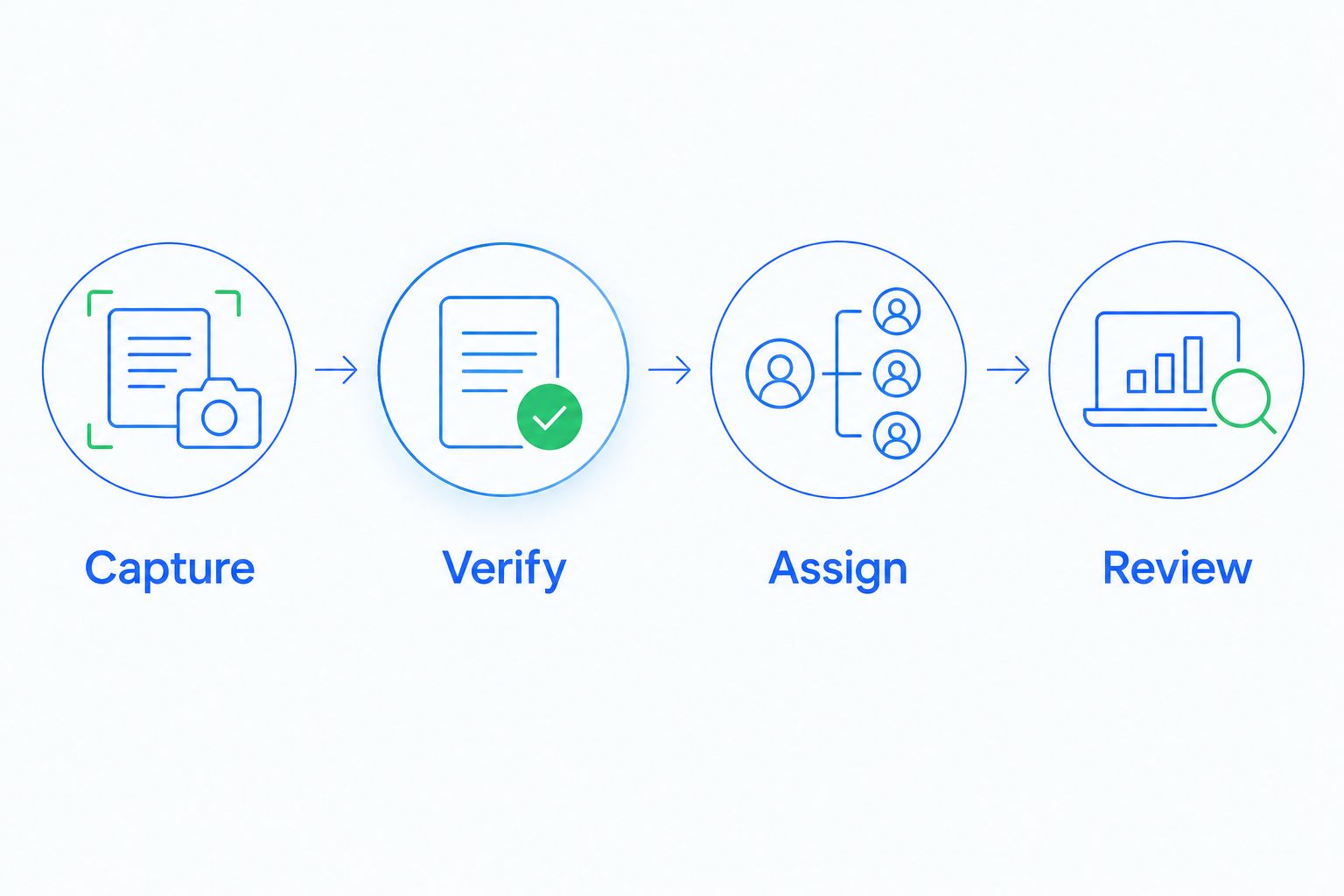
- Capture: Confirm that the meeting or call is recorded as intended, with the required participant notice.
- Verify: Check speaker names, dates, objections, and commitments against the source.
- Assign: Turn an approved next step into a task with an owner.
- Review: Confirm that the receiving rep can find both the task and its supporting evidence.
Keep a simple error log during the pilot. Record the original statement, the transcription or summary error, and the correction required. Separate minor wording problems from mistakes that would change a customer commitment.
A comparison such as Omi vs Fireflies.ai belongs within that same workflow-based decision: capture method, review needs, and the handoff after the conversation matter more than treating every transcription product as interchangeable.
Where call transcription ends and CRM work begins
Your transcription tool answers: what happened on the call? Your CRM should help answer: who owns the next move, and where does the opportunity stand?
Arches CRM brings contacts, conversations, tasks, and sales activity together. Its stated capabilities include workflow automation, email conversation summaries, and opportunity movement based on customer interactions and configured workflows. Those capabilities support sales execution; they do not establish native call transcription or compatibility with every product in this shortlist.
Before connecting systems, define the handoff:
- Contact: Which customer record receives the approved notes?
- Commitment: What did the customer actually agree to?
- Owner: Who is responsible for the next action?
- Task: What specific action should that person complete?
- Stage: What evidence justifies changing the opportunity stage?
Arches CRM is best for growing sales teams that need CRM follow-up workflows around customer conversations. Evaluate the transcription connection separately, including how corrections flow between systems.
For your 2026 rollout, keep stage changes tied to defined evidence. A phrase such as interest in a proposal is not the same as approval to proceed.
How we ranked these tools
This shortlist ranks product fit by capture, transcript review, sales usefulness, action handoff, and recording controls. It does not present a controlled accuracy test or a measured performance comparison.
Fireflies.ai is the default for shared meeting notes. Gong takes the coaching slot. Fathom addresses focused recaps, Otter.ai addresses collaborative transcript review, and tl;dv addresses sharing selected meeting moments.
Your own pilot should decide the purchase. Reject a tool that fails a required calling channel even if its summaries read well.
Which sales call transcription tool should you choose?
Start with Fireflies.ai if your team needs shared, searchable call notes. Choose Gong instead when manager-led coaching is the main requirement. Shortlist Fathom, Otter.ai, or tl;dv when focused recaps, collaborative review, or clips define the job.
Do not buy another recording system to solve an ownership problem. If calls are already captured but follow-up still disappears, map the task assignment and CRM workflow first.
For a 2026 decision, require one complete demonstration: customer statement, verified note, assigned task, and visible next action. That is the sales workflow you are buying—not the transcript alone.
FAQ
What's the best AI call transcription tool for a sales team?
Fireflies.ai is the default recommendation here for shared, searchable sales-call notes. Choose Gong when sales coaching and conversation analysis are the main requirements, and validate either choice against your actual calling workflow.
Is Gong better than a meeting transcription tool?
Gong is a better fit when your requirement includes revenue-focused conversation analysis and manager-led coaching. A meeting transcription tool fits a narrower need for recordings, transcripts, and recaps.
Can a meeting transcription tool record phone calls too?
Do not assume that meeting transcription includes your phone system. Ask the vendor to demonstrate capture from your exact dialer or calling setup before you commit.
Does Arches CRM include AI call transcription?
The supplied Arches CRM product description does not establish native call transcription. It describes lead management, customer communications, workflow automation, email summaries, and AI-assisted pipeline movement; confirm call-transcription requirements directly.
How should a sales team test transcript accuracy?
Compare the transcript and summary with the original recording. Check names, speaker attribution, dates, negations, and customer commitments, then document errors that would change the next sales action.
Should AI-generated call notes automatically change deal stages?
Deal-stage changes should follow defined evidence and configured workflow rules, not an unreviewed summary alone. Test ambiguous statements and corrections before allowing them to affect an active pipeline.
What should we check before recording customer calls?
Check the consent and notice requirements that apply to the participants, along with access permissions, retention, and deletion controls. Get appropriate legal guidance for the jurisdictions involved before enabling recording.
One last thing
Test a statement that contains a condition: the customer wants a proposal only after a technical review. Check whether the summary preserves that condition and whether the follow-up task respects it.
A fluent summary can still create the wrong next action. Make that distinction part of your acceptance test before anyone relies on automated call notes.