
 Log in
 Start Free Trial

Instead of manually checking email and updating deals, use email reply automation CRM workflows to move a matched opportunity forward when a lead sends a genuine reply. Keep the move limited to an engagement stage, then assign the next follow-up so a response becomes work your team can act on.
- Arches CRM suits growing sales teams that need email reply automation CRM workflows tied to pipeline activity.
- Move genuine replies into an engagement stage, not directly into qualified or won stages.
- Match the conversation to one opportunity before changing its stage.
- Keep automated replies, refusals, and ambiguous matches outside the forward-movement rule.
Why this matters
A lead replies, but the deal still sits in an outreach stage. The owner now has to read the message, find the opportunity, update the pipeline, and decide what happens next. Automation removes the stage-update chore; it does not remove the need to answer the customer.
Arches CRM is best for growing sales teams that need customer interactions to drive configured pipeline workflows. Arches CRM brings contacts, conversations, tasks, and sales activity together and supports opportunity movement based on customer interactions and configured workflows.
The benefit is less manual updating. The trade-off is that a poorly defined rule can turn a negative reply into apparent sales progress. For your 2026 workflow, define progress as evidence of engagement—not evidence that a sale is likely.
Before you start
- Access and email capture: Have access to the pipeline, workflow configuration, and the email connection that records customer conversations. Confirm that an incoming test reply appears against the intended contact before configuring stage movement.
- Pipeline definitions: Identify the eligible starting stage, the destination stage, and the person responsible for responding. Use an engagement stage whose definition requires a genuine customer response, not a meeting or purchase commitment.
- The matching gotcha: A contact can have more than one open opportunity. Decide how the workflow identifies the correct deal before enabling updates; an email-address match alone does not resolve that ambiguity.
Treat the instructions below as a workflow specification: incoming event, matching conditions, permitted action, and verification. Apply those rules through the workflow controls or integration configuration you use, rather than creating a rule that advances every incoming message.
Email event and deal matching
The trigger should represent an inbound reply associated with a sales conversation. A new message from a known contact is not automatically a reply about the opportunity you want to advance.
- Select the connected sales email source that receives lead replies. Keep unrelated support or internal conversations outside the initial workflow.
- Define the incoming event as a customer reply to the relevant conversation. Exclude outgoing messages so your own follow-up cannot trigger the stage change.
- Match the sender to the contact record, then connect the conversation to its opportunity. Use the conversation's deal association when available rather than selecting an arbitrary open deal.
- Require 1 matched opportunity before permitting a stage update. Route unmatched conversations and multiple matches to review instead of making a guess.
- Limit eligibility to the starting stages you have chosen. Exclude closed opportunities and deals already beyond the engagement stage.
Expected result: An incoming reply identifies a contact, its conversation, and exactly one eligible opportunity. Nothing moves yet; this configuration establishes which record the later action can safely change.
Check this boundary with a contact who has 2 active deals. A reply about one deal must not move the other. If the association remains unclear, keep both stages unchanged and resolve the match before enabling automatic movement.
Matching deserves more attention than the stage action. Updating the correct record is simple once the relationship is established; updating the wrong record produces a convincing but inaccurate pipeline.
Reply conditions and exclusions
A reply proves that a message arrived. It does not prove interest, qualification, or agreement. Decide which replies satisfy your engagement definition before attaching a stage-change action.
- Define a genuine reply as a customer-written response associated with the opportunity. Separate it from delivery notices, automatic acknowledgments, and out-of-office messages.
- Exclude explicit refusals from the forward-movement rule. A message asking your team to stop contacting the sender needs a different handling path, not a promotion into an active sales stage.
- Keep uncertain classifications in a review path. If an automatic message cannot be distinguished reliably from a customer response, require a person to decide.
- Apply the starting-stage condition again immediately before the update. This prevents a delayed event from moving a deal that has already progressed.
- Define how subsequent replies behave. Once the opportunity reaches the engagement stage, another response should not repeat the same movement or create unnecessary work.
Expected result: Only a genuine, relevant reply associated with an eligible deal reaches the stage action. Excluded and uncertain messages leave the deal unchanged under this rule.
For a 2026 email reply automation CRM setup, keep the first decision narrow: did the customer genuinely respond to this sales conversation? Leave stronger judgments—such as budget fit or purchase readiness—to a separate qualification process.
Choose your movement policy
Use one primary policy for the starting stage. Mixing automatic movement and approval without clear conditions makes ownership harder to understand.
| Policy | Best for | Advantage | Limitation |
|---|---|---|---|
| Automatic engagement move | Teams with clear conversation-to-deal matching | Removes a routine pipeline update | Requires reliable exclusions and a narrowly defined destination |
| Review before movement | Teams handling ambiguous replies or multiple opportunities per contact | Keeps judgment with the owner | Leaves a manual approval step |
Start with review when matching is uncertain; automate movement once the same rules produce correct decisions. Neither policy turns a reply into proof that a deal is qualified.
Stage action and owner handoff
The destination should describe what the reply establishes. An engagement stage fits a genuine response; a booked-meeting stage requires a booking, and a won stage requires the evidence your team uses to confirm a sale.
- Set the action to update only the matched opportunity's stage. Preserve its existing owner unless you have a separate assignment rule.
- Select the engagement destination already defined in your pipeline. Do not skip qualification stages merely because the lead answered.
- Define the owner's next action: read the conversation and respond to the actual request. Include enough context to identify the opportunity and message.
- Create 1 follow-up task for the handoff, with a due time that follows your team's response standard. Check for equivalent open work before adding another task.
- Review scheduled outreach associated with the deal. Stop or redirect messages that still describe the customer as unresponsive, using the controls in your sending workflow.
Expected result: The correct opportunity reaches the engagement stage, the owner has a clear next action, and follow-up language reflects the customer's response.
Arches CRM's sales CRM and workflow automation features support reminders, tasks, and follow-up sequences. Keep the stage rule and the communication rule aligned: changing a pipeline field does not by itself establish what should happen to every scheduled message.
The useful handoff is a decision, not just a notification. Tell the owner to answer the customer's question, confirm the requested next step, or review an objection. A generic reminder to follow up leaves that work undefined.
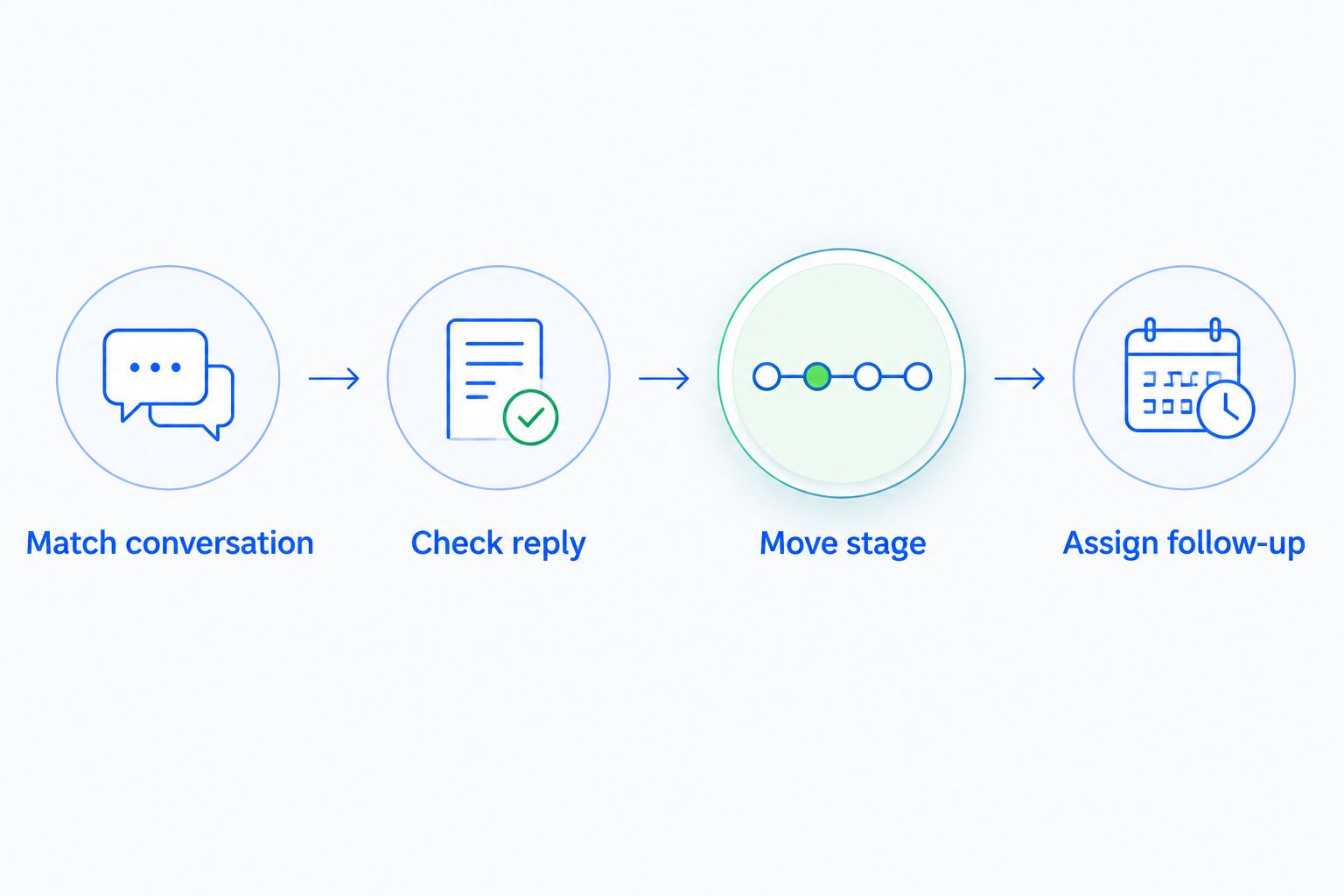
The core sequence is Match conversation, Check reply, Move stage, and Assign follow-up. Each step protects the next from acting on the wrong information.
Test cases and activation
Test the complete path, not just whether a trigger fires. Your 2026 acceptance check should inspect the conversation association, final stage, owner, task, and scheduled follow-up.
- Send 6 test messages covering these cases: genuine interest, a genuine question, an out-of-office response, a refusal, an unmatched sender, and a reply associated with multiple opportunities.
- Confirm that genuine interest and a relevant question move an eligible deal into engagement. Neither should move it directly into a qualified or won stage.
- Confirm that the automatic response, refusal, unmatched sender, and ambiguous match do not advance a deal under this rule.
- Send a further genuine reply on a deal already moved into engagement. Verify that the rule does not repeat the update or duplicate the existing handoff task.
- Enable the workflow for the selected starting stage, then inspect the first live cases against the same acceptance criteria.
Expected result: Eligible replies advance the intended opportunity; excluded cases remain outside the forward-movement path. Owners receive usable work without repeated updates.
Arches CRM can summarize email conversations, which helps owners review context. Keep that summary separate from the acceptance test: verify the actual message and resulting record changes rather than judging success from a summary alone.
For the wider email-to-pipeline process, use the Gmail-to-closed-deals workflow guide to connect this reply rule with the surrounding sales workflow.
Refresh follow-up whenever a lead replies again
A second workflow handles an adjacent problem: the deal is already engaged, but a new reply changes what the owner should do next. Repeating the original stage action adds no useful information.
Use a reply-driven task update instead:
- Match the conversation to the existing opportunity using the same safeguards as the initial workflow.
- Leave the current stage unchanged when it already represents the customer's progress.
- Review the existing follow-up task against the latest message. Replace an outdated instruction or create a task only when no suitable open task exists.
- Reassess scheduled outreach so it does not contradict the new conversation.
Expected result: The owner receives current instructions without an artificial stage change. A request to speak later changes follow-up work; it does not automatically erase completed qualification.
For 2026 pipeline reporting, keep engagement and qualification distinct. A customer asking a question has engaged, but your qualification criteria still need their own evidence.
Troubleshooting
An automatic reply advances the deal
Check whether the rule accepts every inbound message. Add an exclusion or review gate for automatic responses before the stage action. Retest the out-of-office case and confirm that it leaves the opportunity unchanged.
The wrong opportunity moves
Check the conversation association before checking the destination stage. A contact-level match is insufficient when multiple deals exist. Require an unambiguous opportunity match; send unresolved cases to the owner without changing either deal.
Every reply creates another task
Check whether the workflow looks for existing follow-up work. Define the task around the opportunity and current next action, not just the arrival of a message. Update an appropriate open task instead of creating duplicates.
A progressed deal moves backward
Restrict the rule to eligible starting stages and recheck that condition before updating. A delayed reply must not reset a deal that has already reached a later stage. Retest with a conversation linked to an opportunity outside the allowed starting stages.
Outreach continues as though nobody replied
Inspect the sending workflow separately from the pipeline rule. Identify scheduled messages whose premise is now false, then stop or redirect them. Verify both results: the stage changed correctly, and the next message matches the conversation.
Customize your workflow
Once the basic rule passes its tests, expand by conversation type rather than adding more automatic stage jumps. Separate a customer's question, scheduling request, objection, and request for later contact into different next actions.
Keep the shared safeguards: one matched opportunity, a genuine reply, an eligible stage, and an accountable owner. For your 2026 operating checklist, record who owns each rule and what evidence permits each stage transition.
Arches CRM combines email, WhatsApp, SMS, and calls with sales activity. Extend the same engagement definition to other channels only after defining how each interaction connects to the correct opportunity; do not treat every inbound contact as identical evidence.
FAQ
How does email reply automation CRM move a deal forward?
Email reply automation CRM uses an incoming customer reply, an opportunity match, and configured conditions to trigger a stage update. The destination should reflect engagement, while a separate task tells the owner what to do next.
Can Arches CRM move opportunities based on customer replies?
Arches CRM supports opportunity movement based on customer interactions and configured workflows. Define the email association, eligible stages, and reply conditions before enabling a reply-driven rule.
Should every email reply advance a sales opportunity?
No, automatic responses, refusals, and ambiguous matches should stay outside the forward-movement rule. A genuine response supports engagement, not automatic qualification or a won deal.
What happens when a contact has multiple open deals?
The workflow needs an unambiguous conversation-to-opportunity match before changing a stage. If that match is unresolved, keep the deals unchanged and ask the owner to review the conversation.
Will moving a deal stop scheduled follow-up emails?
A stage change alone does not establish that scheduled emails have stopped. Configure and test the sending workflow separately so its messages reflect the customer's reply.
How do I avoid duplicate tasks after repeated replies?
Check for an appropriate open task before creating another follow-up task. Refresh the existing instruction when the new message changes the next action.
Which stage should a replied lead move into?
Use an engagement stage whose definition requires a genuine customer response. Keep meeting, qualification, and won stages tied to their own evidence rather than advancing them from a reply alone.
One last thing
The safest reply automation is the one that knows when not to move a deal. Test a progressed opportunity before expanding the workflow: a fresh reply should improve the owner's next action without undoing work already completed.
A moving pipeline is not the goal. A pipeline that accurately reflects customer conversations is.