
 Log in
 Start Free Trial

Instead of manually checking every stalled lead, set up an automated follow up CRM workflow that detects inactivity, assigns the next action, and stops outreach when the conversation resumes. Arches CRM brings leads, conversations, tasks, and workflow automation together so your team can manage that follow-up in one place.
- Arches CRM fits growing sales teams that need lead management, pipeline tracking, and follow-up automation together.
- An automated follow up CRM workflow needs an inactivity rule, an owner, and a clear stop condition.
- Use customer interactions to identify cold leads; internal record edits do not prove buyer interest.
- Start with owner reminders, then automate messages after testing reply handling and outreach exclusions.
Why this matters
A lead arrives, a rep starts a conversation, and the next action never gets scheduled. The problem is not an empty pipeline. It is an opportunity with no clear owner action.
Arches CRM is best for growing sales teams that need lead management and follow-up automation in one place. Its workflow automation supports reminders, tasks, and follow-up sequences; its communication features bring email, WhatsApp, SMS, and calls together.
The benefit is a shared place to manage the conversation and its next step. The constraint is that your rules still need to distinguish silence from a reply, a scheduled meeting, or a request to stop contact.
For your 2026 workflow, define “cold” as a specific absence of customer interaction—not a rep's impression. Automation should flag that condition and create a useful action, not manufacture urgency or move an opportunity toward a sale without evidence.
Before you start
- Access and ownership: Have permission to configure workflows, access to the relevant pipeline and communication records, and a named owner for each eligible opportunity.
- Rules and materials: Prepare the inactivity threshold, eligible stages, approved message, outreach exclusions, and fallback owner. Confirm that the selected channel records customer interactions against the correct contact.
- The gotcha: A record's last-modified time is not necessarily its last customer interaction. A note edit or automated task update must not reset the inactivity clock unless that action genuinely represents customer contact.
Use the steps below as a configuration blueprint. Match each rule to the controls in your account, and verify its behavior before enabling unattended messages. If you cannot demonstrate reliable reply detection and exclusions, use an owner task rather than automatic sending.
For a concrete starting exercise, use a proposed threshold of 7 days without customer interaction, followed by 1 owner reminder. These are example settings for testing, not performance benchmarks or a recommended cadence for every sales cycle.
Inactivity criteria
Define the cold-lead condition
- Choose the pipeline and stages that qualify for follow-up. Include opportunities where a customer response is outstanding; exclude closed opportunities and records with a scheduled next action that already addresses the silence.
- Identify the customer-interaction timestamp that your workflow will evaluate. Check what it includes: incoming replies, completed conversations, and relevant call activity should be distinguishable from internal edits.
- Set the inactivity threshold. For the example workflow, require 7 days without a qualifying customer interaction. Document whether you mean elapsed days or working days so the team applies the rule consistently.
- Add exclusions before assigning an action. Remove contacts who opted out, opportunities marked closed, and conversations where the customer explicitly requested contact at a later date.
Expected result: A record qualifies because its customer conversation has stalled—not merely because somebody changed a field or failed to update a note.
Do not use one inactivity threshold for every stage without checking the underlying sales process. A new inquiry awaiting its first answer and a proposal awaiting an agreed decision date represent different obligations. Keep the initial workflow limited to one clearly defined situation.
For your 2026 setup, write down the rule in plain language: an open opportunity, awaiting a customer response, with no qualifying interaction during the chosen period and no outreach exclusion. A teammate should be able to identify eligible records without reading the automation configuration.
Separate inactivity from unanswered outreach
A cold-lead rule asks whether the conversation has gone quiet. An unanswered-outreach rule asks whether a particular message still needs a response. Choose the first when you want to monitor an opportunity across channels; choose the second when your next action depends on a specific exchange.
Do not treat a recent outbound message as proof that the buyer is engaged. It proves your team acted. Decide separately whether that action postpones the next reminder, and record that decision in the workflow specification.
Follow-up action
Assign the next step
- Route the action to the current opportunity owner. Define a fallback owner for unassigned records so the workflow does not create an unattended task.
- Choose either an owner task or an approved outbound message. Start with a task when the conversation requires judgment, the contact data needs checking, or the proposed message depends on details not captured reliably.
- Include enough context for the owner to act: the opportunity, the last relevant conversation, the reason it qualified, and the action required. Keep the task focused on a decision or contact attempt.
- Write an outbound message that refers to the actual conversation and asks one clear question. Use personalization only where the underlying field is accurate and has a safe fallback.
Expected result: Every eligible opportunity produces an action with an accountable owner and a clear purpose.
Best for contextual sales conversations: owner-task follow-up. A rep can read the history before contacting the buyer. The trade-off is that the rep still has to complete the task; automation alone does not deliver the follow-up.
Best for repeatable, approved check-ins: automated-message follow-up. It removes the manual sending step. The trade-off is stricter dependence on accurate contact records, reliable stop conditions, and appropriate channel permissions.
| Follow-up option | Best for | Advantage | Constraint |
|---|---|---|---|
| Owner task | Conversations requiring judgment | Keeps message timing and content under human control | Requires the assigned owner to act |
| Automated message | Consistent check-ins with clear eligibility | Sends the approved follow-up without a manual sending step | Requires verified exclusions and reply handling |
A useful message acknowledges the prior discussion and asks whether the next step is still relevant. Avoid unsupported claims about deadlines, limited access, or previous promises. If the conversation history does not justify the wording, send a task to the owner instead.
For more detail on task-based routing, use the guide to automatic follow-up reminders.
Stop conditions
Protect active conversations
- Define what ends cold-lead follow-up: a customer reply, a recorded conversation that resolves the next step, an opt-out, a closed opportunity, or a future contact date agreed with the customer.
- Check those conditions again before any delayed action executes. A contact can qualify when the workflow starts and become ineligible before the message is due.
- Define what happens to an existing reminder when the customer replies. It should no longer instruct the rep to chase silence; replace or resolve it according to the team's task process.
- Prevent repeated enrollment while the same cold-lead action remains unresolved. Require a meaningful change or an explicit restart rule before creating another instance.
Expected result: A resumed conversation leaves the cold-lead path, and one stalled opportunity does not accumulate identical reminders.
Arches CRM can move opportunities through the pipeline based on customer interactions and configured workflows. Keep the stage rule separate from the inactivity rule: a reply warrants attention, but its content determines whether the opportunity has progressed.
For example, a request to postpone the discussion should stop the cold-lead message without being treated as a buying decision. A rejection should also stop outreach. A reply is evidence of contact, not evidence of a successful sale.
Your 2026 acceptance test should check eligibility both when the workflow starts and immediately before outreach. If the chosen workflow cannot enforce that second check, retain the owner-task path until another verified control handles it.
Test records
Verify the workflow before activation
- Prepare 3 test records: an eligible stalled opportunity, an opportunity with a recent reply, and a contact excluded from outreach. Use records and destinations controlled by your team.
- Check that the stalled opportunity receives the intended action and owner. Confirm that its task or message contains the correct conversation context rather than unrelated contact details.
- Confirm that the recent-reply and excluded records produce no cold-lead message. Then change the stalled record to simulate a reply before a pending action executes.
- Run another eligibility check while the first action remains unresolved. Confirm that it does not create a duplicate, and record the observed behavior before expanding the workflow.
Expected result: The intended record receives the action, excluded records stay excluded, and resumed conversations leave the follow-up path.
Use this sequence to review the workflow as a whole: Eligibility, Ownership, Follow-up, Reply check, Exit. Each checkpoint answers a separate question; passing the sending test alone is not enough.
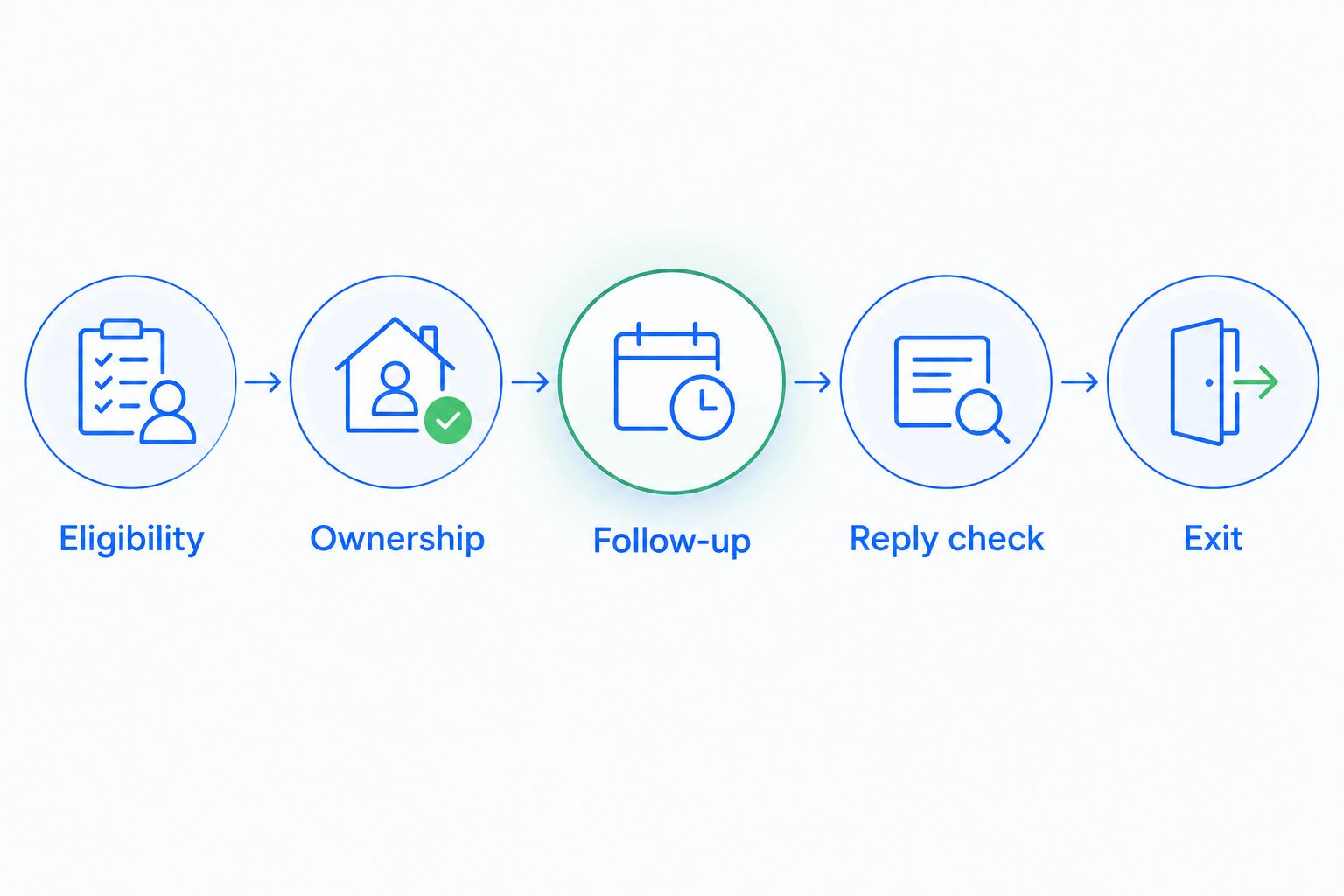
Keep a short record of the test outcome and the responsible owner. When someone changes the threshold, message, or exclusions later, repeat the affected tests rather than assuming the original result still applies.
Follow up when a lead's status changes
An adjacent workflow starts when an opportunity moves into a stage where a response is expected. Instead of waiting for general inactivity, it evaluates whether the required next step happened after that stage change.
Best for stage-specific obligations: status-change follow-up. Use it when a stage has a clear action, such as reviewing a proposal, rather than as a replacement for every cold-lead rule.
- Define the qualifying stage change and the expected customer action.
- Set an example delay of 2 days for testing, then choose the live interval from your actual sales process.
- Recheck the stage, conversation, agreed contact date, and exclusions before acting.
- Cancel or resolve the pending follow-up when the expected response arrives.
The advantage is a reminder tied to a specific sales event. The limitation is overlap: the same opportunity can also meet the general inactivity rule. Assign responsibility to one workflow for that action, or use a shared exclusion that prevents duplicate outreach.
Troubleshooting
Cold leads never qualify
Check the timestamp driving the inactivity rule. If internal edits reset it, a record can look recently active even though the customer has not responded. Use a customer-interaction condition or route the record for manual review.
A customer gets chased after replying
Check whether the reply belongs to the correct contact and opportunity, then check whether pending actions reevaluate eligibility. Stop unattended sending until the reply test passes; changing the message wording does not fix the underlying issue.
Several reminders appear for one opportunity
Check repeated enrollment and overlapping workflows. Require an unresolved-action check or another verified duplicate-prevention control, and decide which workflow owns that follow-up.
The task has no accountable owner
Check assignment before task creation. Use the fallback owner for unassigned opportunities and correct the source assignment rule rather than repeatedly moving orphaned tasks by hand.
Personalization refers to the wrong conversation
Check which record supplies each message field. Remove unreliable personalization, use an approved neutral message, or send an owner task that requires a conversation review before outreach.
Customize your workflow
Expand the workflow by sales context, not by adding more messages. Separate leads awaiting a first response from opportunities awaiting a decision, and give each path its own eligibility rule and stop conditions.
Use your 2026 review to examine completed follow-up tasks, resumed conversations, duplicate actions, and incorrect enrollments. Define how you will record those outcomes before interpreting them; a sent message alone does not demonstrate a recovered opportunity.
Arches CRM supports lead management, pipeline tracking, communication, and workflow automation. Use those functions to make the next action visible, while keeping uncertain decisions with the owner. Automate the repeatable action; preserve judgment where the conversation changes its meaning.
FAQ
How do I automatically follow up when a lead goes cold?
Create a workflow that checks customer inactivity, confirms eligibility, and assigns a task or approved message. Add exclusions and stop conditions before enabling outreach.
What's the best automated follow up CRM workflow to start with?
Start with an owner reminder for a clearly defined stalled conversation. It lets you test eligibility and assignment before relying on unattended messages.
Is a task better than an automatic follow-up email?
A task is better when the conversation requires judgment; an automatic email fits consistent, approved check-ins. Automatic sending requires reliable reply detection and outreach exclusions.
How many days should I wait before following up?
Choose the interval from the sales stage, customer agreement, and expected next action. The guide's 7-day threshold is a test example, not a universal follow-up benchmark.
Can Arches CRM manage follow-up and pipeline activity together?
Arches CRM supports follow-up automation and pipeline tracking in one platform. Its configured workflows can also move opportunities based on customer interactions.
Should an automatic follow-up stop when a lead replies?
Yes, a reply should end the cold-lead follow-up path and prompt review of the conversation. The reply's content determines the next task or pipeline action.
How do I prevent duplicate cold-lead messages?
Prevent repeated enrollment while the same follow-up remains unresolved, and assign one workflow responsibility for the action. Test overlapping inactivity and stage-change rules before activation.
One last thing
Test the customer who replies just before the follow-up executes. That case checks whether your workflow respects the current conversation or simply completes an old instruction. For a 2026 rollout, make that test a release requirement, not a cleanup task after customers receive the wrong message.