
 Log in
 Start Free Trial


Choose Arches CRM if your priority is keeping sales conversations, follow-ups, and pipeline updates together; choose HubSpot if you need sales, marketing, and customer service within a broader customer platform. This 2026 comparison separates a sales-workflow decision from a company-wide software decision.
- Arches CRM vs HubSpot is a sales-workflow versus broader-platform decision, not a universal winner contest.
- Choose Arches CRM for lead management, follow-up automation, and interaction-driven pipeline updates.
- Choose HubSpot when marketing, sales, and service must share a broader platform.
- Compare complete workflows and purchasing terms, not feature counts or starting packages.
Why this matters
A lead arrives, someone replies, and the next action never gets assigned. Buying another contact database does not fix that handoff. You need a system that connects the conversation to an owner, a task, and the right pipeline stage.
But a sales follow-up problem is different from a cross-department reporting problem. If your 2026 purchase must also support marketing campaigns and customer service, platform breadth belongs in the decision from the start.
Choose the scope of the job before comparing the length of the feature list. Otherwise, you risk buying capabilities your sales team never uses while leaving its daily follow-up process unresolved.
At a glance
| Dimension | Arches CRM | HubSpot |
|---|---|---|
| Best for | Growing sales teams prioritizing leads, conversations, and follow-up | Organizations coordinating marketing, sales, and service |
| Standout feature | Interaction-driven opportunity movement and email summaries | Connected products across customer-facing functions |
| Pipeline management | Opportunities move through configured workflows based on customer interactions | Deal pipelines within its sales CRM |
| Follow-up automation | Reminders, tasks, and follow-up sequences | Sales follow-up tools and workflow automation; check package requirements |
| Customer communication | Email, WhatsApp, SMS, and calls brought together | Connected communication tools; confirm channel and package requirements |
| Contact management | Capture, organize, and assign prospects | Contact and company records connected to customer activity |
| Department coverage | Sales CRM and workflow automation | Marketing, sales, and customer service products |
| Integrations | Integrations and APIs for existing business tools | App marketplace and developer APIs |
| Pricing model | Request terms covering your users, workflows, and channels | Product- and subscription-based purchasing; compare the complete configuration |
Treat the table as a shortlist, not a purchase order. A capability appearing in a product family does not establish which package, connection, or configuration your team needs.
Arches CRM fits a sales-workflow brief; HubSpot fits a platform brief
Arches CRM is best for growing sales teams that need lead management and follow-up automation in one sales CRM. Its stated scope brings contacts, conversations, tasks, and sales activity together so the team can see what needs attention next.
The advantage is alignment with a specific operating problem: a salesperson needs to know whom to contact, what was discussed, and what should happen next. The boundary is equally important. A sales-focused brief does not establish suitability for a company-wide marketing and service program.
HubSpot is the stronger fit when the buyer owns that broader program. Its marketing, sales, and service products address multiple customer-facing functions rather than sales follow-up alone.
That breadth also expands the buying exercise. You need agreement on which departments will use the platform, which records they share, and who owns configuration. A wider platform is not automatically the better answer to a narrower problem.
Interaction-driven pipeline movement is the focused sales advantage
The sales-focused platform explicitly supports moving opportunities through the pipeline based on customer interactions and configured workflows. It also summarizes email conversations. That combination addresses two separate jobs: keeping the opportunity current and helping the next person understand its history.
Do not interpret automatic movement as permission to treat every reply as progress. A customer asking to postpone is different from a customer agreeing to a proposal. Your stage definitions must preserve that difference.
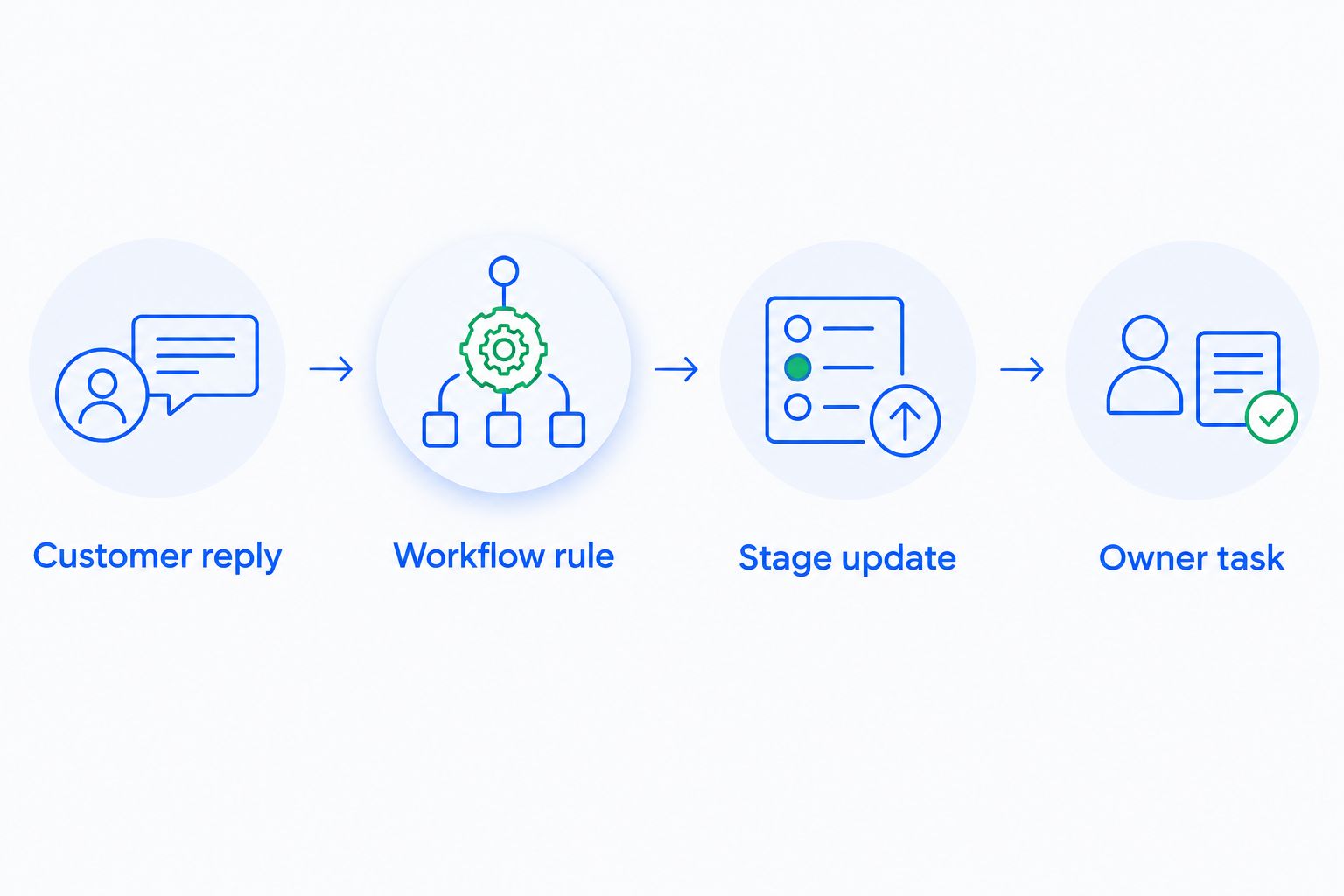
Use this sequence when evaluating pipeline automation:
- Customer reply: Identify what the interaction actually means.
- Workflow rule: Define the condition that justifies a change.
- Stage update: Move the opportunity only when that condition is met.
- Owner task: Make the next human action explicit.
HubSpot also provides deal pipelines and workflow tools. The comparison is not automation versus no automation; it is whether the configuration you would buy supports your exact stage logic without unnecessary steps.
Ask both vendors to demonstrate the same customer interaction. Watch the record change, then inspect the resulting task. A presentation about automation is not a demonstration of your sales process.
Both support follow-up; test what happens after the customer replies
Both options address sales follow-up. The useful distinction is how your proposed setup handles the entire conversation, not whether it can send a message.
Start with how workflow automation reduces manual CRM data entry, then turn the repetitive work into acceptance criteria. Specify who receives the lead, what triggers outreach, and what should happen when the buyer responds.
For your 2026 evaluation, use 10 sample leads over 5 business days. These are suggested test conditions, not claimed performance results. Include an unanswered inquiry, a positive reply, a postponement, and a request that belongs with another salesperson.
Check each outcome:
- Does the correct person own the next step?
- Does a reply prevent inappropriate follow-up?
- Can the salesperson understand why a task exists?
- Does the pipeline reflect the conversation rather than message activity alone?
Neither product wins follow-up on a feature checkbox. Choose the configuration that completes your sequence correctly and leaves the salesperson with a clear next action.
Neither wins communication until your actual channels work
The sales-focused option brings email, WhatsApp, SMS, and calls together. That is directly relevant if your team currently switches between conversations to reconstruct a deal.
HubSpot also connects customer communications to CRM records. Its suitability depends on the channels, products, and connections your team intends to use. Do not assume that a communication capability has identical requirements across configurations.
Test a handoff, not just a successful connection. Have one salesperson start the conversation and another take responsibility for the opportunity. The second person should be able to locate the history and identify the next action without asking the first person for a recap.
The potential benefit is shared context. The limitation is that a channel list alone tells you nothing about record matching, team access, or how the conversation affects tasks. Ask to see those behaviors with your proposed setup.
Contact management is a tie until your data proves otherwise
Both platforms handle the basic CRM job of organizing customer records and sales activity. Neither deserves a win merely for storing a name, email address, and opportunity.
Instead, bring a representative sample of your existing data. Include a person associated with more than one opportunity, an incomplete record, and contacts whose ownership needs to change.
Inspect how the proposed configuration represents those relationships. Confirm which fields your team must complete and whether a salesperson can find the relevant conversation without opening unrelated records.
This is also where adoption becomes tangible. A detailed database is not useful if updating it requires work that has no clear purpose. Keep required fields tied to routing, follow-up, reporting, or a specific business decision.
Call contact management a tie unless your own data reveals a meaningful difference. Familiar screens and long field lists are not evidence of better execution.
HubSpot wins when marketing and service are part of the brief
HubSpot has the clearer advantage when the purchase must cover marketing, sales, and customer service as connected functions. Its product scope explicitly extends beyond the sales pipeline.
That matters when your evaluation includes campaign activity before a lead reaches sales and service activity after the deal closes. You are assessing shared customer operations, not simply a salesperson's task list.
The tradeoff is scope. More departments mean more decisions about ownership, permissions, reporting definitions, and which processes belong in the platform. Those decisions still require someone inside your business to make them.
The sales-focused alternative remains relevant when the immediate brief is lead capture, conversations, and follow-up. Its stated capabilities do not establish equivalent breadth across marketing and service, so do not award it that coverage by assumption.
For a 2026 selection, separate required departmental workflows from future possibilities. Buy for an agreed operating plan, not an undefined ambition to centralize everything.
Integrations need an end-to-end test, not a marketplace count
HubSpot offers an app marketplace and developer APIs. The sales-focused alternative also supports integrations and APIs. That establishes ways to connect business tools, not proof that either will complete your particular workflow.
List the records and events that must cross each connection. A contact appearing in another application is different from ownership, conversation history, and task status staying consistent.
Post-sale processes expose this distinction. For example, automated payment reminders need a reliable payment-status source; a closed-won opportunity does not establish whether an invoice remains unpaid. Define which system owns that status before connecting reminders to sales activity.
Apply the same discipline to your evaluation:
- Name the system that owns each field.
- Define the event that starts the transfer.
- Specify what should happen when a record changes.
- Ask how the team identifies and resolves failed transfers.
HubSpot's marketplace is a strength when it contains the connection your business needs. APIs are useful when a suitable connection requires development. Neither route removes the need to verify behavior, ownership, and maintenance responsibilities.
Pricing: compare the complete operating setup
For a 2026 purchase, compare written configurations rather than isolated subscription labels. HubSpot organizes purchasing around products and subscription levels; your comparison must include the combination required for the workflows you demonstrated.
For the sales-focused option, request terms that identify users, automation, communication channels, integrations, and support responsibilities. Ask whether each requirement is included, separately contracted, or dependent on another provider. Treat those as contract questions, not assumptions about its pricing model.
Predictability and flexibility are different benefits. A fixed commitment helps budgeting; adjustable scope helps when team size or requirements change. Evaluate both against your hiring plan and actual workflow needs.
Use a 30-minute purchasing review to reconcile the proposal with your test results. Confirm renewal terms, implementation responsibilities, usage rules, and data-export provisions. The goal is a configuration your team can operate, not merely a subscription it can approve.
Final verdict: choose the operating model your team needs
Choose Arches CRM if you lead a sales-focused team
Best for: a sales manager whose immediate problem is fragmented conversations, manual pipeline updates, and inconsistent follow-up. Its stated capabilities directly address those jobs through shared sales context, workflow automation, and interaction-driven opportunity movement.
Make the decision after demonstrating your handoffs and stage rules. Do not extend the recommendation to untested departmental requirements.
Choose HubSpot if you own a cross-department customer platform
Best for: a marketing or revenue operations lead selecting connected tools for marketing, sales, and service. HubSpot wins on the breadth of that brief, provided the proposed product combination supports your required processes.
Keep the scope explicit. Broader coverage is valuable when your teams will use it, not simply because it appears in the catalog.
| Dimension | Winner |
|---|---|
| Best for | Sales-focused brief: Arches CRM; cross-department brief: HubSpot |
| Standout feature | Interaction-driven sales work versus connected departmental products |
| Pipeline management | Sales-focused option for its explicitly described interaction-driven approach |
| Follow-up automation | Tie until the reply-handling test |
| Customer communication | Tie until channel and handoff validation |
| Contact management | Tie until testing with your data |
| Department coverage | HubSpot |
| Integrations | HubSpot for marketplace discovery; actual fit requires testing |
| Pricing model | Decide from the complete written configuration |
FAQ
Is Arches CRM better than HubSpot for a small sales team?
Arches CRM is the more directly aligned choice when a small sales team's brief centers on lead management, follow-up automation, and interaction-driven pipeline updates. HubSpot is the stronger choice when the same purchase must also cover marketing and customer service.
Which CRM should I choose for marketing, sales, and service?
Choose HubSpot when connected marketing, sales, and service products are required. Confirm that the proposed product combination covers the workflows each department will actually use.
Can a CRM move deals automatically when customers reply?
Arches CRM supports moving opportunities based on customer interactions and configured workflows. Define which replies justify a stage change so activity does not get mistaken for sales progress.
Which platform is better for WhatsApp and email conversations?
Choose only after testing your actual channels and salesperson handoffs. The sales-focused option explicitly brings email, WhatsApp, SMS, and calls together; verify HubSpot's proposed channel setup and package requirements against the same test.
How should I compare the cost of these CRMs?
Compare complete written configurations covering users, automation, communication channels, integrations, and implementation responsibilities. Also review renewal terms, usage rules, and data-export provisions before committing.
Should I move from HubSpot just to automate follow-up?
Do not migrate solely because another platform advertises follow-up automation. First identify the exact workflow your current configuration cannot complete, then test whether the alternative resolves it and preserves the customer history your team needs.
One last thing
The most revealing CRM demonstration starts with an exception, not a perfect lead. For your final 2026 review, use a customer who replies to the wrong salesperson while another opportunity is already open. Ask who owns the next action and why. The answer should be visible in the workflow, not supplied verbally by the presenter.