
 Log in
 Start Free Trial
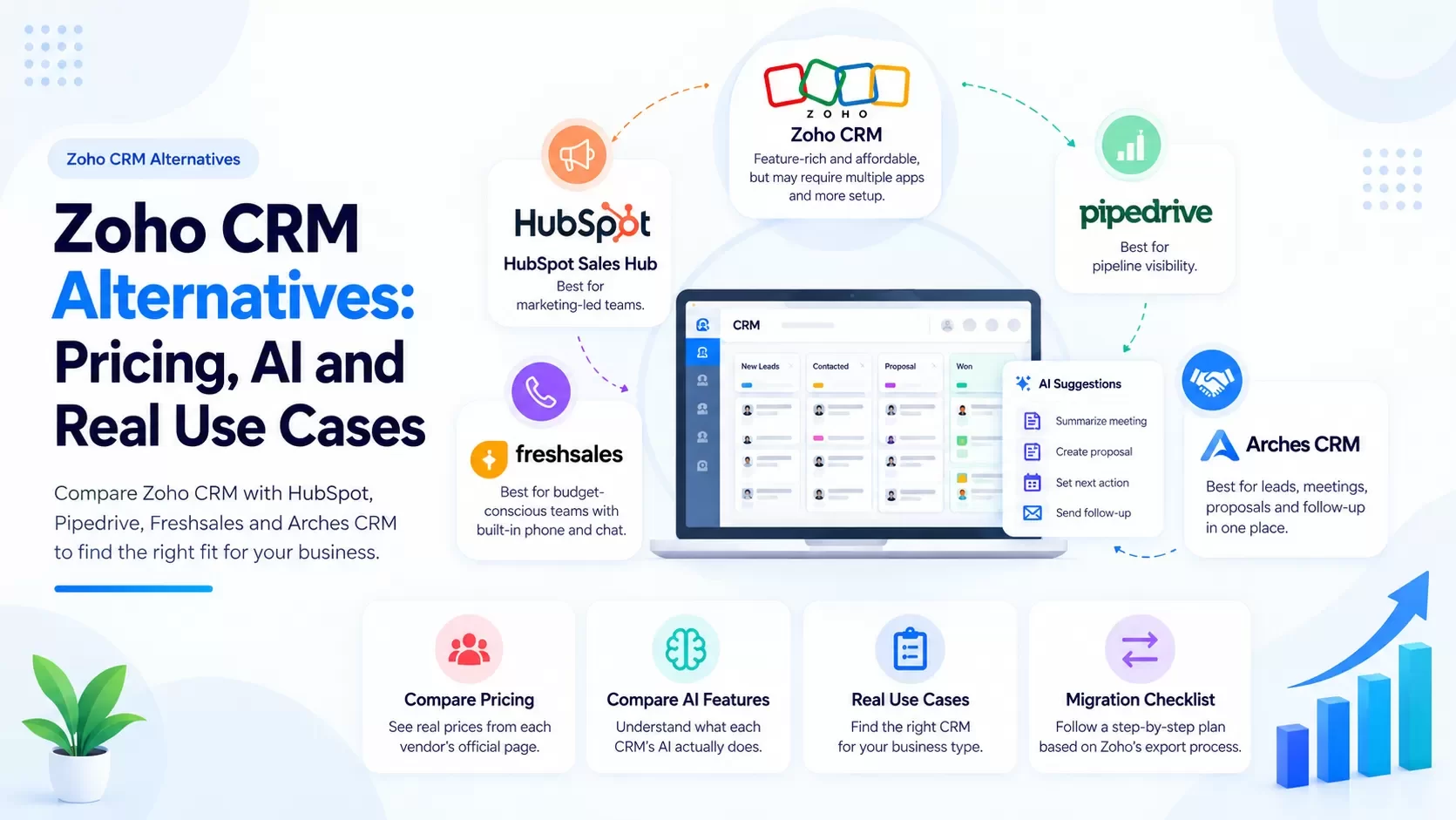
Why do teams look for Zoho CRM alternatives?
Zoho CRM is capable and affordable. Teams usually leave for one of four reasons:
- Too many apps. Zoho's strength is its suite. Its weakness is that proposals, sign, campaigns and analytics can end up in separate apps your team must stitch together.
- Setup fatigue. Blueprints, layouts, custom modules and workflows are powerful, and someone has to build and maintain them.
- AI sits in higher tiers. Zoho's comparison page lists most Zia capabilities in Enterprise and Ultimate (details below).
- Rep adoption. When the CRM feels like a database, reps stop updating it.
If none of those hurt, stay on Zoho. It's a strong product.
Zoho CRM pricing (and what you get)
From Zoho's CRM edition comparison page , as of Sep 2026. Per user/month, billed annually (monthly billing costs more):
| Zoho CRM edition | Price (annual billing) | Notes |
|---|---|---|
| Free | $0 | Up to 3 users |
| Starter | $12 | Entry paid tier |
| Standard | $14 | Core sales automation |
| Professional | $23 | More automation and customization |
| Enterprise | $40 | Zia AI features listed here |
| Ultimate | $52 | Expanded Zia prediction and recommendation capacity |
Zoho's pricing page also shows regional pricing and a price estimator, so your quote may vary by currency and region.
Zoho CRM alternatives: priced comparison
All competitor prices are from each vendor's own pricing page, as of Sep 2026. Per user (seat) per month, billed annually unless noted.
| CRM | Entry paid tier | Mid tier | Upper tier | Watch for |
|---|---|---|---|---|
| Zoho CRM (pricing) | Standard $14 | Professional $23 | Enterprise $40 / Ultimate $52 | Full Zia in Enterprise+ |
| HubSpot Sales Hub (pricing) | Starter $7 ($20 billed monthly) | Professional $90 ($100 monthly) | Enterprise $150 | Onboarding fee: $1,500 (Pro), $3,500 (Enterprise) |
| Pipedrive (pricing) | Lite $14 / Growth $39 | Premium $59 | Ultimate $79 | Smart Docs, Campaigns, LeadBooster are add-ons |
| Freshsales (pricing) | Growth $9 | Pro $39 | Enterprise $59 | Freddy AI Agent add-on: $49 per 100 sessions |
| Arches CRM | [CONFIRM price] | [CONFIRM price] | [CONFIRM: 100+ seat pricing] | [CONFIRM: what's included vs add-on] |
Honest read: On license price alone, Zoho and Freshsales are hard to beat. HubSpot's Professional tier is a big jump from Starter. Pipedrive is priced mid-market with meaningful add-ons. Arches competes on consolidation: fewer tools, less setup, faster follow-up.
How does Zoho Zia compare with other CRM AI?
"AI" means very different things across these products. Here's what each vendor lists on its own pricing pages, as of Sep 2026.
| CRM | AI brand | What the vendor lists | Tier |
|---|---|---|---|
| Zoho CRM | Zia | Data enrichment, conversational AI, Zia reminders, best time to contact, macro and workflow suggestions, assignment suggestions, email intent and sentiment analysis, prediction and recommendation models | Enterprise and Ultimate per the comparison page; the pricing page also advertises building AI agents on Professional [CONFIRM tier detail] |
| HubSpot | AI agents (HubSpot Credits) | Prospecting Agent, Data Agent, Customer Agent | Credits included: 500/month (Starter) up to 5,000/month (Enterprise) |
| Pipedrive | Built-in AI | AI-powered report creation and meeting intelligence (Lite); AI-powered multi-email tools (Premium) | Varies by plan |
| Freshsales | Freddy AI | Freddy AI Agent | Add-on, $49 per 100 sessions |
| Arches CRM | Arches AI | Meeting capture and summary, next-action guidance, proposal drafting, automated follow-up | [CONFIRM: which AI features are live, and on which tier] |
The practical difference: Zia is excellent at analysis: predictions, best time to contact, anomaly and sentiment signals. Arches focuses its AI on execution: turning a meeting into a next action, a proposal and a follow-up without the rep rebuilding context [CONFIRM: AI features live].
What the Arches AI does after a sales call
[CONFIRM: each step live]
- The meeting ends. Notes are captured to the deal record.
- The AI summarizes scope, budget, decision-maker and timeline.
- It sets the next action with a due date.
- It drafts the proposal from those details for the rep to review.
- If the prospect goes quiet, it sends the follow-up automatically.
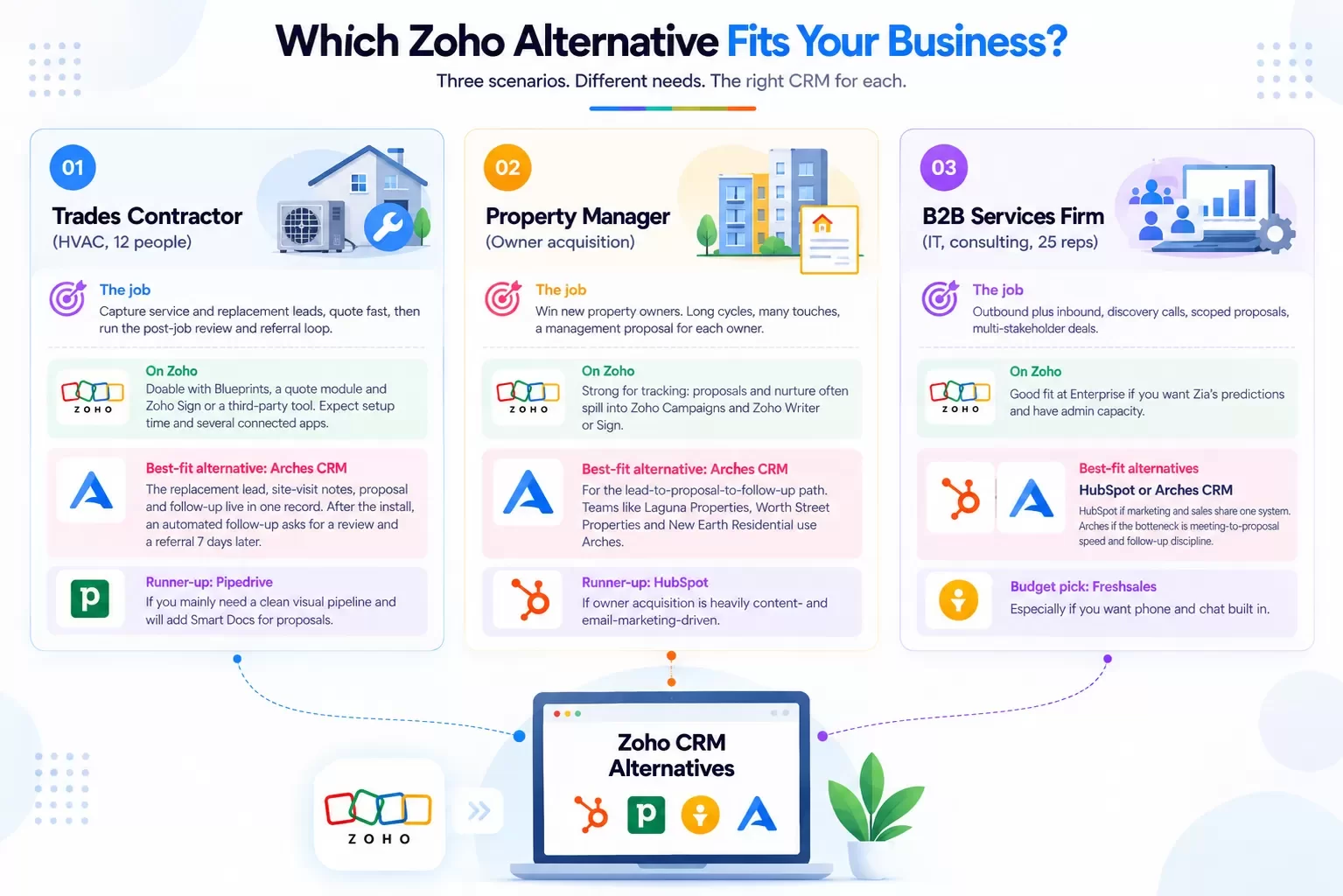
Which Zoho alternative fits your business? Three scenarios
Scenario 1: Trades contractor (HVAC, 12 people)
The job: Capture service and replacement leads, quote fast, then run the post-job review and referral loop.
- On Zoho: Doable with Blueprints, a quote module and Zoho Sign or a third-party tool. Expect setup time and several connected apps.
- Best-fit alternative: Arches CRM. The replacement lead, site-visit notes, proposal and follow-up live in one record. After the install, an automated follow-up asks for a review and a referral 7 days later [CONFIRM: automated follow-up sequences live].
- Runner-up: Pipedrive, if you mainly need a clean visual pipeline and will add Smart Docs for proposals.
Scenario 2: Property manager (owner acquisition)
The job: Win new property owners. Long cycles, many touches, a management proposal for each owner.
- On Zoho: Strong for tracking; proposals and nurture often spill into Zoho Campaigns and Zoho Writer or Sign.
- Best-fit alternative: Arches CRM for the lead-to-proposal-to-follow-up path. Teams like Laguna Properties, Worth Street Properties and New Earth Residential use Arches [CONFIRM: approval to name customers].
- Runner-up: HubSpot, if owner acquisition is heavily content- and email-marketing-driven.
Scenario 3: B2B services firm (IT, consulting, 25 reps)
The job: Outbound plus inbound, discovery calls, scoped proposals, multi-stakeholder deals.
- On Zoho: Good fit at Enterprise if you want Zia's predictions and have admin capacity.
- Best-fit alternatives: HubSpot (if marketing and sales share one system) or Arches (if the bottleneck is meeting-to-proposal speed and follow-up discipline).
- Budget pick: Freshsales, especially if you want phone and chat built in.
Zoho CRM migration checklist
Zoho gives you good export tools. Use them properly and a migration is straightforward.
Before you export
- Freeze schema changes for two weeks. No new fields, layouts or picklist values.
- List every module in use, including custom modules, and which ones you'll keep.
- Document Blueprints and workflow rules. They do not export as data. You'll rebuild the logic in the new CRM.
- Note integrations (Zoho Campaigns, Zoho Books, Zoho Sign, Zoho Desk, forms). Decide what replaces each.
- Clean duplicates using Zoho's deduplication tools before export, not after.
Exporting from Zoho
- Use Data Backup (in Zoho CRM's Data Administration settings) for a full backup of all modules as CSV files, with the option to include attachments [CONFIRM: current Zoho menu path].
- Export module-by-module for anything you want to filter or transform first.
- Keep record IDs. Zoho exports lookups (Account on a Contact, Contact on a Deal) as record IDs. You need them to rebuild relationships.
- Watch multi-select picklists. They export as delimited values in one column. Map them deliberately.
- Export subforms separately. Line items and subform data often sit in their own files.
- Pull notes, tasks, calls and events. These are what reps miss most after a migration.
- Grab email history if you use Zoho's email integration, or accept that historical emails stay in the mailbox.
Importing into the new CRM
- Import in order: Accounts, then Contacts, then Deals, then Activities and Notes, so relationships resolve.
- Map owners (Zoho users) to new-CRM users before importing.
- Map deal stages one-to-one. Collapse stages you no longer use.
- Run a 50-record test import and spot-check relationships.
- Rebuild automation in the new CRM using your Blueprint and workflow notes.
- Run both systems in parallel for one to two weeks, then set Zoho to read-only.
Hexagon IT Solutions has 16+ years of CRM implementation experience and can run Zoho-to-Arches migrations [CONFIRM: migration service scope and pricing].
Before you migrate, measure what bad data is costing you. Try the Arches data decay calculator [CONFIRM: calculator live + URL].
FAQ
What is the best Zoho CRM alternative?
It depends on the job. HubSpot for marketing-led teams, Pipedrive for pipeline visibility, Freshsales for budget plus built-in phone, and Arches CRM for a unified lead-to-proposal-to-follow-up workflow.
How much does Zoho CRM cost?
Per Zoho's comparison page as of Sep 2026: Free (3 users), Starter $12, Standard $14, Professional $23, Enterprise $40 and Ultimate $52 per user/month, billed annually.
Does Zoho CRM include AI?
Yes. Zia's full feature set (predictions, recommendations, enrichment, sentiment analysis) is listed in Enterprise and Ultimate. Check Zoho's pricing page for AI features on lower tiers.
Zoho vs HubSpot: which is cheaper?
Zoho, usually. HubSpot Starter is inexpensive ($7/seat/month billed annually), but Professional jumps to $90/seat/month plus a $1,500 onboarding fee, per HubSpot's pricing page as of Sep 2026.
Can I migrate from Zoho CRM without losing data?
Yes, if you use Zoho's Data Backup, keep record IDs for relationships, and import in the right order. Automation (Blueprints, workflows) must be rebuilt, not exported.
Is Arches CRM cheaper than Zoho?
[CONFIRM price]. Compare total cost, including the separate apps you'd need for proposals, e-signature and follow-up.
Internal-link suggestions
- Pipedrive Alternatives for Teams That Outgrew the Pipeline (anchor: "Zoho vs Pipedrive")
- Salesforce vs Arches CRM: An Honest 2026 Comparison (anchor: "enterprise CRM comparison")
- Is Salesforce Too Much CRM for Your Small Business? (anchor: "CRM complexity checklist")
LinkedIn teaser
Zoho is great value. So why do teams leave? Usually it's the five apps between the meeting and the signed proposal. Pricing, AI and a migration checklist inside.
See Arches side by side with your Zoho setup
Stop managing your CRM. Start closing deals. Small team? Start your free trial and import a sample of your Zoho data. Team of 100+? Book a demo and we'll map your Zoho modules and Blueprints to Arches.