
 Log in
 Start Free Trial
Why do small businesses buy Salesforce in the first place?
Usually for good reasons:
- It's the safe choice. Nobody gets fired for picking the market leader.
- Investors, partners or a new sales leader expect it.
- It scales. You won't outgrow it.
- Salesforce now sells a small-business package. Starter Suite is $25/user/month, per the Salesforce Sales Cloud pricing page (as of Sep 2026).
All true. The problem shows up six months later, when the CRM is technically live and practically ignored.
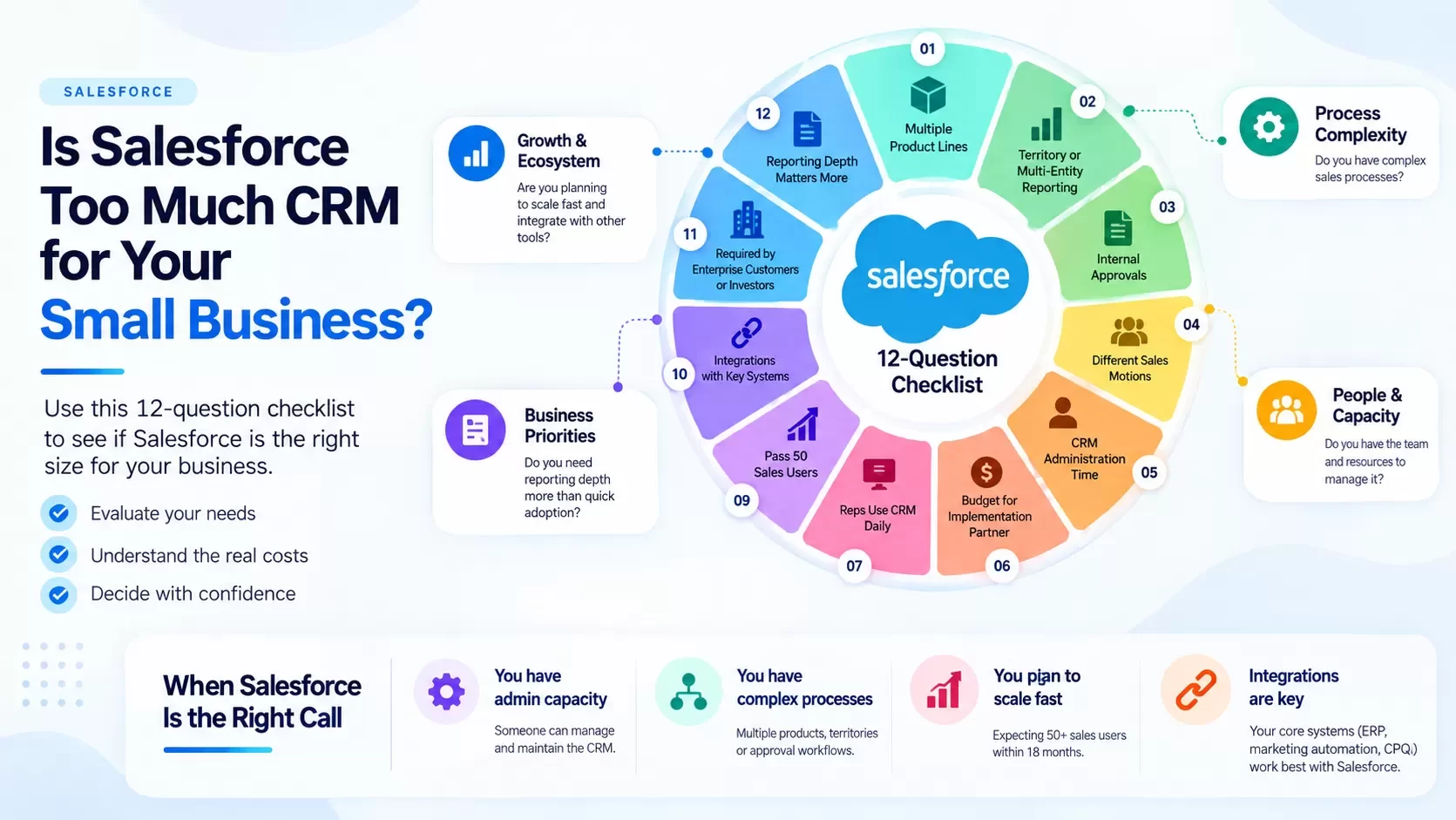
Is Salesforce too complex for your small business? Take the checklist
Score one point for every statement that is true for your team today, not someday.
Process complexity
- We sell multiple product lines with different sales stages.
- We need territory, region or multi-entity reporting.
- Deals require multi-step internal approvals (discounts, legal, finance).
- We run different sales motions (inbound, outbound, channel, renewals) with separate teams.
People and capacity
- We have someone who can spend 5+ hours a week administering the CRM.
- We have budget for an implementation partner or a certified admin.
- We have a sales ops or RevOps role, or plan to hire one this year.
- Our reps already use a CRM daily without being chased.
Growth and ecosystem
- We expect to pass 50 sales users within 18 months.
- Our key systems (ERP, marketing automation, CPQ) integrate primarily with Salesforce.
- Enterprise customers or investors require us to run on Salesforce.
- Reporting depth matters more to us right now than rep adoption.
How to read your score
| Score | What it means |
|---|---|
| 0–4 | Salesforce is probably too much CRM for you right now. You'll pay for capability you won't use. Choose a simpler, unified tool and revisit at scale. |
| 5–8 | Grey zone. Salesforce Starter Suite may fit if you keep it simple. Price in admin time before you sign. |
| 9–12 | Salesforce is likely the right call. Budget for implementation and admin from day one. |
What does Salesforce actually cost a small business?
Here are the published license prices from the Salesforce Sales Cloud pricing page, as of Sep 2026:
| Edition | Price per user/month | Notable inclusions |
|---|---|---|
| Starter Suite | $25 (billed monthly or annually) | Lead, account, contact and opportunity management; sales flows and lead routing; AI email, event and contact sync |
| Pro Suite | $100 (billed annually) | Starter plus more customization and automation; sales quoting and forecasting |
| Sales Cloud Core | $195 (billed annually) | Professional Edition features plus Slack Business+, Tableau Next; Agentforce available to buy |
| Sales Cloud Advanced | $395 (billed annually) | Core plus enhanced security, more AI, more data capacity |
| Sales Cloud Max | $550 (billed annually) | Full AI suite including Agentforce for Sales |
Licenses are only the first line. The real cost components:
- Licenses. Per user, per month, usually on an annual contract.
- Implementation. Configuration of objects, fields, stages, page layouts, automation and reports. Many small businesses use a partner.
- Admin time. Someone has to change fields, fix flows, manage users and build reports. This never ends.
- Add-ons. E-signature, proposal/CPQ, advanced AI, extra data storage, and marketplace apps are often separate purchases.
- Training and adoption. Reps need to learn it. Managers need to enforce it.
- Rep time. Every minute spent on data entry is a minute not selling.
Worked example: 8-person team, year one
All non-license numbers are hypothetical examples. Replace them with your quotes.
| Cost line | Starter Suite | Pro Suite |
|---|---|---|
| Licenses: 8 users x 12 months | 8 x $25 x 12 = $2,400 | 8 x $100 x 12 = $9,600 |
| Setup (example) | $2,000 (self-serve plus a few partner hours) | $12,000 (partner project) |
| Admin time (example: 3 hrs/wk vs 6 hrs/wk at $55/hr) | $8,580 | $17,160 |
| Proposal / e-sign tool (example: $15/user/mo) | $1,440 | Quoting included; e-sign example $720 |
| Training (example) | $1,000 | $2,500 |
| Year-one total (example) | $15,420 | $41,980 |
Look at the Starter column. The license is $2,400. The example total is more than six times that. That gap is the "is Salesforce too complex" question, expressed in dollars.
Want to model your own lead economics first? Try the Arches lead cost calculator. [CONFIRM: calculator live + URL]
A real-world scenario: the property manager's owner-lead follow-up
A property management firm with 6 people. Two business developers chase property owners who want management services. The sales cycle is 30 to 90 days. Each owner needs a management proposal with fees, services and a rental analysis.
What they need: capture owner leads from the website and referrals, log every call, remember to follow up at day 3, 10 and 30, and send a proposal that doesn't take two hours to build.
What Salesforce offers: all of that is possible. It requires configuring lead stages, building follow-up flows, and adding a quoting or document tool. Realistically, it's a project.
What a unified tool offers: the same workflow as the default. In Arches CRM, the owner lead is captured, the discovery call notes are attached to the record, the AI flags the next action ("send management proposal, due Thursday"), the proposal is created from the deal, and follow-up runs automatically if the owner goes quiet. [CONFIRM: web lead capture, AI next-action, proposal creation and automated follow-up live]
That's the difference between a platform you build and a workflow you use.
What does the AI do for a small team?
For small teams, the useful AI moment is not a dashboard. It's the Monday morning list: every open deal, the next action, and which ones are going cold.
In Arches, the AI reviews activity across leads and deals and surfaces the next best action for each rep, such as "call back, no reply in 6 days" or "proposal viewed twice, follow up today" [CONFIRM: AI next-action and proposal-view tracking live]. No report to build. No filter to maintain.
Salesforce offers powerful AI too, through Agentforce, which it lists as available to purchase on Core and above and included in Max, per its pricing page as of Sep 2026. The question for a small business is whether you'll pay for, configure and maintain it.
Signs you've already bought too much CRM
Already on Salesforce? Watch for these signals:
- Reps keep a side spreadsheet. The real pipeline lives outside the CRM.
- Only one person can change a field. And they're busy, or gone.
- Reports are rebuilt by hand before every pipeline meeting.
- Proposals, e-signature and follow-up run in three other tools.
- You're paying for seats that haven't logged in this month.
Two or more of these usually means the problem isn't your team's discipline. It's the fit between the tool and how your team sells. Fix the fit, and adoption follows.
When is Salesforce the right call for a small business?
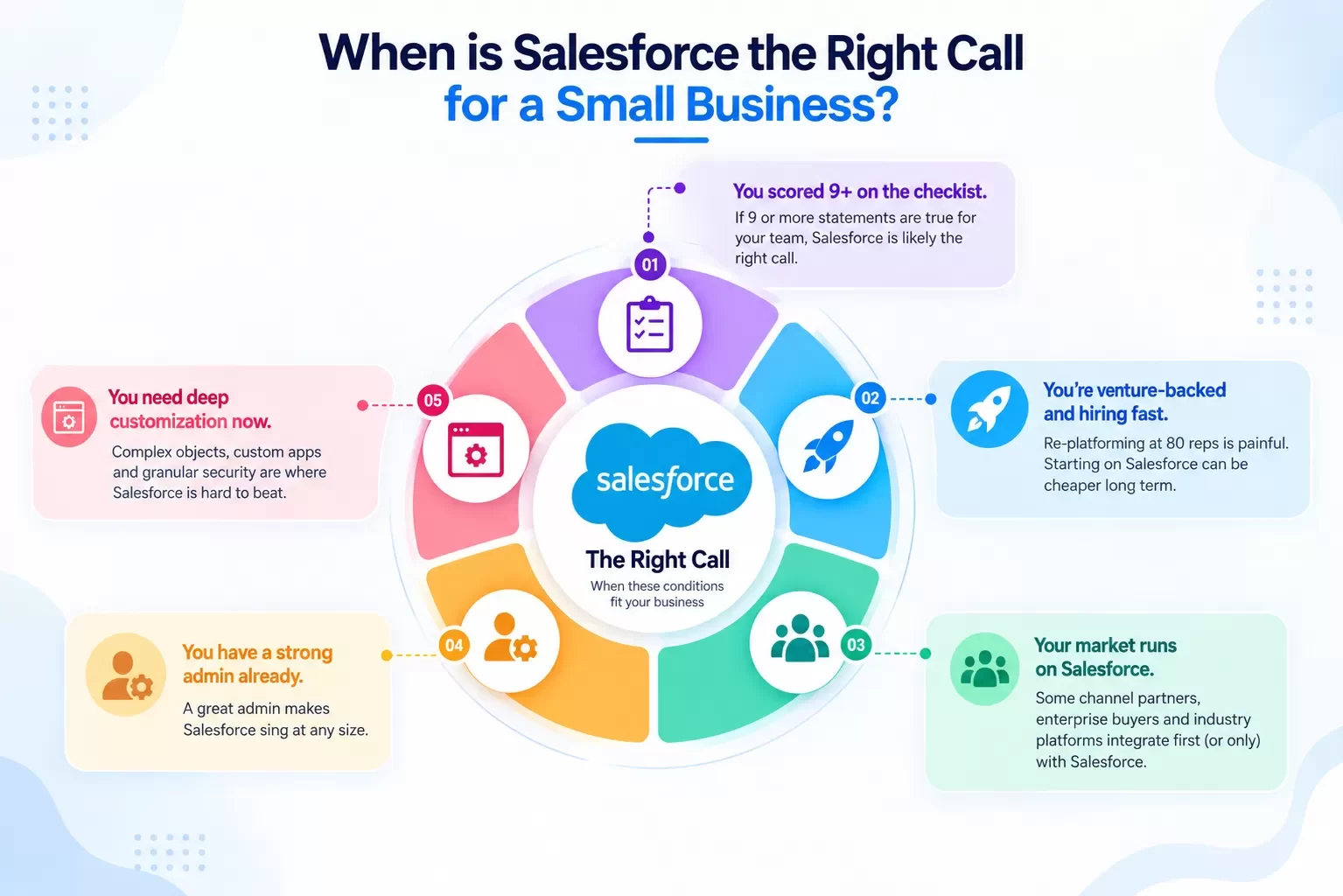
Be fair about it. Salesforce is the right choice when:
- You scored 9+ on the checklist.
- You're venture-backed and hiring fast. Re-platforming at 80 reps is painful. Starting on Salesforce can be cheaper long term.
- Your market runs on Salesforce. Some channel partners, enterprise buyers and industry platforms integrate first (or only) with Salesforce.
- You have a strong admin already. A great admin makes Salesforce sing at any size.
- You need deep customization now. Complex objects, custom apps and granular security are where Salesforce is hard to beat.
If that's you, buy Salesforce, and budget honestly for setup and admin.
If it's not, you're paying for a platform when you need a workflow. For a direct side-by-side, read Salesforce vs Arches CRM: An Honest 2026 Comparison.
FAQ
Is Salesforce good for small businesses?
It can be. Salesforce Starter Suite ($25/user/month as of Sep 2026) is built for small teams. The fit depends on process complexity, admin capacity and growth plans. Use the 12-question checklist above.
Why is Salesforce so complicated?
Because it's designed to handle almost any sales process at almost any scale. That flexibility requires configuration, and configuration requires someone to own it.
How much does Salesforce cost for a small business?
Licenses run from $25 to $550 per user/month depending on edition, per Salesforce's pricing page as of Sep 2026. Add implementation, admin time, add-ons and training for a true total.
Do I need a Salesforce admin?
For Pro Suite and above, most teams benefit from one, part-time or through a partner. Starter Suite can be managed by a tech-comfortable owner or manager if you keep it simple.
What's a simpler Salesforce alternative for small business?
Look for a unified tool that captures leads, logs conversations and meetings, creates proposals and automates follow-up without heavy setup. Arches CRM is built for exactly that. Other options include HubSpot, Zoho CRM and Pipedrive, each with trade-offs.
Can we start simple and move to Salesforce later?
Yes. Keep your data clean and your fields standard, and a later migration is manageable. Hexagon IT Solutions has 16+ years of CRM implementation experience, including migrations in both directions.
Internal-link suggestions
- Salesforce vs Arches CRM: An Honest 2026 Comparison (anchor: "Salesforce vs Arches CRM")
- Zoho CRM Alternatives: Pricing, AI and Real Use Cases (anchor: "lighter CRM options")
- Pipedrive Alternatives for Teams That Outgrew the Pipeline (anchor: "simpler CRMs with proposals")
LinkedIn teaser
Salesforce Starter is $25 a user. Our 8-person example still came to $15K in year one. Take the 12-question test before you sign.
Choose the CRM your team will actually use
Stop managing your CRM. Start closing deals. Small team? Start your free trial and see how simple sales can be. Team of 100+? Book a demo for a fit assessment against your current Salesforce plan.