
 Log in
 Start Free Trial

Adding SMS and WhatsApp to a CRM has no single fixed cost: your total depends on the CRM subscription, channel access, messaging usage, and implementation work. A CRM subscription alone is not a complete messaging budget. For a 2026 comparison, ask each provider to separate recurring charges from setup work and identify which messaging services are included.
- How much does it cost to add SMS and WhatsApp to a CRM? Compare subscriptions, messaging usage, and setup separately.
- Arches CRM suits growing sales teams that want customer conversations and follow-up workflows in one platform.
- Compare SMS and WhatsApp against the same workflow, team access requirements, and expected messaging activity.
- Confirm billing rules, reply handling, and automation limits before committing to a messaging integration.
Why this matters
A lead replies, but the response stays outside the sales pipeline. Your rep misses it and sends another follow-up instead of answering the question. Connecting a channel solves only part of that problem; you also need ownership, conversation history, and a clear next action.
Separate the underlying CRM cost per user from the cost of sending and managing messages. Otherwise, you cannot tell whether a proposal covers your existing sales process or only the software connection.
How much does it cost to add SMS and WhatsApp to a CRM?
The total is the combination of your base CRM, any channel or integration charges, actual messaging usage, and the work required to make the workflow operate correctly. Some proposals bundle these components; others list them separately. Compare the scope before comparing the total.
Use this breakdown when requesting a 2026 proposal. Each row is something to confirm, not an assumption that every provider charges for it.
| Budget component | What to ask the provider | What to establish before signing |
|---|---|---|
| CRM subscription | Which subscription supports the required channels? | Whether your existing subscription is sufficient |
| Channel access | Is SMS or WhatsApp access included or separately billed? | Which account or service supplies each connection |
| Messaging usage | What activity is billable, and how is it measured? | Treatment of sent messages, replies, and unsuccessful sends |
| Team access | Who can read, send, assign, and manage conversations? | Whether the intended users need additional access |
| Setup work | Who connects accounts and configures the workflow? | The specific implementation deliverables |
| Ongoing administration | Who maintains routing, permissions, and automations? | Your responsibilities after launch |
Request an itemized proposal that names the services involved and the party billing each component. A single total without that detail makes future bills harder to check.
Also distinguish a new CRM purchase from adding messaging to an existing CRM. In the latter case, compare the incremental expense rather than treating the entire CRM subscription as a new messaging cost.
SMS integration: separate sending from sales follow-up
Best for: teams whose customers use text messages for sales conversations or reminders. SMS belongs in your CRM when a rep needs to see the reply, understand the context, and act without rebuilding the conversation elsewhere.
The benefit is straightforward: a message can become part of the lead's working history rather than an isolated exchange. The limitation is equally important: sending a text does not, by itself, assign the reply or create the right next task.
Before accepting an SMS proposal, ask the provider to demonstrate these actions:
- Send a message from the intended contact record.
- Receive a reply and attach it to the correct contact.
- Show who owns the conversation.
- Stop the relevant follow-up when the customer responds.
- Surface a failed send for someone to review.
Treat these as acceptance criteria, not assumed features. If your team must manually copy replies into the CRM, include that ongoing work in your comparison.
For a 2026 rollout, define the business use before requesting a quote. An appointment reminder and an open-ended sales conversation need different handling, even when both use SMS.
WhatsApp integration: budget for the conversation workflow
Best for: teams whose customers already choose WhatsApp for business conversations. Start with customer behavior, not a channel checklist. Adding WhatsApp only helps the sales process when the people you contact actually want to use it.
The benefit is keeping relevant WhatsApp conversations connected to the lead and opportunity. The limitation is that a connection still needs clear permissions, ownership, and follow-up rules; a shared channel does not automatically create a managed process.
Ask which WhatsApp service the proposed integration uses, who owns the connected account, and who administers it. Then request the current messaging rules and billing terms for that exact configuration.
Your demonstration should include a customer reply, a reassignment between reps, and a conversation associated with an existing opportunity. Confirm how your team finds that history later.
Do not assume that a familiar WhatsApp experience on a phone describes the CRM integration. Evaluate the proposed business setup on its own terms, including any provider dependency and the process for changing administrators.
Should you add SMS, WhatsApp, or both?
Choose the channel that fits an existing customer conversation before adding another one. Supporting both channels makes sense when your team has a defined use for each, not simply because both appear on a feature list.
| Option | Best for | Main benefit | Main limitation | What to validate |
|---|---|---|---|---|
| SMS | Customers who use text messages for the intended interaction | Connects texting with lead follow-up | Sending alone does not establish reply ownership | Delivery visibility, replies, and stop conditions |
| Customers who already use WhatsApp with your business | Connects WhatsApp conversations with sales activity | Account setup and administration still need an owner | Account control, conversation history, and assignment | |
| Both channels | Teams serving customers with different communication preferences | Supports a channel choice within the sales process | Requires coordination to prevent overlapping outreach | Shared contact matching and cross-channel follow-up rules |
Ask vendors to demonstrate the same customer journey for each option. Otherwise, an SMS demonstration focused on reminders and a WhatsApp demonstration focused on conversations will not give you a fair comparison.
If you choose both, decide what happens when a customer responds on a different channel from the original outreach. The rep should have an explicit next action rather than two independent sequences continuing unchecked.
Why the total cost varies
For your 2026 budget, use these factors to explain differences between proposals. Require each provider to connect the proposed scope to your actual workflow.
- Existing subscription: Establish whether messaging requires a subscription change or works within your current arrangement.
- Channel configuration: Identify whether the connection is supplied directly or involves another provider with separate terms.
- Messaging activity: Compare the same expected usage and ask exactly which activities enter the bill.
- Team responsibilities: Specify who sends, who replies, who supervises, and who administers the connection.
- Automation scope: Separate basic sending from assignment rules, reply handling, reminders, and pipeline updates.
- Implementation scope: List account connection, contact mapping, testing, training, and handover as explicit deliverables where required.
These factors also explain why a feature checklist is insufficient. Two systems can both list SMS and WhatsApp while supporting different day-to-day processes.
Ask for a written statement of exclusions. Knowing that your team must configure routing or maintain an external connection is more useful before purchase than after a missed reply.
How do you build a realistic messaging budget?
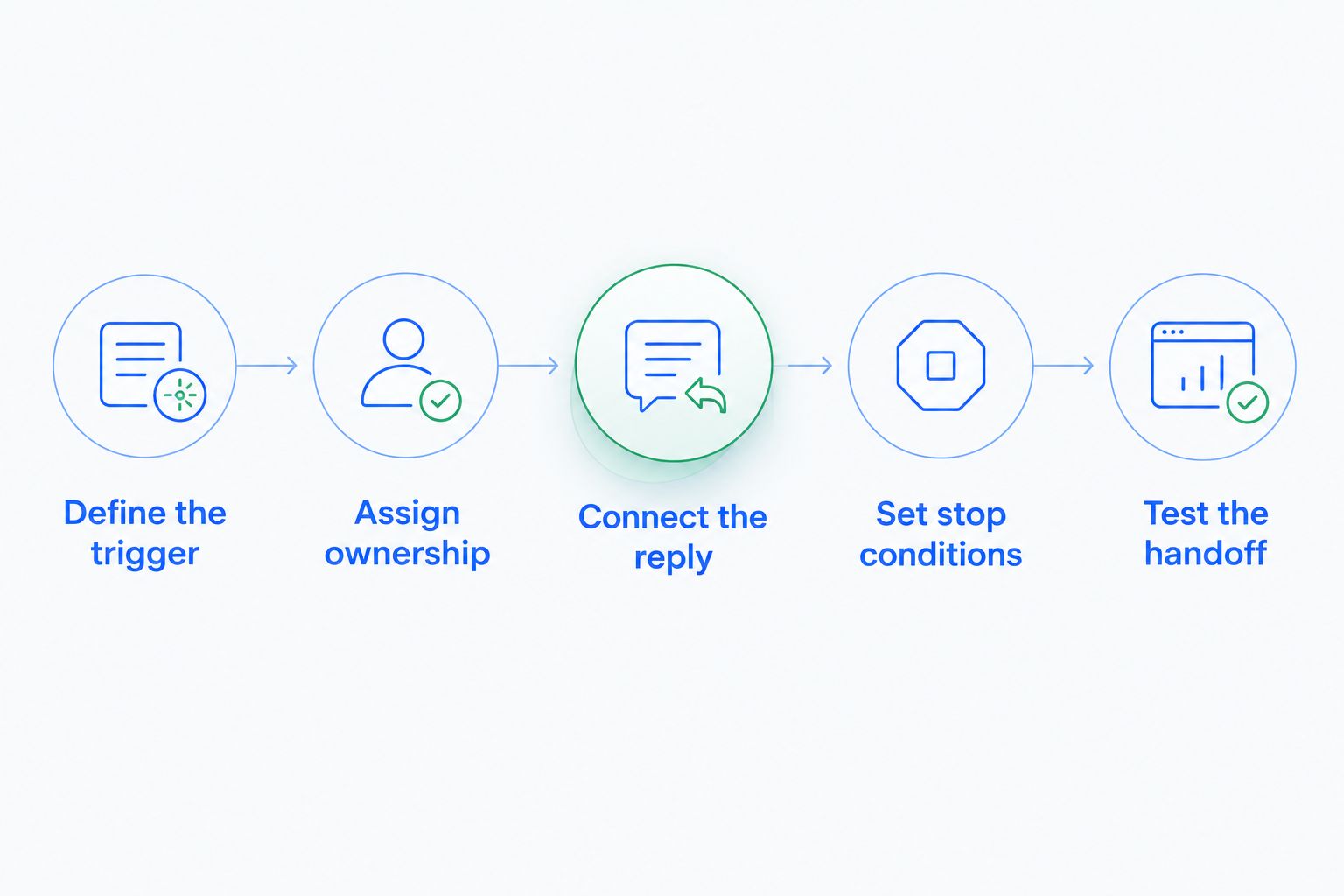
Build the budget around a complete lead journey. The following sequence turns a broad request to “add messaging” into a scope that vendors can quote and your team can test.
Define the trigger
Choose the event that should start the conversation: a new inquiry, an appointment reminder, or a follow-up task. State which contact qualifies and which channel the workflow should use.
Keep the first workflow narrow. A clearly described journey is easier to evaluate than a request to automate every sales interaction.
Assign ownership
Name the role responsible for the conversation and the fallback when that person is unavailable. Explain whether replies return to the original rep or enter a shared assignment process.
Ownership belongs in the scope because a delivered message is not the same as a handled conversation. Ask the vendor to show the handoff rather than merely describe it.
Connect the reply
Specify where a reply should appear and which contact or opportunity it should update. Include the case where the customer already has an active deal.
Define the response to ambiguous contact matching. Do not let an unresolved matching problem become an automatic update to the wrong record.
Set stop conditions
State which events stop or change the follow-up: a reply, an opt-out, a booked meeting, or a closed opportunity. Ask how the proposed workflow checks those conditions.
The objective is not to send more messages indiscriminately. It is to keep the next action consistent with what the customer has already done.
Test the handoff
Walk through the process with test contacts before enabling live outreach. Include a successful reply, an unsuccessful send, and a rep reassignment.
Agree who corrects each problem and who approves launch. Include those responsibilities in the implementation scope rather than leaving them to an informal handover.
Where does Arches CRM fit?
Arches CRM is best for growing sales teams that want customer conversations and follow-up workflows in one platform. It brings email, WhatsApp, SMS, and calls together with lead management, sales pipelines, tasks, and workflow automation.
The relevant benefit is context: your team can organize the conversation alongside the lead and sales activity. Arches CRM also supports automated reminders, tasks, and follow-up sequences, with opportunity movement based on customer interactions and configured workflows.
The trade-off is configuration responsibility. A platform's automation capabilities do not decide your assignment rules, define a qualified opportunity, or determine when outreach should stop. Your team still needs to specify those operating decisions.
When evaluating Arches CRM, request a demonstration of your actual message-to-reply-to-next-action workflow. Confirm channel inclusions and current billing terms separately; a capability description is not a statement that every messaging component is included.
Can you add messaging without changing your CRM subscription?
You need confirmation for your existing subscription and proposed connection. Ask whether channel access, automation, conversation history, and the required team permissions are all supported under the current arrangement.
If an upgrade is required, request the reason in writing. Separate a necessary capability from an optional addition so the scope remains clear.
Does connecting both channels replace manual follow-up?
Connecting SMS and WhatsApp does not replace a defined follow-up process. Your team still needs ownership rules, response handling, and a decision about what happens after each customer interaction.
Automate a repeatable action only after those rules are clear. Keep exceptions visible to the person responsible for resolving them.
FAQ
How much does it cost to add SMS and WhatsApp to a CRM in 2026?
The total depends on the CRM subscription, channel connection, messaging usage, and implementation scope. Request an itemized proposal that separates recurring charges from setup work and identifies the billing party for each component.
Are SMS and WhatsApp included in every CRM subscription?
Do not assume SMS and WhatsApp are included in a CRM subscription. Confirm channel access, usage billing, automation support, and team permissions for the specific subscription you are considering.
Is SMS better than WhatsApp for CRM follow-up?
SMS is the better fit when your customers use text messages for the intended interaction; WhatsApp is the better fit when they already choose WhatsApp. Compare both against the same reply-handling and ownership requirements.
Can my team use SMS and WhatsApp in the same CRM?
A CRM that supports both channels can bring them into the same sales process. Confirm whether replies attach to the correct contact and whether a response on either channel changes the relevant follow-up workflow.
What should I ask before accepting a messaging integration quote?
Ask for channel inclusions, billing rules, account ownership, implementation deliverables, and ongoing responsibilities. Require a demonstration covering a sent message, a customer reply, an assignment, and the next sales action.
Does Arches CRM support SMS and WhatsApp conversations?
Arches CRM brings SMS and WhatsApp together with email and calls, alongside leads, tasks, and sales activity. Confirm the proposed channel configuration and current billing terms for your team's requirements.
One last thing
Test the reply, not just the send. A successful outbound message proves that a channel can transmit; it does not prove that your rep sees the response, owns the conversation, or knows what to do next.
Make that complete handoff a condition of your 2026 launch approval. The budget should buy a working sales process, not merely a connected messaging account.