
 Log in
 Start Free Trial

CRM onboarding has no fixed duration: your timeline depends on data preparation, pipeline setup, integrations, workflow testing, and whether your sales team can use the system correctly. Account access is not the finish line; onboarding includes making sure leads have owners and follow-ups work. For your 2026 rollout, set a launch date against those readiness checks rather than an unsupported average.
- How long does CRM onboarding usually take? Plan around data, integrations, workflow testing, and team readiness—not account creation.
- Arches CRM fits growing sales teams that need lead management, pipeline tracking, and automated follow-ups together.
- Start with a working sales process; add secondary workflows after the core process passes testing.
- Treat onboarding as complete when reps can handle leads without relying on a parallel spreadsheet.
Why this matters
A CRM account can be ready while your sales process is not. If imported leads lack owners or follow-up tasks point to the wrong person, the system still needs work before your team depends on it.
Arches CRM is best for growing sales teams that need leads, conversations, and follow-up workflows in one place. Arches CRM brings those activities together, but your onboarding plan still needs clear ownership and tested rules. Software does not decide what your sales stages should mean.
The useful question is not just when you can sign in. It is when a rep can receive a lead, understand the conversation, take the right action, and leave an accurate record for the next person.
How long does CRM onboarding usually take?
CRM onboarding lasts until the agreed sales process works reliably for the people using it. A contact import alone does not establish that; neither does completing a product walkthrough.
For a 2026 onboarding plan, build the schedule around the following sequence. Assign an owner to each step and require evidence that the step works before calling it complete.
- Define the launch scope. List the lead sources, sales stages, users, and communication channels required for the initial rollout.
- Prepare the records. Decide which contacts and opportunities belong in the CRM, then resolve duplicates and unclear ownership.
- Configure the pipeline. Give each stage an entry condition, an exit condition, and a responsible person.
- Connect essential systems. Check the integrations needed for the launch process, including permissions and record matching.
- Test the workflow. Follow a representative lead through assignment, communication, follow-up, and a stage change.
- Confirm team readiness. Have reps complete the process themselves and identify where they still need help.
Some preparation can happen alongside configuration. However, testing an assignment rule before you have agreed who should receive the lead does not prove the rule is correct.
Set the launch date from the unfinished dependencies, not the number of settings already configured. A short setup checklist can hide a major unresolved decision about ownership, access, or customer communication.
What should your onboarding estimate include?
Ask for separate estimates for data preparation, configuration, integration work, testing, and training. Keep the scope attached to each estimate so a date does not become a promise covering work nobody discussed.
Specify what your team must supply, too. An estimate that assumes clean records and agreed pipeline stages describes a different project from one that includes rebuilding both.
Focused rollout: launch the core sales process first
A focused rollout limits the initial scope to the work your reps need to handle active leads. Define the required records, ownership rules, pipeline stages, and follow-up actions before adding secondary workflows.
Best for: teams with a clearly defined sales process that want to establish a working foundation. The benefit is a narrower acceptance checklist. The limitation is that some reporting, historical records, or additional workflows remain outside the initial launch.
Do not confuse a focused rollout with an incomplete one. Every lead included in the launch still needs a clear owner and next action, even if other parts of the business stay outside the CRM temporarily.
Broader rollout: coordinate connected workflows before launch
A broader rollout includes more teams, communication channels, connected systems, or distinct sales processes in the initial scope. Each connection needs an agreed purpose and a test showing that the expected information reaches the right place.
Best for: teams whose initial sales process depends on several connected workflows. The benefit is coordinated coverage at launch. The limitation is that unresolved dependencies can hold up otherwise finished work.
Use this comparison to choose the scope of your 2026 rollout. Neither approach supplies a universal onboarding duration.
| Rollout approach | Best for | Main benefit | Main limitation | Acceptance evidence |
|---|---|---|---|---|
| Focused rollout | Teams launching a defined core sales process | Keeps initial scope narrow | Secondary workflows remain for later | Reps can handle the included leads end to end |
| Broader rollout | Teams with connected launch requirements | Tests related workflows together | More dependencies need coordination | Connected processes work with correct ownership and access |
Choose based on what your team needs to serve customers, not on which approach sounds faster. Excluding an essential communication channel does not simplify the launch if reps must immediately work around its absence.
Why CRM onboarding time varies
The timeline changes when the work changes. These factors belong in your scope discussion before anyone commits to a launch date:
- Data readiness. Duplicate records, inconsistent fields, and unclear ownership need decisions before import results can be trusted.
- Pipeline definitions. Stages need shared meanings so reps record progress consistently and automation follows the intended process.
- Communication channels. Email, WhatsApp, SMS, and calls introduce distinct connection and testing requirements when included in scope.
- Integrations. Each connected tool needs a clear data flow, suitable permissions, and a way to recognize failed or incorrect updates.
- Workflow rules. Assignment, reminders, follow-up sequences, and stage changes need explicit triggers and stopping conditions.
- Team readiness. Reps need to perform their actual work in the CRM, while managers need to recognize incomplete or incorrect records.
Arches CRM supports sales pipelines, workflow automation, customer communication, and integrations. During onboarding, select the capabilities your launch requires instead of treating every available feature as mandatory setup work.
For spreadsheet-heavy projects, separate migration preparation from the rest of onboarding. The guide to moving from spreadsheets to a CRM addresses that part of the project; training and workflow testing still need their own acceptance criteria.
What should be ready before CRM onboarding starts?
Before configuration begins, write down the sales process in language your reps already use. A useful brief explains where a lead arrives, who owns it, what happens next, and what evidence moves it forward.
Give the implementation owner the following inputs:
- Record source: which system or file supplies the launch records.
- Record owner: who resolves conflicting contact details and ownership.
- Stage rules: what qualifies an opportunity to enter or leave each stage.
- Access rules: which people need to view, edit, or manage records.
- Follow-up rules: what starts a task or message and what stops it.
- Launch evidence: what a rep must demonstrate before the workflow is accepted.
Keep unresolved decisions visible. If sales managers disagree about when a deal becomes qualified, settle the definition rather than building automation around conflicting expectations.
For your 2026 launch brief, distinguish required work from later improvements. This gives the team a clear basis for deciding whether a new request changes the launch scope.
How do you know CRM onboarding is complete?
CRM onboarding is complete when your team can run the agreed sales process correctly without depending on the old process to fill essential gaps. Confirm that through a realistic workflow, not just a settings review.
Use this acceptance sequence with representative records:
- Capture lead. Confirm the record contains the information your team needs to respond.
- Assign owner. Check that responsibility reaches the intended rep and is visible to the team.
- Record conversation. Confirm the rep can find the relevant communication and understand its context.
- Schedule follow-up. Check that the next action has an owner and follows the agreed rule.
- Update pipeline. Confirm the opportunity moves only when the stage condition is satisfied.
- Review exceptions. Identify incomplete records, failed actions, and situations requiring manual judgment.
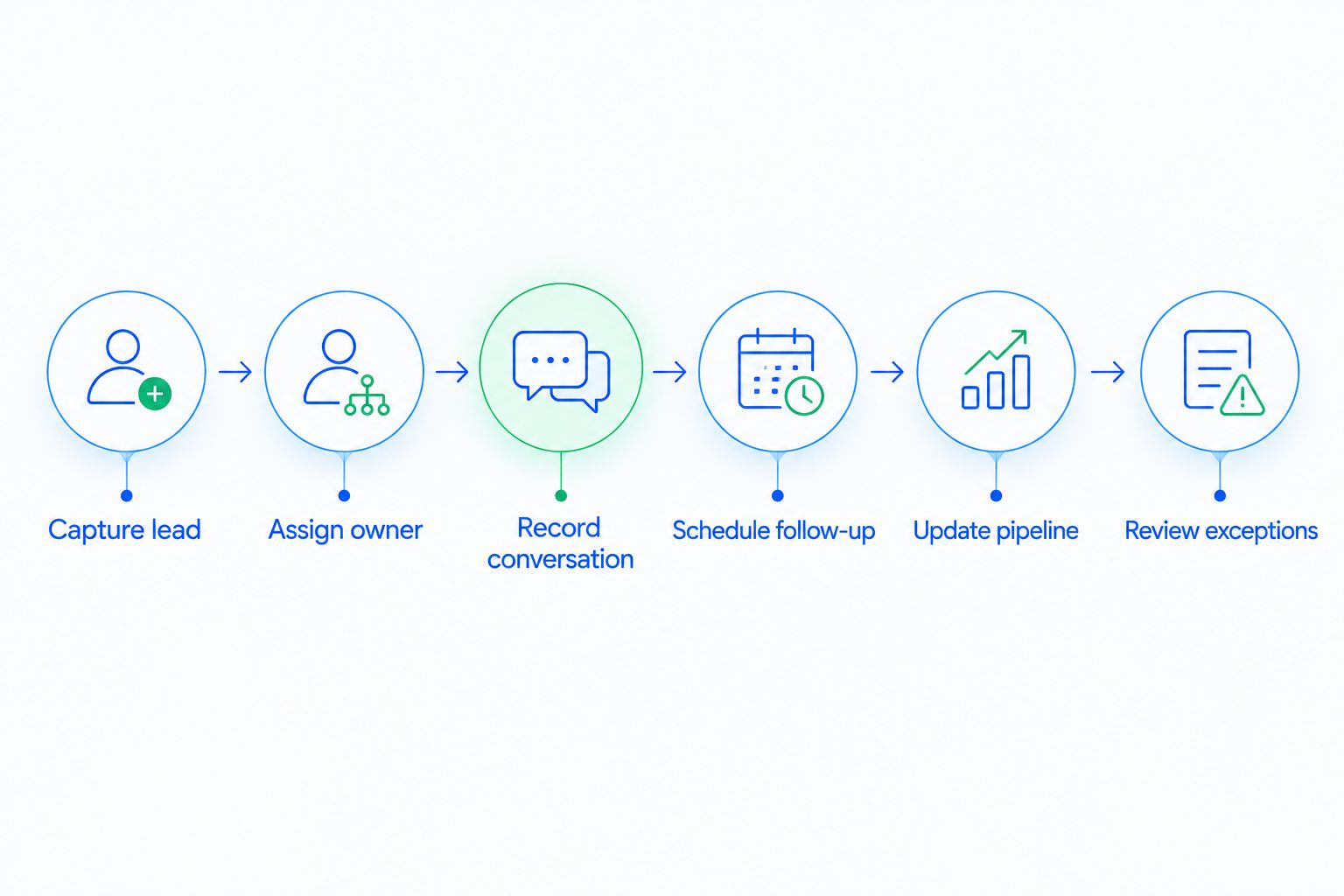
Include exceptions in the test. Check what happens when an owner is unavailable, contact information is incomplete, or a customer replies while a follow-up is pending.
Arches CRM can move opportunities based on customer interactions and configured workflows. That makes checking the configured conditions essential: an automatic stage change must reflect your sales process, not simply demonstrate that automation runs.
Can you launch before every automation is finished?
You can launch before secondary automations are finished if the agreed core process works and responsibilities remain clear. Document the manual action that covers each deferred workflow so a missing automation does not become a missing follow-up.
Do not defer rules that your launch depends on without replacing them. If lead assignment is unfinished, someone must explicitly own assignment until the rule is ready.
For a 2026 rollout, keep deferred work on a separate list with an owner and acceptance condition. That preserves a clear distinction between a working launch and an unfinished project being called complete.
Does importing contacts mean onboarding is finished?
Importing contacts does not finish onboarding. It establishes that records entered the system; it does not establish that ownership, communication, pipeline movement, or follow-up works correctly.
Review representative imported records against their source. Check the fields that drive your workflow, especially owners, contact details, opportunity stages, and next actions.
Then ask a rep to use those records. A successful import is useful only if the resulting information supports the work your team needs to do.
FAQ
How long does CRM onboarding usually take for a small sales team?
CRM onboarding depends on the team's launch scope, data readiness, integrations, and training requirements—not team size alone. Set the schedule after defining the sales process and the checks required for launch.
What's the difference between CRM setup and CRM onboarding?
CRM setup configures the system; CRM onboarding also prepares the people and processes that use it. Onboarding includes checking data, testing workflows, and confirming that reps can complete their daily work.
Can we start using a CRM before all our old data is imported?
You can start before all historical data is imported if the records required for the launch process are ready. Define which records belong in the initial scope and how the remaining records will be handled.
Do we need every integration connected before launching a CRM?
You need the integrations required for your agreed launch process, not every possible connection. Defer optional connections only when the team has a clear way to handle the work without them.
Does workflow automation make CRM onboarding instant?
Workflow automation does not make onboarding instant because triggers, ownership, stopping conditions, and exceptions still need configuration and testing. Confirm that the automated action matches the intended sales process.
What should sales reps demonstrate before onboarding is complete?
Sales reps should demonstrate that they can find a lead, understand the conversation, complete the next action, and update the opportunity correctly. Use representative records rather than relying only on a product walkthrough.
Who should own our CRM onboarding project?
Assign an internal owner who can coordinate decisions about sales processes, data, access, and launch acceptance. Give that person a clear route to the people responsible for each decision.
One last thing
Test whether a follow-up stops when it should, not just whether it starts. A workflow that sends correctly but ignores a customer reply still fails the sales process it was meant to support.
Before approving your 2026 launch, have a rep demonstrate that exception. The result tells you more about operational readiness than another completed configuration checkbox.