
 Log in
 Start Free Trial
Introduction
If you're asking what are the biggest risks in a CRM migration project, the answer usually isn't what teams expect. Most migrations don't fail at cutover. They fail weeks earlier, during the planning phase, when teams skip the diagnostics that would have surfaced the real problems. By the time records are corrupted or users have stopped logging in, the decisions that caused those outcomes were already made.
If you're mid-project or just starting to plan, the risks listed here aren't hypothetical edge cases. Data loss, broken integrations, and low adoption are predictable patterns that show up across the majority of migration projects, regardless of which platforms are involved. Teams that treat migration as a simple technical task, export, map, import, done, tend to discover what went wrong only after the damage is already done.
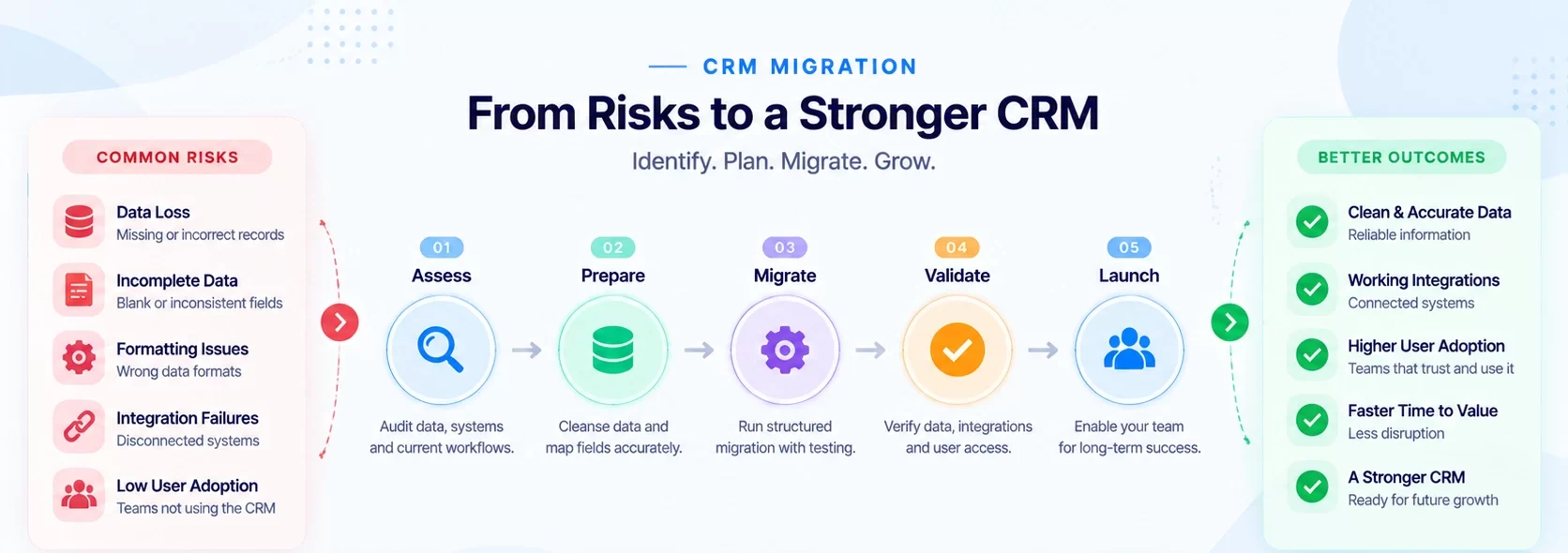
Below are nine of the most critical CRM migration risks, where each one originates, and the concrete steps you can take to address them before a single record moves.
What most CRM migration projects get wrong from the start
1. The "lift and shift" assumption
Many teams treat a CRM migration as a copy-paste operation: export the data, map it to the new system, run the import, and assume it lands correctly. That assumption is where most migration projects start breaking down.
The moment you move records between two systems with different field structures, validation rules, and data relationship models, you're not copying, you're transforming. Transformation without a clear, documented map produces corrupted values, orphaned records, and broken associations that are expensive to trace and fix after the fact.
The teams with the smoothest migrations start by auditing their data, integrations, and workflows before touching either platform. At Arches CRM, every CRM migration begins with a structured diagnostic: mapping data relationships, identifying dirty data, and surfacing integration dependencies before any migration scripts are written. This upfront work cuts post-cutover issues significantly and makes go-live week predictable rather than chaotic.
Data integrity risks hiding in your export file
2. Formatting errors that silently drop records
Data loss during a CRM migration rarely looks dramatic. It's a date field formatted as "DD-MM-YYYY" that the new system parses incorrectly. It's a phone number column that lands in the email field because the schema didn't align. It's a batch of contact records that never transferred because a required field was blank.
Formatting errors are consistently among the top causes of data loss in migrations, and they often go unnoticed until a rep can't find a key account or a revenue report shows numbers that don't reconcile.
3. Dirty data that multiplies on import
Duplicates, incomplete records, and inconsistent entries that your team learned to live with in the old system don't stay contained during migration. They multiply.
A source database with 5,000 contacts and 12% duplication doesn't produce 5,000 clean records in the new platform; it produces a mess that corrupts reporting, confuses your team, and erodes trust in the system from day one.
Run a data profiling report before migration begins. Flag incomplete records, format inconsistencies, and duplicates, and use fuzzy matching to merge duplicates rather than carrying them forward. Establish a baseline before export: document your record counts and critical totals so you have something concrete to reconcile against after import.
Schema mismatches and the integrations that break quietly
4. Field structure mismatches between platforms
When you move data from Salesforce to HubSpot, or from HubSpot to Microsoft Dynamics, the platforms don't share the same data models. Custom fields that existed in the source may have no equivalent in the target.
A field type mismatch - say, a number field in the source mapped to a text field in the target - doesn't throw an error; it silently corrupts the value. Required fields in the new platform that were optional in the old one cause import failures you may not catch until reporting is already broken.
Document every field in the source system, map each one explicitly to its target equivalent, and confirm data type compatibility before the migration runs.
5. Integration failures that break downstream operations
CRM platforms rarely operate in isolation. Most are connected to email tools, marketing automation, billing systems, and ERP platforms via API.
When you migrate the CRM and those connections aren't re-established correctly, you get quiet breakdowns: contacts stop syncing to your marketing platform, support tickets lose their CRM associations, and automated follow-up sequences stop firing.
The integrations that break most quietly are the ones without error alerts. They just stop working without notifying anyone.
Build a complete integration inventory before migration begins, test each connection in a staging environment afterward, and verify that data flows correctly in both directions before disabling the old system. For common integration and schema issues across systems, review this analysis of data migration challenges. Also include any connected hardware or device endpoints in your inventory to avoid forgotten integrations that surface after cutover.
Downtime, cutover planning, and the rollback you haven't built yet
6. Insufficient testing before go-live
Most migration testing stops at checking whether data transferred. The teams that avoid cutover disasters run a full sequence: unit testing of individual components, functional testing of core business workflows, end-to-end testing of the full sales process, and User Acceptance Testing with actual end users before go-live.
Consider breaking this into clear phases:
- Unit testing - validate individual fields, data types, and record counts.
- Functional testing - confirm that core workflows behave correctly in the new system.
- Reconciliation testing - compare record counts, field values, and financial totals between source and target.
- User Acceptance Testing - have actual end users work through their daily tasks before go-live.
Most critically: run a mock cutover. Execute the full migration in a staging environment that mirrors production, measure how long it takes, and identify every failure point before you do it with live data. A mock cutover turns your go-live from a gamble into a drill you've already run.
7. A rollback plan that's never been tested
Every CRM migration needs a rollback plan, and most teams have one they've never actually exercised.
A rollback plan isn't a vague statement that says "we'll revert if something goes wrong." It's a documented set of specific failure criteria - say, reconciliation testing reveals more than 0.1% data mismatch, or a critical business process fails UAT - paired with verified backups and tested restoration scripts.
Run the rollback plan in your staging environment before cutover. Define your go/no-go gate criteria clearly: what has to be true to proceed, and what has to be true to stop. Teams with this structure in place don't panic at cutover; they execute a plan they've already practiced.
User adoption failure: the risk no platform can solve
8. Low adoption rooted in poor change management
A migration can transfer every record perfectly and still fail if users don't adopt the new system. Low adoption is almost always a planning failure that surfaces after go-live.
When users don't understand what's changing, why the new platform works better for their daily tasks, or how their specific workflows function after cutover, they default to workarounds: notes in spreadsheets, manual call logging, and eventually a complete loss of confidence in the CRM data.
That breakdown undermines reporting and pipeline management across the entire organization.
Bring end users into the process early. Share the migration roadmap with the sales and operations teams who use the system daily. Identify power users in each department who can champion the new platform among peers.
Build role-specific training around actual workflows, not a generic feature walkthrough. Treat adoption as a metric, not an assumption. Track login frequency, record update rates, and pipeline data quality in the weeks after go-live, and use that data to identify which teams need additional support.
For practical checklists and adoption-focused guidance, see this migration risks checklist that highlights operational steps to preserve data quality and adoption.
Security and compliance exposure during the transfer window
9. PII and PHI exposure in staging environments
The migration window is when security controls are most likely to be relaxed. CRM systems hold significant volumes of personally identifiable information: contact details, purchase history, communication records, and for healthcare-adjacent businesses, protected health information covered under HIPAA.
Staging environments that lack production-grade security create real exposure. Data moved across regions without checking data residency requirements can trigger GDPR violations. ETL pipelines that leave sensitive data in plaintext "temporarily" create breach windows that regulators treat no differently than any other unauthorized access event.
Security requirements to lock down during migration include:
- Encrypt all data in transit using TLS 1.3 or higher, with AES-256 encryption at rest in staging environments.
- Create migration-specific roles with read-only export access in the source and import-only permissions (no delete) in the target, set to expire within 48 hours of cutover completion.
- Require multi-factor authentication for every account handling migration data.
- After the project closes, revoke all migration-specific roles, destroy staging environments, and rotate any API keys or credentials used during the migration.
That final decommissioning step is where most teams leave the door open longest. For a focused look at migration security in regulated environments, including steps for healthcare cloud migration, and for broader context on threats and mitigations, read our overview of Common Cybersecurity Threats and How to mitigate them during operational changes like migrations.
Build your CRM migration risk checklist before the first record moves
CRM migration risks are predictable. They're not random events that happen to unlucky teams; they're patterns that emerge when planning is treated as overhead rather than the core of the project.
The lift-and-shift assumption, formatting errors, dirty data, schema mismatches, integration failures, testing gaps, unvalidated rollback plans, low adoption, and security exposure all share one common factor: they're caught too late, after the migration has already run.
Understanding what are the biggest risks in a CRM migration project is only half the work. The other half is building a structured plan to address each one before cutover.
The teams that run clean migrations treat the diagnostic phase as the most valuable part of the project. Every hour spent auditing data relationships, stress-testing integrations, and validating a rollback plan before cutover translates directly to fewer hours spent on emergency recovery afterward.
The goal isn't a perfect migration; it's a boring one, where every known risk has already been identified and addressed before go-live.
Planning a CRM migration? Review the risks before the technical work starts.
If your team is planning a CRM migration and wants a second set of eyes on the risk picture before you start, a structured pre-migration audit is worth the conversation.
Planning to switch CRM? See how Arches CRM can simplify your sales workflows, data management, automation, and customer communication.