
 Log in
 Start Free Trial
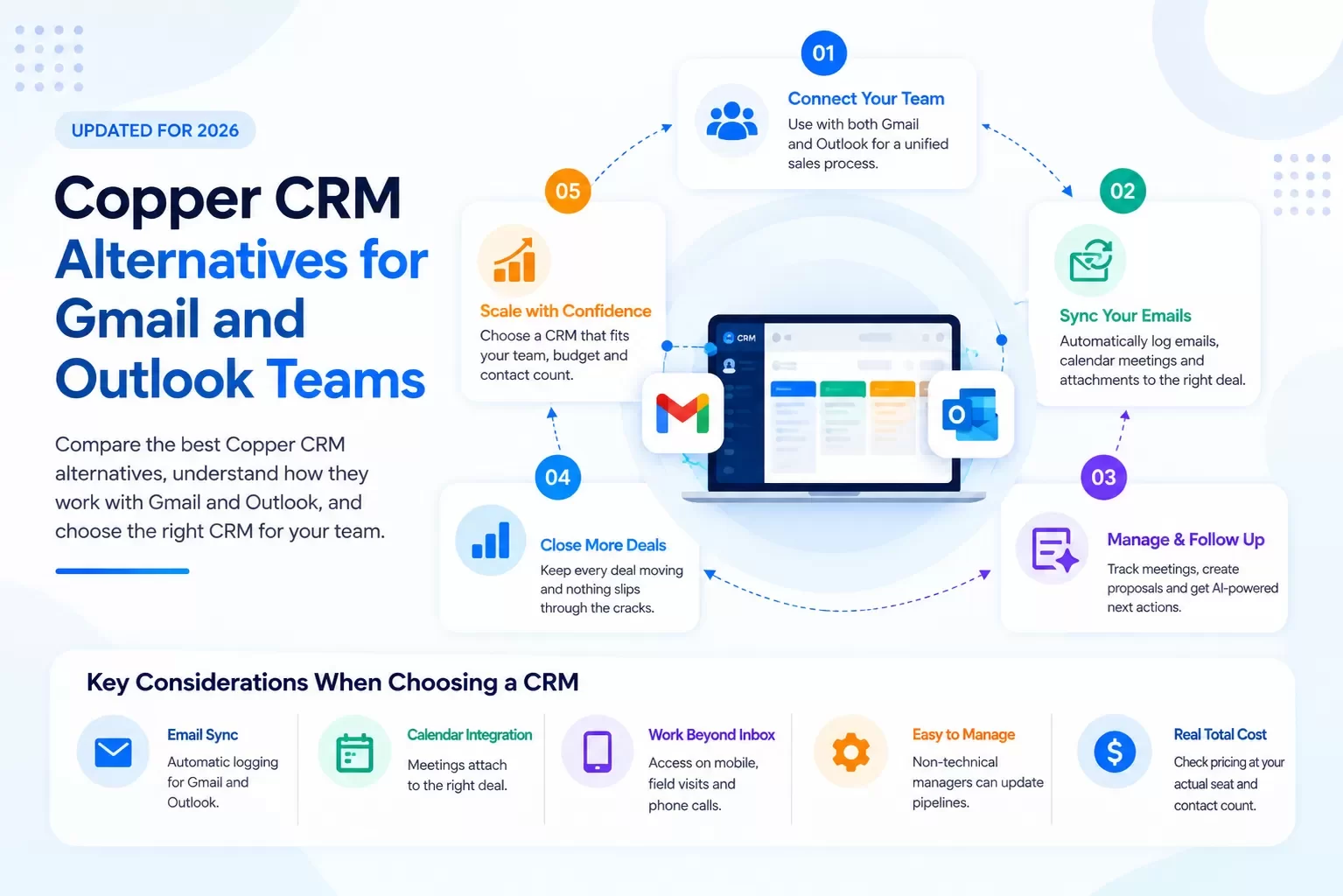
Why do teams outgrow Copper?
Copper does one thing very well: it lives inside Gmail. Contacts, emails, calendar events and Drive files sync with little effort. For a 5-person agency on Google Workspace, that is hard to beat.
The friction shows up when the business changes:
- You acquire or partner with an Outlook shop. Half the team is now on Microsoft 365.
- Enterprise customers want Microsoft. Your new sales hires come from Outlook-first companies.
- Contact limits bite. Copper Basic caps at 2,500 contacts and Professional at 15,000 (copper.com/pricing, Sep 2026).
- Advanced features sit on upper tiers. Workflow automation starts at Professional; email series and custom reports at Business.
- The sales process lives outside the inbox. Site visits, proposals and field meetings don't start in Gmail.
None of this makes Copper a bad product. It makes it a Google-shaped product.
What does Copper cost in 2026?
| Copper plan | Annual billing | Monthly billing | Contact limit | Key additions |
|---|---|---|---|---|
| Basic | $23/seat/mo | $29/seat/mo | 2,500 | Task automation, pipelines, project management, contact enrichment |
| Professional | $59/seat/mo | $69/seat/mo | 15,000 | Workflow automation, bulk email, reporting, integrations |
| Business | $99/seat/mo | $134/seat/mo | Unlimited | Email series, custom reports, multi-currency, premium support |
Source: copper.com/pricing, as of Sep 2026. All plans include the Chrome extension, Gmail email/contact/file sync, Google Calendar sync and Google Drive integration.
Which CRMs work with both Gmail and Outlook?
If your team is mixed, this is the question that matters. Here is the priced comparison, all figures from vendor sites as of Sep 2026.
| CRM | Entry paid price (vendor site, Sep 2026) | Gmail | Outlook / Microsoft 365 | Free option |
|---|---|---|---|---|
| Copper | Basic $23/seat/mo annual; $29 monthly | Yes, native | Not listed on pricing page or homepage [CONFIRM with Copper] | Free trial |
| HubSpot Sales Hub | Starter $7/seat/mo annual; $20 monthly | Yes | Yes - email tracking "works seamlessly with Gmail, Outlook, and Office 365" (hubspot.com) | Free up to 2 users |
| Pipedrive | Lite $14/seat/mo annual | Yes | Yes - "Connect common email providers, such as Gmail and Outlook" (pipedrive.com) | 14-day trial |
| Zoho CRM | [CONFIRM price in USD] | [CONFIRM] | [CONFIRM] | Free for 3 users |
| Arches CRM | [CONFIRM price] | [CONFIRM: Gmail sync live] | [CONFIRM: Outlook/M365 sync live] | Free trial [CONFIRM] |
How to read this table: "supports Outlook" varies a lot in depth. In every demo, ask to see two-way sync, calendar sync and a shared-inbox thread logged against the right deal - for both a Gmail user and an Outlook user, live.
How should a mixed Google/Microsoft team choose?
Score each option against five questions:
- Does email history log automatically for both platforms? Manual BCC is not a sales process.
- Do calendar meetings attach to the deal? Meetings are where deals move.
- Does it work outside the inbox? Mobile, field visits, phone calls.
- Can non-technical managers change the pipeline? Without a consultant.
- What does it cost at your real seat count and contact count? Not the entry tier.
HubSpot
The broadest suite, with Gmail and Outlook tracking and a real free tier. Costs climb as you move to Professional ($90/seat/mo annual plus a $1,500 onboarding fee - hubspot.com, Sep 2026).
Pipedrive
Visual, fast to adopt, and connects to both Gmail and Outlook. A strong fit for teams that think in deal stages.
Zoho CRM
Low cost with a free edition for three users. Deep configuration if you have the time to set it up.
Arches CRM
Arches is built on Sales Made Simple: one place for every lead, conversation, meeting, proposal and follow-up - whichever inbox your reps use [CONFIRM: Gmail + Outlook support]. The goal is not to live inside email. It is to make sure every deal has a next action and nothing slips.
What does the AI do after a meeting?
This is where mixed-inbox teams feel the difference. Example:
- An Outlook-based estimator meets a general contractor on site.
- The meeting is on the calendar, so it attaches to the deal automatically [CONFIRM: calendar-to-deal capture].
- Arches summarizes the meeting notes and drafts a follow-up with scope, timeline and next steps [CONFIRM: AI meeting summary + draft live].
- A Gmail-based sales manager sees the same summary on the deal - no forwarding.
- If the GC doesn't reply in three days, a follow-up fires automatically.
One record. Two inboxes. Zero dropped threads.
Vertical scenario: a specialty trades firm after an acquisition
A commercial flooring contractor on Google Workspace acquires a smaller competitor that runs Microsoft 365. Overnight, half the estimators are on Outlook. Bids come in from general contractors on both sides.
Their bid pipeline:
| Stage | Owner | Automatic next action |
|---|---|---|
| Invitation to bid received | Estimating coordinator | Log bid date; assign estimator |
| Takeoff in progress | Estimator | Reminder 3 days before bid due |
| Bid submitted | Estimator | Follow-up to GC at day 3 and day 7 |
| Shortlisted / scope review | Sales lead | Meeting summary logged; revised proposal task |
| Awarded | Ops manager | Hand-off checklist created |
| Lost | Sales lead | Loss reason captured; re-engage task in 90 days |
The pipeline doesn't care which inbox the bid arrived in. That is the point.
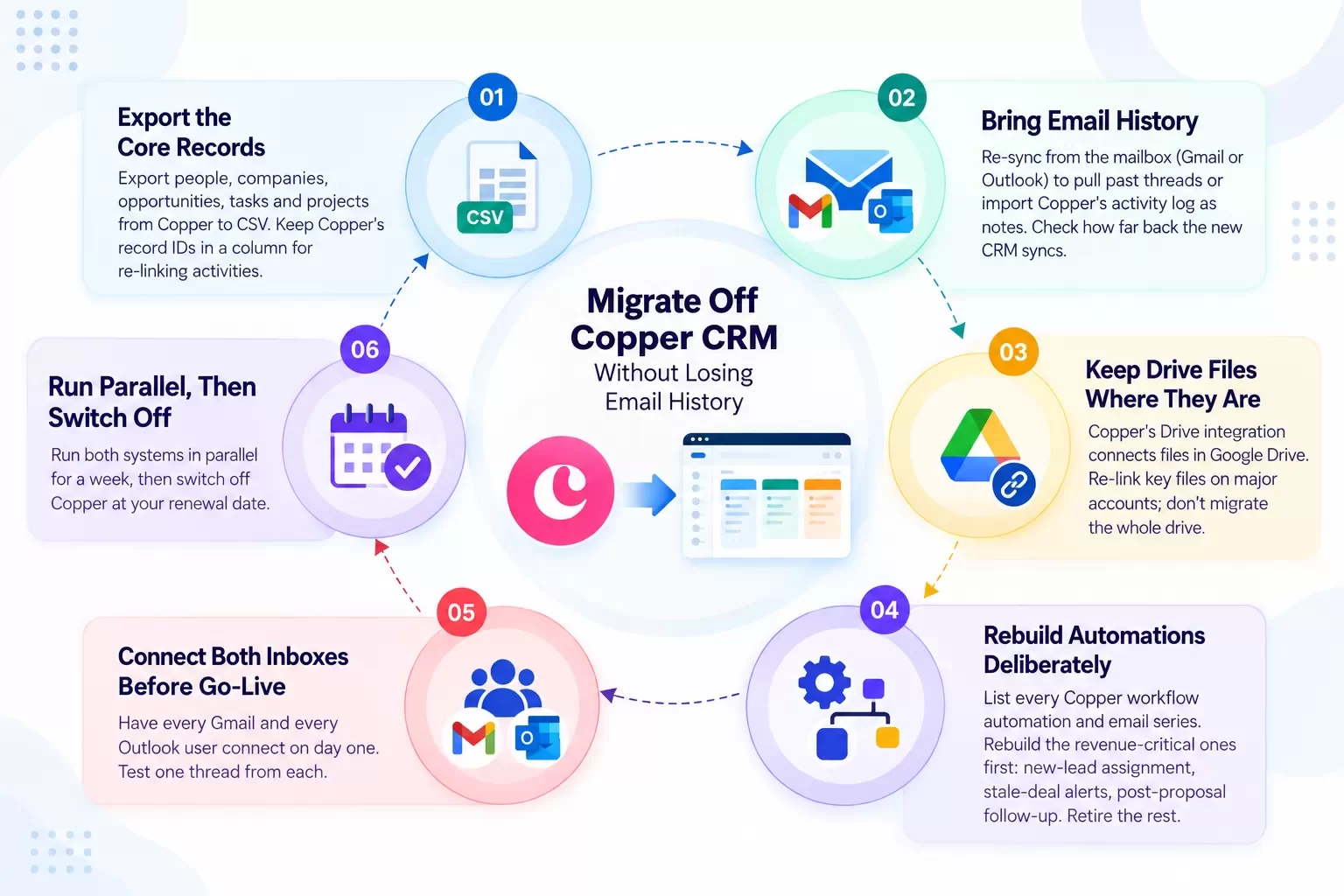
How do you migrate off Copper without losing email history?
Plan the move in this order.
- Export the core records. Export people, companies, opportunities, tasks and projects from Copper to CSV. Keep Copper's record IDs in a column - you'll use them to re-link activities [CONFIRM: Copper export scope - records and activity log].
- Decide how to bring email history. You have two routes:
- Re-sync from the mailbox. Most CRMs that connect to Gmail or Outlook can pull past threads from the mailbox itself once each user connects. Check how far back the new CRM syncs [CONFIRM: Arches historical email sync window].
- Import logged activities. Export Copper's activity log and import it as notes against the matching records. Use this for anything a departed user sent.
- Keep Drive files where they are. Copper's Drive integration connects files that live in Google Drive. Re-link key files on major accounts; don't migrate the whole drive.
- Rebuild automations deliberately. List every Copper workflow automation and email series. Rebuild the revenue-critical ones first: new-lead assignment, stale-deal alerts, post-proposal follow-up. Retire the rest.
- Connect both inboxes before go-live. Have every Gmail and every Outlook user connect on day one. Test one thread from each.
- Run parallel for a week, then switch off Copper at your renewal date.
Hexagon IT Solutions has done CRM implementation and cleanup work for 16+ years. We run these migrations as a service.
So which Copper alternative is right?
- All-Google team, under the contact caps, happy today? Stay on Copper.
- Mixed Google/Microsoft and want a broad suite? HubSpot.
- Mixed and want a simple visual pipeline? Pipedrive.
- Tight budget, willing to configure? Zoho CRM.
- Want every lead, meeting, proposal and follow-up in one place, regardless of inbox? Arches CRM.
Stop managing your CRM. Start closing deals.
FAQ
Does Copper CRM work with Outlook?
Copper markets itself as a Google Workspace CRM. Its pricing page and homepage list Gmail, Google Calendar and Google Drive integrations and do not mention Outlook or Microsoft 365, as of Sep 2026. Confirm current Microsoft support directly with Copper.
How much does Copper CRM cost in 2026?
Basic is $23/seat/month annual ($29 monthly), Professional $59 ($69) and Business $99 ($134), per copper.com/pricing, as of Sep 2026.
What is the best CRM for both Gmail and Outlook?
HubSpot and Pipedrive both state Gmail and Outlook support on their own sites. Arches CRM aims to capture conversations from both [CONFIRM]. Test two-way sync live for one user on each platform.
Can I keep my email history when leaving Copper?
Yes, in most cases. Re-sync threads from each user's mailbox into the new CRM and import Copper's activity log for anything that can't be re-synced.
Do Copper automations transfer to a new CRM?
No CRM imports another's automations. Export the list, rebuild the revenue-critical ones first, and retire the rest.
What are Copper's contact limits?
2,500 contacts on Basic, 15,000 on Professional, unlimited on Business, as of Sep 2026.
Internal-link suggestions
- Keap Alternatives 2026: Pricing, ROI and Better Fits
- SugarCRM Alternatives: Scorecard, 3-Year TCO and a Migration Plan
- Affordable CRM Software for Small Business: Real Prices, Real Math
LinkedIn teaser
Half your team on Gmail, half on Outlook, and a CRM built for only one of them? Here is how to choose - and migrate - without losing a thread.
Get moving
Small team? Start your free trial of Arches CRM.
100+ employees or a mixed Google/Microsoft org? Book a demo and we will map your inboxes, pipeline and migration.