
 Log in
 Start Free Trial

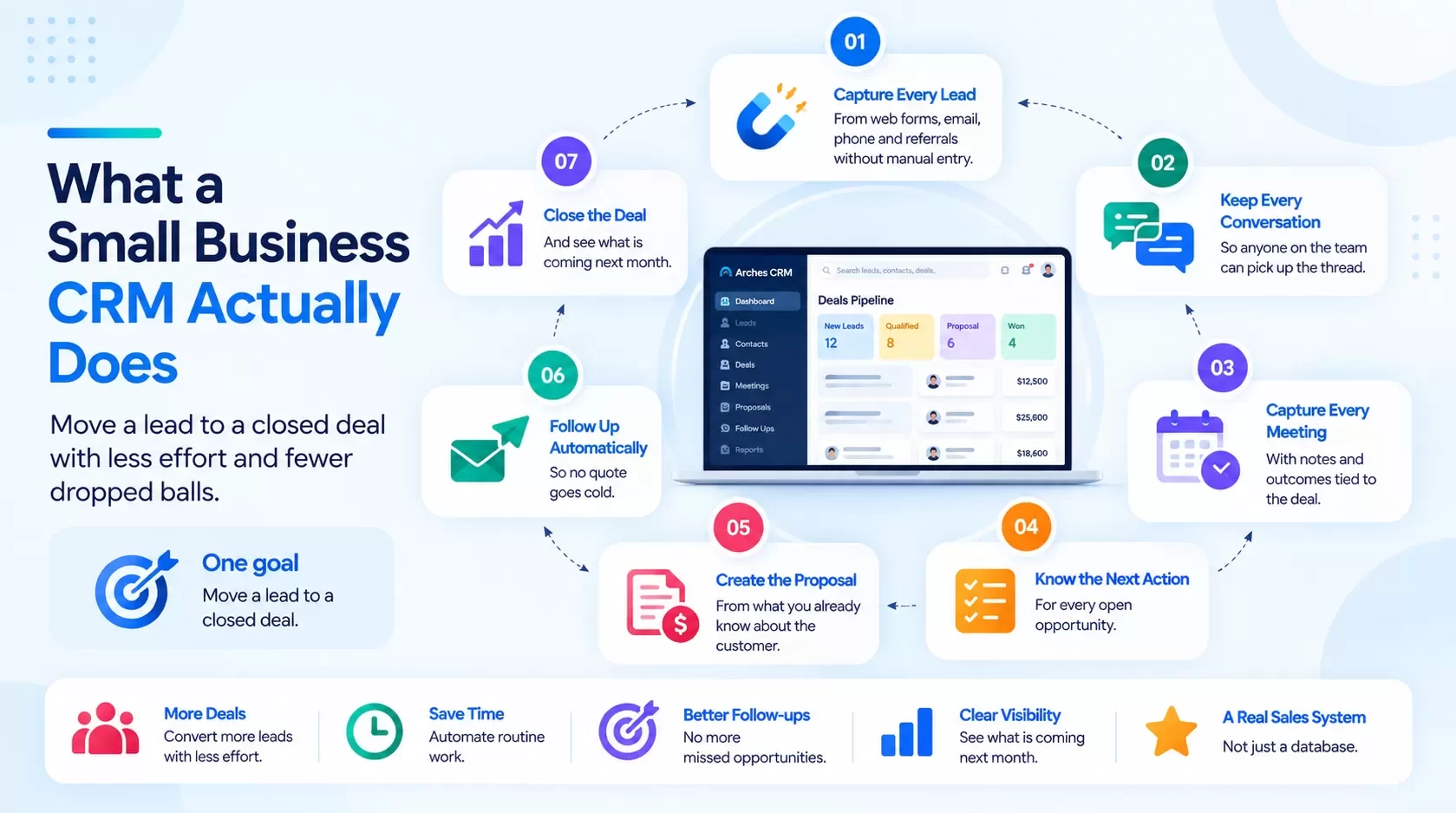
What should a small business CRM actually do?
Strip away the feature grids and a small business CRM has one job: move a lead to a closed deal with less effort and fewer dropped balls. That breaks into seven jobs:
- Capture every lead from web forms, email, phone and referrals without manual entry.
- Keep every conversation so anyone on the team can pick up the thread.
- Capture every meeting with notes and outcomes tied to the deal.
- Know the next action for every open opportunity.
- Create the proposal from what you already know about the customer.
- Follow up automatically so no quote goes cold.
- Close the deal and see what is coming next month.
If a CRM makes your team do these jobs by hand, it is a database, not a sales system. That is the idea behind Arches CRM: Sales Made Simple.
CRM pricing: how do the major vendors compare?
Prices below come from each vendor's own pricing page, as of Sep 2026. List prices change often and many plans require annual billing, so check the linked page before you buy.
| Vendor / plan | List price (per user/month) | Billing notes | AI and automation | Best fit |
|---|---|---|---|---|
| HubSpot Sales Hub Starter | $20 billed monthly; $7 billed annually (as of Sep 2026) | Free tier for up to 2 users | Basic sequences; more AI on higher tiers | Marketing-led teams already on HubSpot |
| HubSpot Sales Hub Professional | $100 billed monthly; $90 billed annually (as of Sep 2026) | Required one-time $1,500 onboarding fee | Sequences, forecasting, automation | Growing teams that want marketing and sales in one vendor |
| Salesforce Starter Suite | $25 (as of Sep 2026) | Billed monthly or annually | Entry-level automation | Teams expecting to grow into Salesforce |
| Salesforce Pro Suite | $100 (as of Sep 2026) | Billed annually | Broader automation, forecasting | Teams with admin capacity or a partner |
| Zoho CRM Standard / Professional | [CONFIRM price] (USD not displayed on page at time of check) | Free tier available | AI assistant on higher tiers [CONFIRM] | Cost-conscious teams comfortable configuring |
| Pipedrive Lite / Growth / Premium / Ultimate | $14 / $39 / $59 / $79 billed annually (as of Sep 2026) | Monthly billing costs more | Pipeline automation, AI features on upper tiers [CONFIRM] | Pipeline-first sales teams |
| Arches CRM | [CONFIRM price] | [CONFIRM: billing terms, free trial length] | AI next action, meeting capture, proposal and follow-up [CONFIRM: AI features live] | SMB and mid-market teams that want one platform from lead to close |
Two lessons from the table:
- The sticker price is not the real price. Onboarding fees, annual commitments, add-ons and the tier you actually need (usually one above the one you planned) decide your total cost.
- AI is unevenly distributed. Many vendors reserve AI and automation for their upper tiers. Price the tier that includes the AI you want, not the entry tier.
How to pick the best CRM for your small business: a 6-point rubric
Score each shortlisted CRM from 1 to 5 on these criteria. Weight them for your business. Anything under 3 on adoption or AI is a warning sign.
| Criterion | Weight (example) | What a 5 looks like |
|---|---|---|
| Adoption | 25% | Reps log in daily without being chased; mobile works in the field |
| AI assistance | 20% | AI captures meeting notes, suggests the next action, drafts follow-ups and flags stalled deals, without a separate tool |
| Lead-to-close coverage | 20% | Lead capture, conversations, meetings, proposals and follow-up live in one platform |
| Total cost of ownership | 15% | Clear per-seat price, no surprise onboarding fees, no add-ons for basics |
| Implementation effort | 10% | Live in weeks, not quarters; data import handled; partner support available |
| Integrations and security | 10% | Connects to email, calendar, accounting; security documentation available |
Why AI is its own criterion: in 2026, a CRM without useful AI still makes reps do data entry. The question is not "does it have AI?" but "does the AI remove work my reps do today?" Ask every vendor to show one real example: a meeting goes in, notes and a next step come out.
What the AI does in Arches: a rep finishes a site walk with a prospect. Arches captures the meeting notes, updates the deal stage, proposes the next action ("Send revised bid by Thursday") and drafts the follow-up email for approval [CONFIRM: meeting capture, next-action and follow-up drafting live]. The rep reviews and sends. No typing into fields.
CRM ROI: a worked example for an 8-rep team
Hypothetical example. Numbers are illustrative so you can run your own. Swap in your figures, or use the Arches campaign ROI calculator [CONFIRM: calculator live + URL].
Assumptions: 8 reps, $40/hour loaded cost, 40 proposals a month across the team, $12,000 average deal, 30% gross margin, 25% baseline close rate.
| Line item | Before CRM | After CRM | Annual impact |
|---|---|---|---|
| Admin time per rep per week | 5 hours | 2 hours | 3 hrs x 8 reps x 48 weeks = 1,152 hours = $46,080 saved |
| Close rate on proposals | 25% | 28% (better follow-up) | +1.2 deals/month x 12 = 14.4 deals |
| Added revenue | 14.4 x $12,000 = $172,800 | ||
| Added gross profit (30%) | $51,840 | ||
| Total annual benefit | $97,920 | ||
| CRM cost, year one | 8 seats x $60/month x 12 = $5,760 + $5,000 implementation = $10,760 | ||
| Net benefit | $87,160 | ||
| ROI | ~8.1x |
The $60 per seat is a placeholder, not an Arches price. The point: a three-point lift in close rate pays for almost any CRM many times over. The risk is not overpaying for a CRM. The risk is buying one your team ignores.
What does CRM implementation involve for a small business?
A good small business CRM implementation runs in four steps:
- Define the pipeline. Write down your real stages, from new lead to closed. Five to seven stages is plenty.
- Clean and import data. Contacts, open deals and recent history. Bad data in means bad pipeline out; check your data decay first with the Arches data decay calculator [CONFIRM: calculator live + URL].
- Connect the inbox and calendar. This is where most of the manual entry disappears.
- Train on the daily routine, not the features. Show reps their morning view: today's next actions, stalled deals, follow-ups due.
Arches onboarding typically takes [CONFIRM: onboarding time and cost]. Hexagon IT Solutions has implemented and improved CRMs for 16+ years and can migrate you from spreadsheets or another CRM.
Which CRM is best for your industry?
Construction and specialty trades
Your pipeline is bids. You need bid-due dates, estimator assignments, site-walk notes, and follow-up on every submitted quote.
- Shortlist: Arches CRM (built for construction first), Pipedrive (simple pipeline), Salesforce Pro Suite (if you have an admin).
- Scenario: a roofing contractor submits 30 bids a month. Arches tracks each bid by due date and flags any bid with no follow-up in five days [CONFIRM: stalled-bid alert live]. Go Build and Symphony Homes are among the construction-side teams using Arches.
Real estate and property management
Your pipeline is owner leads, listings and renewals. Relationships span years, and staff turnover is common.
- Shortlist: Arches CRM, HubSpot Sales Hub, Zoho CRM.
- Scenario: a property manager gets an owner inquiry about managing a 12-unit building. Arches logs the call, schedules the walkthrough, and queues a follow-up with a management proposal [CONFIRM: proposal generation live]. Teams like New Earth Residential, Laguna Properties and Worth Street Properties use Arches.
Home and field services
Your pipeline is estimates, and your growth engine is reviews and referrals.
- Shortlist: Arches CRM, Pipedrive, a field-service-specific tool paired with a CRM.
- Scenario: an HVAC company closes a system replacement. Arches triggers a review request after the job and a referral ask 30 days later [CONFIRM: post-job automation live]. Every happy customer becomes a lead source.
Red flags when comparing small business CRMs
- The demo shows dashboards but never shows a rep's daily workflow.
- AI is "coming soon" or requires a separate add-on.
- Proposals, meeting notes or follow-up live in other tools.
- The vendor cannot give you a total year-one cost in writing.
Frequently asked questions
What is the best CRM for a small business?
The one your team will use daily that covers lead capture through close in one place. Score options on adoption, AI assistance, coverage, cost, implementation and integrations.
How much does small business CRM software cost?
Entry plans run from free to roughly $25 per user per month; mid-tier plans with automation commonly run $39 to $100 per user per month, as of Sep 2026 vendor pricing pages. Add onboarding fees and annual commitments.
How do I calculate CRM ROI?
Add admin hours saved (hours x loaded rate) and added gross profit from a higher close rate, then subtract year-one CRM cost. Divide net benefit by cost.
How long does CRM implementation take?
For a small team with clean data, a few weeks. Messy data, custom workflows or many integrations extend it. A partner shortens the timeline.
Should AI be a deciding factor?
Yes, if the AI removes real work: meeting notes, next actions, follow-up drafts. Ignore AI that only summarizes dashboards.
Is Arches CRM only for construction?
No. Arches started in construction and is now a general sales CRM for SMB and mid-market teams, including real estate, property management and field services.
Internal link suggestions
- What Is CRM? A Plain-English Definition and How Modern CRM Works
- All-in-One CRM for Small Business: Why One Platform Beats a Stitched Stack
- Relationship Management Software: Keep Context When People Leave
LinkedIn teaser
A three-point lift in close rate pays for almost any CRM eight times over. Here is how to pick one your team will actually use.
Start closing deals
Stop managing your CRM. Start closing deals. Small team? Start your free trial of Arches CRM. 100+ employees? Book a demo and we will map Arches to your sales process.