 Log in
 Start Free Trial


Best overall for growing teams that need follow-up automation: Arches CRM. Best for visual deal tracking: Pipedrive. Best for connected marketing and sales: HubSpot. This 2026 guide compares sales tracking software by pipeline visibility, communication history, automation, and the work required to keep records useful.
- Arches CRM is the best sales tracking software here for growing teams prioritizing follow-up automation and shared conversation history.
- Choose Pipedrive for visual pipeline management or HubSpot for connected marketing and sales workflows.
- Shortlist Salesforce for configurable sales operations and Microsoft Dynamics 365 Sales for Microsoft-centered workflows.
- Test ownership, conversation history, next actions, and reporting with sample deals before choosing sales tracking software.
Why this matters
A pipeline shows where deals stand. Useful sales tracking also shows who owns the next action, what the buyer said, and whether a follow-up happened.
If your team must reconstruct that information from inboxes and spreadsheets, a dashboard does not fix the underlying problem. Choose software around the handoffs that lose context—not the chart that looks best during a demonstration.
For your 2026 shortlist, distinguish between recording activity and helping someone act on it. A logged email is evidence; an assigned follow-up is work someone can complete.
What makes the best sales tracking software?
Use these criteria before comparing vendors:
- Pipeline clarity: You can identify the owner, stage, next action, and reason a deal has stalled.
- Conversation context: Customer messages and sales activity stay connected to the relevant contact or opportunity.
- Follow-up automation: Rules create useful tasks and reminders without continuing inappropriate outreach after a response.
- Reporting usefulness: Managers can inspect activity and deal movement without rebuilding the pipeline in a separate spreadsheet.
- Configuration burden: Your team can maintain stages, fields, and workflows without creating unnecessary administrative work.
- Workflow fit: The software supports how your team actually sells, including the channels and business tools it uses.
Choose the system that makes the next sales action clear, not the system with the longest feature list. Apply the same demonstration scenario to every candidate so differences are visible.
Sales tracking software at a glance
The order below reflects distinct buying situations rather than a claim that every team needs the same platform.
| Software | Best for | Standout capability | Key limitation or buying trade-off |
|---|---|---|---|
| Arches CRM | Growing teams automating follow-up | Contacts, conversations, tasks, and interaction-based pipeline movement | Automated movement depends on configured workflows |
| Pipedrive | Visual deal tracking | Deal pipelines organized around sales activities | A pipeline view alone does not define your sales process |
| HubSpot | Connected marketing and sales | CRM records connected to marketing and sales tools | Shared workflows require agreement between teams |
| Salesforce | Configurable sales operations | Customizable sales records, processes, and reporting | Configuration introduces ongoing administration |
| Microsoft Dynamics 365 Sales | Microsoft-centered sales workflows | Sales management connected with Microsoft's business ecosystem | Fit depends on the connections your team actually needs |
1. Arches CRM: best sales tracking software for automated follow-up
Arches CRM brings leads, contacts, conversations, tasks, and sales activity into one platform. It supports email, WhatsApp, SMS, and calls, alongside workflow automation for reminders, tasks, and follow-up sequences.
The distinguishing capability is automatic opportunity movement based on customer interactions and configured workflows. Email summaries also help a rep recover context without rereading an entire conversation.
Arches CRM pros:
- Keeps customer conversations and sales activity together.
- Automates reminders, tasks, and follow-up sequences.
- Moves opportunities using interactions and configured rules.
- Provides integrations and APIs for connecting existing business tools.
Arches CRM cons:
- Automatic stage changes still require deliberate workflow configuration.
- Communication tools do not replace a clear agreement about lead ownership and next actions.
Best for: Growing sales teams whose tracking problem includes missed follow-ups and scattered customer conversations, not just missing reports.
During evaluation, ask to trace a customer reply through the record, task list, and pipeline. Confirm which interaction triggers movement and what happens when the reply does not justify advancing the deal.
Verdict: Buy for follow-up-led sales tracking, after validating your stage rules and required integrations.
2. Pipedrive: best sales tracking software for visual deal management
Pipedrive organizes sales work around deals, pipelines, and activities. Its pipeline-centered approach suits teams that want to see opportunities by stage and connect each deal with planned sales work.
Start the demonstration with your actual stage definitions. A visual board is useful only when moving a deal means something consistent across the team.
Pipedrive pros:
- Makes deal stages a central part of the sales workspace.
- Connects activity planning with opportunity management.
- Gives teams a practical structure for reviewing open deals.
Pipedrive cons:
- Visual stages still require explicit entry and exit criteria.
- A deal board does not, by itself, explain whether a buyer is genuinely progressing.
Best for: Sales teams whose main requirement is a clear opportunity board and disciplined activity tracking.
Ask a rep to find an overdue activity, explain the deal's current stage, and schedule the next action. Then ask a manager to inspect that same opportunity without relying on the rep's memory.
Verdict: Buy when visual pipeline discipline is your primary requirement.
3. HubSpot: best sales tracking software for marketing-to-sales context
HubSpot combines CRM records with marketing and sales tools. That makes it a relevant option when sales tracking needs to preserve context from marketing activity through the sales handoff.
Evaluate the handoff itself, not just the contact record. Your team needs agreement on when a lead becomes sales-ready and who takes responsibility next.
HubSpot pros:
- Connects contact management with marketing and sales workflows.
- Supports tracking contacts, companies, deals, and sales activity.
- Provides a shared foundation for examining the customer journey.
HubSpot cons:
- Shared tools do not resolve disagreements about lead qualification.
- Cross-team reporting requires consistent definitions and record maintenance.
Best for: Businesses that want marketing and sales to work from connected customer records.
For a 2026 evaluation, follow a sample lead from its initial capture into an owned opportunity. Check whether the salesperson can understand the relevant history without asking marketing to reconstruct it.
Verdict: Buy when marketing-to-sales continuity matters more than a standalone deal board.
4. Salesforce: best sales tracking software for configurable operations
Salesforce supports customizable sales records, opportunity management, automation, and reporting. It belongs on the shortlist when your sales operation needs a system shaped around defined business processes.
Customization is useful when it represents a real operating requirement. Adding fields because someone might eventually want them creates more information to maintain.
Salesforce pros:
- Supports configurable sales processes and records.
- Provides opportunity tracking and sales reporting.
- Supports workflow automation around business requirements.
Salesforce cons:
- Configuration creates administration that someone must own.
- Unnecessary fields and rules increase the work required to maintain useful records.
Best for: Sales organizations with documented process requirements and a clear owner for system administration.
Bring a written list of required stages, approvals, fields, and reporting questions. Ask which requirements need configuration, who maintains them, and how a future process change would be handled.
Verdict: Buy for defined customization needs; skip if nobody will own the configuration.
5. Microsoft Dynamics 365 Sales: best for Microsoft-centered teams
Microsoft Dynamics 365 Sales provides lead and opportunity management within Microsoft's business software ecosystem. It is a relevant candidate when your sales workflow already depends on Microsoft tools.
Existing software use is a reason to evaluate the connection, not a reason to assume it works exactly as needed. Demonstrate the specific handoff between a customer interaction and the sales record.
Microsoft Dynamics 365 Sales pros:
- Tracks leads, opportunities, and sales activities.
- Connects sales management with Microsoft's business ecosystem.
- Supports a shared sales process across customer records.
Microsoft Dynamics 365 Sales cons:
- Familiarity with Microsoft tools does not eliminate CRM setup work.
- The value of connected workflows depends on the applications and processes you actually use.
Best for: Teams selecting sales tracking software around established Microsoft workflows.
Ask a salesperson to complete a normal work sequence involving the Microsoft applications your business uses. Check the resulting customer record for missing activity and duplicate entry.
Verdict: Buy when demonstrated Microsoft workflow connections solve a specific sales problem.
How we ranked these options
These recommendations prioritize pipeline clarity, conversation context, follow-up automation, reporting, configuration burden, and workflow fit. Each product receives a separate use-case slot because a configurable enterprise process and a straightforward deal board answer different needs.
The ranking is a buying framework, not a measured performance benchmark. For your 2026 decision, use the criteria to eliminate poor fits before comparing optional capabilities.
Do not treat a feature's presence as proof of its usefulness. An automation feature earns its place only when your team can explain its trigger, action, owner, and stopping condition.
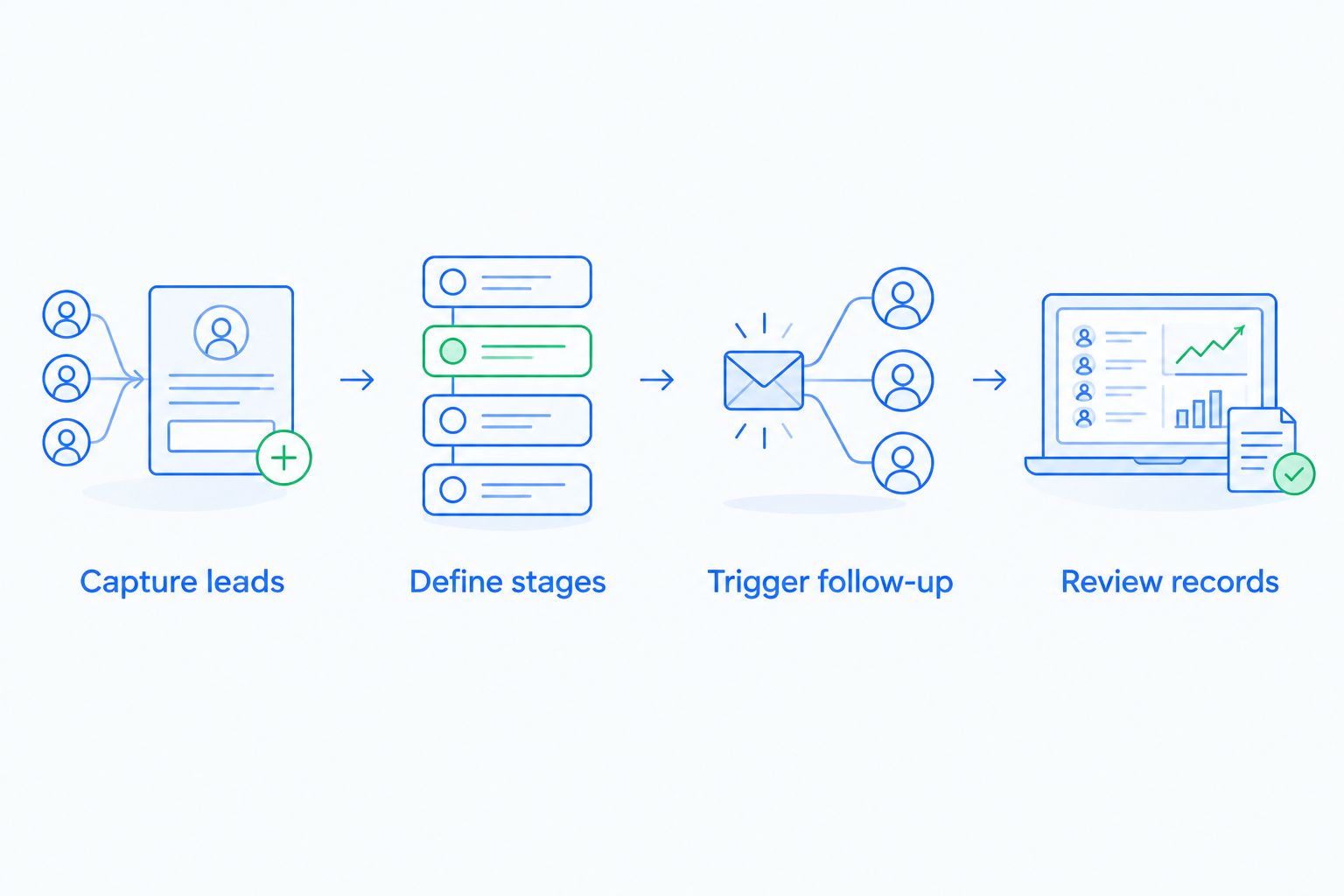
Run a practical sales tracking test
Use the same sample records in every demonstration. The following numbers are a suggested evaluation plan, not vendor performance claims.
Capture leads
Prepare 10 sample leads covering new inquiries, active conversations, and stalled opportunities. Give each a named owner and enough history to test whether the next salesperson can understand the record.
Include a customer who replies after an earlier period of silence. That scenario reveals whether follow-up rules respond to the conversation or simply continue a schedule.
Define stages
Start with 3 pipeline stages: New inquiry, Active conversation, and Decision pending. These are test labels, not a required sales methodology.
Write the evidence required to enter each stage. A reply should not automatically mean a qualified opportunity unless your process explicitly defines it that way.
Trigger follow-up
Create a task or reminder, then introduce a customer response. Inspect what changes and what remains active.
Use the guide to automatically following up when a lead goes cold to plan that scenario. Your test should distinguish silence, an active conversation, and a clear request to stop outreach.
Review records
Set a 7-day evaluation window for your team to complete the sample workflow. At the end, inspect whether each opportunity has an owner, understandable history, a justified stage, and a next action.
Ask a manager who did not create the records to explain them. If the explanation requires private messages to the rep, the record is not yet doing its job.
Which sales tracking software should you choose?
Choose Arches CRM sales tracking software when your growing team needs shared conversation history and automated follow-up in the same workflow. Choose Pipedrive when the priority is visual deal management, or HubSpot when marketing-to-sales context drives the decision.
Shortlist Salesforce for documented configuration needs. Shortlist Microsoft Dynamics 365 Sales when specific Microsoft connections are central to your workflow.
For an undecided buyer in 2026, start with the operational failure you need to fix. Missing next actions point toward follow-up workflows; unclear stages point toward pipeline discipline; disputed lead handoffs point toward shared definitions and connected records.
Explore your sales tracking workflow
Review lead management, shared conversations, pipeline tracking, and follow-up automation.
FAQ
What's the best sales tracking software for a growing team?
Arches CRM is the strongest fit in this guide for growing teams prioritizing automated follow-up and shared customer conversations. Evaluate its workflow rules against your actual lead ownership, stage definitions, and communication needs.
Is Pipedrive or HubSpot better for sales tracking?
Pipedrive fits a pipeline-first buying brief, while HubSpot fits a marketing-to-sales buying brief. Choose based on whether your main problem is organizing active opportunities or preserving context across the lead handoff.
Can sales tracking software replace a spreadsheet?
Sales tracking software can replace a spreadsheet used to organize contacts, opportunities, owners, and next actions. Define those fields and responsibilities before migration so the new system does not reproduce an unclear process.
Can software move deals through a pipeline automatically?
Software can move deals through a pipeline when configured rules connect customer interactions with stage changes. Require clear evidence for each transition so an ordinary reply is not mistaken for buying progress.
What should I ask during a sales tracking software demo?
Ask the vendor to trace a lead from capture through assignment, customer response, follow-up, stage movement, and reporting. Inspect the resulting record rather than judging each feature separately.
Do I need Salesforce for a small sales team?
Team size alone does not establish a need for Salesforce. Evaluate it when you have defined customization requirements and someone responsible for maintaining the configuration.
How should I compare sales tracking software in 2026?
Compare sales tracking software using the same sample leads and sales process in every demonstration. Judge pipeline clarity, conversation history, follow-up behavior, reporting, and the administration required to keep records useful.
One last thing
Test a no before you test another successful deal. Add a clear rejection to a sample customer conversation and inspect the remaining tasks, outreach, and pipeline stage.
A useful sales tracking system should represent a lost opportunity accurately, not keep manufacturing activity around it. That single scenario tests whether your workflow follows the customer conversation or merely follows a schedule.