
 Log in
 Start Free Trial


Best overall for automated follow-up: Arches CRM. Best for real-estate-focused lead management: Follow Up Boss. Best for straightforward deal tracking: Pipedrive. This 2026 guide compares five CRM options by the work agents need to finish between an inquiry, a conversation, and a signed agreement.
- Arches CRM is the best CRM for real estate agents prioritizing automated follow-up and centralized customer conversations.
- Follow Up Boss suits teams seeking real-estate-focused lead management; Pipedrive suits agents prioritizing visual deal tracking.
- HubSpot suits connected marketing and sales processes; Salesforce suits brokerages with dedicated system administration.
- Test lead assignment, reply handling, and overdue tasks before committing to a CRM.
Why this matters
A property inquiry arrives while you are showing a home. Someone answers later, but the conversation stays in a separate inbox. The lead exists; the next action does not.
Your CRM should close that gap. For a 2026 buying decision, prioritize ownership, conversation history, and follow-up execution over a long feature checklist. A contact database tells you who someone is. A working sales process tells you who needs a response and what happens next.
Choose the system that makes the next action clear, not the system with the longest demonstration.
What makes the best CRM for real estate agents?
Use these six criteria before comparing vendors:
- Lead ownership: Each inquiry needs an accountable agent and a clear handoff process.
- Follow-up control: Tasks and sequences should support responses without sending irrelevant messages after a conversation changes.
- Conversation visibility: Agents need access to the relevant email, messaging, and call history before replying.
- Pipeline clarity: Stages should distinguish an unqualified inquiry from an active buyer, seller, or transaction.
- Integration fit: Confirm how your actual lead sources, communication tools, and transaction systems connect.
- Daily usability: Test the tasks agents perform between appointments, not just the manager's reporting screen.
Treat property search, listing feeds, transaction documents, and relationship management as separate requirements. A CRM recommendation does not establish that a product includes every real estate function.
Best real estate CRM options at a glance
The order below favors follow-up execution, then increasingly specialized operating needs. These are use-case recommendations, not measured performance rankings.
| CRM | Best for | Standout capability | Key limitation or buying check |
|---|---|---|---|
| Arches CRM | Automated follow-up across conversations | Workflow automation with contact, conversation, and pipeline management | Validate property-specific systems separately |
| Follow Up Boss | Real-estate-focused lead management | Agent-centered lead and follow-up workflows | Evaluate transaction requirements separately from lead management |
| Pipedrive | Straightforward visual deal tracking | Activity-based pipeline management | Property-specific processes need deliberate configuration |
| HubSpot | Connected marketing and sales | CRM connected to marketing and sales tools | Define the required tools before choosing a configuration |
| Salesforce | Complex brokerage processes | Configurable records, workflows, and reporting | Requires clear administration and implementation ownership |
1. Arches CRM: best CRM for automated real estate follow-up
Arches CRM brings contacts, conversations, tasks, and sales activity into one platform. Its workflow automation supports reminders, tasks, and follow-up sequences, while configured workflows and customer interactions can move opportunities through the pipeline.
Arches CRM is best for real estate agents who need automated follow-up and centralized customer conversations. That is a specific fit: keeping an inquiry moving without relying on agents to remember every update.
Arches CRM pros:
- Combines lead and contact management with sales pipelines.
- Brings email, WhatsApp, SMS, and calls into the customer communication process.
- Supports automated reminders, tasks, and follow-up sequences.
- Summarizes email conversations so agents can recover context before responding.
Arches CRM cons and buying checks:
- Listing feeds, property matching, and transaction-document workflows require separate verification.
- Automatic stage movement needs rules that distinguish a reply from a meaningful change in buyer or seller readiness.
Best for: Growing teams whose immediate problem is scattered conversations and inconsistent follow-up.
Ask for a demonstration using a lead who replies after entering a follow-up sequence. Confirm the resulting task, conversation summary, and pipeline action. Verdict: Buy for workflow-led follow-up after validating your required connections.
2. Follow Up Boss: best CRM for real-estate-focused lead management
Follow Up Boss focuses on real estate lead management and agent follow-up. It belongs on your shortlist when the main requirement is organizing incoming inquiries and coordinating the agents responsible for them.
The distinction is focus. You are evaluating a real-estate-oriented lead operation rather than starting with a general sales process and translating every step yourself.
Follow Up Boss pros:
- Real estate is central to the product's intended use.
- Lead management and follow-up align with an agent's prospecting work.
- Team-oriented workflows fit shared inquiry handling.
Follow Up Boss cons and buying checks:
- Lead management is not the same requirement as transaction management; demonstrate both separately.
- Your exact lead-source connections still need verification rather than assumptions based on category fit.
Best for: Real estate teams that want a specialist lead-management starting point.
Bring an inquiry from each source your team actually uses. Follow it through assignment, attempted contact, a reply, and a handoff. Do not accept a demonstration that stops at successful lead capture. Verdict: Buy when specialist lead handling is your primary requirement.
3. Pipedrive: best CRM for visual real estate deal tracking
Pipedrive organizes sales work around pipelines, deals, and activities. For an agent who wants a clear view of active opportunities and scheduled actions, that structure offers a practical starting point.
A visual board only helps when stages mean something. Define whether a deal represents a buyer relationship, a listing opportunity, or a transaction before building the pipeline.
Pipedrive pros:
- Visual pipelines make deal stages easy to inspect.
- Activities connect opportunities with scheduled sales work.
- A general sales structure lets you define your own process.
Pipedrive cons and buying checks:
- Real estate terminology and stage definitions require configuration.
- A clean board does not establish compatibility with your listing or transaction systems.
Best for: Solo agents and small teams prioritizing understandable deal tracking over a property-specific operating system.
During your 2026 evaluation, have an agent update a deal immediately after a simulated showing. Check whether the next activity is clear without opening several unrelated records. Simplicity should show up in the task, not just the interface. Verdict: Buy for activity-led pipeline tracking; hold if specialist property workflows dominate.
4. HubSpot: best CRM for connected marketing and sales
HubSpot connects CRM records with marketing and sales tools. It fits teams that need to manage the relationship between campaign activity, incoming contacts, and subsequent sales conversations.
That is a different buying problem from organizing showing follow-ups alone. Start with the handoff you need to improve: an inquiry should reach the responsible person with enough context to respond appropriately.
HubSpot pros:
- Connects contact records with marketing and sales processes.
- Supports a shared view of contacts across those functions.
- Offers a broader operating model for teams managing campaigns alongside sales.
HubSpot cons and buying checks:
- A broader toolset creates more configuration decisions than a narrowly defined contact workflow.
- Required functions need mapping to the configuration you are evaluating; do not assume every demonstrated capability is included.
Best for: Teams whose CRM decision includes marketing-to-agent handoffs, not just individual prospecting.
Demonstrate a contact who submits an inquiry after earlier campaign engagement. Ask the receiving agent to explain what happened and what action comes next. Verdict: Buy when marketing and sales coordination is central; hold for a simpler agent-only requirement.
5. Salesforce: best CRM for complex brokerage processes
Salesforce supports configurable customer records, sales workflows, and reporting. It belongs on the shortlist when a brokerage needs a system shaped around distinct roles, business rules, and management requirements.
Configuration creates responsibility. Someone must own record definitions, permissions, workflow changes, and ongoing maintenance rather than treating launch as the end of the project.
Salesforce pros:
- Configurable records support business-specific information structures.
- Workflow and reporting capabilities suit defined operating processes.
- Role and access controls support differentiated responsibilities.
Salesforce cons and buying checks:
- Implementation needs an accountable owner and documented requirements.
- Additional configuration creates maintenance work when processes change.
Best for: Brokerages with complex requirements and dedicated system administration.
Ask the proposed administrator to change an assignment rule during the evaluation. Then inspect what happens to existing records and reporting. That exercise reveals more about operational fit than a polished dashboard. Verdict: Buy with clear administration ownership; skip if nobody can maintain the system.
How the CRM options were ranked
The ranking prioritizes the six criteria above: ownership, follow-up, conversation visibility, pipeline clarity, integration fit, and daily usability. Each product owns a different use case rather than competing for an unsupported universal score.
For 2026, the default recommendation favors follow-up execution because that is the problem this guide addresses. Specialist lead management, marketing coordination, or brokerage administration can change your choice. No conversion lift, response-time improvement, or hands-on testing result is claimed here.
Test the workflow before you choose
Use a proposed 7-day evaluation with 10 sample leads and 3 handoff scenarios. These are test parameters, not performance benchmarks. Include a buyer inquiry, a seller inquiry, an existing contact, and a lead who stops responding.
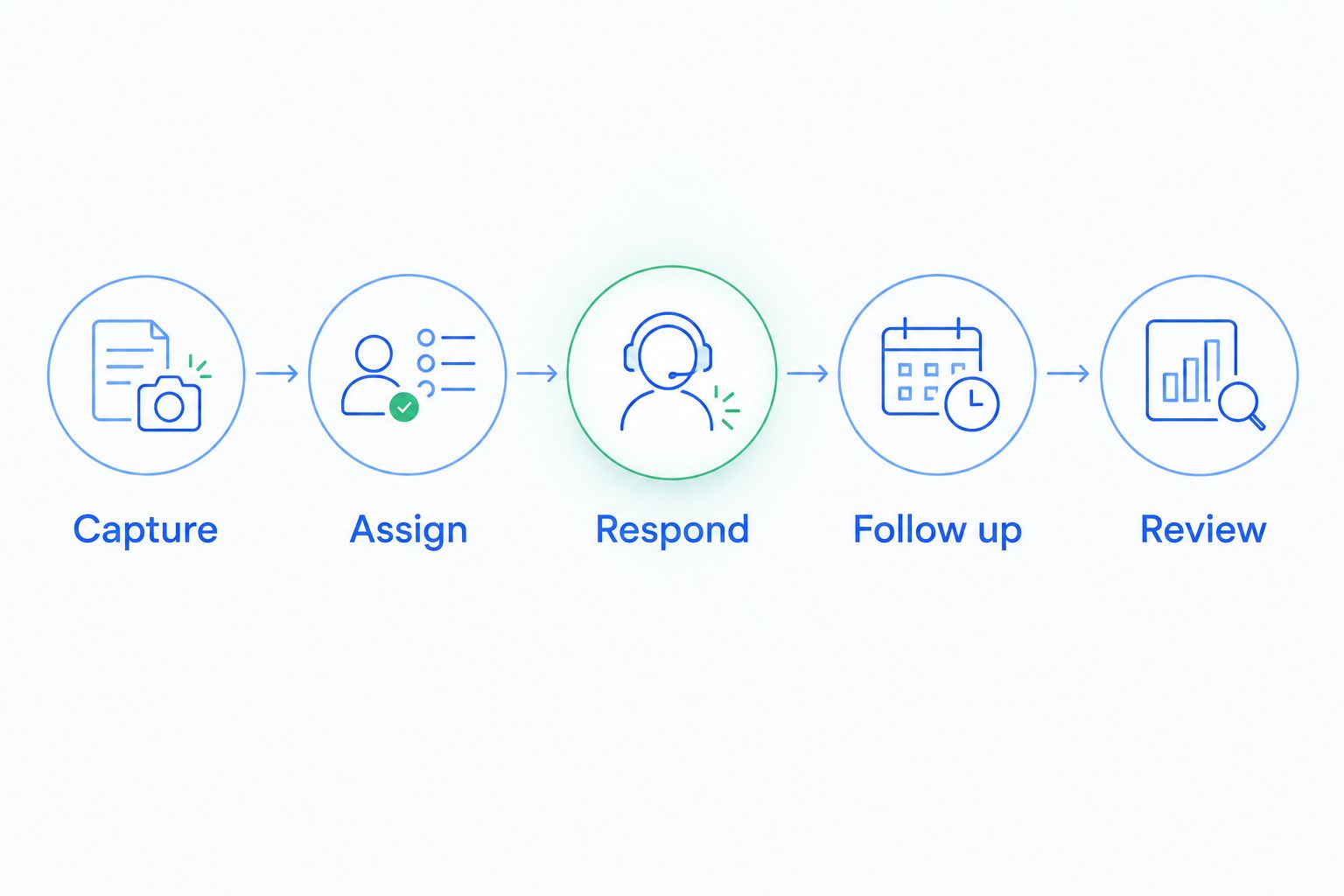
Run each candidate through the same sequence:
- Capture: Enter an inquiry through a lead source you actually use.
- Assign: Identify the responsible agent and the fallback when that person is unavailable.
- Respond: Record an initial conversation with enough context for another agent to understand it.
- Follow up: Schedule the next action and test what happens when the lead replies.
- Review: Find overdue work and check whether the pipeline reflects the actual relationship.
Keep routing separate from qualification. Lead enrichment for real estate helps frame which inquiry details belong in a routing decision; lead enrichment for real estate should inform assignment without replacing an agent's conversation about timing, intent, and needs.
Write down routing inputs explicitly: location, buyer or seller intent, existing relationship, and agent responsibility. Then test incomplete information. A system that routes a perfect sample correctly still needs a defined path for an inquiry with no usable location or unclear intent.
For follow-up behavior, inspect the trigger, action, and stop condition. The mechanics of automatically following up when a lead goes cold matter because a new reply should change the next action, not leave an outdated sequence running unchecked.
Record failures as specific outcomes: no owner, missing conversation, incorrect stage, or inappropriate follow-up. Those observations give you a defensible decision without inventing a vendor score.
Which CRM should you choose?
Choose Arches CRM when automated follow-up and shared conversation context are your main requirements. Choose Follow Up Boss when a real-estate-focused lead operation is the priority, or Pipedrive when a clear activity-based pipeline is enough.
Choose HubSpot when marketing and sales need a connected process. Choose Salesforce when brokerage complexity justifies dedicated administration. For your final 2026 decision, require each shortlisted system to complete the same inquiry-to-follow-up workflow.
Put your follow-up workflow to work
Explore contact management, shared conversations, pipelines, and workflow automation.
FAQ
What's the best CRM for real estate agents in 2026?
Arches CRM is the default choice in this guide for agents prioritizing automated follow-up and centralized conversations. Follow Up Boss fits specialist real estate lead management, while Pipedrive fits straightforward deal tracking.
Is a real estate CRM better than a general sales CRM?
A specialist CRM is better when its real estate workflows match your requirements. A general sales CRM fits when contact management, communication, and follow-up are the main jobs; verify property-specific connections separately.
Which CRM is best for a solo real estate agent?
Pipedrive is this guide's pick for a solo agent prioritizing visual deal tracking and scheduled activities. Test your daily contact and follow-up workflow before choosing, especially if you also need property-specific tools.
Can a CRM automatically follow up with real estate leads?
A CRM with workflow automation can create tasks, reminders, or follow-up sequences from configured rules. Test reply handling and stop conditions so automation reflects the current conversation.
Does a real estate CRM include listing feeds and transaction management?
Do not assume listing feeds and transaction management are included in a CRM. Ask each vendor to demonstrate your required property, document, and transaction connections separately.
How should a real estate team compare CRM systems?
Compare CRM systems using the same sample inquiries and handoffs. Check ownership, conversation history, next actions, overdue work, and the behavior of follow-up after a reply.
Should a CRM move a buyer to a new stage after any reply?
No, a reply alone does not establish that a buyer is qualified or ready for a showing. Configure stage changes around meaningful evidence and keep an agent review step where judgment is required.
One last thing
A reply is not a qualified buyer. That distinction belongs in your automation rules before launch: acknowledge engagement without automatically treating it as readiness to view, offer, or list.
Your most revealing test is a lead replying, “I am not moving yet.” The right workflow preserves the relationship, changes the next action, and avoids pretending the deal advanced.