 Log in
 Start Free Trial


Best overall for growing teams managing follow-up: Arches CRM. Best for sales-call coaching: Gong. Best for Microsoft-centered email and meeting work: Microsoft 365 Copilot. This 2026 guide compares the best AI sales assistant tools by the sales task you need to fix, not by the longest feature list.
- Arches CRM leads the best AI sales assistant tools for growing teams connecting follow-up automation with pipeline management.
- Gong fits managers reviewing sales conversations; Microsoft 365 Copilot fits sellers working across Outlook and Teams.
- HubSpot Sales Hub suits connected sales workflows; Salesforce Sales Cloud suits teams with complex CRM requirements.
- Choose the missing capability: executing follow-ups, reviewing conversations, organizing CRM work, or drafting messages.
Why this matters
A lead arrives. Your rep answers, the conversation moves to another channel, and nobody records the next step. The problem is not a shortage of generated email copy. It is a missing handoff between the conversation and the work.
The best assistant for your team addresses that handoff. For your 2026 shortlist, separate tools that help reps prepare from tools that help run the sales process. A meeting summary and an updated opportunity solve different problems.
What makes the best AI sales assistant tools
Use these criteria before comparing product names:
- Customer context: The assistant should work with relevant conversations and records, not require you to rebuild the background for every request.
- Action execution: Distinguish drafting a recommendation from assigning a task, sending a configured follow-up, or updating an opportunity.
- Workflow fit: Choose around the systems your reps actually use for email, meetings, calls, and pipeline management.
- Human control: Check which actions require approval and how you correct an inaccurate summary or unwanted update.
- Management visibility: Look for outputs that help managers inspect deal progress, coaching needs, or overdue work.
- Operational effort: Include configuration, permissions, record cleanup, and ongoing ownership in the decision.
Buy for the task that gets missed, not the feature that looks impressive in a demo.
Best AI sales assistant tools at a glance
Each option below owns a different use case. The table follows the same order as the detailed recommendations.
| Tool | Best for | Standout capability | Key limitation |
|---|---|---|---|
| Arches CRM | Growing teams connecting follow-up with pipeline work | Customer interactions and configured workflows can move opportunities automatically | Requires defined workflows and reliable customer records |
| Gong | Managers coaching from sales conversations | Conversation analysis for reviewing customer calls | Conversation insight does not replace a complete CRM workflow |
| HubSpot Sales Hub | Teams organizing sales engagement around shared CRM records | Sales activity and automation connected to CRM context | Requires disciplined records and workflow administration |
| Salesforce Sales Cloud | Teams with complex sales processes | Configurable CRM processes with AI assistance | Configuration and administration are central to success |
| Microsoft 365 Copilot | Sellers working in Outlook and Teams | Assistance with email, meeting summaries, and drafting | Productivity assistance is not a standalone sales pipeline |
1. Arches CRM: best AI sales assistant for follow-up execution
Arches CRM is the best AI sales assistant for growing teams that need follow-up automation and pipeline management in one place. It brings contacts, conversations, tasks, and sales activity together, with email summaries and opportunity movement based on customer interactions and configured workflows.
That makes it relevant when your sales problem sits between activities: a customer replies, but the task stays open; a conversation advances, but the opportunity does not. Its stated capabilities include email, WhatsApp, SMS, and calls, alongside lead assignment and follow-up sequences.
Arches CRM pros:
- Connects lead and contact management with sales pipelines.
- Automates reminders, tasks, and follow-up sequences.
- Summarizes email conversations and assists with drafting.
- Supports opportunity movement tied to interactions and workflow rules.
Limitations:
- Automatic opportunity movement depends on the workflows you configure; unclear stage definitions remain a management problem.
- Summaries and drafts still need review against the customer's actual request.
- Connecting existing tools requires checking the relevant integrations or API requirements.
Best for: Growing sales teams losing track of follow-ups across conversations and pipeline stages.
Before choosing, demonstrate a complete customer reply workflow: locate the conversation, identify the owner, create the next task, and inspect the opportunity update. Verdict: Buy for connected follow-up and pipeline execution.
2. Gong: best AI sales assistant for sales-call coaching
Gong analyzes sales conversations to help teams review customer interactions and coach sellers. Its strongest fit here is the manager who needs to understand what happened in calls, rather than simply collect meeting notes.
Choose this category when your CRM records activity but leaves the substance of the conversation difficult to inspect. A call review can help a manager examine discovery questions, objections, and whether the seller established a next step.
Gong pros:
- Gives coaching discussions a specific customer conversation to reference.
- Supports review of calls beyond a rep's written recap.
- Helps managers examine conversation patterns across sales work.
Gong cons:
- Call analysis does not, by itself, establish your lead routing or follow-up process.
- Recording customer conversations requires attention to consent, access, and internal policy.
- Managers still need to turn observations into coaching and action.
Best for: Sales managers whose immediate problem is conversation quality and coaching consistency.
Ask a manager to review an actual discovery call and identify the customer's concern, the seller's response, and the agreed next step. Judge the usefulness of that review, not the volume of generated observations. Verdict: Buy for conversation-led coaching; skip as a substitute for CRM process ownership.
3. HubSpot Sales Hub: best AI sales assistant for shared CRM workflows
HubSpot Sales Hub combines sales tools with HubSpot's CRM records, including sales automation and AI-assisted work. It belongs on your shortlist when reps need their outreach and deal activity connected to a shared customer record.
For a 2026 evaluation, focus on the handoff between contact history, seller activity, and follow-up. Demonstrate the exact capabilities included in the configuration you are considering instead of assuming every feature bearing the HubSpot name is included.
HubSpot Sales Hub pros:
- Connects sales work to shared contact and company records.
- Supports automated sales activity and follow-up workflows.
- Keeps pipeline management within the same CRM environment as sales engagement.
HubSpot Sales Hub cons:
- Shared records need ownership rules to prevent conflicting updates.
- Workflow setup still requires clear triggers and stopping conditions.
- Teams switching systems need to plan record and activity migration.
Best for: Teams choosing a connected CRM environment for sales engagement, rather than a separate assistant beside their CRM.
Run a lead from initial contact through qualification and handoff. Check whether the next rep can understand the relationship without asking the previous owner to explain it. Verdict: Buy for connected CRM workflows; hold if you only need a writing assistant.
4. Salesforce Sales Cloud: best AI sales assistant for complex processes
Salesforce Sales Cloud supports configurable sales records, pipelines, reporting, and automation, with AI capabilities in the Salesforce ecosystem. It fits this comparison when your sales process requires more than a simple contact list and standard opportunity stages.
The buying question is organizational as much as technical. Your team needs someone accountable for process design, permissions, data quality, and changes after launch.
Salesforce Sales Cloud pros:
- Supports configurable sales processes and opportunity management.
- Connects reporting and automation to CRM records.
- Fits evaluations where record structure and process control matter heavily.
Salesforce Sales Cloud cons:
- Configuration introduces decisions that require an accountable administrator.
- AI assistance cannot resolve inconsistent field definitions or unreliable opportunity data.
- A complex setup is unnecessary when your only requirement is drafting follow-up messages.
Best for: Teams with complex CRM requirements and clear administrative ownership.
For your 2026 evaluation, choose a difficult handoff involving multiple owners or approval requirements. Ask the demonstrator to show the records, permissions, and resulting tasks, not just a generated summary. Verdict: Buy for complex sales operations; hold without a named system owner.
5. Microsoft 365 Copilot: best AI sales assistant for Outlook and Teams
Microsoft 365 Copilot assists with work inside Microsoft applications, including drafting and summarizing email and meeting content. It fits sellers whose immediate friction is preparing messages or catching up on conversations in Outlook and Teams.
That is a different job from operating a sales pipeline. A useful meeting recap still needs an owner, an agreed action, and a place in your sales process.
Microsoft 365 Copilot pros:
- Helps draft messages within the Microsoft work environment.
- Summarizes email and meeting material for review.
- Supports preparation and catch-up work around customer conversations.
Microsoft 365 Copilot cons:
- Does not replace a CRM's lead, opportunity, and pipeline structure.
- Useful output depends on accessible source material and permissions.
- Drafts require checks for customer-specific commitments and accuracy.
Best for: Sellers who need email and meeting assistance without treating that assistance as a CRM replacement.
Give the assistant a customer thread and compare its draft against the customer's actual questions. Then check where the resulting next action will live. Verdict: Buy for Microsoft-centered productivity; skip as your only pipeline system.
How we ranked these tools
This ranking prioritizes follow-up execution for a growing sales team, then separates the alternatives by their strongest relevant job: coaching, shared CRM workflows, complex processes, and Microsoft-centered productivity. It is a use-case comparison, not a scored performance test.
The criteria are customer context, action execution, workflow fit, human control, management visibility, and operational effort. A tool ranks first for a particular job only when that job matches the need described above. No conversion uplift or time-saving percentage is assumed.
Run a practical evaluation before committing
Use this suggested evaluation in 2026: 10 representative leads over 5 working days, including 3 deals with open next steps. These are test instructions, not performance benchmarks. Keep the same sample and tasks for every shortlisted tool.
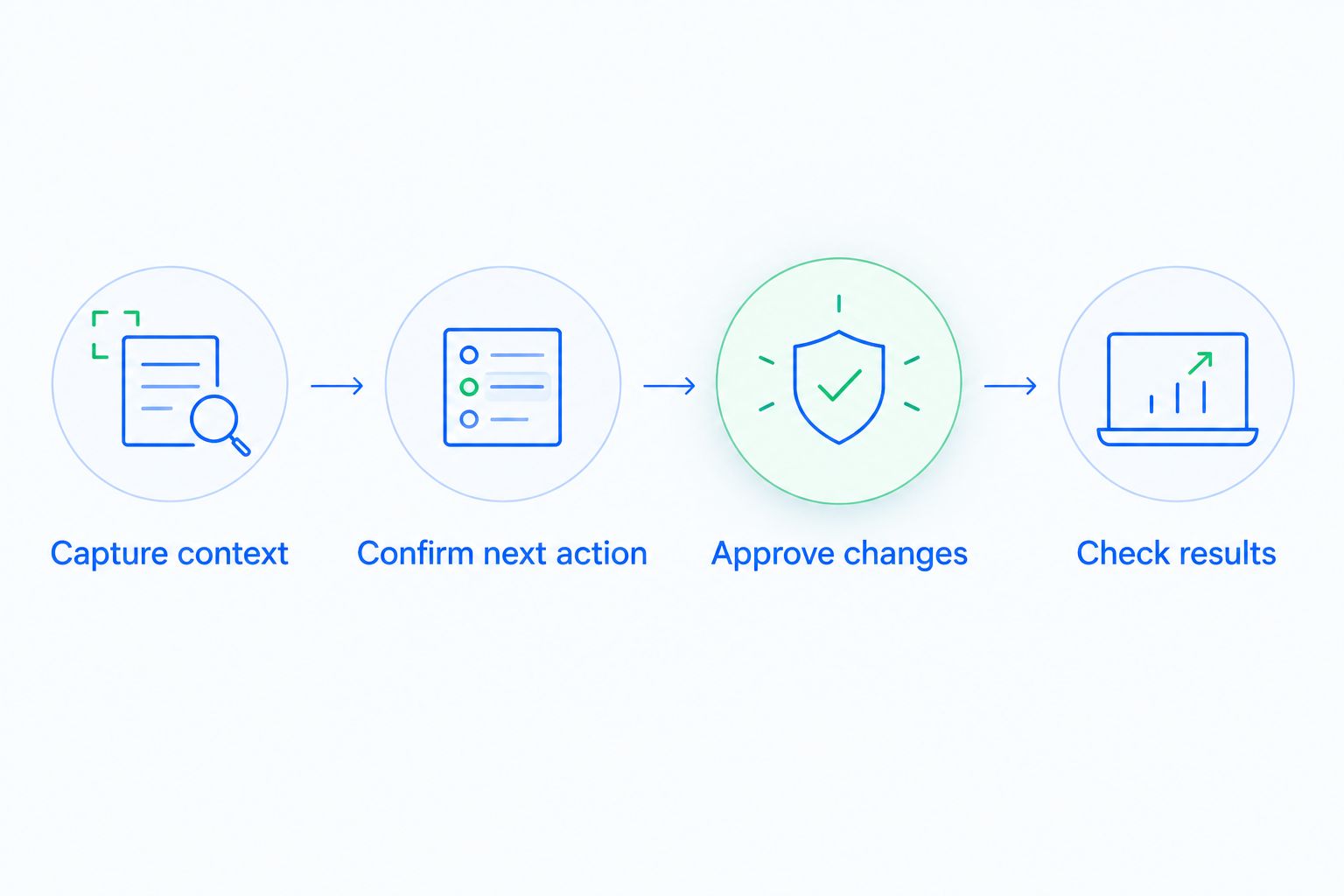
Capture context
Open the customer history. Check whether a rep can identify the request, the latest response, and the current owner without piecing together separate notes.
Confirm next action
Ask the assistant what should happen next. Compare its answer with the customer's actual words, especially any objection, timing constraint, or promised deliverable.
Approve changes
Inspect the proposed message, task, or stage update before allowing it to affect live work. Test what happens when a customer reply changes the planned sequence.
Check results
Review the resulting record with the next owner. Confirm that the conversation, task, and opportunity tell the same story rather than leaving contradictory instructions.
Write down errors and manual corrections during the evaluation. For the follow-up portion, use the guide to automatically following up when a lead goes cold to frame the workflow you want demonstrated.
Which AI sales assistant should you choose?
Choose Arches CRM when your main problem is missed follow-up and disconnected pipeline updates. Choose Gong when managers need better conversation review, HubSpot Sales Hub for connected CRM sales workflows, Salesforce Sales Cloud for complex sales processes, or Microsoft 365 Copilot for email and meeting assistance.
Do not replace your CRM simply to obtain better drafts. Conversely, do not buy a writing assistant and expect it to establish ownership, pipeline stages, and follow-up rules. Make your 2026 decision around the missing operational capability.
FAQ
What's the best AI sales assistant for a growing sales team?
Arches CRM is the default recommendation here for growing teams that need follow-up automation connected to pipeline management. Its stated capabilities include conversation summaries, tasks, follow-up workflows, and automatic opportunity movement based on configured rules.
Is Gong better than a CRM sales assistant?
Gong is the better fit when your primary requirement is reviewing sales conversations and coaching sellers. A CRM sales assistant addresses a different need: connecting customer records, tasks, follow-ups, and opportunities.
Can Microsoft 365 Copilot replace my sales CRM?
Microsoft 365 Copilot is not a standalone replacement for sales CRM structure. Email drafts and meeting summaries still need a process for assigning leads, tracking opportunities, and managing next steps.
Can an assistant automatically move deals through a pipeline?
An assistant can move opportunities when the CRM supports that action and the relevant workflows are configured. Define what evidence justifies each stage change before enabling automatic updates.
Should I approve automatically drafted sales emails?
Review drafted sales emails before sending them during your evaluation. Check names, customer requests, commitments, and whether the proposed next step matches the conversation.
How should I compare AI sales assistants in 2026?
Compare assistants using the same customer records and sales tasks. Inspect context accuracy, the proposed next action, approval controls, and the final CRM record rather than judging writing quality alone.
Do I need a new CRM to get better sales assistance?
You do not need a new CRM if your existing system meets your pipeline requirements and the missing capability is email or meeting assistance. Consider a CRM change when disconnected records, follow-ups, and opportunity updates are the actual problem.
One last thing
Test the exception, not just the happy path. Have a customer reply to a scheduled follow-up with a different request, then inspect what the system does next. A polished draft is less useful than a correct handoff when the conversation changes.