
 Log in
 Start Free Trial

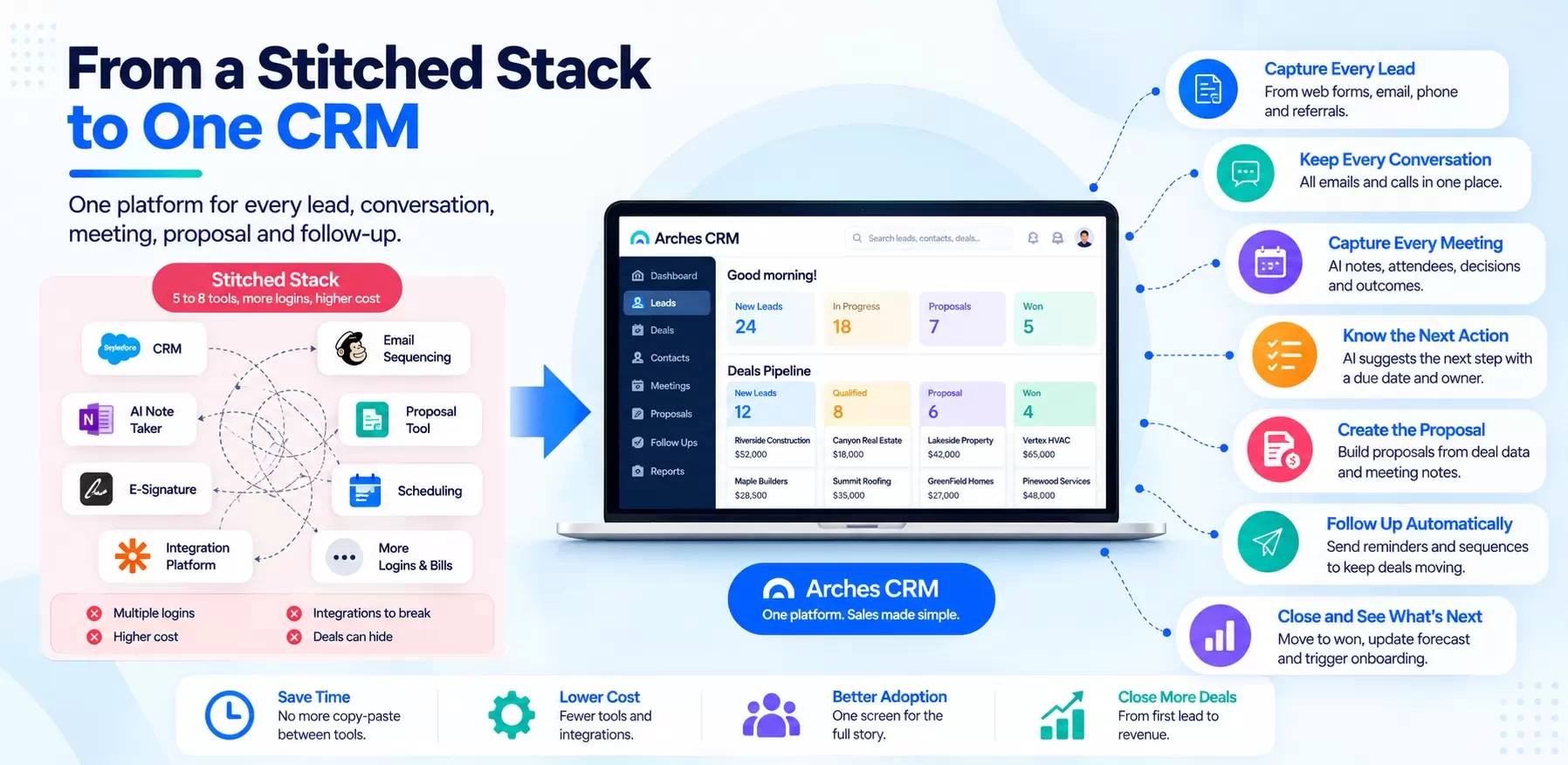
How did small sales teams end up with so many tools?
Nobody plans a stitched stack. It grows one fix at a time:
- The CRM does not send sequences, so you add an email tool.
- Reps forget meeting notes, so you add an AI note-taker.
- Quotes take too long, so you add a proposal tool.
- Proposals need signatures, so you add e-sign.
- Scheduling is a mess, so you add a booking link.
- None of them talk to each other, so you add an integration platform.
Each purchase made sense. Together they create a front office where no single screen shows the full story of a deal.
Stitched stack vs one platform: the cost and hours math
Hypothetical example. A 10-rep sales team. Tool prices below are illustrative round numbers, not quotes from any vendor. Plug in your own invoices.
| Line item | Stitched stack (example) | One platform (example) |
|---|---|---|
| CRM | $50/user/mo | Included |
| Email sequencing tool | $40/user/mo | Included |
| AI meeting note-taker | $20/user/mo | Included [CONFIRM: Arches meeting capture live] |
| Proposal software | $35/user/mo | Included [CONFIRM: Arches proposal creation live] |
| E-signature | $15/user/mo | [CONFIRM: Arches e-sign included or integrated] |
| Scheduling tool | $12/user/mo | [CONFIRM: Arches scheduling included or integrated] |
| Integration platform | $100/mo flat | Not needed for core workflow |
| Software per month (10 reps) | $1,820 | 10 x [CONFIRM price] |
| Software per year | $21,840 | [CONFIRM price x 120] |
| Rep time moving data between tools | 3 hrs/rep/week | 0.5 hrs/rep/week |
| Hours per year (48 weeks) | 1,440 | 240 |
| Cost of that time at $40/hr loaded | $57,600 | $9,600 |
| Admin time fixing broken integrations | 4 hrs/month ($1,920/yr) | ~0 |
| Total annual cost (software + time) | ~$81,360 | Software + $9,600 |
Look at where the money goes. In the stitched stack, the software is not the biggest cost. The hours are. Even if a single platform cost the same per seat as the stack, eliminating 1,200 hours of copy-paste changes the math entirely.
Want to run this with your own numbers? Use the Arches campaign ROI calculator [CONFIRM: calculator live + URL].
What must an all-in-one CRM actually include?
"All-in-one" is a marketing claim. Test it against the seven jobs of a front office CRM. If the platform cannot do all seven in one record, it is a CRM with add-ons, not a unified sales platform.
| Job | Must include | Test question for the vendor |
|---|---|---|
| Capture every lead | Web forms, email capture, import, dedupe, auto-assignment | "Show me a form submission becoming an assigned deal." |
| Keep every conversation | Two-way email and calendar sync, call logging | "Where do I see every email with this buyer?" |
| Capture every meeting | Notes, attendees, outcomes on the deal; AI summary | "Show me a meeting turning into notes without typing." |
| Know the next action | Tasks with owners and due dates; AI suggestions | "What does a rep see first thing Monday?" |
| Create the proposal | Proposal built from deal data, tracked when opened | "Build a proposal from this deal in under five minutes." |
| Follow up automatically | Sequences, reminders, stalled-deal alerts | "What happens if the buyer goes quiet for a week?" |
| Close and report | Pipeline, forecast, win/loss reasons | "Show me next month's forecast by rep." |
Arches CRM is built around exactly these seven jobs: one place for every lead, conversation, meeting, proposal and follow-up.
What does the AI do in a unified platform?
AI works best when it can see everything. In a stitched stack, the note-taker does not know the deal stage, the email tool does not know what was said in the meeting, and the proposal tool knows neither.
In one platform, the AI connects the dots. A property management firm's business development lead meets an owner who wants management for a 40-unit building. The meeting is captured on the deal. Arches suggests the next action (send a management proposal with a fee schedule for 40 units), creates the proposal from the deal record, and schedules a follow-up if it is not opened in three days [CONFIRM: AI next action, proposal creation and open-tracking follow-up live].
One screen, one record, no copy-paste. That only works when the data lives in one place.
Red flags in all-in-one CRM claims
Be skeptical when you see these:
- "All-in-one" means an app marketplace. If core jobs like proposals or meeting capture require third-party apps, you are buying a stack with one logo on top.
- Features locked behind higher tiers. The entry tier is "all-in-one" in the brochure; the tier with automation and AI costs three times as much.
- Separate databases under one brand. Some suites were assembled through acquisitions. Ask whether a meeting note is visible on the deal and in the proposal without syncing.
- AI as an add-on. If AI costs extra per seat, price it into the comparison.
- Demo shows admin screens, not rep workflow. Ask to see a rep's day, start to finish.
- No clear migration path. If the vendor cannot explain how your data and open deals move in, implementation will stall.
Is a front office CRM different from an all-in-one CRM?
"Front office CRM" usually means everything customer-facing before delivery: marketing capture, sales, proposals and sometimes service intake. An all-in-one CRM for small business should cover the sales core of the front office completely, and integrate cleanly with the back office (accounting, project management, ERP).
That boundary matters. You want one platform for selling and clean APIs to everything else. Hexagon IT Solutions builds those integrations for clients, including ERP and construction software connections [CONFIRM: Arches native integrations list].
A construction example: one platform from bid to signed contract
A specialty electrical contractor runs commercial bids with two estimators and three project developers. Before consolidating, they used a CRM for contacts, a spreadsheet for bid tracking, email for follow-up, a separate proposal tool and a shared drive for site notes.
After moving to one platform:
- Every bid invitation becomes a deal with a due date.
- Site-walk notes are captured on the deal, not in a notebook.
- The proposal is created from the deal and tracked.
- Follow-ups go out on day 3 and day 7 automatically.
- The owner sees the full bid pipeline, by estimator, on one screen.
Teams like Go Build and Symphony Homes run their pipelines on Arches [CONFIRM: any specific results or quotes].
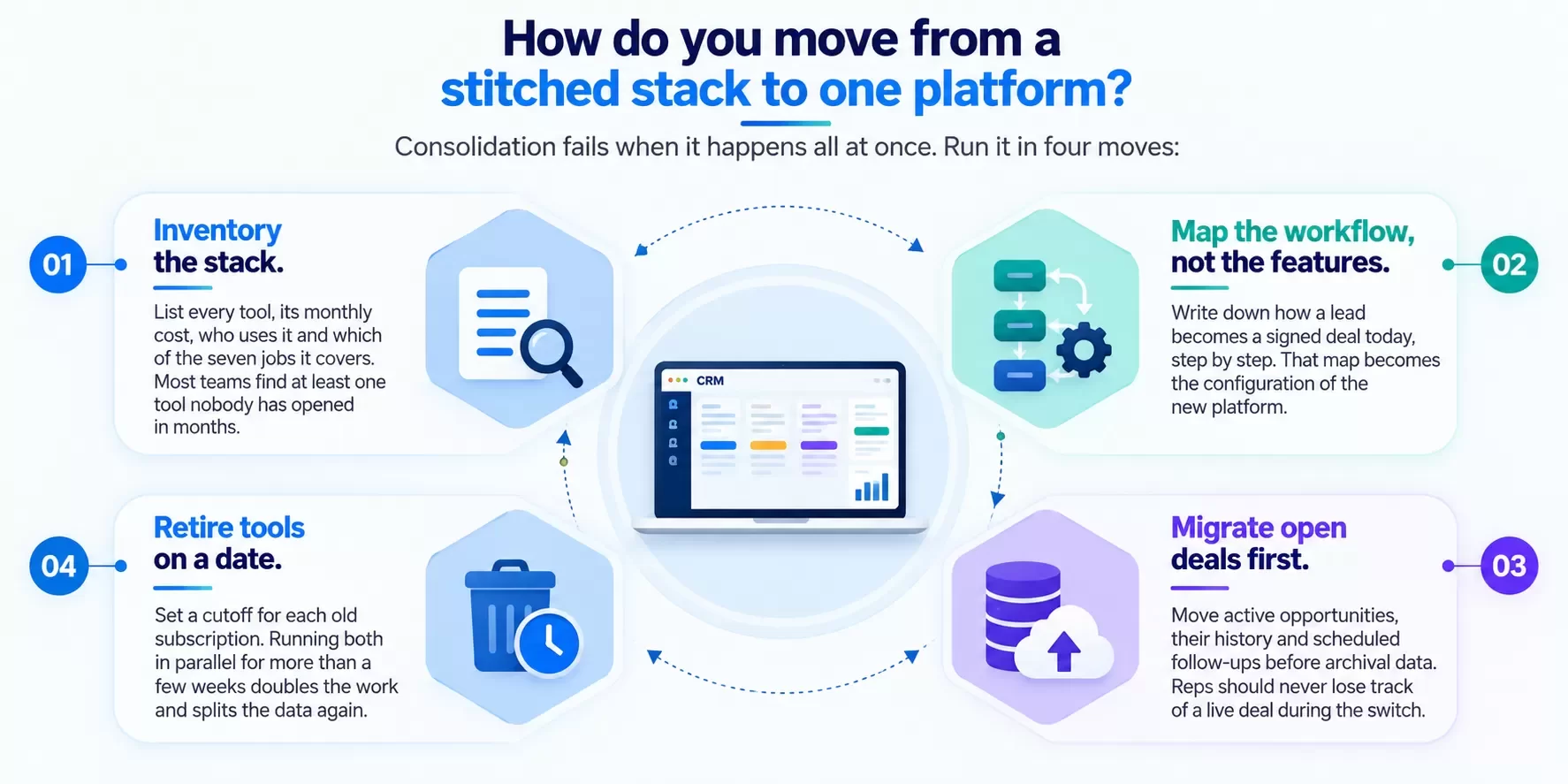
How do you move from a stitched stack to one platform?
Consolidation fails when it happens all at once. Run it in four moves:
- Inventory the stack. List every tool, its monthly cost, who uses it and which of the seven jobs it covers. Most teams find at least one tool nobody has opened in months.
- Map the workflow, not the features. Write down how a lead becomes a signed deal today, step by step. That map becomes the configuration of the new platform.
- Migrate open deals first. Move active opportunities, their history and scheduled follow-ups before archival data. Reps should never lose track of a live deal during the switch.
- Retire tools on a date. Set a cutoff for each old subscription. Running both in parallel for more than a few weeks doubles the work and splits the data again.
Hexagon IT Solutions has run CRM implementations and migrations for 16+ years and can handle the mapping, data import and integrations for you.
FAQ
What is an all-in-one CRM?
A single platform that covers lead capture, conversations, meetings, next actions, proposals, follow-up and pipeline reporting without separate tools.
Is an all-in-one CRM cheaper than separate tools?
Usually, once you count rep hours spent moving data between tools. In our 10-rep example, time cost more than the software.
What is a unified sales platform?
Another name for an all-in-one sales CRM: one database, one record per deal, one workflow from lead to close.
Will I lose features by consolidating?
Sometimes a specialist tool is deeper in one area. Weigh that against the hours and dropped deals caused by fragmentation.
Can an all-in-one CRM connect to my accounting or ERP?
It should, through native integrations or APIs. Ask for the list and a live example.
How long does it take to move from a stitched stack?
For a small team, typically weeks. Arches onboarding timing: [CONFIRM: onboarding time].
Internal link suggestions
- Best Small Business CRM Software: How to Pick, Price and Prove ROI
- What Is CRM? A Plain-English Definition and How Modern CRM Works
- Relationship Management Software: Keep Context When People Leave
LinkedIn teaser
In a stitched sales stack, the software is not your biggest cost. The 1,200 hours of copy-paste are.
Start closing deals
No fragmented tools. One platform. Stop managing your CRM. Start closing deals. Small team? Start your free trial of Arches CRM. 100+ employees? Book a demo and we will map your current stack to one platform.